Drawing and reading ask opposite things of a tablet stand. Drawing wants the screen low and nearly flat, locked hard enough that palm pressure and stylus strokes do not push it around. Reading wants the screen upright and raised, closer to eye level, with the tablet easy to lift out again. A stand that only does one of those jobs well is a poor buy for anyone who does both, so this guide separates the two needs for every pick: the size class each stand truly fits, the angle range it covers, how it stays stable under a stylus, and whether a charging cable can stay plugged in while the tablet is mounted. If you have not chosen the tablet itself yet, start with our guide to the best gaming drawing tablet and then match the stand to the size class you end up with.
Disclosure: As an Amazon Associate we earn from qualifying purchases.
1. Huion ST300 — the foldable drawing stand for pen displays
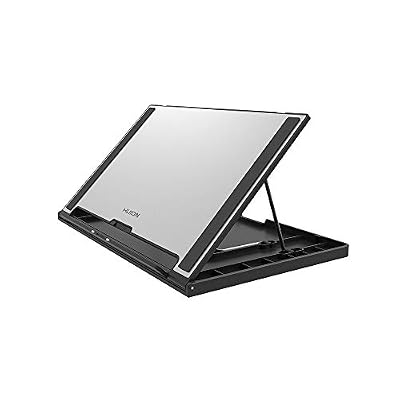
The ST300 is Huion’s own easel-style stand for its smaller pen displays, and it is the most drawing-focused design in this guide. Huion lists it for the Kamvas 12, Kamvas 13 and Kamvas 16 (2021) and the Kamvas Pro 12 and 13, and the manual gives a general fit of pen displays and tablets up to 15.6 inches. It adjusts through six stepped positions from 14.5 to 45 degrees — a range that sits squarely in drawing territory and never pretends to be an upright reading stand. The aluminium alloy and plastic frame folds down to 11 mm thick, and silicone padding covers the contact points so the display does not slide under stroke pressure. Be honest about the trade-off before buying: 45 degrees is the ceiling, so long reading sessions mean propping it against something else or choosing a different pick below.
Specs
- Type: Foldable easel stand for pen displays
- Fit: Tablets and pen displays up to 15.6 inches (maker lists Kamvas 12, 13, 16 (2021), Kamvas Pro 12 and 13)
- Angle range: 14.5 to 45 degrees, six stepped positions
- Build: Aluminium alloy and plastic with silicone padding
- Folded thickness: 11 mm
- Weight: 1.22 lb (maker figure)
- ASIN: B08JCDH72H
2. Parblo PR120 — the VESA stand for large pen displays

The PR120 solves a different size problem: pen displays too big for any cradle. Instead of a lip or tray, the display bolts to the stand’s VESA plate (both 75×75 mm and 100×100 mm patterns are supported), and Parblo publishes a fit range of 13.3 to 32 inches with a maximum load capacity of 40 kg. The zinc alloy legs adjust from 20 to 80 degrees, which reaches from a low drawing tilt to a genuinely upright angle for reading reference material or watching your own work back. Because the display mounts by its back panel, its ports stay exactly where the display maker put them — nothing about the stand blocks a cable. The limits are just as clear: a slate tablet without VESA holes cannot use it at all, and it is a fixed desk fixture, not something that travels.
Specs
- Type: VESA-mount stand for pen displays
- Fit: 13.3 to 32 inch displays with 75×75 mm or 100×100 mm VESA mounts
- Angle range: 20 to 80 degrees
- Maximum load: 40 kg (maker figure)
- Build: Zinc alloy legs, ABS, anti-slip sleeves
- Dimensions: 8.46 x 2.95 x 12.4 inches; 1.34 lb (maker figures)
- ASIN: B0DKXDGNML
3. Sketchboard Pro 2 — the flat drawing board for 11-inch iPads
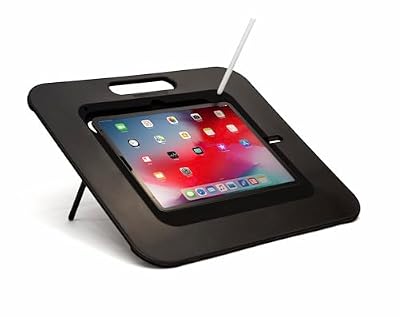
The Sketchboard Pro 2 takes the opposite approach to a stand: the iPad drops into a board that sits flush with the screen, recreating the feel of drawing on a sheet of paper resting on a sketchboard. This version is cut for one size class only — the iPad Pro 11-inch (1st to 4th generation) and iPad Air (4th and 5th generation) — so check your exact model before ordering, because other iPads do not fit the frame. Folding legs underneath set the tilt, which makes it work on a desk or across your lap, and the board includes a slot for the Apple Pencil and a slot that lets a charging cable reach the iPad while it is seated. Stability under the stylus is its whole design brief: the iPad cannot rock in a cradle because there is no cradle. It is a drawing tool first, though — the low, lap-friendly angles suit reading in a chair, but it will not raise an iPad to monitor height on a desk.
Specs
- Type: Flat drawing board with folding legs
- Fit: iPad Pro 11-inch (1st to 4th generation) and iPad Air (4th and 5th generation) only
- Model: SBP0010
- Surface: iPad sits flush with the board for a paper-like drawing area
- Extras: Apple Pencil storage slot, charging cable slot
- ASIN: B0CPTKJZ8W
4. UGREEN Tablet Stand with 360° Rotating Base — height and angle for reading
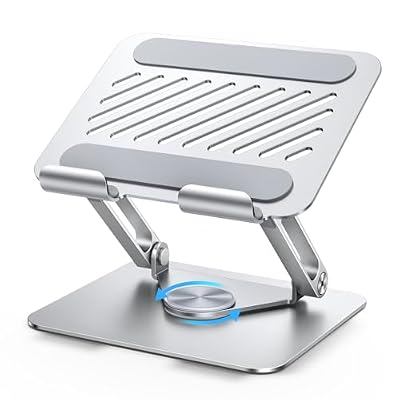
UGREEN’s dual-rod stand is the pick that leans toward reading without giving up drawing entirely. The aluminium support arms adjust both height and angle, the base rotates a full 360 degrees, and the arms can be locked in position with the hex key included in the box — that lock is what separates it from friction-only cradles when a stylus presses down. UGREEN lists compatibility across the iPad Pro 13, 12.9 and 11 inch models, iPad Air and iPad mini lines, phones and e-readers, so it covers the mainstream tablet size classes in one stand. The support plate has grippy pads and a vented section. It will not go as low or lock as rigidly as the ST300’s stepped easel, so heavy palm-down drawing still belongs on picks 1 to 3; for reading, video calls and light annotation at a desk, the height adjustment is the most useful in this guide.
Specs
- Type: Dual-rod desk stand with rotating base
- Fit: Tablets and phones including iPad Pro 13, 12.9 and 11 inch, iPad Air, iPad mini, e-readers
- Adjustment: Height and angle via dual support arms; arms lock with included hex key
- Rotation: 360 degree rotating base
- Build: Aluminium with padded, vented support plate
- Model: 45864
- ASIN: B0DGXKF4G8
5. Lamicall Adjustable iPad Stand for Desk (STDT02) — the slim folding reader

Lamicall’s STDT02 is built for the reading half of this guide. The listing gives a fit range of 4.7 to 13 inches, which spans phones, e-readers and every mainstream iPad size, and the stand folds ultra-slim for a bag or drawer. A heavy-duty metal base keeps it planted, the cradle rotates 360 degrees for portrait reading, and dual-axis adjustment lets you set both the height of the arm and the tilt of the holder. That combination makes it the easiest pick here for cookbooks in the kitchen, sheet music, or long articles at a desk. The honest limit is stylus work: a cradle on an arm is the least rigid arrangement in this guide, so treat it as a stand for reading and note-taking with a finger or a light pen, not for palm-down illustration.
Specs
- Type: Folding cradle desk stand
- Fit: 4.7 to 13 inch devices (iPad Pro, Air and mini, Kindle, phones)
- Adjustment: Dual-axis (arm height and holder tilt)
- Rotation: 360 degree cradle rotation
- Base: Heavy-duty metal base; ultra-slim folding body
- Model: STDT02
- ASIN: B0FP9GJBMV
How to choose: separate the drawing angle from the reading angle
Start with the size class, not the brand. Every stand above names its fit differently — a diagonal range (STDT02, 4.7 to 13 inches), a display range with a mounting condition (PR120, 13.3 to 32 inches and VESA holes required), or an exact model list (Sketchboard Pro 2). A tablet in a thick case can also outgrow a cradle that fits the bare device, so measure the cased thickness against the lip or cradle depth before ordering.
Match the angle range to the job. Drawing angles live between roughly 15 and 45 degrees: low enough that your forearm rests naturally and your wrist stays neutral. Reading angles start where drawing angles end — 60 degrees and beyond, ideally with height adjustment so the screen meets your eyes instead of your neck bending to it. A stand whose range stops at 45 degrees (the ST300) is a drawing stand whatever the listing implies, and a stand that cannot go below about 30 degrees will tire a drawing wrist.
Judge stability by the locking method. Under stylus pressure, what matters is how the angle is held: stepped notches (ST300), a bolted VESA plate (PR120), a flush board with no hinge at all (Sketchboard Pro 2), or arms that lock with a tool (UGREEN). Friction-only hinges are the ones that creep downward mid-stroke; if a listing does not say how the angle locks, assume it is friction.
Check charging clearance while mounted. Pen displays draw power over the same cable run as the video signal, and iPads in long sessions need a cable too. Confirm the stand leaves the port edge clear: the Sketchboard Pro 2 builds a cable slot in, easel stands leave the display’s side ports open, and cradle stands should be checked for whether the bottom lip covers the port in the orientation you actually use — portrait readers hit this more than landscape drawers.
One stand or two? If you draw daily and read daily, the pattern that works is a dedicated low-angle drawing stand at the desk (picks 1 to 3) plus a folding reader that travels (pick 5). If you want a single stand, pick 4 is the compromise: height, angle and a lockable arm in one unit, accepting that it is second-best at both extremes.