

Disclosure: As an Amazon Associate we earn from qualifying purchases.
RGB memory is the easiest lighting upgrade in a windowed case, but the light bar is the last thing to choose. The first thing is the memory generation: DDR4 and DDR5 use different slots, different notch positions and different voltages, and a kit from one generation physically cannot run in a board built for the other. Every pick below is labelled by generation and platform, and the DDR4 and DDR5 recommendations are kept separate on purpose — never mix the two in one build plan.
After generation, the checks that matter are the published speed and timings, the capacity your workload actually uses, the module height against your CPU cooler, and which software ecosystem will drive the lighting. All figures below are the makers’ published specifications as printed on their Amazon listings and product pages, not measured results. For a wider shortlist of gaming-focused memory, see our separate roundup of the best RGB gaming RAM as well.
1. G.Skill Trident Z5 Neo RGB 32GB DDR5-6000 — for AMD AM5 builds

The Trident Z5 Neo RGB is G.Skill’s AMD-tuned line: this 32GB kit carries an AMD EXPO profile at DDR5-6000 with CL30-38-38-96 timings at 1.35V, which is the speed and latency combination most often published as the sweet spot for Ryzen 7000 and 9000 processors. The listing states compatibility with AMD X870, X670, B850, B840, B650 and A620 platforms. Lighting runs through G.Skill’s Trident Z Lighting Control software or supported motherboard software, per the maker’s product description.
Specs
- ASIN: B0BF8FVLSL
- Model: F5-6000J3038F16GX2-TZ5NR (Matte Black)
- Type: DDR5 U-DIMM, 288-pin, non-ECC
- Capacity: 32GB (2 x 16GB)
- Speed and timings: 6000 MT/s, CL30-38-38-96, 1.35V
- Profile: AMD EXPO
- Module height: around 43mm per published measurements — check clearance under large tower coolers
- RGB control: G.Skill Trident Z Lighting Control or motherboard sync software
Suits: a new AMD AM5 gaming build at the standard 32GB capacity, where the EXPO profile can be enabled in one step.
2. Corsair Vengeance RGB DDR5 32GB 6000MHz CL30 — for Intel XMP builds
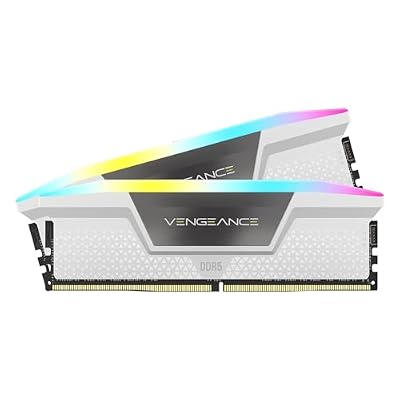
This white Vengeance RGB kit is the Intel-profile version of Corsair’s mainstream DDR5 line, sold with an Intel XMP 3.0 profile at 6000MHz and CL30. Corsair fits ten individually addressable RGB zones per module behind a panoramic light bar, and all lighting is driven from Corsair’s iCUE software, which is the deciding factor if the rest of the build already runs iCUE-controlled fans or cooling. The listing gives a 1.4V operating voltage for the XMP profile.
Specs
- ASIN: B0CD7WZRHF
- Model: CMH32GX5M2B6000C30W (White)
- Type: DDR5 DIMM, 288-pin
- Capacity: 32GB (2 x 16GB)
- Speed and timings: 6000MHz, CL30-36-36-76, 1.4V
- Profile: Intel XMP 3.0
- Module height: around 44mm per published figures — taller than low-profile kits, so confirm cooler clearance
- RGB control: Corsair iCUE, ten-zone lighting per module
Suits: an Intel LGA1700 or LGA1851 gaming build, especially one already committed to the iCUE ecosystem. Corsair sells a separate grey EXPO variant of this kit for AMD boards; this listing is the XMP version, so match the listing to your platform before ordering.
3. TEAMGROUP T-Force Delta RGB DDR5 32GB 6000MHz CL30 — dual-profile flexibility

The T-Force Delta RGB is the platform-flexible pick: the listing states both Intel XMP 3.0 and AMD EXPO compatibility on the same kit, at 6000MHz with CL30 timings. Its RGB controller is built to hand control to the motherboard rather than a separate app — TEAMGROUP lists ASUS Aura Sync, GIGABYTE RGB Fusion 2.0, MSI Mystic Light Sync and ASRock Polychrome Sync as supported. That makes it the natural choice when the lighting plan is “whatever the board already runs.”
Specs
- ASIN: B0B3HHB3Z9
- Model: FF3D532G6000HC30DC01 (Black)
- Type: DDR5 desktop DIMM
- Capacity: 32GB (2 x 16GB)
- Speed and timings: 6000MHz, CL30
- Profiles: Intel XMP 3.0 and AMD EXPO
- RGB control: motherboard sync software (ASUS Aura Sync, GIGABYTE RGB Fusion 2.0, MSI Mystic Light Sync, ASRock Polychrome Sync)
Suits: a DDR5 build on either platform where lighting will be synced through the motherboard software instead of a memory maker’s own app.
4. G.Skill Trident Z5 RGB 64GB DDR5-6000 — high capacity for Intel builds
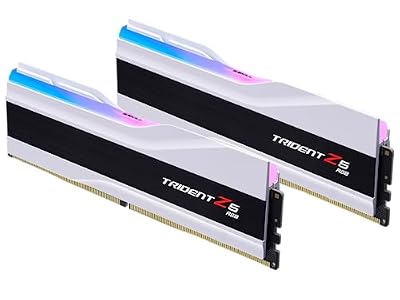
Doubling capacity changes which kit makes sense, and this Trident Z5 RGB set is the 64GB option: two 32GB modules at DDR5-6000 with CL30-40-40-96 timings at 1.40V and an Intel XMP 3.0 profile. Two-module 64GB kits are the configuration makers publish for holding an EXPO or XMP profile at this capacity, rather than filling all four slots. The matte white finish and the line’s streamlined light bar suit white-themed builds.
Specs
- ASIN: B0CBLC66NB
- Model: F5-6000J3040G32GX2-TZ5RW (Matte White)
- Type: DDR5 U-DIMM, 288-pin
- Capacity: 64GB (2 x 32GB)
- Speed and timings: 6000 MT/s, CL30-40-40-96, 1.40V
- Profile: Intel XMP 3.0
- Module height: around 44mm per published figures — check clearance under tower coolers
- RGB control: G.Skill Trident Z Lighting Control or motherboard sync software
Suits: an Intel build that games and also runs memory-heavy work — streaming, video editing, virtual machines or large modded game installs — where 32GB is the limiting factor.
5. Corsair Vengeance RGB Pro 32GB DDR4-3200 — for existing DDR4 platforms

This is the only DDR4 kit in the guide, kept for owners of AM4 and older Intel DDR4 boards who want lighting without a platform swap. It runs 3200MHz at CL16-20-20-38 timings and 1.35V under an XMP 2.0 profile, with ten ultra-bright RGB LEDs per module controlled through iCUE. At around 51mm tall per published figures, it is the tallest kit here, so air-cooler clearance matters most on this pick. It cannot be used in a DDR5 board, and no DDR5 kit above can be used in its place.
Specs
- ASIN: B07GTG2T7L
- Type: DDR4 DIMM, 288-pin
- Capacity: 32GB (2 x 16GB)
- Speed and timings: 3200MHz, CL16-20-20-38, 1.35V
- Profile: Intel XMP 2.0
- Module height: around 51mm per published figures — the tightest fit here under large air coolers
- RGB control: Corsair iCUE, ten RGB LEDs per module
Suits: a lighting and capacity refresh of a DDR4 system (AM4, or Intel 10th–12th generation on a DDR4 motherboard) that is not being rebuilt around DDR5.
How to choose
Start with the socket, not the speed. DDR5 boards (AMD AM5; Intel LGA1700 and LGA1851 DDR5 models) take only DDR5 kits such as picks 1–4. DDR4 boards (AM4; DDR4 variants of Intel LGA1700 boards) take only DDR4 kits such as pick 5. Check the exact kit part number against your motherboard’s memory support (QVL) list before ordering — makers publish these lists per board model.
Match the profile to the platform. EXPO kits are validated for AMD boards and XMP kits for Intel boards. A kit carrying both profiles, like pick 3, removes that decision. Rated speeds above the JEDEC default only apply once the profile is enabled in the BIOS.
Buy capacity as one matched kit. Makers state plainly that kits are sold as matched sets and that mixing separate kits can cause instability. For 32GB, buy a 2 x 16GB kit; for 64GB, a 2 x 32GB kit keeps two slots free and is the configuration the published timings are validated on.
Measure the height. Every RGB kit here is taller than a bare module because of its light bar — roughly 43–51mm across these five picks. If a dual-tower air cooler overhangs the memory slots, compare the module height against the cooler’s published clearance before choosing.
Pick one lighting ecosystem. iCUE kits (picks 2 and 5) are driven from Corsair’s app; G.Skill kits (picks 1 and 4) use G.Skill’s software or the motherboard’s; the TEAMGROUP kit (pick 3) is motherboard-sync only. Choosing the ecosystem you already run avoids stacking several lighting apps on one PC.
Verdict by configuration
- AMD AM5 gaming build, 32GB: G.Skill Trident Z5 Neo RGB (pick 1) — EXPO profile, DDR5-6000 CL30.
- Intel gaming build, 32GB, iCUE setup: Corsair Vengeance RGB DDR5 (pick 2) — XMP 3.0, ten-zone lighting.
- Either DDR5 platform, motherboard-synced lighting: TEAMGROUP T-Force Delta RGB (pick 3) — XMP 3.0 and EXPO on one kit.
- Intel build needing 64GB: G.Skill Trident Z5 RGB 64GB (pick 4) — 2 x 32GB at DDR5-6000 CL30.
- DDR4 platform staying DDR4: Corsair Vengeance RGB Pro (pick 5) — DDR4-3200 CL16, and the only pick that fits those boards.









