

- Top Pick: Alienware m18 R2 – the desktop replacement
- Runner-up: Lenovo Legion Pro 7i Gen 8 – the vapor-chamber 16-incher
- Also consider: Acer Predator Helios 16 – the Mini-LED showpiece
At this rung the RTX 4080 stops being a guest appearance and becomes the point of the purchase. Every pick below runs that GPU at its full 175W power level, pairs it with a flagship HX processor, and wraps it in a chassis designed to sustain that output — vapor chambers, quad fans, even optional liquid cooling. The priority order changes here: GPU wattage and thermal design come first, because a throttled 4080 is just an expensive 4070. If your target is 1440p at ultra settings with ray tracing, held for hours at a time, this is the rung built for it.
As an Amazon Associate, we earn from qualifying purchases.
Quick answer
The Alienware m18 R2 is the straight pick: a full-power RTX 4080, an Intel Core i9 HX processor, 32GB of memory and a big 18-inch QHD+ display in a true desktop-replacement chassis. Choose the Legion Pro 7i instead for a 16-inch machine with a vapor chamber, or the MECH 17 GP2 for liquid-cooled thermals.
Alienware m18 R2 – the desktop replacement

The m18 R2 makes no apology for what it is: an 18-inch, near nine-pound desktop replacement that happens to fold shut. That size buys the two things this rung values most — cooling volume and screen. The RTX 4080 runs at the full 175W, the Intel Core i9-14900HX brings 24 cores, and Alienware’s Cryo-tech system uses a vapor chamber, quad fans and gallium-silicone thermal interface material to keep both chips at boost through marathon sessions.
The 18-inch QHD+ display runs at 2560×1600 and 165Hz with G-SYNC, a size that makes 1440p gaming feel cinematic and gives creators a real workspace. The configuration includes 32GB of DDR5 memory and a 1TB SSD, with room inside for expansion — the m18 line is built with accessible slots and bays, and even offers an optional Cherry mechanical keyboard on this model line.
You will not carry this one casually, and the 330W-class power brick travels with it. But as a single-box replacement for a gaming desktop at this rung, the m18 R2 is the most complete expression of the idea: maximum silicon, maximum cooling, maximum screen.
Lenovo Legion Pro 7i Gen 8 – the vapor-chamber 16-incher
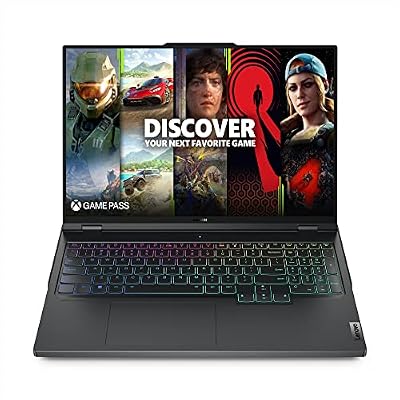
The Legion Pro 7i delivers the same full-power recipe in a 16-inch frame that still fits in a normal backpack. Its RTX 4080 runs at 175W, backed by Lenovo’s Coldfront Vapor system — a large vapor chamber spanning both the CPU and GPU, with dual fans and liquid-metal compound. In practice that means the 4080 holds its clocks in a chassis a full size class smaller than the 18-inch machines here.
The Intel Core i9-13900HX pairs with 16GB of DDR5 memory and a 1TB SSD, both upgradeable through the bottom panel, and Lenovo’s AI tuning adjusts fan and power behavior per game. The 16-inch WQXGA display is a highlight: 2560×1600 at 240Hz, around 500 nits, with full sRGB coverage and G-SYNC, so it serves competitive play and color-sensitive work equally well. The per-key RGB keyboard and rear-facing ports keep a desk setup clean.
Choose the Legion Pro 7i if you want desktop-replacement performance with some portability left over. It is the balanced pick of this rung — the one that gives up the least in any category, and the easiest to recommend to buyers who split time between a desk and the road.
Acer Predator Helios 16 – the Mini-LED showpiece

This Helios 16 configuration exists for one reason: the screen. Its 16-inch Mini-LED panel runs at 2560×1600 and 250Hz, with local dimming that pushes HDR highlights toward 1000 nits and blacks far deeper than any standard IPS panel here. For cinematic single-player games with HDR, it is the most dramatic display in this article, and for video work it doubles as a genuinely capable grading monitor.
The hardware underneath is full-strength: an Intel Core i9-13900HX, an RTX 4080 at the full 175W, 32GB of DDR5 memory and a 2TB SSD — the largest storage in this group. Acer’s AeroBlade 3D fans and liquid-metal thermal compound handle the cooling, and the port selection includes dual Thunderbolt 4 and Killer networking.
Mini-LED panels can show slight blooming around bright objects on dark backgrounds, the honest trade-off of the technology. But if display quality is your deciding factor, this Helios 16 is the pick — it regularly settles into this band, and nothing else here looks like it.
Eluktronics MECH 17 GP2 – the liquid-cooled outlier
The MECH 17 GP2 approaches this rung’s thermal priority from a direction no mainstream brand attempts: it is designed to connect to an external liquid-cooling unit, sold separately, which circulates coolant through the chassis and drops temperatures dramatically compared with air alone. Even on air, the internal dual-fan system runs the RTX 4080 at its full 175W — but with the liquid loop attached, the same hardware runs cooler and quieter at sustained boost, which is exactly the sustained-performance game this rung is about.
The configuration is the most generous here: an Intel Core i9-13900HX, 64GB of DDR5 memory and a 2TB PCIe Gen 4 SSD, behind a 17.3-inch QHD+ display at 2560×1600 and 240Hz with a MUX switch. Eluktronics also exposes BIOS-level tuning that big brands lock away, which enthusiasts will appreciate and everyone else can safely ignore.
The caveats are real: it is a smaller brand with a smaller support network, and the liquid-cooling kit is an extra purchase. But for buyers who treat thermals as the headline spec — streamers, renderers, and players running long sessions — the MECH 17 GP2 offers something nothing else at this rung can match.
Eluktronics Prometheus XVI G2 – the understated powerhouse

The Prometheus XVI G2 is the stealth option: a 16-inch chassis with clean, logo-light styling that would not draw a second look in a meeting room, hiding an Intel Core i9-13900HX and an RTX 4080 running at the full 175W. Its air-cooling system uses dual fans and an extensive heat-pipe array, and Eluktronics’ control software lets you set power limits and fan curves directly rather than accepting a manufacturer’s presets.
The 16-inch QHD+ display runs at 2560×1600 and 240Hz with strong color coverage, so nothing about the visual experience feels cut down. A per-key RGB keyboard, a full set of ports including Thunderbolt, and accessible memory and storage bays round out a specification that reads like the Legion’s, in a plainer suit.
Like its sibling above, the trade-off is brand scale: support runs through Eluktronics directly rather than a global retail network. In exchange you get full-power hardware, honest pricing within this rung, and a machine that does not announce itself. Choose the Prometheus XVI G2 if you want 4080-class performance at work and at play, without the gaming-laptop costume.
How to choose
At this rung, shop thermals first. Confirm the RTX 4080 runs at the full 175W level — every pick here does — then look at how the chassis sustains it: vapor chambers, fan count, exhaust placement and, in one case here, liquid cooling. A 4080 that throttles after fifteen minutes surrenders its advantage over the rung below. Second, match the display to your games: 240Hz panels for competitive play, Mini-LED for HDR single-player titles, 18-inch screens for a fixed desk. Third, treat 32GB of memory and at least 1TB of storage as the comfortable baseline, and favor machines with accessible upgrade bays. Finally, prices and offers change often, so check the current price on the Amazon product page before you decide. Our guide to the best RTX laptops explains where this GPU tier sits in the wider lineup.
Who should skip
Skip this rung if your laptop leaves the house daily — every machine here is heavy, loud under load and paired with a large power brick, and the rung below offers far better travel manners. Skip it if you game at 1080p, where an RTX 4080 is simply wasted money. And skip it if you prefer the newest GPU generation’s features over raw tier performance; the next rung up trades some of this brute force for RTX 5070 Ti efficiency and newer display options.
When to step up or down a rung
Step down to the under-1900 rung when you catch an RTX 4080 dipping into that band, or when a flagship 4070 machine’s display and build matter more than the GPU tier — you lose some 1440p ultra headroom, but the daily experience can be better. Step up to the under-2200 rung when you want the newer RTX 5070 Ti generation, OLED display options or larger factory configurations, rather than the 4080’s raw power. Stay at this rung when sustained 1440p ultra performance is the whole point and the laptop lives on a desk — that is precisely the job these five machines were built to do.
Frequently asked questions
Is the RTX 4080 enough for 1440p ultra settings with ray tracing?
Yes — that is exactly its home territory. A full-power 4080 holds ultra settings at 1440p across current releases, with ray tracing playable at high levels and DLSS available when a title pushes hard. It is also the first tier in this ladder with comfortable 4K ability on an external display at adjusted settings.
Why does cooling matter so much for RTX 4080 laptops?
Because the chip’s advantage is sustained, not momentary. All 4080 laptop GPUs share the same silicon, but a chassis that cannot remove heat cuts clocks until performance resembles a cheaper tier. Vapor chambers, larger fans and liquid-metal compounds convert the 175W specification into real frame rates an hour into a session — at this rung, cooling design is a performance feature, not a comfort extra.
Should I choose a 16-inch or 18-inch model at this rung?
Choose 18 inches if the laptop stays on one desk: the bigger screen is more immersive, and the larger chassis cools more quietly. Choose 16 inches if the machine travels, or if you play competitively and prefer the faster 240Hz panels that cluster at that size. Performance is equivalent when wattage matches, so this is a lifestyle decision more than a specifications one.
How much RAM and storage should a desktop replacement have?
Treat 32GB of memory and 1TB of storage as the sensible baseline at this rung, with 2TB preferable if your library is large — modern installs routinely exceed 100GB each. Most picks here expose their memory and storage bays, so a 16GB configuration is not a dead end, but buying headroom upfront is simpler.
Final verdict
This is the RTX 4080 rung, and it delivers the tier properly: full 175W power, serious cooling and displays that justify the GPU. The Alienware m18 R2 is the complete desktop replacement, the Legion Pro 7i the balanced 16-inch pick, the Helios 16 the display-lover’s choice, and the two Eluktronics machines serve thermal enthusiasts and stealth buyers respectively. If 1440p ultra is your target, buy here with confidence.










