

This is the rung where the ladder forks. Part of the budget still buys the finest RTX 4070 laptops money can reach — machines with 240Hz QHD panels, flagship processors and premium metal builds. But for the first time, the RTX 4080 also enters the conversation, in full-power models that dip into this band on their usual pricing. That makes the decision here more interesting than at any lower rung: the polished, no-compromise 4070 machine, or the rawer 4080 machine with a clear performance tier in hand? The five picks below cover both answers.
As an Amazon Associate, we earn from qualifying purchases.
Quick answer
The Acer Predator Helios 16 is the straight pick: it brings a full-power RTX 4080 with 12GB of VRAM, an Intel Core i9 HX processor, 32GB of memory and a 240Hz WQXGA display into this band. Choose the ROG Strix G16 instead for the finest 4070 package, or the Alienware x16 R2 for a slim metal build.
Acer Predator Helios 16 – the first RTX 4080 in reach

The Helios 16 is the reason this rung exists. Its RTX 4080 runs at the full 175W power level, and the step from a 4070 is not subtle: more cores, 12GB of GDDR6 memory instead of 8GB, and the headroom to hold ultra settings at 1440p where a 4070 starts leaning on upscaling. For buyers who keep a laptop for years, that VRAM margin is the most future-proofing spec in this article.
The supporting hardware matches the GPU. An Intel Core i9-13900HX drives the chip, 32GB of DDR5 memory comes standard, and storage starts at 1TB. The 16-inch display runs at 2560×1600 and 240Hz with G-SYNC and around 500 nits of brightness, so the panel keeps up with the graphics card instead of bottlenecking it. Acer’s AeroBlade fan design and liquid-metal thermal compound keep the full-power GPU fed with cool air.
There are compromises: a chunky chassis, a large power brick, and fan noise under full load. But as a performance proposition at this rung, nothing else here is close. If you find it in this band, the Helios 16 is the buy.
ASUS ROG Strix G16 (2024) – the finest RTX 4070 package

If you would rather have the best RTX 4070 laptop than the entry RTX 4080 one, the Strix G16 is that machine. The 2024 model pairs an Intel Core i9-14900HX with a full-power 140W RTX 4070 and a MUX switch, wrapped in a chassis with the kind of fit and finish that justifies a flagship badge. The ROG Nebula display is the headline: 16 inches at 2560×1600, 240Hz, around 500 nits, with full DCI-P3 coverage and G-SYNC.
Cooling is a strength rather than a footnote: a tri-fan design with a full-width rear heatsink and liquid-metal compound keeps both chips near their boost clocks, and the keyboard deck stays comfortable in long sessions. Per-key RGB, a large glass touchpad and strong ports round out a package with no obvious weak point.
The configuration ships with 16GB of DDR5-5600 memory and a 1TB SSD, both upgradeable through the bottom panel. Choose the Strix G16 if you value refinement — the display, the acoustics, the build — over the raw tier jump of a 4080, or if the Helios above is out of stock when you buy. As a complete 4070 machine, it has no equal at this rung.
Alienware x16 R2 – the slim metal flagship
The x16 R2 is the design statement of this group: an anodized aluminum and magnesium chassis, Lunar Silver finish, stadium lighting ring and per-key RGB. It looks like a business ultrabook’s dramatic sibling, yet inside sits a full-power RTX 4070 at up to 140W — a rare combination of slim design and honest wattage.
The specification suits mixed use: the Intel Core Ultra 7 155H is more efficient than the HX chips here, helping battery life and fan noise in everyday work, while the 16-inch QHD+ display runs at 240Hz with G-SYNC and full sRGB coverage. Memory is 16GB of fast LPDDR5X and storage is a 1TB SSD. Alienware’s Cryo-tech cooling uses vapor-chamber technology and quad fans to keep the slim chassis in check, though it will run warmer and louder than the thicker Strix under sustained load.
Pick the x16 R2 if the laptop travels daily and has to look at home in a lecture hall or office, without giving up full-power 4070 gaming at night. It is the premium portable at this rung, and its pricing regularly settles into this band.
MSI Vector GP68 HX – the value RTX 4080
The Vector GP68 HX takes the opposite approach to the Helios 16: same full-power RTX 4080 at 175W, same 12GB of VRAM, but the money goes entirely into performance hardware and the display is where the savings show. The 16-inch panel is a 1920×1200 FHD+ screen at 144Hz — perfectly serviceable for fast-paced gaming, and arguably a sensible match for competitive titles, but visibly less sharp than the QHD panels elsewhere here.
Everything else is serious: an Intel HX-series processor, MSI’s Cooler Boost 5 dual-fan system with shared heat pipes, and a chassis built around airflow rather than thinness keep the 4080 at full song. The configuration carries 16GB of DDR5 memory and a 1TB SSD, both behind an accessible bottom panel. Ports are plentiful, including Thunderbolt 4 and full-size Ethernet, and the keyboard is a SteelSeries per-key RGB unit.
Choose the Vector GP68 HX if your priority is frames per dollar at the 4080 tier and you play on the laptop screen at fast refresh rates, or you already own a good external monitor for detailed single-player games. It is the pragmatic route into RTX 4080 performance at this rung.
Acer Predator Triton Neo 16 – the creator-grade display
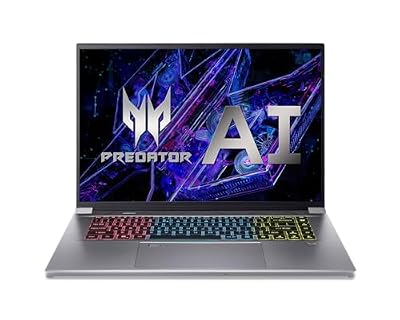
The Triton Neo 16 is the pick for players who also create. Its 16-inch display runs at a pin-sharp 3200×2000 resolution and 165Hz, and it is Calman Verified for color accuracy — the only panel here aimed as much at video editors and photographers as at gamers. With full DCI-P3 coverage and high brightness, it is a genuine dual-purpose screen.
The hardware balances both roles: an Intel Core Ultra 9 185H with better efficiency than HX chips, an RTX 4070 that accelerates editing timelines as well as games, 32GB of LPDDR5X memory and a 1TB SSD. Acer’s 5th-generation AeroBlade fans and liquid-metal compound handle cooling in a chassis notably slimmer than the Helios line.
The trade-off is memory: LPDDR5X is soldered, so the 32GB it ships with is what you keep. For most creator-gamers that is plenty. Choose the Triton Neo 16 if your week mixes ranked matches with Lightroom, Premiere or Blender, and you want one screen that flatters both. At this rung it regularly undercuts the flagship 4070 machines while offering the best display of the five.
How to choose
Decide first which fork of this rung you are on. The RTX 4080 picks bring a real tier jump and 12GB of VRAM, which matters most for 1440p ultra settings, ray tracing and longevity; the flagship RTX 4070 picks answer with better displays, quieter cooling and slimmer builds. Neither answer is wrong — it depends on whether you game on the internal panel or an external monitor, and how long you keep a laptop. Second, check GPU wattage: every pick here runs its chip at or near full power. Third, weigh memory: 32GB as standard removes an upgrade from your future. Finally, prices and offers change often, so check the current price on the Amazon product page before deciding — 4080 models in particular move in and out of this band. Our broader best gaming laptops for 2026 guide shows how these picks sit in the wider market.
Who should skip
Skip this rung if you game at 1080p on a 144Hz panel — the rungs below deliver that for much less, and the extra power would go unused. Skip it if you need maximum battery life or a truly light bag; even the slim pick here is a performance machine first. And skip the 4080 models if fan noise bothers you and your games are esports-focused — a refined 4070 flagship beats raw wattage you never call on.
When to step up or down a rung
Step down to the under-1700 rung when a premium RTX 4070 build is all you need — you keep full-power performance and excellent panels, and give up only the 4080 option. Step up to the under-2100 rung when the RTX 4080 is the point of the purchase: there it becomes the standard rather than the exception, with stronger cooling, bigger displays and desktop-replacement designs across the board. Stay at this rung when you want the choice itself — the best 4070 laptops and the first 4080 laptops, side by side, at the same money.
Frequently asked questions
Is the RTX 4080 worth it over a flagship RTX 4070 laptop?
For gaming performance, yes: the 4080 is a clear tier above, with more cores and 12GB of VRAM against 8GB, which shows at 1440p with ultra settings and ray tracing. The flagship 4070 machines answer with better screens, quieter cooling and slimmer builds. If you play demanding single-player games and keep laptops for years, take the 4080; if you value the display most, the 4070 flagships are genuinely satisfying.
Why do some RTX 4080 laptops here have weaker displays?
Because manufacturers balance a fixed budget differently: a full-power 4080 with an HX processor consumes most of the cost, so some models pair it with an FHD+ panel to stay in this band while others stretch to QHD. If you game on an external monitor, the compromise costs you nothing. If the laptop screen is your only display, weight the QHD models more heavily.
How much does 12GB of VRAM matter for future games?
Increasingly, it matters. Several recent releases already use more than 8GB at 1440p with ultra textures, and that trend points one way. A 12GB card gives you headroom that delays the day you start lowering settings — precisely what a purchase at this rung is meant to buy, and the strongest longevity argument for a 4080 model here.
Should I wait for a sale to buy at this rung?
This band is unusually sale-sensitive: the 4080 models dip into it from above during major shopping events, then drift back out. If your timing is flexible, watching the product pages around big sale periods is worthwhile. If you need the laptop now, the 4070 flagships hold their value year-round and are rarely a purchase to regret.
Final verdict
The Helios 16 is the headline: a full-power RTX 4080 with 32GB of memory and a 240Hz QHD display is the strongest performance buy in the ladder so far. The Vector GP68 HX offers the same GPU tier for pragmatic buyers, while the Strix G16, Alienware x16 R2 and Triton Neo 16 prove a flagship 4070 laptop can still be smarter when display, design or creative work leads. Decide which fork fits, and buy with confidence.










