Racing simulators ask a PC to do something different from a shooter or an open-world game. The physics engine is calculating tyre flex, suspension movement and aerodynamic load many times per second, the AI or online field is being simulated around you, and the whole picture has to arrive at a perfectly even pace, because a single late frame in a braking zone feels like the car stuttering under you. On top of that, a sim rig hangs a wheel base, pedals, a shifter and often a button box off the PC, and many drivers spread the view across three monitors or a VR headset. A good gaming PC for racing sims is therefore not simply a fast gaming PC. It is a machine balanced for consistent frame times first, raw frame rate second, and with enough ports and upgrade room to grow with the rig.


As an Amazon Associate, we earn from qualifying purchases.
The Short Answer
Start with the CPU. Most racing sims lean hard on one or two fast cores for their physics thread, so a modern processor with strong single-core performance matters more than a high core count you will never use. Match the graphics card to your displays: a single 1440p monitor is a mid-range job, triple screens multiply the pixel count roughly threefold, and VR asks for two high-refresh views at once. Add 32 GB of memory, a fast NVMe solid-state drive with room for several large sim installs, and a motherboard with enough USB ports for the wheel, pedals, shifter and extras. If you are still deciding what a good all-round gaming desktop looks like before narrowing down to the track, our guide to what makes a good gaming desktop covers the general case; everything below is the racing-specific version of that advice.
The Three Tiers at a Glance
| Tier | CPU focus | GPU class | Memory | Storage | Display target |
|---|---|---|---|---|---|
| Single screen | Modern six-core with high boost clocks | Mid-range | 32 GB | 1 TB NVMe | One 1080p or 1440p high-refresh monitor |
| Triple screen | Fast six or eight-core, strong single-core | Upper mid-range to high-end | 32 GB | 2 TB NVMe | Three matched monitors, wide field of view |
| VR | Fastest single-core you can justify | High-end | 32 GB | 2 TB NVMe | High-refresh headset, steady frame delivery |
The pattern to notice is that the CPU line barely changes between tiers while the GPU line climbs steeply. That is the shape of sim racing demand: the physics bill stays roughly the same whatever you look at the race through, while the rendering bill is set almost entirely by how many pixels your screens or headset ask for.
CPU: Single-Core Speed Runs the Physics
In most racing sims the main physics and game thread does the heaviest lifting, and it can only run as fast as one core lets it. This is why two PCs with the same graphics card can feel completely different in a crowded online race: the one with the faster single-core performance holds its frame times steady when thirty cars bunch into turn one, while the other dips exactly when you can least afford it. Cache-rich gaming processors are popular with sim racers for the same reason, since the simulation constantly re-reads car state, tyre data and track data.
Practical guidance follows from that. Favour a current-generation six-core or eight-core chip known for gaming over an older many-core part bought for core count alone. Keep the processor cool enough to hold its boost clocks through a long endurance stint, because a chip that throttles after forty minutes quietly becomes a slower chip. And do not pair a high-end graphics card with an ageing budget CPU for sims; the imbalance shows up as inconsistent frames rather than a clean, easy-to-diagnose bottleneck.
GPU: Your Screens Set the Bill
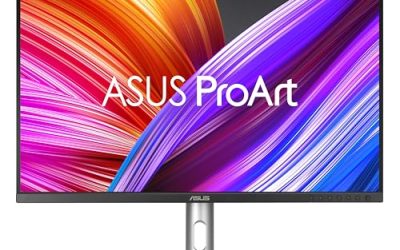
A single 1080p or 1440p monitor at a high refresh rate is comfortably within reach of a mid-range graphics card in the major sims, which are generally less demanding per pixel than the latest open-world releases. Triple screens change the maths: three 1440p panels ask the card to draw roughly three times the pixels of one, at the wide field of view that makes triples worthwhile, so this is where an upper-tier card earns its place. VR is the hardest target of all, because the headset needs two views rendered every frame and any missed frame is far more noticeable, and more uncomfortable, than a dip on a monitor.
Whichever tier you aim at, leave headroom rather than buying the exact card that just copes today. A new sim release, a move from 1080p triples to 1440p triples, or a higher-refresh headset can all arrive before your next planned upgrade, and the GPU is the part you least want to replace early.
Memory and Storage: Quiet but Not Optional
Thirty-two gigabytes of memory is the sensible standard for a sim racing PC. The sim itself, voice chat, telemetry tools, overlays and a browser full of setup guides add up quickly, and running out of memory mid-race produces exactly the kind of hitch this whole build is designed to avoid. Sixteen gigabytes still works for a single-screen machine running one sim and little else, but it leaves no slack.
Storage speed matters in a different way: modern sims and their content libraries are large, and several installed titles with car and track packs will fill a small drive faster than expected. A PCIe NVMe drive keeps loading times short and leaves the machine responsive while content installs or updates in the background. Buy capacity generously here, because swapping a too-small drive later means reinstalling the entire library.
Ports and Peripherals: The Forgotten Half of the Build
A sim rig is a small USB ecosystem. A direct-drive or belt-driven wheel base, load-cell pedals, an H-pattern or sequential shifter, a handbrake, a button box and a headset can easily occupy six or more ports, and some devices dislike sharing a hub. Before choosing a motherboard or case, count the ports your current and planned gear needs, favour boards with a generous rear panel selection, and plan a powered hub only as a supplement rather than the main connection for the wheel base itself. Front-panel ports on the case are worth checking too, since a VR headset cable or a quick-swap device will live there. None of this is glamorous, but a rig that drops a wheel mid-race because of a flaky connection undoes every other good decision in the build.
Parts Worth Shortlisting
Samsung 990 PRO NVMe SSD
A premium PCIe 4.0 drive suited to the main slot of any tier in the table, where the sim library lives and loads from constantly.
Specs
- Interface: PCIe 4.0 NVMe, M.2 2280
- Role: primary game and system drive
- Tier: premium
WD Black SN850X NVMe SSD
A second high-end option with the same job: fast, sustained storage for large sim installs and content packs.
Specs
- Interface: PCIe 4.0 NVMe, M.2 2280
- Role: primary game and system drive
- Tier: premium
Crucial P3 Plus 1TB NVMe SSD

The value pick for a single-screen build or a secondary drive holding overflow titles, replays and recordings.
Specs
- Interface: PCIe 4.0 NVMe, M.2 2280
- Capacity: 1 TB
- Tier: budget
Corsair Vengeance LPX 32GB DDR4 Memory Kit
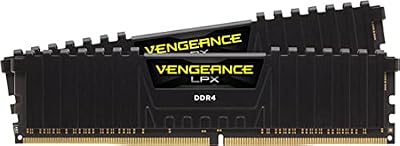
For drivers upgrading an existing DDR4 platform rather than building new, a matched 32 GB kit is the simplest consistency fix there is.
Specs
- Capacity: 32 GB kit
- Type: DDR4, 3600 speed class
- Tier: mid-range
Corsair RM750x (2021) Fully Modular PSU

A quality power supply with headroom for a stronger graphics card later, which is exactly the upgrade path most sim rigs eventually take.
Specs
- Output: 750 watts
- Cabling: fully modular
- Certification: 80 Plus Gold
- Tier: premium
Upgrade Headroom: Build for the Rig You Will Own
Sim racing hardware tends to grow in stages: a starter wheel becomes a direct-drive base, one monitor becomes three, three become a headset. A good build anticipates that path. Choosing a current motherboard platform with several processor generations ahead of it means a CPU upgrade later does not force a new board and memory at the same time. A power supply with sensible headroom, a case that fits longer graphics cards, and a second free M.2 slot all cost little at build time and save a rebuild later. The one upgrade to plan most carefully is the GPU jump that comes with triples or VR; if that move is even a possibility within the life of the machine, buy the power supply and case for it now.
Frequently Asked Questions
Is a gaming laptop good enough for racing sims?
A capable gaming laptop can run the major sims well on a single screen, and it is a reasonable choice if space or portability decides the question. The compromises are cooling during long sessions, fewer USB ports for rig gear, and almost no upgrade path beyond storage and memory, so a desktop remains the better long-term rig foundation.
Which matters more for iRacing and similar sims, CPU or GPU?
On a single screen, the CPU is usually the part that decides whether frame times stay consistent in large fields, because the physics and main thread work sits there. As you add pixels with triple screens or VR, the GPU becomes the limiting part. Balanced builds respect both, in that order.
Do I need a direct-drive wheel for the PC to be worth it?
No. The PC cannot tell what wheel is attached, and a modest wheel on a well-balanced PC gives a better experience than an expensive base on a machine that stutters. Upgrade the PC for consistency first; wheel upgrades change feel, not frame times.
How long should a sim racing PC last before upgrading?
A well-chosen build should handle several seasons of sim releases, because the major titles evolve gradually and publish their own minimum and recommended specifications, as iRacing does for its service. Expect the graphics card to be the first part you replace, typically when your display setup changes, with the platform underneath it lasting longer.
Final Verdict
A good gaming PC for racing sims is a consistency machine: a fast single-core CPU at its heart, a graphics card sized honestly to your screens or headset, 32 GB of memory, generous NVMe storage, and enough clean USB connections for the whole rig. Buy the tiers in this guide in that order, leave power and platform headroom for the upgrades sim racing always eventually demands, and the PC will disappear underneath the driving, which is precisely what it is for.
Product and ASIN Reference
| Product | ASIN |
|---|---|
| Samsung 990 PRO NVMe SSD | B0BHJJ9Y77 |
| WD Black SN850X NVMe SSD | B0B7CMZ3QH |
| Crucial P3 Plus 1TB NVMe SSD | B0B25NXWC7 |
| Corsair Vengeance LPX 32GB DDR4 Memory Kit | B07ZPLM1R1 |
| Corsair RM750x (2021) Fully Modular PSU | B08R5W27JS |