Twitch Streaming Settings 2026 Guide: Bitrate, Keyframes and Audio
Twitch streaming settings decide whether a channel looks sharp for viewers or spends the broadcast buffering. Twitch sets requirements for the ingest connection, including the keyframe interval, the bitrate ceiling and the audio format. Those requirements change over time, so this guide focuses on the logic behind each setting and points you to the places to confirm the current numbers. It covers the encoder, the bitrate, the output resolution, the audio track and a test routine that catches problems before your first live audience arrives.
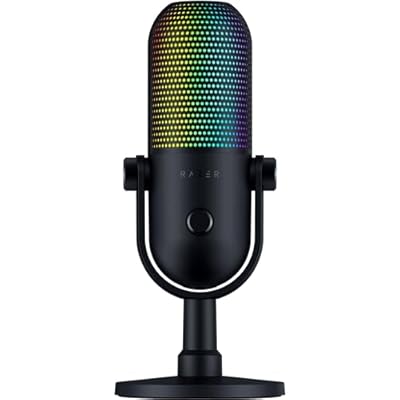
The hero listing above is the main pick for the query “Twitch streaming guide”, with four alternatives that support the same channel setup. Think of the card as the closest match for the category, not a promise about one exact product. Check the card for the model, specifications and price before you order.

Start With the Platform’s Ingest Rules
Every streaming setting depends on what the platform accepts. Twitch publishes ingest guidance that covers the supported resolutions, frame rates, keyframe interval and audio format. Before changing any number in your streaming app, open the current guidance and write the values down. Settings copied from an old video or a forum post often break when the platform changes its limits.
The main requirement most streamers meet is a keyframe interval of two seconds. A keyframe is a full picture that the decoder uses as a reference point. If the interval is too long, viewers who join late wait longer for a clear picture, and some players stall. Set the keyframe interval in the advanced output settings of your streaming app, and confirm the value after every change.
Choosing Bitrate and Resolution
Bitrate is the amount of data your connection sends each second. Twitch has published bitrate ceilings that differ by account type and by resolution, so the right target depends on your account and your output. For most channels, a stable constant bitrate that sits well below the ceiling is better than a high bitrate that drops frames during peaks.
Resolution and Frame Rate Together
A higher frame rate needs more bitrate for the same picture quality. Running 1080p at 60 frames per second takes more data than 1080p at 30. If your bitrate is limited, lowering the frame rate can produce a cleaner picture than lowering the resolution, especially for slower games. Choose the pair that your upload connection supports, then test it for a full session.
Constant Bitrate for a Stable Stream
Constant bitrate keeps the data rate steady, which helps the platform and the viewer’s player handle the stream smoothly. Variable bitrate can produce better quality in some cases, but it can also spike during busy scenes and cause dropped frames. For most gaming channels, constant bitrate is the safer default.
The bitrate guide for YouTube streaming explains the same trade-offs for a different platform, and the how to stream on Twitch from a PC guide walks through the first-time account and key setup.

Gaming Microphone for PC: USB Mic for Podcasts Videos & Streaming - Condenser Mic with Quick Mute & Pop Filter - RGB Microphone Gift for Gamer boys - Compatible with PS4/5 & Computer & Laptop


As an Amazon Associate we earn from qualifying purchases. Product prices and availability are accurate as of the date/time indicated.
Encoder Choice and Game Performance
The encoder is the part of the streaming app that compresses the picture. A hardware encoder on the graphics card usually leaves more processor time for the game. A software encoder can look good but competes with the game for CPU time. For a single-PC setup, start with the hardware encoder, record a test session, and check the dropped frame counter before you switch.
If you run a dual PC or a capture card setup, the encoder may sit on a separate machine. In that case, the game PC’s job is simply to output a clean picture, and the encoder PC handles the compression. The CPU guide for gaming and streaming helps you judge whether a processor has enough headroom for a software encoder.
Audio Settings for Twitch
Audio settings are easy to overlook, and viewers notice them quickly. Use a stereo AAC track at a bitrate that gives clear speech without wasting data, and set the sample rate to 48 kHz to match most game audio. Keep the microphone and game levels balanced so that speech stays clear when the game gets loud.
Twitch viewers often watch on phones and in low-light rooms, so a clear voice matters more than a wide dynamic range. Monitor your mix with headphones, and test a few loud moments before you go live. A limiter on the master track prevents sudden peaks from distorting the broadcast.
Comparing Twitch Streaming Setups
The table compares the hero listing and four alternatives by the role each plays in a Twitch channel setup. It does not list prices or ratings, because those change often and vary between sellers. Confirm every number on the live listing before buying.
| Option | Role in this guide | Best for | What to confirm | Price |
|---|---|---|---|---|
| Hero listing | Primary pick for the Twitch query | New Twitch streamers building a first setup | Compatibility with your OS and streaming app | Check current price |
| Alternative 1 | Supporting hardware for the same setup | Streamers who want a cleaner camera image | Resolution and low-light performance | Check current price |
| Alternative 2 | Audio hardware for the setup | Channels where voice quality is the priority | Pickup pattern and connection type | Check current price |
| Alternative 3 | Capture or control accessory | Streamers switching scenes during play | Software compatibility and input count | Check current price |
| Alternative 4 | Lighting or desk accessory | Creators who appear on camera | Mounting, power and colour temperature | Check current price |
Pick one item from the table that fixes your weakest point. Most Twitch problems come from one setting or one component, not from the whole channel.
Twitch Pre-Stream Test Routine
Record a Full Test Session
Stream privately or record a session of at least thirty minutes, and watch the file for stutter, muffled audio and any frame drops. Long tests reveal problems that short tests miss, such as slow heat build-up or a bitrate that holds only for the first few minutes.
Check the Connection
Confirm the upload speed while other devices are active in the house. If the stream drops only at certain times, check whether a background download or a cloud backup is running. The router settings guide for gaming covers the network settings that protect a stream from background traffic.
Confirm the Stream Key and Ingest
Paste the stream key only into your streaming app, and never share it in chat or screenshots. A changed or regenerated key will stop the stream, so check it before a scheduled broadcast.
Related reading: the best gaming streaming PC guide lists machines that handle encoding well, the streamer setup guide for 2026 covers the desk, the internet speed guide explains upload targets, the AI avatar services guide for livestreamers covers one way to add presence without a camera, and the roundup of streaming setups for gaming compares full layouts.
Frequently Asked Questions
What keyframe interval should I use on Twitch?
Twitch’s ingest guidance has asked for a two-second keyframe interval. Confirm the current value on the platform’s documentation, then set it in your streaming app’s advanced output settings.
Is constant bitrate better than variable bitrate for Twitch?
For most gaming channels, constant bitrate is the safer choice because it keeps the data rate steady and reduces dropped frames during busy scenes. Variable bitrate can look good, but it is less predictable on a live connection.
Can a weak CPU stream to Twitch?
It can, but a software encoder on a weak processor will compete with the game and may drop frames. A hardware encoder on the graphics card is usually the better option for a single-PC setup.
Why does my Twitch stream look blurry?
Blur usually comes from a bitrate that is too low for the resolution and frame rate, or from fast motion that the encoder cannot compress well. Test a lower frame rate or a higher bitrate that your upload connection can hold steadily.