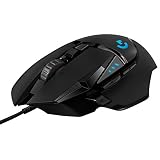
- Top Pick: Logitech G502 Hero Wired Gaming Mouse – Black
- Best Value: Logitech G502 Hero High Performance Wired Gaming Mouse, Hero 25K Sensor, 25,600 DPI, RGB, Adjustable Weights, 11 Programmable Buttons, On-Board Memory, PC/Mac – Black (Renewed)
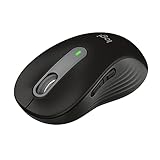
- Premium Choice: Logitech G305 Lightspeed Wireless Gaming Mouse – Black
The Logitech G502 Hero is a wired gaming mouse built around the 25K Hero optical sensor, an 11-button layout, and a tunable weight system that lets you add up to 18g of extra mass in 3.6g increments. It’s still one of the most recommended mice in 2026 not because it’s new, but because the sensor accuracy, button count, and physical adjustability haven’t been meaningfully surpassed by mice at the same $50-$70 price point. Here’s what actually matters when you own one or are deciding whether to buy one.
As an Amazon Associate we earn from qualifying purchases at no extra cost to you.



The weight system: what 121g base plus 6x 3.6g actually changes
The G502 Hero ships at 121g for the mouse body alone. Underneath the removable base plate, Logitech includes a cartridge that holds six weights, each weighing 3.6g, for a maximum total of 139.6g when fully loaded. That range matters more than it sounds like on paper.
Lighter mice (sub-90g) favor fast wrist flicks for close-range tracking in shooters. Heavier mice (130g+) favor stability during slow, precise tracking, like sniping or design work. The G502 Hero’s tuning range lets you move within that spectrum without buying a second mouse:
| Configuration | Total Weight | Best For |
|---|---|---|
| No weights installed | 121g | Fast flicking, close-quarters shooters, low-sens players |
| 2 weights (7.2g) | 128.2g | Balanced FPS use, general aim tracking |
| 4 weights (14.4g) | 135.4g | Slower, more controlled tracking, MMO/RPG use |
| 6 weights (21.6g) | 142.6g | Design work, high-precision cursor placement, drag clicking |
Note that 6 weights at 3.6g each is technically 21.6g, not 18g. Logitech’s marketing rounds this differently depending on the region, so don’t be surprised if you see “18g” on the box and get 21.6g of measurable difference on a scale. Either way, the practical takeaway is the same: start with 2 weights installed (the factory default) and remove or add one at a time. Most players settle somewhere between 121g and 130g total.
25K Hero sensor: which settings actually matter
The Hero 25K sensor supports up to 25,600 DPI, but that number is mostly irrelevant to real-world play. Almost nobody uses more than 3,200 DPI effectively, because higher DPI just multiplies cursor speed without adding tracking accuracy. What actually matters:
- DPI setting: 800-1600. This is the range where the sensor’s tracking error is lowest and where most competitive players land. Pick one value and pair it with in-game sensitivity rather than changing DPI per game.
- Polling rate: 1000Hz (1ms). The G502 Hero reports position every 1 millisecond by default over USB. There’s no reason to lower this unless you’re troubleshooting interference, which is rare on a wired mouse.
- Lift-off distance (LOD): 2mm default, adjustable in G HUB. If you lift your mouse between swipes (common with lower sensitivities), set LOD to the lowest available option in software to avoid cursor drift when the mouse is lifted but still in sensor range.
- Angle snapping: off. This is a software setting in G HUB that rounds slightly diagonal movements into straight lines. Competitive players almost always disable it because it fights raw input, which is exactly what you want the sensor to report untouched.
The sensor itself tracks accurately up to 400 IPS (inches per second) and handles acceleration up to 40G, both of which exceed what any human hand movement produces. In practice this means the G502 Hero’s sensor is not the limiting factor in your aim; your settings and mechanics are.
11 programmable buttons: how they’re actually laid out
The “11 buttons” figure includes more than people expect. It’s not 11 separate keys scattered across the shell:
- Left click, right click, middle click (via the scroll wheel)
- Scroll wheel tilt left and tilt right (2 buttons)
- DPI cycle button behind the scroll wheel
- Two thumb buttons (forward/back, standard browser navigation by default)
- A “sniper button” below the thumb buttons, which temporarily drops to a lower DPI while held
- Two buttons near the top for adjusting scroll wheel resistance (not remappable, these are mechanical, not electronic)
All electronic buttons are remappable through Logitech G HUB, including assigning them to macros, secondary DPI stages, or game-specific profiles that auto-switch when you launch a title. The sniper button is the one most new owners overlook, and it’s genuinely useful in games with scoped weapons since it lets you keep a high DPI for general movement and drop precision on demand without touching a DPI cycle button mid-fight.
Known wear points after long-term use
The G502 Hero has been on the market long enough that its failure patterns are well documented. If you already own one, or you’re buying a used unit, these are the parts to check.
Scroll wheel tension loosening
The scroll wheel has a physical resistance switch that toggles between free-spin and ratcheted (notched) scrolling. Over 1-2 years of daily use, many users report the ratcheted mode losing tension and feeling looser or less “clicky” than when new. This is a mechanical spring wear issue, not a software problem, and there’s no software fix. If it bothers you, the only real remedies are opening the shell to inspect the tension mechanism (voids warranty) or living with the softer feel.
Cable fraying near the strain relief
The G502 Hero uses a rubberized (non-braided) cable. The most common failure point is right where the cable exits the mouse body, since that’s where flex stress concentrates during aggressive mouse movement. Signs of early fraying include a slight kink or discoloration at that exact point. If you notice intermittent disconnects specifically when the cable is bent at an angle near the mouse, that’s a fraying cable, not a USB port or driver issue. Prevention is straightforward: use a cable holder or bungee to keep the cord elevated and reduce the bend angle during play.
Left-click double-clicking (switch wear)
Like most mice with mechanical switches, heavy daily clicking over 2-3+ years can lead to the left mouse button occasionally registering a double click on a single press. This is switch debounce wear, and it’s fixable in G HUB by increasing the debounce time slightly, though a persistent issue usually means the switch itself needs replacing, which is a repair rather than a settings fix.
| Symptom | Likely Cause | Fix |
|---|---|---|
| Scroll wheel feels loose/less notched | Tension spring wear | No software fix; internal inspection only |
| Random disconnects when cable is bent | Cable fraying at strain relief | Use a cable bungee; replace cable if available |
| Left click registers twice | Switch debounce wear | Increase debounce time in G HUB; replace switch if persistent |
| Cursor drifts after quick lifts | LOD set too high | Lower lift-off distance in G HUB |
Who this mouse actually makes sense for
The Logitech G502 Hero high performance wired gaming mouse fits a specific profile better than others:
- You want one mouse that adapts. The weight tuning and DPI range cover FPS, MMO, and general desktop use without needing separate mice for each.
- You don’t need wireless. It’s wired only, so if a cable-free desk is a priority, look at Logitech’s wireless mice in the same sensor class instead.
- You want mechanical durability at a mid-range price. Usually priced in the $50-$70 range, it undercuts many flagship wireless mice while keeping the same sensor generation.
- You click a lot, over years. Given the known switch wear pattern, if you’re an extremely high-APM player putting in 4+ hours daily for several years, budget for eventual switch fatigue as a normal wear item, not a defect.
For most desk setups, the G502 Hero remains a sound pick in 2026 precisely because its core hardware, the sensor and button layout, hasn’t been meaningfully outdated, even as the known wear points (scroll wheel, cable, switches) are just the cost of a mouse built to be used for years rather than replaced every season.