The Dark Pictures Anthology: Little Hope is Supermassive Games’ second entry in its horror anthology, published by BANDAI NAMCO Entertainment Europe and released on Steam on 29 October 2020. A bus crash strands a college class and their professor in the abandoned town of Little Hope, and play alternates between exploring its streets, making timed decisions in conversation, and reacting to quick prompts as the story branches. The store lists single-player alongside shared-story and shared-screen multiplayer modes, and the themes are handled here in gameplay terms only.
The narrower question for this page is what the game’s own records say about Linux. The answer is unusually consistent: every layer describes a Windows game, the one field that might suggest otherwise is an empty shell, and Valve’s Steam Deck sheet is a negative one.
As an Amazon Associate, we earn from qualifying purchases.
Quick answer
Little Hope has no native Linux build. Steam flags the game Windows only, its Linux requirements field is an empty shell, and SteamDB lists no Linux depot. Linux players run the Windows build through Proton, where ProtonDB rates it Platinum, but Valve rates the game Unsupported on Steam Deck.
The store record: flags first, then the shell
Steam’s record for app 1194630 reads windows true, mac false, linux false. The developer field names Supermassive Games and the publisher field names BANDAI NAMCO Entertainment Europe, and the categories are exactly: Single-player, Multi-player, PvP, Online PvP, Shared/Split Screen PvP, Shared/Split Screen, Steam Achievements, Full controller support, Steam Trading Cards, DualShock and DualSense controller support, Steam Cloud, Remote Play Together and Family Sharing. The store’s content descriptors, Frequent Violence or Gore and General Mature Content, are label facts; its upgrade notes list subtitle sizing among wider accessibility options, a store-listed capability.
The requirements fields are where this record gets its shape. The Windows tab is genuinely populated at both tiers: Windows 10 in 64-bit form, a Core i5-3470 or FX-8350 class processor, 8 GB of memory and a GeForce GTX 750 Ti class card at minimum, rising to a Core i5-8400 or Ryzen 5 1600 with a GTX 1060 or RX 580 recommended, with 80 GB of storage asked at both tiers. The Linux field, by contrast, is an empty shell: the Minimum and Recommended headings are present, but the lists beneath them are empty, and the Mac field is the same shell under its own false flag. A heading with nothing under it is paperwork, not a build. SteamDB’s configuration adds one quiet line: the extended-OS field is an empty string. Two absences are gaps rather than promises: no DRM notice and no external account notice appear on the record, and the licence entry is standard licence text.
The depot table: content for one platform only
SteamDB’s depot table holds two large content depots, at 43.38 GiB and 42.96 GiB on disk, beside debug, regional, worldwide and influencer depots that carry no size or a few bytes. The only redistributables are the shared Windows ones. There is no Linux depot and no macOS depot in any branch, and the total on disk is 86.33 GiB, all of it Windows content. The public branch stands on a build set in May 2023, so the delivery layer agrees with the flags: what Steam serves for this game is a Windows build.
The family check: no array, and a demo that agrees
The recurring failure mode in this series is a Windows-only game whose soundtrack or artbook app flags Linux, so store filters mislabel the game itself. That trap cannot form here: the game’s record carries no DLC array at all, so no soundtrack or artbook app exists to read. The only other family member is the free demo, app 1269060, a separate app outside any array, and its own record answers identically: windows true, mac false, linux false, the same empty-shell Linux field, the same developer and publisher. Across the two readable family records, the Linux-flag tally is zero of two.
Anti-cheat and the multiplayer modes
Anti-cheat is a three-source negative. Steam’s record names none. SteamDB’s detected technologies are Unreal Engine plus NVIDIA physics, cloth and profiling libraries and Ogg, Vorbis and XAudio2 audio libraries: engine and media plumbing, not an anti-cheat product. The Are We Anti-Cheat Yet dataset, all 1,167 games of it, carries no entry for this title. The multiplayer categories quoted above are stated exactly as Steam lists them; nothing here rules on server state, and tooling that bypasses a publisher’s checks is a terms violation with ban risk attached, never a route.
ProtonDB: Platinum, and a header that disagrees
ProtonDB’s summary record answers in full: headline Platinum, best-reported Platinum, trending Platinum, across 37 reports, at the confidence the service labels strong. The file describes the Windows build under Proton, and recent reports in it describe the online multiplayer modes rated Excellent on current Proton versions; older reports needed a runtime install step that later reports say a game update made unnecessary.
One check cuts the other way. ProtonDB’s game page carries a classification header reading Natively Supports, drawn from the game’s requirements paperwork. Steam’s own record contradicts it on every delivery layer: a false flag, an empty shell where the Linux requirements would sit, and no Linux depot. This article follows Steam, as this series always does when the two disagree: the header describes a field, not a build.
Steam Deck: Unsupported, and the paperwork is dated
Valve’s own compatibility endpoint, read directly, returns the negative category: Unsupported on Steam Deck, with a single listed item, that SteamOS does not support the game. SteamOS compatibility is separately rated Unsupported with the same single item. That is a support ruling, not a performance measurement: the sheet records no frame-rate or input failures, because the test stops at the support question.
The dated paperwork behind the verdict comes from SteamDB’s republication of Valve’s compatibility data: the test is dated 26 July 2022, run on an earlier build with the stable Proton runtime recommended and gamepad as the supported input. One caution: the public branch has since moved to a build set in May 2023, so the 2022 paperwork predates the download a buyer receives today, while the live category still reads Unsupported. The gear below is therefore framed for a desktop or laptop, not the handheld.
The other storefront: no GOG edition
GOG does not sell this game, and the ruling rests on GOG’s own behaviour rather than its search box alone: the natural product address resolves to GOG’s general games catalogue, and its catalogue search returns no product record for the game or the series. Steam is therefore the only PC edition of the two storefronts checked.
Gear for a desktop Linux run
Because the record points away from the handheld, the gear below follows the desktop shape of the game: a keyboard, two pads for the shared modes, a mouse, and room for a large install.
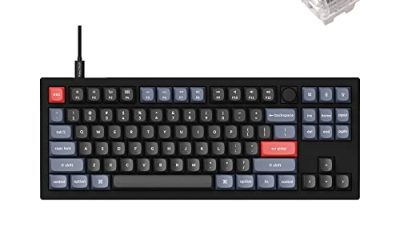
Keychron V3

The keyboard pick for desktop sessions: QMK and VIA support lets you remap keys at the keyboard level, which keeps working across every Linux install you plug it into.
Specs
- Tenkeyless layout with rotary knob
- QMK and VIA remapping support
- Hot-swappable K Pro Brown switches
- Wired USB-C connection
- Maker-rated 1,000 Hz polling
8BitDo Ultimate 2 Bluetooth Controller

The pad pick for the shared story modes. The record lists full controller support, and this pad covers the couch case with modern sticks and triggers plus back buttons for repeated interactions.
Specs
- Connectivity: Bluetooth wireless and USB-C wired
- Joysticks: TMR electromagnetic, anti-drift design
- Triggers: Hall effect, with mode switching
- Extras: two remappable back buttons, motion control
- In the box: charging dock included
Xbox Wireless Controller, Carbon Black

The safest guest pad in PC gaming: Steam Input support is universal, the glyphs match what most games display, and it pairs over Bluetooth or its own wireless standard, so a second player is never a setup project.
- Connectivity: Xbox Wireless and Bluetooth
- Port: USB-C for wired play
- Controls: hybrid D-pad, dedicated Share button
- Power: AA batteries or optional rechargeable pack
Logitech G502 HERO

Exploring Little Hope means searching rooms, reading documents and working through conversation choices, and at a desk a precise wired mouse makes that searching faster than a stick. Eleven programmable buttons cover the confirm, cancel and camera inputs.
Specs
- HERO optical sensor, up to 25,600 DPI
- 11 programmable buttons
- Adjustable weight system
- Wired USB connection
- On-board memory profiles
Samsung T9 Portable SSD 2TB

The depot table totals over 86 GiB on disk, so the install is not small: for moving a Linux game library between machines, or keeping an offline backup, a fast USB-C drive is the simple answer. The headline figure needs a Gen 2×2 host port; on a lesser port the drive runs at that ceiling instead.
Specs
- Capacity: 2 TB portable SSD
- Interface: USB 3.2 Gen 2×2, USB-C connector
- Maker-rated speeds: up to 2,000 MB per second read, 1,950 MB per second write
- Features: Dynamic Thermal Guard, maker-rated drop resistance
How to choose
On a desktop or laptop, the Steam copy under Proton is the route the records support: install with the default compatibility tool, because the community file behind the Platinum rating describes exactly that on current Proton versions, online modes included. Choose input by mode: a pad is the natural shape for the shared story and shared-screen play, while a mouse and a remappable keyboard earn their place for searching and document work. Do not buy this one for Steam Deck play on the strength of the ProtonDB file; desktop Proton evidence does not upgrade a handheld support ruling.
Who should skip
Skip this one if you buy only native Linux builds: there is none here, none in the demo, and no family app suggests one is coming. Skip it if the Steam Deck is your only machine, because Valve rates the game Unsupported there. Skip it if a store or tracker view labelled the game natively supported; that label traces back to an empty requirements field, not a build. And skip it if the material is not for you: the store’s descriptors are Frequent Violence or Gore and General Mature Content.
FAQ
Is Little Hope native on Linux?
No. Steam flags the game Windows only, its Linux requirements field is an empty shell with headings over empty lists, and SteamDB’s depot table holds no Linux depot. The Linux route is the Windows build through Proton.
Why does ProtonDB describe the game as natively supported?
Its game page carries a Natively Supports classification header drawn from the game’s requirements paperwork. That paperwork is an empty shell, and Steam’s flags and depot table both say Windows only, so the header describes a field, not a build.
Is Little Hope Steam Deck Verified?
No. Valve’s compatibility record rates it Unsupported, with a single failing item: SteamOS does not support the game. The test paperwork is dated July 2022 and predates the current branch build, while the live category remains Unsupported.
Can I buy Little Hope on GOG instead?
No. GOG’s catalogue holds no product record for the game; the Steam copy is the only PC edition of the two storefronts checked.
Final verdict
Little Hope is a closed record with one misleading label: a Windows-only game whose flags, empty-shell Linux field and Windows-only depots all agree, whose family holds nothing that could lend it a stray flag, and whose Proton file is strong on desktop while its Deck sheet is a plain refusal. The Natively Supports header is the one line that disagrees, and it traces back to headings over empty lists. Buy the Steam copy for a desktop or laptop; leave the handheld out of the plan.
Product and ASIN Reference
| Product | ASIN |
|---|---|
| Keychron V3 | B0B2DMMMG2 |
| 8BitDo Ultimate 2 Bluetooth Controller | B0F194QFT2 |
| Xbox Wireless Controller, Carbon Black | B08DF248LD |
| Logitech G502 HERO | B07GBZ4Q68 |
| Samsung T9 Portable SSD 2TB | B0CHFS9K14 |