- Top Pick: Kasa Smart Plug HS103P2, Wi-Fi Outlet Works with Alexa, 2-Pack
- Best Value: Kasa Smart Plug Ultra Mini 15A, EP10P4, Smart Home Wi-Fi Outlet
- Premium Choice: Kasa Smart Plug HS103P4, Smart Wi-Fi Outlet, Touch Actuator, Works with Alexa, Echo, Google Home, No Hub Required, 15 Amp, UL Certified, 4-Pack, White
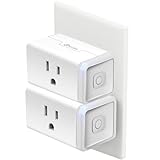
The Kasa Smart Plug HS103P2 is the two-pack of TP-Link’s best-selling smart plug — the same hardware as the popular HS103P4 four-pack but priced for buyers who want to try one or two smart plugs before committing to a whole-home rollout. Each plug connects to 2.4GHz Wi-Fi without a hub, works with Alexa, Google Assistant and SmartThings, and runs the polished Kasa Smart app. At around $20 for two it is one of the most accessible entry points to TP-Link’s smart-plug ecosystem and a sensible try-before-you-commit purchase for buyers new to smart home automation. The two plugs are enough to cover one lamp and one appliance, or two lamps in different rooms, and learn whether smart plugs add real value to your routine before scaling up. This Kasa HS103P2 review covers setup, features, build, energy considerations, value and who it’s for.
🛒 Best Price Today on Amazon
Prime members get fast, free shipping on everything above, plus member-only deals. New members get a 30-day free trial — cancel anytime.
As an Amazon Associate we earn from qualifying purchases.


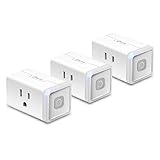


Kasa Smart Plug HS103P2 at a Glance
| Component | Specification |
|---|---|
| Wattage capacity | 15A / 1,800W at 120V per plug |
| Wireless protocol | Wi-Fi 2.4GHz (no Bluetooth, no 5GHz) |
| Voice assistant support | Alexa, Google Assistant, SmartThings (no HomeKit) |
| Scheduling | Yes, per-plug schedules and scenes in Kasa app |
| Away mode / Energy monitoring | Away mode included; no per-device energy reporting |
| Outdoor rated | No — indoor use only |
| Sockets per device | 1 socket per plug; 2 plugs in pack |
| Hub required | No — direct Wi-Fi pairing |
| Approx price | around $20 for the 2-pack |
Setup & App Experience
The HS103P2 ships as two identical plugs, and the setup matches the wider Kasa experience exactly. Install the free Kasa Smart app, plug in the first HS103, and the app walks through Wi-Fi pairing on the 2.4GHz band in a minute. Labelling each plug (“Bedroom Fan,” “Office Lamp”) and assigning to rooms takes another minute, and the second plug pairs faster than the first because the app already has your Wi-Fi credentials. Linking to Alexa or Google Home is a single skill-link step in the respective app. The polished setup is one of the main reasons Kasa is the default recommendation in this category — there are no clunky third-party clouds, no obscure pairing modes, and the app is updated regularly without becoming bloated. For a first-time smart-plug buyer, this is exactly the experience the category needs.
Smart Features — Scheduling, Voice, Away Mode
Functionally the HS103P2 is identical to the HS103P4 four-pack — same firmware, same app, same hardware. Schedules let you turn on lamps at sunset and off at bedtime, with sunrise and sunset times calculated for your location. Voice commands work through Alexa (“Alexa, turn off bedroom fan”) and Google Assistant (“Hey Google, turn on office lamp”). Scenes group multiple plugs into a single tap — useful for households that will add more Kasa plugs later. Away mode randomises lamp on/off over a defined window to mimic occupancy. SmartThings integration adds compatibility with Samsung’s automation routines for households built around that platform. There is no Apple HomeKit support — that limit applies across the entire Kasa basic line, and Apple-first buyers should choose a HomeKit-native plug instead.
Energy Monitoring & Savings
The HS103 line does not include energy monitoring, so the savings from this two-pack come from scheduling rather than per-device wattage tracking. For a buyer trying smart plugs for the first time, that is the right starting feature set — the main wins come from automatically switching off the lamps and small appliances that are left on accidentally, which the HS103 handles well. If detailed energy data becomes important later, the Kasa Mini Energy Monitoring plug (KP125M / KP115) is the direct upgrade and uses the same Kasa app and account, so adding it to a household built around the HS103 is straightforward. Each plug carries the standard 15A / 1,800W rating, covering any single appliance under 1,800W comfortably.
Build & Reliability
Each plug in the two-pack is the standard HS103 chassis — a chunky white plastic body with one status LED, a single physical button on the side, and a footprint that will cover the second socket on a standard duplex outlet. The Kasa Ultra Mini line is the slimmer alternative if duplex-outlet coverage matters. Build quality is robust — the contacts are firm, the chassis feels well-made, and the plugs reconnect to Wi-Fi reliably after router reboots and power cuts. TP-Link’s long-term firmware support is the best in the category, which matters more than buyers often realise: a $10 smart plug is only good value if it still works in five years, and Kasa has delivered on that for years.
Who It’s For
The HS103P2 is the right pick for buyers who want to try smart plugs without committing to a whole-home rollout. Two plugs at around $10 each is a low-cost entry — enough to cover one lamp and one appliance, or two lamps in different rooms, and learn whether smart plugs add real value to your routine. For households already committed to going smart-plug across a whole home, the four-pack HS103P4 is the better per-plug value at around $9 each. For Apple Home users this isn’t the right pick — choose a HomeKit-native plug. For anyone else taking the first step toward home automation, this two-pack is a low-risk, high-reward starting point. Pair the setup with a desktop refresh from our Intel Core Ultra laptop guide guide.
Verdict
At around $20 the Kasa HS103P2 earns a recommendation as the best low-commitment entry into smart plugs for Alexa and Google Home households. It is the same hardware and software as the four-pack at a fraction of the upfront cost, with the polished Kasa app, dual-platform voice support and TP-Link’s strong long-term support — all of which extend to additional Kasa plugs added to the same household later. The lack of HomeKit is the only meaningful gap, and it applies across the Kasa basics, so Apple Home users should choose the KP125M Mini Energy Monitoring plug instead. For buyers who want to try before they commit to a whole-home rollout, this two-pack is the right starting point at the lowest entry cost in the Kasa Wi-Fi line. For households that already know they want a whole-home rollout, the four-pack HS103P4 is the better value per plug. For everyone else taking the first step toward home automation on a low-risk budget, this two-pack is a sensible starting choice. See also our USB-C hub buyer’s guide for matching desk accessories and our best gaming desks guide for clean install placement.
Frequently Asked Questions
How is the HS103P2 different from the HS103P4?
The HS103P2 contains two plugs while the HS103P4 contains four. The plugs themselves are identical in hardware, firmware and features. The four-pack is better value per plug; the two-pack is better for testing the platform first.
Does the Kasa HS103P2 work with Apple HomeKit?
No. The basic HS103 line supports Alexa, Google Assistant and SmartThings, but not Apple HomeKit. For HomeKit compatibility, choose the Kasa KP125M Mini Energy Monitoring plug or a HomeKit-native plug instead.
Can I mix the HS103P2 plugs with other Kasa models?
Yes. All Kasa smart plugs use the same Kasa Smart app and account, so HS103, HS105, HS103P4, KP125 and energy-monitoring models can all coexist in a single household and scenes.
Do the HS103 plugs work on 5GHz Wi-Fi?
No. The HS103 line requires a 2.4GHz Wi-Fi network. Most dual-band routers broadcast both 2.4GHz and 5GHz; the plug uses only the 2.4GHz band, which is normal for the smart-plug category.
More Smart Plug Reviews
- Kasa Ultra Mini Smart Plug 15A Review: 4-Pack Slim Plugs
- Kasa Mini Smart Plug 15A Review: 4-Pack Compact Wi-Fi Plugs
- Kasa Ultra Mini Smart Plug 15A Single Review: 1-Pack Slim Plug
- Kasa Smart Wi-Fi Plug HS105 Review: Slim 12A Wi-Fi Plug
- Kasa Outdoor Smart Plug KP400 Review: 2-Socket Weatherproof Plug
- Mifaso Outlet Extender Review: 6-Outlet Surge Protector + USB
- Kasa Smart Plug Mini Energy Monitoring Review (KP125M)
- HBN Smart Plug 15A Review: Wi-Fi + Bluetooth Dual Plug
Affiliate Disclosure: As an Amazon Associate, we earn from qualifying purchases. If you click a link and make a purchase, we may earn a small commission at no extra cost to you. Prices and availability are accurate as of publication and may change.
Related Articles
Looking for more on this topic? Browse the hand-picked guides below — each one applies the same scoring rubric used in this review.