

The Havit HV-F2056 is one of the best-known budget laptop cooling pads, a slim three-fan design built for 15.6 to 17-inch notebooks. With more than a decade in market and a vast base of buyer reviews behind it, it remains the default recommendation for anyone shopping for a no-fuss cooler under $20. It pairs three large fans, USB pass-through, two-height tilt and a metal-mesh top with a thin, lightweight chassis. At around $25 it sits firmly in the entry tier. This Havit HV-F2056 review covers cooling performance, build, ergonomics, connectivity and who it is for.

havit HV-F2056 Laptop Cooling Pad for 15.6-17 Inch Laptops, Black




As an Amazon Associate we earn from qualifying purchases. Product prices and availability are accurate as of the date/time indicated.
🛒 Best Price Today on Amazon
Prime members get fast, free shipping on everything above, plus member-only deals. New members get a 30-day free trial — cancel anytime.
As an Amazon Associate we earn from qualifying purchases.



Havit HV-F2056 at a Glance
| Component | Specification |
|---|---|
| Laptop size range | 15.6 to 17 inches |
| Fan count | 3 fans |
| Fan size | Large central fan with two side fans |
| Speed (RPM) | Single fixed speed (not adjustable) |
| Adjustable tilt heights | 2 positions (low / high) |
| USB pass-through ports | 2 USB-A pass-through |
| RGB / LED lighting | Blue LED indicator (power) |
| Power source | USB-A (powered from the laptop) |
| Approx price | Around $25 |
Cooling Performance and Noise
The Havit HV-F2056 uses a three-fan layout — a large central fan flanked by two smaller fans — under a perforated metal-mesh top that lets the airflow reach the bottom of the laptop chassis evenly. In real-world use a quality cooling pad of this design typically lowers sustained CPU temperatures by roughly 3 to 7 degrees Celsius compared with the laptop sitting flat on a desk, depending on the laptop’s own thermal design, ambient temperature and workload. That is not a dramatic single-number drop, but it is a useful one — enough to keep a thermally-marginal laptop out of throttling territory during long gaming or video-editing sessions. The fans run at a single fixed speed and produce a soft whoosh that most users find unintrusive, particularly when the laptop’s own fans are already audible under load. Buyers who prioritise silence above all should look at a quieter, slower-fan model; for the price the F2056 strikes a sensible balance. For broader airflow context see our best quiet PC case fans roundup.
Worth understanding too is how the pad actually helps. Most gaming laptops draw cooling air through intake vents on the underside of the chassis. When the laptop sits flat on a desk those vents are partly blocked, and on a soft surface like a bed or sofa they can be almost entirely sealed off, which is why thermal throttling tends to be worse in casual use than at a clean desk. A cooling pad lifts the laptop and adds active airflow at exactly the right place — into the laptop’s own intake path — so the manufacturer’s cooling system gets the air mass it was designed around. The HV-F2056’s three fans are spaced to align reasonably with the intake regions of a typical 15.6 to 17-inch gaming laptop, which is why the design has held up over so many years and product generations.
Build Quality and Materials
The HV-F2056 uses a metal-mesh top panel rather than the plastic grilles common at this price, which is the main reason it has held its reputation for so long. The mesh feels rigid under a heavy 17-inch laptop and resists the flexing that lets cheaper pads sag in the middle. The rest of the chassis is plastic with rubberised pads on the laptop-side feet to grip the notebook, plus four base feet to grip the desk. It is light enough to throw in a backpack with the laptop, and the integrated USB cable tucks into a channel on the underside so it does not flap around in transit. Build is honest budget-tier rather than premium, but it is well-judged for the price.
Ergonomics and Tilt
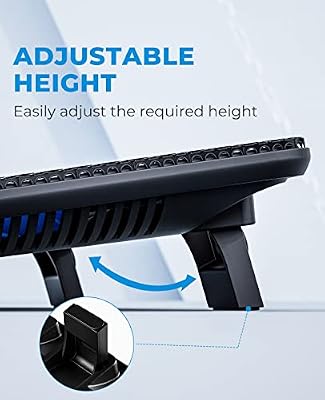
The pad offers two tilt heights — flat for use on a lap and a raised position for desk use. The raised setting lifts the back of the laptop a useful amount and brings the keyboard into a more natural typing angle, which is a real ergonomic benefit during long sessions. The two-position design is simpler than the multi-stage adjusters on premium pads (LIENS, TopMate C11), and some buyers will miss the fine control, but for the money the two positions cover the main use cases. The wide base means a 17-inch laptop sits squarely on the pad without overhang, and the rubber stops on the front edge keep the laptop from sliding forward when tilted.
Connectivity and USB Pass-Through
A common annoyance with laptop coolers is that they consume one of the laptop’s USB ports for power. The HV-F2056 mitigates this with two USB-A pass-through ports — the cooler powers itself from one of the laptop’s USB ports and presents two new USB ports back to the user. That is genuinely useful if you have a wired mouse, USB headset or external drive that needs a port; the pass-through is for low-power devices and is not intended for charging or for power-hungry external drives. The integrated cable is captive and routed cleanly. For a wider workstation context including monitor and peripheral routing, see our best gaming desks roundup.
Who It’s For
The HV-F2056 is for the buyer who wants a no-nonsense, well-built cooling pad at the lowest sensible price. If your laptop runs hot during long gaming or video sessions, your typing angle is uncomfortable when the laptop sits flat, or you simply want to lift the laptop off a bed or sofa to improve airflow, the Havit is squarely your machine. It is also a sensible accessory for a student gaming laptop in the best gaming laptops under $1,200 bracket — for around $25 it can preserve performance and the lifespan of the laptop’s own fans. It is less suited to buyers who want adjustable fan speeds, fine-grained tilt control or RGB lighting; those features start higher up the price ladder.
Verdict
At around $25 the Havit HV-F2056 remains an easy recommendation for anyone shopping the budget end of the laptop cooling pad market. The three-fan, metal-mesh design is engineered well enough to deliver useful temperature drops on a typical gaming laptop, the two-height tilt covers desk and lap use, the dual USB pass-through compensates for the port it borrows, and the build holds up to a 17-inch laptop. The fixed fan speed and basic tilt mechanism are the honest compromises for the price. For buyers stepping up to a more powerful gaming machine like those in our best RTX 5070 gaming laptops guide, the F2056 is a sensible cheap-insurance accessory; for casual users it is one of the best-value coolers you can buy. Plain, dependable and well-judged at the price.
Frequently Asked Questions
Does the Havit HV-F2056 fit a 17-inch laptop?
Yes. The HV-F2056 is designed for laptops from 15.6 to 17 inches, and the wide metal-mesh top supports a 17-inch chassis without overhang.
How much does the Havit HV-F2056 lower laptop temperature?
A quality cooling pad of this design typically lowers sustained CPU temperatures by roughly 3 to 7 degrees Celsius compared with the laptop sitting flat on a desk. Exact figures depend on the laptop, ambient temperature and workload.
Does the Havit HV-F2056 need its own power adapter?
No. It is powered from one of the laptop’s USB-A ports, and it provides two USB-A pass-through ports so you do not lose port capacity.
Are the fans on the Havit HV-F2056 adjustable?
No. The HV-F2056 runs at a single fixed speed. Buyers who want adjustable fan speed should look at a higher-tier model like the KLIM Wind or TopMate C11.
More Laptop Cooling Pad Reviews
- KLIM Wind 4-Fan Laptop Cooling Pad Review
- Kootek 5-Fan Laptop Cooling Pad Review
- TECKNET Slim Powerful Laptop Cooling Pad Review
- AICHESON 5-Fan Heavy Notebook Cooler Review (17.3 Blue LED)
- ICE COOREL Gaming 8-Fan Laptop Cooler Review
- 6-Fan LED Laptop Cooling Pad Review (15.6-17 Generic)
- TECKNET Portable Slim Quiet Laptop Cooler Review
- LIENS 2-Fan Adjustable-Height Laptop Cooling Stand Review
Affiliate Disclosure: As an Amazon Associate, we earn from qualifying purchases. If you click a link and make a purchase, we may earn a small commission at no extra cost to you. Prices and availability are accurate as of publication and may change.
Related Articles
Looking for more on this topic? Browse the hand-picked guides below — each one applies the same scoring rubric used in this review.
Ready to decide? Our #1 pick for 2026 is the Laptop size range.
Live price & availability on Amazon.


