Cultist Simulator is Weather Factory’s card-driven game of occult research, in which a seeker combines cards on a table to work jobs, study lore and chase an ascension. It launched on 31 May 2018, and because it is the kind of small, text-heavy title that often ships Windows-only, Linux players usually have to ask the compatibility question first. This time the answer is unusually well documented.
Steam’s record for app 718670 claims a Linux build outright, and for once the claim survives every cross-check available: the requirements field is filled in, the depot table carries a full-size Linux depot, the expansion family repeats the pattern, and Valve’s Deck sheet names the native runtime.
As an Amazon Associate, we earn from qualifying purchases.
Quick answer
Yes. Cultist Simulator has a native Linux build, and no compatibility layer is required. Steam flags Linux true and publishes Linux minimum requirements naming Ubuntu and CentOS, SteamDB lists a dedicated Linux depot of about 737 MB inside the base game’s depot set, and Valve’s Deck sheet records the recommended runtime as native. Proton remains an optional fallback that some players prefer, not a requirement.
What Steam’s own record claims
The store record, developed and published by Weather Factory as the record itself states, flags all three platforms true: Windows, Mac and Linux. The Linux requirements field is populated rather than decorative. Its minimum tier names a 64-bit system running Ubuntu 20.04, Ubuntu 18.04 or CentOS 7, a 2 GHz or better processor, 1 GB of RAM, graphics at 1280 by 768 with OpenGL Core support, and 500 MB of storage. The recommended tier of the Linux field is an empty list, a small gap in the paperwork: the minimum is fully written, the recommended column was never filled in.
The category list supports the desktop reading: single-player, achievements, trading cards, Steam Workshop, Steam Cloud and Family Sharing, plus accessibility entries that suit a card game, including adjustable text size and a mouse-only option. There is no DRM notice and no external-account notice on the record.
The depot table settles it
Flags and text fields are claims; depots are deliveries. SteamDB’s depot table for the base game lists three platform depots side by side: Windows at about 713 MB, macOS at about 741 MB, and Linux at about 737 MB. The Linux depot is a full-size build in the base game’s own depot set, not a stub or a file parked in a package nobody receives. A base-game purchase grants these depots, so the Linux build is part of the ordinary product, not a beta branch or separate edition.
The record even carries a dedicated Linux client icon among its assets, a detail that only exists when a Linux build ships.
Six more apps on the record
The game’s record names six related apps, and each was opened and read individually rather than assumed to mirror the base game. Four are content expansions: The Dancer, The Priest, The Ghoul and The Exile. Every one flags Linux true, repeats the base game’s Linux minimum requirements almost word for word, and has a matching Linux depot in SteamDB’s inner-depot listing. The expansions are native on the same terms as the base game.
The fifth app is the Original Soundtrack, a music product. It flags all three platforms true while its Linux requirements field is an empty list outright. That is the familiar soundtrack shape, and here it changes nothing: an audio package carries no executable, so its flag describes file delivery, not a port. The sixth app, The Lady Afterwards, is a digital edition of a book whose own requirements text says plainly that the product is a PDF. Neither non-game app weakens the verdict, and neither is evidence for it; the verdict rests on the game and its four expansions.
ProtonDB: a Platinum file for a game that does not need Proton
ProtonDB’s summary reads Platinum at the headline tier, Platinum as the best-reported tier and Gold on the trending tier, across 16 reports, at moderate confidence. The classification heading on the game’s ProtonDB page says the game natively supports Linux, and here the heading agrees with Steam’s record on every layer: the clean outcome, not the stray-tag pattern seen on so many Windows-only titles.
The reports themselves explain why a native game has a Proton file at all. Several are filed against the native build directly, and a recurring thread describes flickering or vanishing cards in the native version, with some players switching to a forced Proton build to make the problem go away. Other native reports mention reversed zoom and Workshop mods loading imperfectly, while plenty simply report the native version working. Read at report weight, the native build is real and broadly functional, with a quirk that pushes a minority toward Proton as a workaround. Both routes are documented; neither is mandatory.
The Steam Deck sheet
Valve’s compatibility record was read through SteamDB’s republication of Valve’s data, and it is one of the stronger sheets in this series. The category is Verified, with SteamOS separately marked Compatible, and the checks pass on the default controller configuration, Deck controller icons, legible text and default graphics performance. The decisive line is the recommended runtime: native. The badge certifies the Linux build itself, not a Windows build carried by Proton.
One caveat belongs on the record. Valve’s test was logged on 16 December 2023 against build 12871853, while the current public branch serves build 22090405, dated February 2026. The verdict therefore describes an older build than the one a buyer downloads today. That does not overturn it, since the depot table independently confirms the native build, but the paperwork predates the current branch.
Anti-cheat, from three separate sources
This is a single-player card game, so the short answer is that there is nothing to find, but the three sources were still checked separately. Steam’s record names no anti-cheat, no DRM notice and no external account. SteamDB’s detected technologies are engine and SDK plumbing only: Unity, Mono, SteamworksNET and cURL. The Are We Anti-Cheat Yet dataset carries no entry for this title. Three empty results from three independent directions agree: no anti-cheat stands between this game and a Linux desktop.
The other storefront
GOG sells this game too, and its live product page was read directly for this ruling. The page identity checks out: title, Weather Factory as the company, and the 31 May 2018 release date all match Steam’s record. GOG’s compatibility line lists Windows, Linux and Mac OS X, and the page’s own questions section states the game is officially supported on all three. The GOG edition therefore includes a Linux build, and both storefronts agree with the depot evidence.
Gear that fits the record
The picks below follow the record’s shape: the handheld whose native-runtime badge anchors the verdict, two pads, a mouse for a card game that lives on clicks, and library storage.
Valve Steam Deck OLED 512GB

The handheld the Verified badge was written for, and one of the rare badges earned by a native build. Valve’s sheet passes the game on configuration, icons, legibility and performance.
Specs
- Display: 7.4-inch HDR OLED, 1280 by 800, up to 90 Hz
- Processor: AMD Zen 2 and RDNA 2 custom APU
- Memory: 16 GB LPDDR5
- Storage: 512 GB NVMe, plus a microSD slot
- Wireless: Wi-Fi 6E and Bluetooth
- Channel note: Valve sells the Deck mainly through its own store, so Amazon listings are third-party sellers
8BitDo Ultimate 2 Bluetooth Controller

The docked and desktop pad pick. The game leans mouse-first, but a pad covers couch play, and the Deck sheet confirms the default controller configuration works fully.
Specs
- Connectivity: Bluetooth wireless and USB-C wired
- Joysticks: TMR electromagnetic, anti-drift design
- Triggers: Hall effect, with mode switching
- Extras: two remappable back buttons, motion control
- In the box: charging dock included
Xbox Wireless Controller, Carbon Black

The safest guest pad in PC gaming: Steam Input support is universal, the glyphs match what most games display, and it pairs over Bluetooth or its own wireless standard.
- Connectivity: Xbox Wireless and Bluetooth
- Port: USB-C for wired play
- Controls: hybrid D-pad, dedicated Share button
- Power: AA batteries or optional rechargeable pack
Logitech G502 HERO

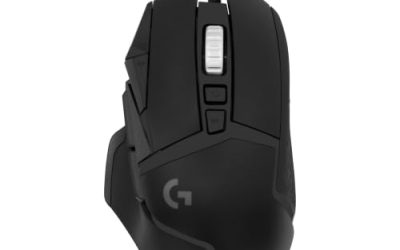
Cultist Simulator is played by dragging cards across a table, so at a desk the mouse is the primary instrument. Eleven programmable buttons cover the pause, inspect and menu inputs a long session repeats.
Specs
- HERO optical sensor, up to 25,600 DPI
- 11 programmable buttons
- Adjustable weight system
- Wired USB connection
- On-board memory profiles
Samsung T9 Portable SSD 2TB

For moving a Linux game library between machines, or keeping an offline backup of installers, a fast USB-C drive is the simple answer. The headline figure needs a Gen 2×2 host port; on a lesser port the drive runs at that ceiling.
Specs
- Capacity: 2 TB portable SSD
- Interface: USB 3.2 Gen 2×2, USB-C connector
- Maker-rated speeds: up to 2,000 MB per second read, 1,950 MB per second write
- Features: Dynamic Thermal Guard, maker-rated drop resistance
How to choose
Start with the build, not the layer. On a Linux desktop, install the game and let Steam deliver the native build by default; the depot is part of the base product and the published minimums are low enough that almost any maintained system qualifies. Keep Proton in reserve: if the card flicker described in player reports shows up, forcing a recent Proton build is the workaround, at the cost of running the Windows executable instead.
On the Deck, the Verified badge and the native runtime make the choice for you, with the footnote that the test paperwork dates from December 2023. Buy the expansions on the same terms as the base game: each carries its own Linux depot and matching requirements. If you prefer a storefront without a client, the GOG edition lists Linux support on its own page.
Who should skip
Skip the native-first plan if you depend heavily on Steam Workshop mods: player reports describe mods loading imperfectly in the native build, so the Windows build under Proton may be the pragmatic route for mod-heavy play. Skip the Deck paperwork as your only evidence if you need a guarantee about the current branch build, because Valve’s test predates it. And skip the game entirely if a slow, text-led card game built around experimentation and frequent failure does not appeal.
FAQ
Is Cultist Simulator native on Linux?
Yes. Steam flags Linux true with a populated minimum requirements field, SteamDB lists a Linux depot of about 737 MB in the base game’s depot set, and Valve’s Deck sheet names the recommended runtime as native.
Do the expansions work on Linux too?
The four content expansions each flag Linux true, repeat the base game’s Linux minimum requirements and carry their own Linux depots. The soundtrack and the digital book are platform-neutral files rather than ports.
Is Cultist Simulator Steam Deck Verified?
Yes, and the badge was earned by the native build. Valve’s sheet, read through SteamDB’s republication of the data, passes the game on controller configuration, icons, legible text and performance; the test is dated 16 December 2023 and predates the current public branch build.
Can I buy Cultist Simulator on GOG for Linux?
Yes. GOG’s live product page lists Windows, Linux and Mac OS X as supported systems, in both its compatibility line and its questions section.
Final verdict
Cultist Simulator is one of the cleanest native cases in this series. Every layer that can confirm a Linux build does so: the store flags, the filled-in requirements, a full-size Linux depot in the base package, four expansions repeating the pattern, a Deck badge earned on the native runtime, a ProtonDB heading that agrees with the record, and a second storefront listing Linux on its own page. The caveats are small: the recommended tier of the Linux requirements was never filled in, and Valve’s Deck test predates the current branch build. Neither touches the verdict. On Linux, this game is native, documented and delivered.
Product and ASIN Reference
| Product | ASIN |
|---|---|
| Valve Steam Deck OLED 512GB | B0CQ3RWQQZ |
| 8BitDo Ultimate 2 Bluetooth Controller | B0F194QFT2 |
| Xbox Wireless Controller, Carbon Black | B08DF248LD |
| Logitech G502 HERO | B07GBZ4Q68 |
| Samsung T9 Portable SSD 2TB | B0CHFS9K14 |