Our Short List of 3

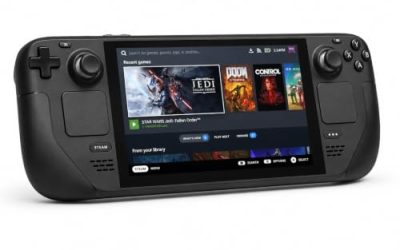
- Display: 7.4-inch HDR OLED, 1280 by 800, up to 90 Hz
- Processor: AMD Zen 2 and RDNA 2 custom APU
- Memory: 16 GB LPDDR5
- Storage: 512 GB NVMe, plus a microSD slot

- Connectivity: Bluetooth wireless and USB-C wired
- Joysticks: TMR electromagnetic, anti-drift design
- Triggers: Hall effect, with mode switching
- Extras: two remappable back buttons, motion control

- Connectivity: Xbox Wireless and Bluetooth
- Port: USB-C for wired play
- Controls: hybrid D-pad, dedicated Share button
- Power: AA batteries or optional rechargeable pack
All 5 Picks at a Glance
| Product | Specs | Action |
|---|---|---|
| Valve Steam Deck OLED 512GB |
| Check price on Amazon |
| 8BitDo Ultimate 2 Bluetooth Controller |
| Check price on Amazon |
| Xbox Wireless Controller, Carbon Black |
| Check price on Amazon |
 Logitech G502 HERO |
| Check price on Amazon |
 Samsung T9 Portable SSD 2TB |
| Check price on Amazon |
Cronos: The New Dawn, Bloober Team’s survival horror game released on 5 September 2025, makes the strongest claim a Linux player can ask for: Steam’s own record ticks the Linux box. Claims like that deserve suspicion — this catalogue has seen Linux flags carried by soundtrack apps and depots that ship nothing — so this article ignores the flag and goes straight to the delivery evidence.
The evidence holds up at every layer. The sold package contains a full-size Linux depot updated the same day as the current public build, the Linux requirements tab is written out in full, and Valve’s own Steam Deck test names the native runtime as the recommended way to run the game. This build is no store-page accident — it is the product being sold.
As an Amazon Associate, we earn from qualifying purchases.
Quick answer
Yes — Cronos: The New Dawn is genuinely native on Linux. Steam’s record carries a populated Linux requirements tab and a 20.48 GiB Linux depot inside the package a purchase delivers, and Valve’s Deck test names the native runtime. The build is Deck Playable, ProtonDB’s Windows-build file settles at Gold, and GOG sells a Windows-only edition.
The delivery evidence, layer by layer
Start with the depots, because depots are what an install downloads. The record lists five content depots. The Windows depot holds 22.17 GiB, the macOS depot 23.39 GiB, and between them sits depot 2101962, configured for 64-bit Linux, at 20.48 GiB — a full game build, exactly what a port of the same Unreal Engine game should weigh. Two further depots carry Traditional Chinese labels and no recorded size, one a Linux Steam Deck variant marked Unused; they are paperwork entries, not the build a Linux buyer receives.
The decisive check is the package. The standard purchase package — the licence a buyer actually gets — contains three depots: the Windows build, the macOS build and that same 20.48 GiB Linux depot. Its manifest was last updated on 27 October 2026, the day the current public build was assembled, ruling out the stranded-build pattern where a native port is abandoned while the Windows version moves on. The flags agree with the delivery for once: all three read true, each with a real depot behind it.
What the requirements tabs say
A populated Linux requirements tab is the second layer, and Cronos has one. The minimum tier asks for a 64-bit Linux system, an Intel Core i5-8400F or i5-8600K or an AMD Ryzen 5 3600, 16 GB of RAM, and a GeForce GTX 1080, Radeon RX 5700-XT or Intel Arc A770, with 30 GB of storage. The recommended tier steps up to a Core i7-10700K or Ryzen 5 3600X and an RTX 3080, RX 6800-XT or Arc B580. Those figures mirror the Windows tab almost line for line, with the OS and audio lines rewritten for Linux — the signature of a tab written for a real port. The macOS tab is populated too, aimed at Apple silicon.
One paperwork gap is worth naming: the record registers no LinuxClientIcon among its client assets. That is missing artwork, not a missing build — the depot, package and requirements tab all outweigh it.
Native or Proton? The reports genuinely split
Because the Windows build also runs under Proton, ProtonDB’s file covers both routes. Its full summary settles at Gold, with a best-reported tier of Platinum and a trending tier of Gold, across 46 reports with strong confidence. For a native title, that medal describes the Windows build running through Proton — it is not a grade for the native port. ProtonDB’s own page heading, which labels the game under its Natively Supports line, agrees with Steam’s record here; the heading is right this time.
The individual filings split in an instructive way. Plenty of players run the native build happily, including a Steam Deck report covering a full 31-hour playthrough that describes the native version downloading automatically. Others hit real faults on the native build: missing terrain textures in the opening area, stutter that cleared after forcing Proton, and no DLSS, where the engine’s own TSR upscaling is the recommended substitute. One filing warns that cloud saves did not carry between the native and Windows builds, so switching routes mid-playthrough is a decision to make once. Proton remains a well-trodden fallback if your hardware trips over the port’s rough edges.
The Steam Deck sheet: Playable, and tested on today’s build
Valve’s own compatibility endpoint returned unusable output in this session, so the test sheet here is read through SteamDB’s republication of Valve’s data. The verdict is Playable, one step below Verified, with SteamOS separately rated Compatible. What lifts this sheet above most is its date: the test was recorded on 6 November 2026 against build 26243774, the current public build — the paperwork grades the exact version a buyer downloads today. Its configuration block recommends the native runtime, Valve’s own confirmation that a Linux launch path exists.
The deductions are the familiar Playable set: the game sometimes shows mouse, keyboard or non-Deck controller icons; it requires manual configuration of graphics settings; it does not exit cleanly and may need a manual quit through the Steam overlay; and it does not default to external controllers, so a paired pad may need switching through the Quick Access Menu. Against those, all functionality is accessible with the default configuration and interface text is legible. The record’s own controller field lists full controller support, with DualShock and DualSense support among its store categories.
The family, the anti-cheat question and the other storefront
The base game’s DLC list holds two apps, both read individually. The Deluxe Edition Upgrade flags Windows only, and the second app, Cronos: Lazarus, also flags Windows only and is still marked as an upcoming release. Neither carries a Linux tick, so there is no soundtrack-style trap in this family — and none is needed, since the base game’s own depot settles the question. The game is single-player, its record names no DRM and no third-party account requirement, and the AreWeAntiCheatYet database, read in full at 1,167 entries, holds no entry for it in either direction — documentation silence, not a clearance.
GOG does sell this game — its product API holds a live record — but the compatibility fields read Windows true, macOS false and Linux false, with a single Windows installer. The GOG edition is the Windows build only; a Linux player who buys there is buying a Proton project, and one ProtonDB filing indeed runs that copy through the Heroic launcher with a custom Proton build. The native build exists in exactly one place: Steam.
Gear that fits the record
The gear below follows the record’s shape: the handheld Valve tested the native build on, two pads for docked and desktop play, a mouse for desktop menu work, and fast library storage.
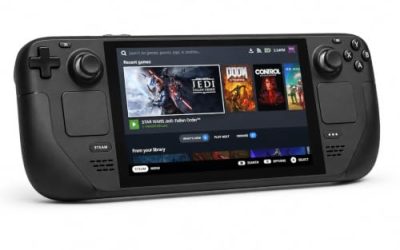
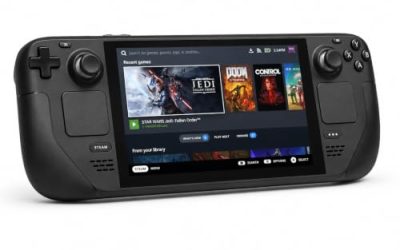
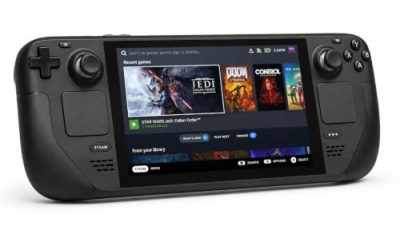
Valve Steam Deck OLED 512GB
- Display: 7.4-inch HDR OLED, 1280 by 800, up to 90 Hz
- Processor: AMD Zen 2 and RDNA 2 custom APU
- Memory: 16 GB LPDDR5
- Storage: 512 GB NVMe, plus a microSD slot
The handheld the Playable sheet was written for, tested against the current build with the native runtime recommended. Expect to set the graphics options yourself, and to quit through the overlay when the game hangs on exit.
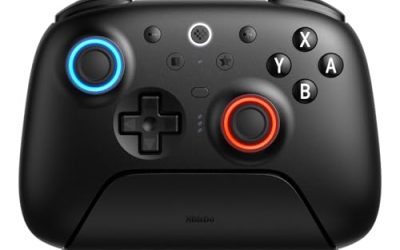
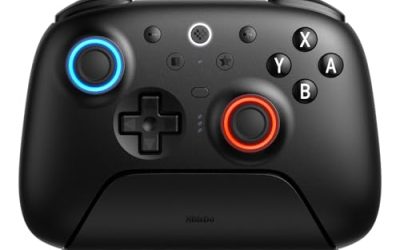
8BitDo Ultimate 2 Bluetooth Controller
- Connectivity: Bluetooth wireless and USB-C wired
- Joysticks: TMR electromagnetic, anti-drift design
- Triggers: Hall effect, with mode switching
- Extras: two remappable back buttons, motion control
The docked and desktop pad pick. The record lists full controller support, and this pad covers the couch case with modern sticks and triggers plus back buttons for menu shortcuts.
Xbox Wireless Controller, Carbon Black
- Connectivity: Xbox Wireless and Bluetooth
- Port: USB-C for wired play
- Controls: hybrid D-pad, dedicated Share button
- Power: AA batteries or optional rechargeable pack
The safest guest pad in PC gaming: Steam Input support is universal, the glyphs match what most games display, and it pairs over Bluetooth or its own wireless standard. On the handheld, an external pad may need a manual Quick Access Menu switch before it takes over.
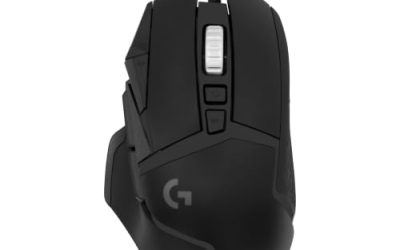
Logitech G502 HERO
- HERO optical sensor, up to 25,600 DPI
- 11 programmable buttons
- Adjustable weight system
- Wired USB connection
The game is played on the pad, but its menus, inventory and settings screens are faster with a precise wired mouse at a desk. Eleven programmable buttons cover the inputs a long session repeats.
Samsung T9 Portable SSD 2TB
- Capacity: 2 TB portable SSD
- Interface: USB 3.2 Gen 2×2, USB-C connector
- Maker-rated speeds: up to 2,000 MB per second read, 1,950 MB per second write
- Features: Dynamic Thermal Guard, maker-rated drop resistance
For moving a Linux game library between machines, or keeping an offline backup of installers, a fast USB-C drive is the simple answer. The headline figure needs a Gen 2×2 host port; on a lesser port the drive runs at that ceiling.
How to choose
Choose the Steam copy, because it is the only edition that contains the native build; the GOG copy is Windows-only on GOG’s own record. On a Linux desktop, install and launch normally first — Steam fetches the Linux depot by default — and only force Proton if you hit the texture or performance faults some filings describe, keeping in mind that saves may not follow you across the switch. On Steam Deck, the Playable badge on the current build means the native route is the tested one; budget a few minutes for graphics settings. For input, a pad is the shape the record describes.
Who should skip
Skip the GOG edition if native play is the point — it has no Linux build. Skip the game for now if your purchase depends on DLSS, since filings agree the native port does not expose it. Deck players who want a badge promising zero configuration should also pause: Playable here explicitly means manual graphics setup and an occasional overlay quit. And if you plan to alternate between native and Proton on one save, the cloud-save warning in the filings says to pick a route and stay on it.
FAQ
Is Cronos: The New Dawn native on Linux?
Yes. The package a Steam purchase delivers contains a 20.48 GiB Linux 64-bit depot alongside the Windows and macOS builds, the Linux requirements tab is fully populated, and Valve’s Deck test recommends the native runtime. This is a shipped port, not a flag error.
Is Cronos: The New Dawn Steam Deck Verified?
It is rated Playable, not Verified. Valve tested build 26243774 — the current public build — on 6 November 2026 and rated SteamOS Compatible, with deductions for non-Deck glyphs, manual graphics configuration, an unclean exit and external controllers not taking over by default.
Should I play the native build or force Proton?
Start native; it is the tested, default route. ProtonDB’s summary settles at Gold with a Platinum best-reported tier across 46 reports, and some players fixed missing textures or stutter by forcing Proton, so the fallback is proven if the port misbehaves.
Can I buy Cronos: The New Dawn on GOG for Linux?
GOG sells the game, but its own product record marks the edition Windows-only, with no Linux installer. On Linux that copy runs only through Proton; the native build is exclusive to Steam.
Final verdict
Cronos: The New Dawn is native on Linux, and unusually, every layer of the record says so at once: all three platform flags are true, all three requirements tabs are written out, the sold package carries a full-size Linux depot updated alongside the current build, and Valve tested that build on Deck with the native runtime recommended. The caveats concern polish, not existence — a Playable badge, a native port some filings find rougher than the Proton route, no DLSS natively, and a Windows-only GOG edition. Buy it on Steam, start native, and keep Proton in reserve.
Product and ASIN Reference
| Product | ASIN |
|---|---|
| Valve Steam Deck OLED 512GB | B0CQ3RWQQZ |
| 8BitDo Ultimate 2 Bluetooth Controller | B0F194QFT2 |
| Xbox Wireless Controller, Carbon Black | B08DF248LD |
| Logitech G502 HERO | B07GBZ4Q68 |
| Samsung T9 Portable SSD 2TB | B0CHFS9K14 |