

🛒 Best Price Today on Amazon
Prime members get fast, free shipping on everything above, plus member-only deals. New members get a 30-day free trial — cancel anytime.
Top Choose Between Custom Build Prebuilt Picks for 2026
Here are our current top choose between custom build prebuilt picks, compared on real Amazon owner reviews, price, and features. Live prices update below.


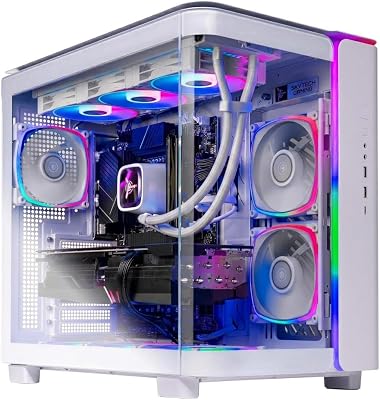


Gaming Desktop PC Computer Liquid Cooled 12-Core Processor, GeForce RTX 4060 GDDR6, 64GB RAM, 512GB NVMe SSD + 1TB HDD, WiFi 6 & BT 5.4, 7× ARGB Fans, 650W PSU, Windows 11
View on Amazon.com
Affiliate disclosure: GamingPCGuru is reader-supported. When you buy through links on our site, we may earn an affiliate commission at no extra cost to you. This does not influence our independent reviews.
How to Choose Between Custom Build vs Prebuilt: The DIY Savings Argument Is Mostly Dead
Quick Answer (TLDR)
The conventional wisdom that DIY building always saves money is no longer accurate in 2026. Boutique system integrators using standard ATX parts now charge only 8-15% over component cost — and that premium buys assembly, cable management, testing, warranty, and shipping insurance. If you enjoy building or want absolute component control, build it yourself. If your time is worth more than $30/hour and you don’t enjoy the process, a boutique prebuilt is the rational choice. The real decision matrix has three axes: skill comfort, time value, and how much you care about specific component choices. Avoid the false middle ground: don’t buy a big-box prebuilt with proprietary parts thinking you’re getting “the convenience of prebuilt with the value of DIY” — you’re getting neither.
The Five Criteria That Matter
1. Your time value relative to assembly hours. A first-time builder typically spends 6-10 hours on assembly, plus 2-4 hours on troubleshooting, plus 1-2 hours on Windows setup and driver installation. If you earn $50/hour and don’t enjoy the process, that’s $400-800 of opportunity cost — which often exceeds the prebuilt premium.
2. Component-level control vs convenience tradeoffs. DIY lets you pick exact RAM SKU, specific motherboard, preferred PSU brand, and aesthetic case. Boutique prebuilts offer 3-5 options per category. Big-box prebuilts offer zero control — you take what they ship. If you have strong preferences on, say, “must be Noctua brown fans” or “must be SeaSonic PSU”, DIY is the only path.
3. Warranty coordination simplicity. A custom build has 6-8 separate warranties — when your RAM fails 8 months in, you deal with Corsair, not the builder. A prebuilt offers one warranty contact for everything. For non-technical users or those who hate vendor coordination, single-point warranty is genuinely valuable.
4. Cable management and assembly quality. A skilled boutique builder produces cleaner cable management than 90% of first-time builders. Top boutiques use sleeved custom cables and route everything invisibly. If aesthetics matter and you don’t have the patience to redo cables 3 times, a prebuilt with professional cable work delivers value.
5. Stress and risk tolerance. DIY building includes the risk of damaging parts (dropped GPU, broken CPU pins, stripped screws), incompatibility surprises (RAM that doesn’t post, AIO that doesn’t fit), and troubleshooting weird boot failures. Prebuilts arrive assembled, tested, and working. If you don’t want this anxiety, the prebuilt premium is paying for someone else’s risk.
Buying Checklist
- Honestly assess your tolerance for assembly stress (6-10 hours first time)
- Calculate your hourly time value to compare against assembly time cost
- Determine if you have strong preferences on specific components (DIY-only)
- Check current pricing: PCPartPicker total vs boutique build with same parts
- Verify you have a static-safe workspace and basic tools (screwdrivers, zip ties)
- If DIY: confirm RAM is on motherboard QVL (qualified vendor list)
- If prebuilt: verify standard ATX parts and exact component models listed
- Compare total warranty terms (DIY: 6-8 individual warranties; prebuilt: 1 unified)
- Calculate shipping and tax differences (boutique builds usually include shipping)
- Decide based on the actual value-add, not based on assumed DIY savings
Spec Primer: What the Numbers Actually Mean
The 10-20% “boutique markup.” What this premium covers: 4-8 hours of skilled assembly labor, cable management, 24-hour burn-in testing, Windows installation and driver setup, professional packaging with custom foam, and unified warranty across all components. Calculated honestly, the boutique price is often very close to “DIY cost plus what your labor is worth.”
The “DIY savings” delusion. Component prices fluctuate. Microcenter bundles, MSI rebates, and Amazon flash deals can push DIY costs 5-10% below MSRP. But missing these deals (most builders do) often makes DIY only 5-10% cheaper than a boutique build with the same parts.
Total cost of ownership. Factor in: thermal paste ($10), zip ties ($5), screwdriver set if you don’t have one ($25), Windows license ($120 retail or $30 OEM), warranty replacement shipping when something fails ($20-50 per RMA). DIY incidentals add up.
Resale value. A boutique-built PC retains better resale value than a DIY build because boutique builds have documented assembly, original packaging, and warranty transferability. DIY builds sell for component-sum minus 20-30%.
Modular upgrade path. Both DIY and boutique-with-standard-parts have unlimited upgrade paths. Big-box prebuilts (HP/Dell/Lenovo with proprietary parts) often dead-end at the original PSU/motherboard.
Common Buyer Mistakes
Romanticizing the DIY experience. Building is fun for some, miserable for others. If you’ve never enjoyed assembling IKEA furniture or working on a car, you won’t suddenly love building a PC. Pay the premium without guilt.
Buying the wrong prebuilt to save money. A $1,200 big-box prebuilt with proprietary motherboard, 500W PSU, and stock cooler costs less upfront than a $1,400 boutique build — but you can’t upgrade it, can’t replace the PSU easily, and it’ll throttle under sustained load. The “savings” is illusory.
Underestimating Windows setup time. First-boot driver installation, bloatware removal, Windows Update marathon, game library reinstall — easily 4-6 hours. Boutiques typically deliver a clean Windows install ready to use.
Not pricing the actual same parts. “DIY is $400 cheaper!” often compares a DIY build with a Tier-3 PSU against a boutique build with a Tier-1 PSU. Compare exact component lists or you’re not comparing fairly.
Treating it as a binary choice. Many boutique builders offer “we’ll source and assemble parts you pick” service for $150-300. You get DIY component control with professional assembly. Worth investigating for buyers who want both.
FAQ
What’s the absolute beginner recommendation? If you’ve never built a PC, don’t enjoy tech-adjacent hobbies, and want to game tonight — buy a boutique prebuilt. The peace of mind, professional assembly, and unified warranty are worth the modest premium. NZXT BLD, Origin PC, Maingear, and Starforge are all reasonable starting points.
What if I want to learn? DIY is genuinely educational. You’ll understand your PC, troubleshoot future issues, and feel confident upgrading. The frustration of first-build mistakes is the tuition. If learning is part of the goal, DIY is worth the time cost.
Are PC building YouTube tutorials enough? For the mechanical assembly, yes. Linus Tech Tips and Gamers Nexus build guides cover the basics well. Where tutorials fall short: troubleshooting failed POST, BIOS configuration for XMP/EXPO memory profiles, and dealing with unusual cooler mounting hardware. Have a fallback plan (Reddit r/buildapc, or a tech-savvy friend) for these.
Is the DIY warranty hassle really that bad? For most builds, you’ll have zero warranty claims in the first 2 years. When something does fail, you’ll spend 1-2 hours coordinating an RMA. Manageable for most people, but if “managing RMAs” sounds awful, prebuilt’s unified warranty is genuinely useful.
The Hybrid Option Most Buyers Miss
A growing number of boutique builders now offer “BYO assembly” — you order parts (theirs or yours), they assemble and test. Typical cost: $150-250 for assembly labor on a build using your purchased parts. This hybrid captures the value of DIY (your exact component choices, control over purchases) with the convenience of professional assembly. For people who want specific components but don’t want to assemble, this is often the optimal path.
Final Take
The DIY-versus-prebuilt question in 2026 isn’t really about money — the price gap has shrunk to 8-15% for equivalent boutique builds. It’s about how you value your time, how much you enjoy the building process, and how much component-level control you want. If you’d genuinely enjoy the assembly and have a weekend free, DIY remains rewarding. If you’d rather game on Saturday than build on Saturday, a boutique prebuilt is the rational choice — and “saving money” by buying a proprietary big-box prebuilt is a false economy that costs more in upgradability over the PC’s lifetime.
Related Guides
- Acer Nitro 27-inch QHD 180Hz Gaming Monitor Review
- Best Workstation Speakers in 2026
- Best Speakers for Game Development in 2026
- TopMate C11 RGB Adjustable-Height Laptop Cooler Review
Frequently Asked Questions
Is building my own PC actually cheaper?
Usually by 10 to 20 percent at mid-range and above, and the gap is largest when GPU supply is normal. Prebuilts sometimes win at the budget end because system integrators buy Windows licences and OEM parts in bulk, but they typically recover the discount through a weaker power supply, motherboard or cooler.
What are the hidden compromises in prebuilt systems?
The parts nobody lists on the box. Check the exact power supply model and wattage, whether the motherboard has heatsinked VRMs and enough M.2 slots, whether the RAM is a matched dual-channel kit, and whether the case has real airflow. Proprietary boards or non-standard PSU connectors also block future upgrades.
How hard is it to build a PC for the first time?
It is closer to careful assembly than engineering. The main risks are forgetting standoffs, not seating the CPU cooler evenly, or missing the extra EPS power cable. Give yourself a couple of unhurried hours, follow the motherboard manual and check compatibility on a parts list tool before ordering.
How does warranty and support compare?
A prebuilt gives one warranty and one phone number for the whole machine, which has real value if something fails. A self-build means each component carries its own manufacturer warranty and you diagnose the fault yourself, which is cheaper long term but requires your own time and a spare part to test with.
Which route is better if I want to upgrade later?
Self-build, in most cases, because you control socket choice, PSU headroom and case clearance from day one. If you do buy prebuilt, verify it uses a standard ATX power supply, a retail motherboard chipset and a case that accepts long triple-slot graphics cards.










