

The SATA SSD remains one of the best value upgrades in computing. While NVMe drives grab the headlines for raw sequential speed, a 2.5-inch SATA SSD is the drive that transforms older laptops and desktops, slots into virtually any machine with a SATA port, and replaces a slow mechanical hard drive with a near-instant, silent, shock-resistant alternative. For boot drives, game libraries on systems without spare M.2 slots, and broad compatibility, SATA is still the practical champion. This guide rounds up the best SATA SSDs in 2026 across the capacities people actually buy, from compact boot drives to roomy 1TB libraries.
- Best SATA SSDs at a Glance
- 1. Crucial MX500 500GB 3D NAND SATA 2.5-Inch Internal SSD
- 2. Crucial BX500 1TB 3D NAND SATA 2.5-Inch Internal SSD
- 3. Kingston A400 480GB SATA 3 2.5″ Internal SSD (HDD Replacement)
- 4. SANDISK SSD PLUS 240GB Internal SSD SATA III 6Gb/s, 2.5″/7mm
- 5. Samsung SSD 860 EVO 250GB 2.5 Inch SATA III Internal SSD
- 6. Samsung 870 EVO SATA III SSD 1TB 2.5″ Internal Solid State Drive
- How to Choose a SATA SSD
- Frequently Asked Questions
- Related Guides
- Related Articles
We chose these drives on the criteria that matter for SATA: real-world reliability, endurance, capacity-for-the-money, and the trust of an established brand. Every drive here is a true 2.5-inch SATA III unit — the standard form factor that fits any laptop drive bay or desktop SATA port — so there is no NVMe confusion to trip over. We have not invented benchmark numbers; instead we explain where each drive fits and who it suits, and we are honest about value, including one premium 1TB option that costs far more than its rivals. Prices span from around $85 to a notably steep figure at the top end. Below is an at-a-glance comparison, then a closer look at each and a buyer’s guide built around getting the most from a SATA upgrade.
As an Amazon Associate we earn from qualifying purchases at no extra cost to you.


🛒 Best Price Today on Amazon
Prime members get fast, free shipping on everything above, plus member-only deals. New members get a 30-day free trial — cancel anytime.
Best SATA SSDs at a Glance
| SSD | Best For | Standout Spec | Approx Price |
|---|---|---|---|
| Crucial MX500 500GB 2.5″ SATA | Best overall value | 3D NAND, ~540MB/s, 2.5″ | around $85 |
| Crucial BX500 1TB 2.5″ SATA | Roomy budget 1TB | 1TB, 3D NAND, ~540MB/s | around $170 |
| Kingston A400 480GB 2.5″ SATA | Cheapest HDD replacement | 480GB, ~500MB/s, 2.5″ | around $115 |
| SanDisk SSD PLUS 240GB 2.5″ SATA | Compact boot drive | 240GB, ~530MB/s, 7mm | around $94 |
| Samsung 860 EVO 250GB 2.5″ SATA | Proven small SATA SSD | 250GB, MJX controller, 2.5″ | around $90 |
| Samsung 870 EVO 1TB 2.5″ SATA | Premium 1TB SATA | 1TB, fast SATA III, 2.5″ | around $486 |
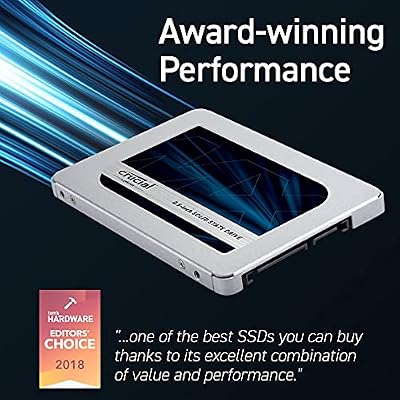
1. Crucial MX500 500GB 3D NAND SATA 2.5-Inch Internal SSD

Crucial MX500 1TB 3D NAND SATA 2.5 Inch Internal SSD, up to 560MB/s - CT1000MX500SSD1



As an Amazon Associate we earn from qualifying purchases. Product prices and availability are accurate as of the date/time indicated.
The Crucial MX500 500GB is the best overall value SATA SSD on this list and our default recommendation for most upgrades. It is a true 2.5-inch SATA III drive built on 3D NAND, rated up to around 540MB/s sequential reads, and Crucial backs it with a strong reputation for reliability and endurance. At around $85 it offers a near-ideal blend of capacity, dependability and price.
This is the drive to choose as a fast, roomy boot and applications disk, or to replace a sluggish hard drive in a laptop or desktop. The 500GB capacity is enough for Windows, your core programs and a healthy selection of games, the near-maximum SATA III speed makes the whole system feel responsive, and the MX500’s track record means it is a drive you can install and forget. For anyone who wants the best balance of value and confidence in a 2.5-inch SATA SSD, the MX500 is the obvious pick and a long-standing favorite.
Pros: Excellent value, near-max SATA III speed, dependable 3D NAND, trusted endurance.
Cons: 500GB fills quickly with large game installs; SATA caps sequential speed.
2. Crucial BX500 1TB 3D NAND SATA 2.5-Inch Internal SSD

Crucial BX500 1TB 3D NAND SATA 2.5-Inch Internal SSD, up to 540MB/s - CT1000BX500SSD1, Solid State Drive


As an Amazon Associate we earn from qualifying purchases. Product prices and availability are accurate as of the date/time indicated.
The Crucial BX500 1TB is the roomy budget pick, doubling capacity while keeping the price sensible. It is a 2.5-inch SATA III drive on 3D NAND, rated up to around 540MB/s reads, and positioned as Crucial’s value line beneath the MX500. At around $170 it delivers a full terabyte of solid-state storage at a cost that is hard to argue with for the space.
This is the drive for the upgrader who wants real capacity — a sizeable game library, a large photo or document archive, or a single roomy boot-and-storage disk — without paying a premium. The 1TB capacity provides plenty of breathing room, the SATA III speed keeps everyday use snappy compared with any hard drive, and the 2.5-inch form factor drops into any laptop bay or desktop SATA port. As a value-focused line the BX500 trims some of the MX500’s extras, but for affordable 1TB SATA storage it is a strong, practical choice.
Pros: Full 1TB at a low price, 3D NAND, ~540MB/s reads, fits any SATA bay.
Cons: Value line lacks some MX500 features; sustained writes are modest.
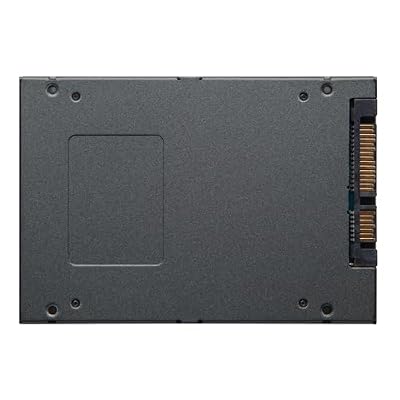
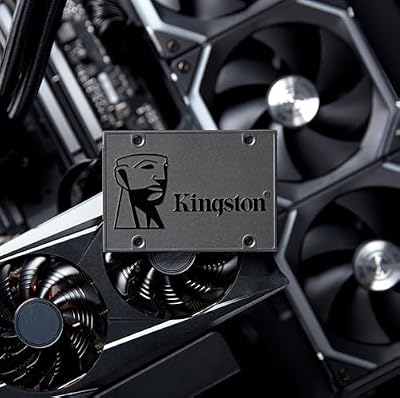
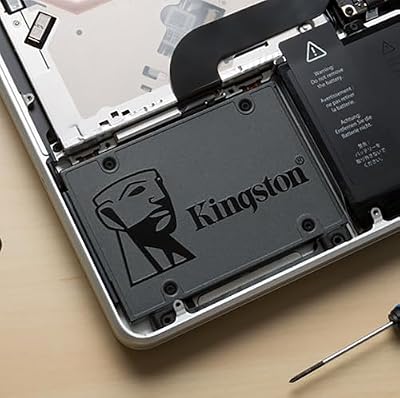
3. Kingston A400 480GB SATA 3 2.5″ Internal SSD (HDD Replacement)

Kingston 480GB A400 SATA 3 2.5" Internal SSD SA400S37/480G - HDD Replacement for Increase Performance




As an Amazon Associate we earn from qualifying purchases. Product prices and availability are accurate as of the date/time indicated.
The Kingston A400 480GB is the dedicated HDD-replacement pick, designed specifically to revive systems still running on a mechanical hard drive. It is a 2.5-inch SATA III drive rated up to around 500MB/s reads, and Kingston markets it explicitly as a drop-in upgrade to make an old PC or laptop feel new again. At around $115 it is a straightforward, no-frills way to ditch a spinning disk.
This is the drive to choose when the goal is simple: replace a slow hard drive and feel the difference immediately. Swapping a mechanical disk for the A400 dramatically cuts boot and load times, ends the noise and vibration of a spinning platter, and adds the shock resistance of solid-state storage to a laptop. The 480GB capacity comfortably holds an operating system and everyday files. For a no-nonsense, widely available HDD replacement from a trusted brand, the A400 is a dependable, popular choice.
Pros: Purpose-built HDD replacement, ~500MB/s, silent and shock-resistant, easy upgrade.
Cons: Entry-level performance among SATA drives; modest sustained write speed.
4. SANDISK SSD PLUS 240GB Internal SSD SATA III 6Gb/s, 2.5″/7mm

SANDISK SSD Plus 500GB Internal Solid State Drive - SATA III 6 Gb/s, 2.5"/7mm, Read/Write Speeds of up to 545MB/s / 505MB/s - SDSSDA-500G-G28
As an Amazon Associate we earn from qualifying purchases. Product prices and availability are accurate as of the date/time indicated.
The SanDisk SSD PLUS 240GB is the compact boot-drive pick. It is a slim 7mm 2.5-inch SATA III drive rated up to around 530MB/s reads, sized as an affordable, dedicated disk for an operating system and core applications. At around $94 it is an inexpensive way to add a fast, dedicated boot drive or to give a secondary machine a solid-state lift.
This is the drive for a focused job: a snappy boot and applications disk in a system that keeps bulk storage elsewhere, or a quick, low-cost upgrade for an older laptop. The 240GB capacity is enough for Windows and your essential programs, the near-max SATA III read speed makes startup and app launches feel instant, and the slim 7mm height fits thin notebooks. It is not a drive for large game libraries, but as a small, affordable, dependable SATA boot disk from a trusted name, the SSD PLUS does its job well.
Pros: Affordable, slim 7mm 2.5″ design, ~530MB/s reads, ideal dedicated boot drive.
Cons: Small 240GB capacity; best paired with separate bulk storage.
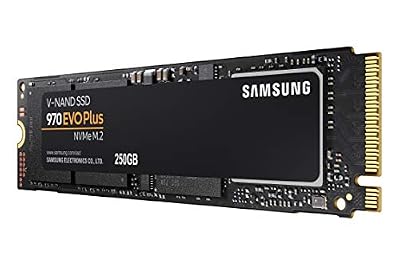
5. Samsung SSD 860 EVO 250GB 2.5 Inch SATA III Internal SSD

SAMSUNG 970 EVO Plus SSD 250GB NVMe M.2 Internal Solid State Drive with V-NAND Technology, Storage and Memory Expansion for Gaming, Graphics w/ Heat Control, Max Speed, MZ-V7S250B/AM



As an Amazon Associate we earn from qualifying purchases. Product prices and availability are accurate as of the date/time indicated.
The Samsung 860 EVO 250GB is the proven small-capacity SATA pick from one of the most respected names in solid-state storage. It is a 2.5-inch SATA III drive built on Samsung’s mature controller and V-NAND, long regarded as a benchmark for SATA reliability and consistency. At around $90 it offers Samsung’s pedigree in a compact 250GB capacity.
This is the drive for the upgrader who wants a small, dependable SATA SSD with a stellar reputation behind it — a quality boot drive, a reliable disk for a secondary system, or a trusted replacement for a failing mechanical drive. The 250GB capacity suits an operating system and core applications, the SATA III speed keeps everything responsive, and the 860 EVO’s renowned consistency means steady, predictable performance. While newer drives exist, the 860 EVO remains a respected, sensible choice for a compact SATA upgrade you can rely on.
Pros: Trusted Samsung reliability, mature V-NAND, consistent SATA III performance, compact.
Cons: Small 250GB capacity; an older model than Samsung’s current 870 line.
6. Samsung 870 EVO SATA III SSD 1TB 2.5″ Internal Solid State Drive
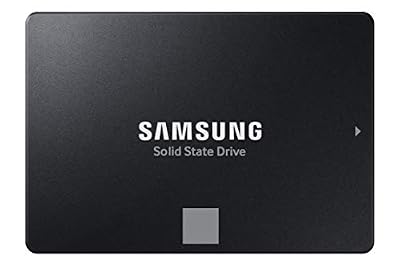
Samsung SSD 870 EVO SATA III 2.5” 1TB, Read Speeds Up to 560MB/s | SATA Internal Solid State Drive, Upgrade PC or Laptop Memory & Storage for IT Pros, Creators, Everyday Users (MZ-77E1T0B/AM)


As an Amazon Associate we earn from qualifying purchases. Product prices and availability are accurate as of the date/time indicated.
The Samsung 870 EVO 1TB is the premium 1TB SATA pick — and the one we list with a clear caveat on price. It is Samsung’s flagship SATA drive, a 2.5-inch SATA III unit widely considered the fastest and most consistent SATA SSD you can buy, with excellent endurance and Samsung’s polished Magician software. Performance and reliability are top-tier; the listed price of around $486, however, is unusually steep for a 1TB SATA drive.
On the merits, this is the drive for someone who wants the very best 2.5-inch SATA experience — the most consistent speeds the SATA interface allows, class-leading endurance for heavy workloads, and Samsung’s mature software and warranty support. That said, at this price it is hard to recommend over the BX500 1TB for most buyers, since a 1TB SATA drive should normally cost far less. Consider the 870 EVO if you specifically want Samsung’s flagship SATA drive and find it at a fair price; for pure value 1TB storage, the Crucial BX500 is the smarter buy.
Pros: Flagship SATA performance, class-leading consistency and endurance, polished Magician software.
Cons: Listed price is very high for a 1TB SATA drive; far pricier than rivals here.
How to Choose a SATA SSD
The first thing to settle is SATA versus NVMe, because the two are not interchangeable and the right answer depends on your machine. NVMe drives use the M.2 slot and PCIe lanes to reach far higher sequential speeds, but they need a compatible M.2 slot to work. A SATA SSD, by contrast, connects through the universal SATA interface and fits virtually any laptop drive bay or desktop SATA port. If your system lacks a free M.2 slot — as many older laptops and desktops do — or you simply want guaranteed compatibility, a 2.5-inch SATA drive like every option here is the right tool.
Be realistic about what SATA speed means in practice. The SATA III interface caps sequential transfers at roughly 550MB/s, so all of these drives cluster near that ceiling and none will match an NVMe drive’s headline numbers. The good news is that the leap that actually transforms a system is from a mechanical hard drive to any SSD — boot times, app launches and load screens all shrink dramatically. For everyday computing the difference between a fast SATA SSD and an NVMe drive is far smaller than the difference between an HDD and a SATA SSD, so do not overpay chasing sequential speed you will rarely notice.
Capacity is where you should focus your budget. A 240GB or 250GB drive, like the SanDisk SSD PLUS or Samsung 860 EVO, is ideal as a dedicated boot-and-applications disk paired with separate bulk storage. A 500GB drive such as the MX500 is a comfortable single-drive solution for most users, while a 1TB drive like the BX500 gives room for a real game library or large media archive. Buy the capacity your library and workflow need now, with a little headroom, rather than the smallest disk you can manage.
Finally, weigh brand, endurance and value together — and watch the price per gigabyte. Established names like Crucial, Kingston, SanDisk and Samsung have earned their reputations for reliability, and endurance ratings matter if you write data heavily. But value is part of the decision: the Crucial BX500 1TB delivers a terabyte affordably, whereas a flagship like the Samsung 870 EVO can command a steep premium that is hard to justify for most buyers unless the price is right. Decide on SATA versus NVMe for your machine, pick the capacity you need, and choose the drive on this list that offers the best balance of trust and price.
Frequently Asked Questions
What is the difference between a SATA SSD and an NVMe SSD?
A SATA SSD connects through the universal SATA interface and fits almost any 2.5-inch drive bay or desktop SATA port, with sequential speeds capped around 550MB/s. An NVMe SSD uses an M.2 slot and PCIe lanes for far higher sequential speeds, but requires a compatible M.2 slot. Every drive on this list is a 2.5-inch SATA drive, ideal when you lack a free M.2 slot or want broad compatibility.
Is a SATA SSD still worth it when NVMe exists?
Absolutely. The transformative upgrade is moving from a mechanical hard drive to any SSD — boot, load and launch times all shrink dramatically. For everyday use the gap between a fast SATA SSD and an NVMe drive is far smaller than the gap between an HDD and a SATA SSD. SATA also fits machines without M.2 slots, making it the practical, affordable upgrade for countless laptops and desktops.
What capacity SATA SSD should I buy?
For a dedicated boot drive with bulk storage elsewhere, 240GB to 250GB like the SanDisk SSD PLUS or Samsung 860 EVO is enough. For a single all-purpose drive, 500GB such as the Crucial MX500 is the comfortable sweet spot. If you want a real game library or large media archive on one disk, choose a 1TB drive like the Crucial BX500. Buy for your current needs plus a little headroom.
Will a 2.5-inch SATA SSD fit my laptop?
Most laptops with a 2.5-inch drive bay accept these SSDs directly, and slim models often need the 7mm height that drives like the SanDisk SSD PLUS provide. Check whether your laptop has a 2.5-inch bay and confirm the height clearance before buying. Many older notebooks shipped with a 2.5-inch hard drive, making a same-form-factor SATA SSD a straightforward, high-impact replacement.
Related Guides
- Best NVMe SSDs
- Best External SSDs
- Best SSDs for Gaming
- Best Budget SSDs
- Best Gaming PCs
- Best Budget Gaming Setup
Affiliate Disclosure: As an Amazon Associate, we earn from qualifying purchases. If you click a link and make a purchase, we may earn a small commission at no extra cost to you. Prices and availability are accurate as of publication and may change.










