

Updated October 2026 – availability rechecked; one unavailable listing and two duplicate listings were replaced.
- Quick Answer: Best Wireless Webcams in 2026
- Top Wireless Webcams Picks for 2026
- Best Wireless Webcams at a Glance
- 1. NexiGo N660P Pro 4K Webcam with Distortion-Free Lens, 1080p 60 fps Autofocus USB
- 2. Acer A640 4K Webcam with AI Noise Canceling Mic
- 3. Logitech HD Pro Webcam C920, Widescreen Video Calling and Recording, 1080p Camera
- 4. EMEET 1080P Webcam with Microphone, C960 Web Camera, 2 Mics Streaming Webcam, 90 FOV
- 5. Insta360 Link 2C 4K Webcam with Auto Framing
- 6. Logitech 4k Webcam
- True Wireless Webcams: 2.4G, Battery and AI-Tracking Options
- How to Choose a Wireless Webcam
- Wireless Webcam Buying Guide: Thresholds That Matter
- Frequently Asked Questions
- Related Guides
- Related Articles
Quick Answer: Best Wireless Webcams in 2026
The best wireless webcams for most people are cameras with a single USB cable, because true battery or WiFi webcams are rare and cost more. Our top pick is the NexiGo N660P Pro 4K for 1080p 60fps autofocus. The Logitech HD Pro Webcam C920 is the safe workhorse, and the Gsou 2.4G model is the true wireless option.
- Best overall: NexiGo N660P Pro 4K · 1080p 60fps · autofocus · distortion-free lens · USB
- Best budget: EMEET C960 1080P · dual mics · 90-degree view · USB
- Best 4K value: Acer A640 4K · Sony 1/2.8 in sensor · PDAF autofocus · USB
- Best premium: Logitech 4K Pro Webcam · 4K UHD · HDR · USB
- Truly wireless: Gsou 2.4G Wireless Webcam · rechargeable · half-day use per listing
🛒 Best Price Today on Amazon
Prime members get fast, free shipping on everything above, plus member-only deals. New members get a 30-day free trial — cancel anytime.
Top Wireless Webcams Picks for 2026
Here are our current top wireless webcams picks, compared on published specifications, price and features. Live prices update below.
As an Amazon Associate we earn from qualifying purchases at no extra cost to you.


Search for a ‘wireless webcam’ and you quickly hit an honest truth worth saying up front: genuine WiFi or battery-powered webcams that stream video without any cable are rare in the desktop and streaming space. The vast majority of high-quality webcams people actually buy — including every numbered pick below — connect over a single USB cable, which both powers the camera and carries the video. We have flagged that clearly for each pick rather than pretend otherwise. This guide rounds up the best webcams in 2026 for anyone shopping the ‘wireless’ term, focusing on cameras that keep cabling to an absolute minimum: one tidy USB lead, no separate power brick, and plug-and-play setup. If you do want a camera with no cable to the PC at all, see the true wireless section further down.
Our picks were chosen on a simple basis: image quality, autofocus and low-light performance, microphone quality, and overall value, with the cable reality stated honestly for each. We have included a deliberate price spread — from around $38 to around $119 — because the best webcam is the one that fits your camera needs and your budget. If your real goal is a clean, near-cable-free setup with a single USB connection rather than a battery-powered WiFi camera, the cameras below deliver exactly that. Below you will find an at-a-glance comparison, then a closer look at each webcam and a buyer’s guide covering resolution, autofocus, and what ‘wireless’ genuinely means for webcams.
Best Wireless Webcams at a Glance
| Webcam | Best For | Standout Spec | Approx Price |
|---|---|---|---|
| NexiGo N660P Pro 4K (1080p60) | Single-cable 4K-class clarity | 4K sensor, 1080p 60fps, USB | around $80 |
| Acer A640 4K | Budget 4K-class video | Sony 1/2.8 in sensor, PDAF autofocus, 1080p 60fps, USB | around $40 |
| Logitech C920 HD Pro | Trusted single-cable workhorse | 1080p, dual mics, USB | around $68 |
| EMEET C960 1080P | Cheapest tidy USB pick | 1080p, dual mics, 90 FOV | around $38 |
| Insta360 Link 2C | Auto-framing 4K calls | 4K, 1/2 in sensor, HDR, gesture control, USB | around $150 |
| Logitech 4K Pro Webcam | Highest-resolution USB pick | 4K UHD, HDR, USB | around $119 |
1. NexiGo N660P Pro 4K Webcam with Distortion-Free Lens, 1080p 60 fps Autofocus USB

NexiGo N660P Pro 4K Webcam with Distortion-Free Lens, 1080p 60 fps Autofocus USB Streaming Camera, 3DNR, Noise-Canceling Mics & Privacy Cover, Web Cam for Gaming/Live Streaming/PC/Mac/Switch 2, Pink


As an Amazon Associate we earn from qualifying purchases. Product prices and availability are accurate as of the date/time indicated.
The NexiGo N660P Pro 4K leads this list as the standout choice for anyone who wants near-cable-free clarity from a single USB connection. It uses a 4K-class sensor, captures sharp 1080p video at a smooth 60 frames per second with autofocus, and pairs it with a distortion-free lens that keeps your face looking natural rather than stretched. At around $80 it is a feature-rich camera that punches well above its price for streaming and calls.
It is important to be straight about the ‘wireless’ question here: this is a USB-tethered webcam, not a WiFi or battery camera. It connects with one USB cable that supplies both power and video, so there is no separate adapter and no battery to charge — about as tidy and close to cable-free as a high-quality webcam realistically gets. For that single-lead simplicity plus genuinely good 1080p60 autofocus and a flattering lens, the N660P Pro is the obvious starting point and our top pick.
Pros: Sharp 1080p 60fps autofocus, 4K-class sensor, distortion-free lens, single-cable USB setup.
Cons: USB-tethered, not a true WiFi or battery webcam; needs a free USB port.
2. Acer A640 4K Webcam with AI Noise Canceling Mic

The Acer A640 4K is the budget 4K-class pick on this list at around $40. Its maker listing specifies a Sony 1/2.8-inch sensor, phase-detection autofocus, 2K and 1080p 60fps output, and an AI noise-canceling microphone. For remote workers and streamers who want a sharper picture than a basic 1080p webcam without paying premium prices, it is the cheapest route to a 4K-class image here.
Like every numbered pick, it is a USB webcam rather than a WiFi or battery model. It ships with an A-to-C adapter, so it works on both USB-A and USB-C ports, and a single cable carries power and video. Specs above are taken from the maker listing. Skip it if you want the long software track record of a bigger webcam brand.
Pros: 4K-class sensor at a low price, autofocus, 1080p 60fps, A-to-C adapter included.
Cons: USB-tethered, not cordless; less proven than Logitech.
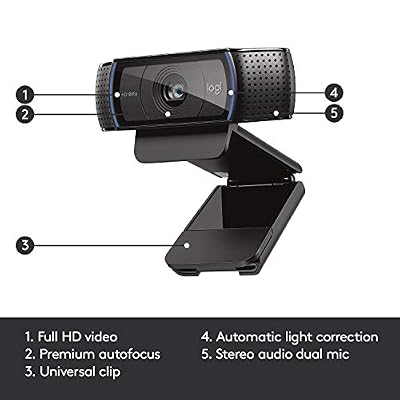
3. Logitech HD Pro Webcam C920, Widescreen Video Calling and Recording, 1080p Camera

Logitech HD Pro Webcam C920, Widescreen Video Calling and Recording, 1080p Camera, Desktop or Laptop Webcam




As an Amazon Associate we earn from qualifying purchases. Product prices and availability are accurate as of the date/time indicated.
The Logitech C920 is the trusted single-cable workhorse of this list, and one of the most popular webcams ever made. It records crisp widescreen 1080p video, includes a pair of built-in microphones for clear stereo audio, and benefits from Logitech’s reliable autofocus and proven build quality. At around $68 it is a dependable, no-drama camera that simply works for calls and streaming.
On the wireless point, the C920 is firmly a USB webcam: it plugs into one USB port that carries both power and video, with no battery or WiFi involved. That is exactly why it stays so easy to live with — plug it in and it is recognised instantly on virtually any computer, with a single tidy cable and nothing to charge. If your priority is a rock-solid, near-cable-free camera with a long track record rather than a cordless gimmick, the C920 is a classic, safe recommendation.
Pros: Reliable widescreen 1080p, dual built-in mics, plug-and-play on any machine, single USB cable.
Cons: USB-tethered, not wireless; 30fps cap means less smooth motion than 60fps rivals.
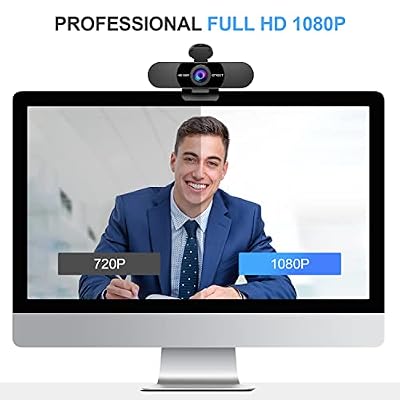
4. EMEET 1080P Webcam with Microphone, C960 Web Camera, 2 Mics Streaming Webcam, 90 FOV
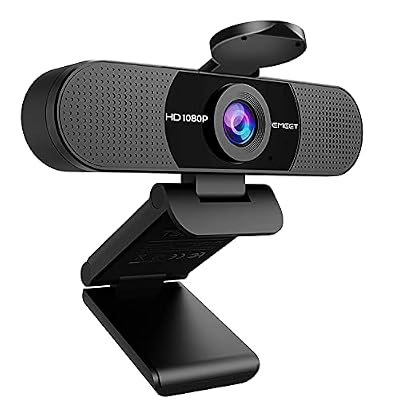
EMEET 1080P Webcam with Microphone, C960 Web Camera 2 Mics Streaming Webcam | 90°FOV Computer Camera, Plug and Play USB Web Cam for Online Calling/Conferencing, Zoom/Teams/Facetime/YouTube, Laptop/PC


As an Amazon Associate we earn from qualifying purchases. Product prices and availability are accurate as of the date/time indicated.
The EMEET C960 is the cheapest tidy-cable pick here, and a strong value at around $38. It delivers solid 1080p video, packs two noise-reducing microphones for clearer voice pickup, and offers a 90-degree field of view that frames a single person neatly without dragging in too much background. For a budget-friendly camera that keeps cabling minimal, it covers the essentials well.
Like the rest of this roundup, the C960 is a USB webcam rather than a wireless one — and that is no bad thing. It connects with a single USB cable for both power and video, so setup is genuinely plug-and-play with no adapter or battery to manage, and the lightweight clip sits easily on a laptop or monitor. If you want the cleanest possible single-cable setup for video calls and casual streaming on a tight budget, the EMEET C960 is a sensible, affordable choice.
Pros: Lowest price here, dependable 1080p, dual noise-reducing mics, single-cable USB simplicity.
Cons: USB-tethered rather than WiFi/battery; 90 FOV is tighter than wide-room cameras.
5. Insta360 Link 2C 4K Webcam with Auto Framing

The Insta360 Link 2C is the pick for people who move around on calls. The maker lists a 4K sensor (1/2 inch), auto framing that keeps you centered, HDR, an AI noise-canceling microphone and gesture control. At around $150 it costs more than the other USB cameras here, but the framing features remove the need to adjust the camera by hand.
It is a USB webcam, so one cable still handles power and video and nothing needs charging. It suits remote workers, teachers and streamers who stand, gesture or share a desk. Skip it if you only sit still in front of a monitor and want the lowest price.
Pros: Auto framing, 4K with HDR, gesture control, AI noise-canceling mic.
Cons: Pricier than the other USB picks; USB-tethered, not wireless.
6. Logitech 4k Webcam

Rounding out the list is the Logitech 4K Pro Webcam, the highest-resolution and most premium pick here at around $119. It captures genuine 4K Ultra HD video with HDR for better detail in tricky lighting, steps down cleanly to smooth 1080p when you need it, and brings Logitech’s polished autofocus and build to demanding streamers and professionals. If outright image quality is the goal, this is the camera to beat.
On the wireless question it is the same story as the rest: this is a USB-connected webcam, with one cable handling both power and video and no battery or WiFi link. That single-cable design is what keeps even a 4K camera this clean to set up — plug it in and it is ready. For the sharpest video on this list from a trusted brand, delivered through a tidy single USB connection rather than a cordless setup, the Logitech 4K Pro is the standout premium choice.
Pros: True 4K UHD with HDR, excellent autofocus, premium Logitech build, single-cable USB.
Cons: USB-tethered, not wireless; the priciest pick and 4K needs a capable PC.
True Wireless Webcams: 2.4G, Battery and AI-Tracking Options
If a USB lead is a dealbreaker, only a handful of webcams cut the cable to the PC. They cost more per pixel than the USB picks above, and battery models need charging. Details below come from the maker listings.
Gsou Wireless Webcam – Best Battery-Powered Wireless Webcam
The Gsou Wireless Webcam, shown in the top cards, is listed as a 2.4G rechargeable 1080p camera with a mic, an auto privacy cover and a manual focus ring. The listing says half-day use, so plan to charge it between long sessions. At around $126 it is expensive for 1080p, which is the price of cutting the cable. Skip it if you stream for many hours a day.
TOALLIN 1080P Wireless Webcam – Best for Moving a Camera Around a Room
The TOALLIN 1080P HD Wireless Webcam, also in the top cards, is sold as a wireless computer camera with a built-in noise-canceling mic for conferencing and live streaming. At around $119 it is one of the few listings that targets the wireless search directly. Check the maker page for the power and receiver setup before buying, because listings in this category differ on battery versus USB power.
SynthMeet 1080P Wireless Webcam – Best Wireless-Style Webcam Without a Battery

The SynthMeet 1080P Wireless Webcam is sold in a USB-powered version without a battery, so you avoid charging but still have a lead for power. It suits desks where you want a camera that rotates and sits away from the monitor.
- 1080p video with a noise-reducing microphone
- 92-degree field of view
- 360-degree rotation
- USB-powered, plug and play
Pros: Plug and play; rotating body; mic included.
Cons: About $100 for 1080p; not cordless in the USB-powered version.
Skip it if you need a camera with no power cable at all.
EMEET PIXY Wireless 4K – Best Premium Wireless AI-Tracking Camera
The EMEET PIXY Wireless is a dual-lens 4K streaming camera with AI tracking, aimed at creators who want the camera to follow them and switch between views. It is the most expensive pick on this page at around $180.
- 4K dual-lens design
- 1/2.55-inch sensor
- AI tracking and gesture control
- Multi-camera live support
Pros: Tracks movement; gesture control; 4K image.
Cons: Highest price here; overkill for basic calls.
Skip it if you only need a webcam for meetings.
OBSBOT Meet SE – Best 1080p High-Frame-Rate USB Pick

The OBSBOT Meet SE is a USB camera for people who want smooth motion and automatic framing at around $69. It sits between the budget picks and the premium ones.
- 1080p at up to 100fps
- 1/2.8-inch sensor
- AI framing and gesture control
- Beauty mode
Pros: Very smooth frame rate; auto framing; fair price.
Cons: USB-tethered; fewer reviews than Logitech models.
Skip it if you need 4K resolution.
How to Choose a Wireless Webcam
The first thing to get straight when shopping for a ‘wireless webcam’ is what the word actually means. True wireless webcams that stream over WiFi or run on a battery with no cable at all are uncommon in the desktop and streaming world, and none of the numbered picks below are that — they are all high-quality USB webcams. The true wireless options are covered in their own section. For most people that is genuinely what they want anyway: a single, tidy USB cable that supplies power and video, with no adapter, no charging and no pairing. Set your expectations on the cable reality first, and you will choose far better.
Resolution and frame rate come next, and they shape how your video looks. A 1080p camera is the practical standard for sharp calls and streaming, while the 4K-class sensors in the NexiGo N660P Pro models and the Logitech 4K Pro capture extra detail and downscale cleanly for crisp 1080p. Frame rate matters too: 1080p at 60fps, as on the N660P Pro cameras, looks noticeably smoother in motion than the 30fps of the classic C920. Decide whether ultimate sharpness or fluid movement matters more for what you do.
Autofocus, lens and microphone quality separate a good webcam from a frustrating one. Reliable autofocus keeps you sharp as you lean in and out of frame, a distortion-free lens — a NexiGo highlight — stops your face looking stretched on calls, and built-in dual microphones, as on the C920 and EMEET C960, save you buying a separate mic for casual use. Match the field of view to your space too: a tighter 90-degree view frames one person neatly, while wider angles suit groups or showing your room.
Finally, match the camera to your setup and budget, and remember the one thing they all share: they need a free USB port. Confirm you have one (USB-A or USB-C with the right cable), set a budget — there is a capable single-cable option here from around $38 to around $119 — and decide whether you are paying for 4K, 60fps, a flattering lens or simply a dependable workhorse. If you genuinely need a cable-free WiFi or battery camera, see the true wireless section above; but for a clean, minimal-cabling webcam that just works, pick the one on this list that fits your priority.
Wireless Webcam Buying Guide: Thresholds That Matter
| Priority | What to look for | Pick from this list |
|---|---|---|
| Lowest cost | 1080p, under $40 | EMEET C960 1080P |
| Smooth motion | 60fps or higher at 1080p | NexiGo N660P Pro 4K, OBSBOT Meet SE |
| Sharpest image | 4K sensor, HDR | Logitech 4K Pro Webcam, Acer A640 4K |
| Hands-free framing | Auto framing or AI tracking | Insta360 Link 2C, EMEET PIXY Wireless |
| No cable to the PC | Rechargeable battery, 2.4G link | Gsou Wireless Webcam |
Count your ports before shopping: every USB model needs a free USB-A port or an adapter. For calls only, 1080p at 30fps is enough. For streaming, choose 60fps. Battery webcams are only worth it if you move the camera often and sessions stay under a few hours.
Which Wireless Webcam Should You Choose?
Working from home on a budget: EMEET C960 1080P. Streaming with smooth motion: NexiGo N660P Pro 4K. Presenting while standing: Insta360 Link 2C. Moving a camera around a room: Gsou Wireless Webcam. Maximum detail for recording: Logitech 4K Pro Webcam.
Frequently Asked Questions
Are any of these webcams truly wireless (WiFi or battery)?
Not the numbered picks. Webcams 1 to 6 are USB cameras that connect with a single cable carrying both power and video. Genuine WiFi or battery-powered webcams, such as the Gsou 2.4G model listed in the top cards, are rare in this category. The upside is that a single-cable USB camera is what most ‘wireless webcam’ shoppers actually want: tidy, plug-and-play, with nothing to charge or pair.
What does a single-cable USB webcam need to work?
Just one free USB port on your computer. The USB connection supplies power and carries the video at the same time, so there is no separate power adapter and no battery. Check whether your machine has a spare USB-A port (or USB-C with the right cable), plug the camera in, and it is typically recognised instantly without extra software — about as close to cable-free as a quality webcam gets.
Which webcam here has the best image quality?
The Logitech 4K Pro Webcam is the sharpest, capturing genuine 4K Ultra HD with HDR and downscaling cleanly to 1080p. The NexiGo N660P Pro models are close behind with 4K-class sensors and smooth 1080p 60fps autofocus at a lower price. If you want maximum detail, choose the Logitech 4K; if you want excellent value with fluid 60fps motion, the N660P Pro cameras are the smart pick.
Do I need a separate microphone with these webcams?
Not for casual use. Several of these cameras, including the Logitech C920 and the EMEET C960, include built-in dual microphones that are perfectly fine for video calls and light streaming. For serious streaming or recording where voice quality is paramount, a dedicated USB or XLR microphone will still sound better, but the built-in mics save you the extra purchase for everyday use.
Related Guides
- Best Streaming Webcams
- Best USB Webcams
- Best Microphones for Streaming
- Best Gaming Headsets
- Best Ring Lights for Streaming
- Best Budget Gaming Setup
Affiliate Disclosure: As an Amazon Associate, we earn from qualifying purchases. If you click a link and make a purchase, we may earn a small commission at no extra cost to you. Prices and availability are accurate as of publication and may change.
Can I use my phone as a wireless webcam?
Yes. Phone apps and built-in features can turn a phone into a webcam over USB or WiFi. Image quality is often better than a basic webcam, but setup takes more steps and the phone is tied up during the call.
Can a WiFi security camera work as a webcam?
Some can, through special firmware or desktop software, but it is usually less reliable than a USB webcam. Check the maker support page first, because many security cameras cannot act as a webcam.
Is 4K worth it for a webcam?
For video calls, usually not, because most meeting apps compress video to 1080p or lower. 4K helps when you record content or crop in later. For calls, 1080p with good autofocus matters more.










