Going from one camera to several is the moment a stream starts to feel like a broadcast. A video switcher lets you cut between cameras, a gameplay feed and a laptop without juggling windows in your streaming software. It also takes work off your PC, since many models handle switching and sometimes recording in hardware.
This guide is for streamers, church and school teams, podcasters and event producers choosing a first or next switcher. The decisions that matter most are the input type and count (HDMI versus SDI), whether the unit streams and records on its own or sends a clean feed to a PC, and how much on-device control you want, from a small screen to a joystick and an audio mixer.
Quick Picks
| Product | Best for | Key spec from the title |
|---|---|---|
| Dual 4K HDMI Capture Card Switcher | Two-source desktop streaming | Dual 4K HDMI inputs, USB 3.0, 1080P 60FPS recording |
| Osee GoStream Deck HDMI Pro | Multi-camera shows with a mixer feel | HDMI multi-camera mixer switcher |
| Mixer Plus Compact Switcher | Portable classes and events | 4 HDMI inputs, 4-inch built-in screen |
| Osee GoStream Duet | Mixed SDI and HDMI cameras | SDI and HDMI inputs |
| RGBlink Mini V3 | Customizable control | 4K HDMI, 2.1-inch touch screen, dual HDMI out |
| FoMaKo KC800 | PTZ camera productions | 4K HDMI, PTZ joystick, AI tracking, XLR mixer |
| Tenveo 4K60FPS Switcher | Large camera counts | 4 SDI and 4 HDMI inputs, 5.5-inch screen |
| Blackmagic ATEM Mini Pro | Streaming plus recording in one box | 4 HDMI inputs, streaming, recording, multiview |
How to Choose
Input type and count
Start by listing every source you plan to connect: cameras, a gaming PC, a laptop for slides and a capture card. Match the count to HDMI or SDI inputs on the listing. HDMI is common on mirrorless and consumer cameras, while SDI uses locking connectors and handles longer cable runs. Leave at least one spare input for growth. Also check whether each input accepts the camera’s output resolution and frame rate, since a mismatch can cause a black screen or a flicker on air.
Outputs, recording and streaming
Some switchers send a clean program feed over USB, while others add recording to USB or SD media, or even stream directly through an Ethernet connection. Check the listing for words like USB output, SD recording, multiview and dual HDMI outputs. If the title does not mention direct streaming, assume you will need a computer or a capture setup.
Control surface and monitoring
Built-in screens show your sources so you can cut without looking at a laptop. Larger screens, touch control and buttons all change how fast you can work. Joystick and PTZ controls only help if your cameras support them, so verify the control protocols on the listing before you buy.
Audio and resolution handling
Streams live or die by sound. Check for XLR inputs, embedded HDMI audio handling and an on-device mixer if you use microphones. For resolution, look for the output rate, such as 1080P at 60 frames per second, and confirm whether 4K means pass-through or full processing.
The 8 Best Options
Dual 4K HDMI Capture Card Switcher
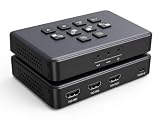
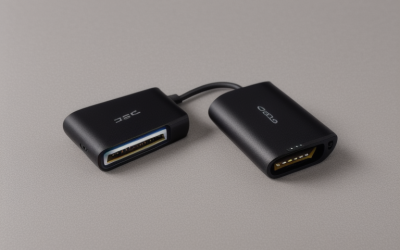
A small generic-brand switcher built around a USB 3.0 capture card with two HDMI inputs. The title names dual 4K HDMI inputs and 1080P at 60FPS recording, so it fits a desktop streamer toggling between a camera and a console. It doubles as a capture card, so a single USB 3.0 connection can send both sources to the PC without extra gear.
- Strength: dual HDMI inputs in a compact capture design.
- Strength: 1080P at 60FPS recording per the title.
- Limit: only two inputs, and the title is cut off for other specs.
Skip it if you want more than two cameras or a standalone control surface.
Osee GoStream Deck HDMI Pro

A multi-camera HDMI mixer switcher from a brand focused on live production gear. The title is short, so details like input count, outputs and streaming features need a check on the full spec sheet. It suits creators who want a dedicated mixer feel on the desk instead of a software panel, and who are comfortable confirming the details before they buy.
- Strength: purpose-built multi-camera HDMI switcher.
- Strength: Pro-labeled model from a live-production brand.
- Limit: the title offers few specs, so verify inputs and recording.
Skip it if you want a comparison based entirely on stated specs.
Mixer Plus Compact Video Switcher

A portable four-input HDMI switcher with a 4-inch built-in screen. The listing mentions multi-camera shoots, online classes, events, YouTube and OBS, which fits a classroom, a small workshop or a mobile streaming bag. The built-in screen lets a teacher or operator check every camera without leaning over a laptop.
- Strength: 4 HDMI inputs with a built-in 4-inch screen.
- Strength: portable body made for classes and events.
- Limit: no SDI inputs are named in the title.
Skip it if your cameras use SDI or you want an audio mixer in the unit.
Osee GoStream Duet

The Duet takes both SDI and HDMI cameras, which is handy for mixed gear such as a camcorder with SDI and a mirrorless on HDMI. It suits churches, schools and small studios upgrading in stages, since older SDI camcorders and newer HDMI cameras can share one switcher during the transition.
- Strength: both SDI and HDMI inputs.
- Strength: multiple-camera design for live streams.
- Limit: input counts are not in the title, so check the spec sheet.
Skip it if you only use HDMI sources and want the simplest path.
RGBlink Mini V3

This model combines 4K HDMI switching, a 2.1-inch touch screen, dual HDMI outputs and customization through TAO Cloud. It suits producers who like to set up buttons and workflows their own way. Dual HDMI outputs make it easy to send one feed to the stream and another to a confidence monitor or projector.
- Strength: touch screen and dual HDMI outputs.
- Strength: customizable features through TAO Cloud.
- Limit: the screen is small, and input count is not listed in the title.
Skip it if you prefer physical buttons and joystick control.
FoMaKo KC800
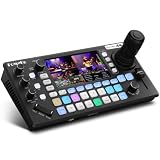
A feature-packed 4K HDMI switcher with a 4D joystick PTZ controller, AI tracking, a 5.5-inch LCD, an XLR audio mixer and USB or SD recording. It suits solo producers who want camera moves, audio and switching on one panel. A church tech running a PTZ camera and a microphone at the same time will see the appeal immediately.
- Strength: PTZ joystick, AI tracking and XLR audio in one unit.
- Strength: 5.5-inch LCD with USB or SD recording.
- Limit: PTZ features need compatible cameras.
Skip it if you have no PTZ cameras or want a simpler layout.
Tenveo 4K60FPS Switcher Mixer

An eight-input switcher with four SDI and four HDMI inputs, a five-channel design, a 5.5-inch Full HD screen and 1080P60 output. It suits larger productions, such as school events, worship services or multi-camera interviews. With that many inputs, label your cables and plan power before show day.
- Strength: 4 SDI and 4 HDMI inputs.
- Strength: 5.5-inch FHD screen and USB or SD recording.
- Limit: the title is cut off, so check the spec sheet for audio and streaming.
Skip it if you only have two cameras or want a pocket-sized unit.
Blackmagic Design ATEM Mini Pro

A four-input HDMI production switcher with built-in streaming, recording and multiview. It suits creators who want a well-known, widely used box for a first multi-camera show, with direct streaming that reduces reliance on a PC. Podcasters and small churches often start here, then add SDI converters if the camera count grows.
- Strength: 4 HDMI inputs, streaming and recording in one unit.
- Strength: multiview for monitoring all sources.
- Limit: HDMI-only inputs, so SDI cameras need converters.
Skip it if you need SDI inputs or on-device PTZ control.
Which One Fits Your Situation
A solo streamer with two sources
The Dual 4K HDMI Capture Card Switcher is the simple route for a camera and a console. If you want more room to grow, the ATEM Mini Pro offers four inputs.
A classroom, church or event team
The Mixer Plus, the Osee Duet and the Tenveo cover different needs: portable, mixed-input and large-count. Pick by connector type first, then by whether you want a screen on the unit. A volunteer team will move faster with visible sources and clearly labeled inputs.
A creator who wants PTZ control
The FoMaKo KC800 stands apart because its title names a PTZ joystick, AI tracking and an XLR mixer. Confirm camera compatibility before buying, and check that the PTZ protocol listed on the full spec sheet matches your cameras. For a gamer who streams with a webcam and a capture card, the KC800 is probably more than needed.
Common Mistakes
- Buying on input count alone and ignoring connector type.
- Assuming 4K input means 4K output.
- Forgetting that streaming from the unit may need a separate network connection.
- Ignoring audio, then discovering the switcher has no microphone input.
- Overlooking cable length limits for HDMI runs across a room.
Frequently Asked Questions
Do I need a switcher if I use OBS?
Not necessarily, but a hardware switcher takes load off your PC and gives you physical buttons for live cuts. It also keeps working if a desktop app crashes, which matters for live events.
HDMI or SDI?
HDMI is common on consumer cameras. SDI uses locking connectors and supports longer runs, which suits larger venues.
Can these record without a computer?
Some list USB or SD recording, such as the FoMaKo and Tenveo, while others rely on a PC. Check each listing.
Do I need a PTZ controller?
Only if you use PTZ cameras. Otherwise a standard switcher is enough.