Photo and video work often ends the same way: a full memory card, a laptop with no card slot, and a deadline. A USB-C card reader is the small fix, turning one port into a way to pull footage off an SD or microSD card. For creators who shoot with a camera, a drone, an action cam or a trail camera, it is one of the most used accessories in the bag.
The choice looks trivial, but three trade-offs separate the models: whether the reader has one slot or two, how fast the interface and card support are, and which devices it plugs into without an adapter. The eight readers below cover phones, tablets and computers, so check your card type and your port before you compare anything else.
Quick Picks
| Product | Best for | Key spec from the title |
|---|---|---|
| USB C SD Card Reader (unbranded) | Phones, tablets and trail cameras | SD and microSD, iPhone 15 16, iPad, Mac |
| acer Dual Slot Reader | Laptop and PC use | Dual slots, microSD, SDHC, SDXC |
| Anker Dual Slot Reader | Phone and laptop transfers | Dual slots, SDXC, SDHC, SD, microSD |
| BnmxTek USB C Reader | Apple and Android devices | SD and microSD, USB 3 |
| Apple USB-C to SD Card Reader | Mac and iPad owners | USB-C to SD |
| UGREEN USB 3.0 Micro SD Reader | PC and MacBook | 2-in-1, USB 3.0, microSD, SDHC, SDXC |
| UGREEN USB C 2-in-1 Reader | Phone and tablet use | 2-in-1, TF and SD, Type C |
| Lexar Dual-Slot Reader | High-speed camera cards | Up to 312MB/s read, USB-C, LED indicator |
How to Choose
Card types and slot count
SD, SDHC and SDXC are full-size cards with growing capacity, while microSD is the smaller format used by phones, drones and action cameras. Check the listing for the exact formats a reader supports, and choose dual slots if you handle both. Single-slot models are simpler, but they may need a separate adapter for the other size.
Interface speed
The reader’s interface sets a ceiling, but the card and the host port also limit speed. Look for USB 3.0 or a stated read speed, and remember that UHS-I and UHS-II describe card classes, not the reader. A fast card in a slow reader moves at the reader’s pace.
Device compatibility
USB-C ports are common on laptops, tablets and recent phones, but not every phone supports external storage the same way. Read the compatibility list on the listing and note which models are named. Some titles name iPhone and iPad, while others only say laptops or PCs.
Build, size and indicators
A compact body with a short connector travels well, though a bulky case can block neighboring ports. Look for a status LED, a strain-relieved cable if there is one, and clear slot labels. Confirm in the listing whether the reader has a USB-C plug only or extra USB-A support.
The 8 Best Options
USB C SD Card Reader (Unbranded, SD and MicroSD)

This unbranded reader supports SD and microSD cards and names iPhone 15 and 16, iPad, MacBook and Mac in its title, with a note on trail camera viewing. It suits a casual shooter who moves clips from a trail camera or phone to a tablet.
- Strength: SD and microSD support in a single title.
- Strength: named Apple device compatibility.
- Limit: no speed figure or interface standard appears in the title.
Skip it if you need a stated transfer speed for large video files. It reads as a convenience adapter for phones, tablets and trail footage, so confirm the interface on the listing before relying on it for heavy 4K clips.
acer Dual Slot SD Card Reader

The acer reader has dual slots and supports microSD, SDHC and SDXC cards, with laptop and PC compatibility in the title. It suits a desk setup where two cards are handled at once, such as copying footage from a camera and a drone.
- Strength: dual slots for two card formats.
- Strength: SDHC and SDXC support listed.
- Limit: the title is cut off, so check the full spec sheet for speed and device compatibility.
Skip it if you want a stated read speed up front. For a creator who ingests two cards at the same time, the dual slots are the draw, but verify that both can be read at once on the full spec sheet.
Anker SD Card Reader
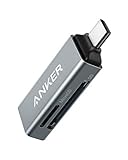
Anker lists dual slots on a USB-C reader that works with iPhone and laptops, and supports SDXC, SDHC, SD and microSD cards. It suits a photographer who wants a recognizable brand with broad card support for a phone-and-laptop workflow.
- Strength: dual slots with wide format support.
- Strength: iPhone and laptop use named in the title.
- Limit: the title is cut off before speed details, so check the listing.
Skip it if you need explicit information on UHS-II support. A known brand does not guarantee speed on its own, so match the reader’s stated interface to the card class you actually shoot on.
BnmxTek USB C to SD Card Reader

BnmxTek supports SD and microSD cards and lists USB 3 in the title, with compatibility for iPhone 15 and 16, iPad, MacBook Pro and Air. It suits a creator who moves between Apple devices and wants a dual-format reader.
- Strength: USB 3 interface is named.
- Strength: SD and microSD formats in one reader.
- Limit: the title ends before the Android list, so check the full spec sheet.
Skip it if you want a bigger brand name or published speed numbers. Apple-heavy workflows benefit from its named iPhone, iPad and Mac compatibility, but Android owners should read the complete device list first.
Apple USB-C to SD Card Reader

Apple’s reader has a short title that names only USB-C to SD, which makes it the plain option for owners of Macs and iPads. It handles full-size SD cards from a camera, with no extra ports to consider.
- Strength: a first-party design for Apple ecosystems.
- Strength: simple USB-C to SD function.
- Limit: the title lists no speed, microSD or compatibility details, so check the full spec sheet.
Skip it if you need microSD support or a stated transfer speed. It is a minimalist choice for a person who ingests from a camera and nothing else, with fewer features but also fewer decisions to make.
UGREEN USB 3.0 Micro SD Card Reader

This UGREEN reader is a 2-in-1 USB 3.0 design for microSD, SDHC and SDXC, with PC, MacBook and laptop compatibility in the title. It suits a laptop user who needs to read microSD cards from a drone or action camera.
- Strength: USB 3.0 interface named.
- Strength: 2-in-1 design with SDHC and SDXC support.
- Limit: the title focuses on microSD, so verify full-size SD support.
Skip it if you only use full-size SD cards from a camera. Drone pilots and action-camera users get the most out of a microSD-focused reader, while mirrorless shooters should look for explicit SD support.
UGREEN USB C SD Card Reader, 2-in-1

This second UGREEN model is a USB-C 2-in-1 reader for TF, SD, microSD, SDXC and SDHC cards, with iPhone compatibility named in the title. It suits someone who wants the same brand across a phone and a laptop kit.
- Strength: broad card format list in the title.
- Strength: Type C plug for phones and tablets.
- Limit: the title is cut off before the full device list.
Skip it if you need stated speed or UHS-II detail. It is a practical match for a mixed phone and laptop kit, but the details you need for high-bitrate video are on the full spec sheet, not in the title.
Lexar Dual-Slot SD and Micro SD Card Reader

Lexar lists up to 312MB/s read speed, a USB-C connection, a compact body and an LED activity indicator, with UHS-I backward compatibility. It suits a photographer with fast cards who wants the clearest speed claim in the group.
- Strength: the only stated read speed, up to 312MB/s.
- Strength: LED activity indicator and dual slots.
- Limit: it works with USB-C computers per the title, so check phone support.
Skip it if you mainly connect to a phone and want device compatibility confirmed. Streamers and video editors who offload large files to a desktop will value the speed claim, but treat the figure as a maximum, not a promise.
Which One Fits Your Situation
Moving large video files quickly
Start with the Lexar reader because it is the only title that states a read speed. Pair it with a card that matches the reader’s ceiling and confirm the port on your computer.
Working from a phone or tablet in the field
The unbranded USB C SD Card Reader, BnmxTek and UGREEN USB C model all name iPhone or iPad. Check which phone models are supported on the listing.
A desk with a camera and a drone
The acer and Anker dual-slot readers handle SD and microSD together. That helps if you ingest from a mirrorless body and an action camera in one session.
An Apple-only setup
The Apple USB-C to SD Card Reader is the simple option for a Mac or iPad when you only use full-size SD cards.
Common Mistakes
- Pairing a fast UHS-II card with a reader that cannot use its speed.
- Buying a microSD-only reader and then trying to read a full-size card.
- Assuming every phone can read external storage the same way.
- Ignoring the host port, since a slow port limits any reader.
- Pulling the card while the activity light is still active.
Frequently Asked Questions
Do I need a dual-slot reader?
Only if you use both SD and microSD. A single-format reader is fine when all your cards are the same size.
Will it work with my phone?
Many USB-C phones and tablets support card readers, but behavior varies. Check the named devices on the listing before buying.
What do read speeds mean?
The figure is a maximum under best-case conditions. Real speed depends on the card, the file sizes and the host port.
Is a card reader better than a camera cable?
A reader is usually faster and avoids draining the camera battery. A cable is handy when the card is hard to remove.