If you edit photos or video near a window, glare is the enemy of accurate color. A bright reflection washes out shadows, tempts you to push exposure too far and makes it hard to judge a gradient. A monitor hood, also called a sunshade or sunhood, is a three-sided shield that frames the screen and blocks stray light. It will not replace a calibrated display, but it keeps the room from fighting your edit.
This guide is for photographers, streamers and gamers who share a room with sunlight or overhead lights. Three trade-offs matter most: whether the hood fits your screen size and bezel, how it attaches (strap, clip or frame-fit), and whether you want a permanent shell or a foldable shade that stores flat. Check each of these on the listing before choosing, because a hood that is too small leaves gaps and one that is too large sags.
Quick Picks
| Product | Best for | Key spec from the listing |
|---|---|---|
| TT TYTX Anti-Glare Sun Shade Hood | Home office monitors | Fits 19 to 27 inch desktop monitors, foldable |
| Strap-Back Adjustable Monitor Hood | Photo editors with mid-size screens | 17 to 27 inch monitors, frame width 41 to 71 cm |
| Portable Anti-Glare Monitor Hood | Wide or large flat screens | 17 to 32 inch displays, black Oxford cloth, tool-free mounting |
| iLooker-27S Monitor Hood | 27-inch ultra-slim-frame displays | 27 inch LCD or LED, ultra-slim frame |
| 21.5 Inch Monitor Hood Sunshade | Compact gaming and office screens | 21.5 inch display, adjustable, small size |
| iLooker-23E Monitor Hood | 23 and 24 inch displays | 23 and 24 inch LCD or LED, ultra-slim frame |
How to Choose
Match the hood to your screen size and bezel
Hoods are sold by screen diagonal, and some also give an outer frame width in centimeters. Measure the diagonal and the full width of your monitor, including the bezel, and compare both numbers with the listing. If your screen sits near the edge of a range, such as 27 inches in a 19 to 27 inch product, check the width line as well, because ultra-wide or curved displays may not fit a hood built for flat 16:9 panels.
Look at the attachment method
Some hoods wrap around the back with an adjustable strap, some use hook-and-loop tabs and others are built for a slim-frame fit. Read the listing for mounting details such as “tool-free” or “strap-back,” then picture your desk: a monitor on an arm or a wall mount may leave no room behind it for a strap. Pick the method that works with your stand and cable layout. Also look at how the hood handles ports and the power button: a design that covers the lower edge can make it awkward to reach the controls on the bezel, so check the photos for an open front or a cutout.
Consider material and fold-flat storage
Fabric hoods are often made from Oxford cloth and fold flat, which suits travel and small desks. Rigid shells hold their shape but take up space. Look for a matte interior in the listing photos, because a glossy interior can bounce light back onto the display. Check the full spec sheet for color and finish details. A black interior is the usual choice for editing, because lighter colors reflect more room light toward the panel and defeat the purpose of the shade.
Plan for viewing angle and reach
A hood narrows what reaches the screen, but it also hides the sides of the panel at wide angles. If you share your screen with a client or sit close to a monitor, check the depth listed in the product details. Shallow shades block less light but leave your view open, while deeper ones shut out more room light and need a head-on seating position.
The 6 Best Options
TT TYTX Anti-Glare Monitor Sun Shade Hood

This foldable hood is listed for 19 to 27 inch desktop monitors and aims to reduce screen reflection and block glare for office, home and outdoor work. It suits home offices with a standard monitor and a window nearby.
- Strength: covers a wide 19 to 27 inch range, so it fits many existing monitors.
- Strength: foldable design for storage when you do not need it.
- Limit: the title is cut off, so check the full spec sheet for attachment and depth.
Skip it if your monitor is larger than 27 inches.
Strap-Back Adjustable Monitor Hood

Described as a strap-back adjustable sun shade for 17 to 27 inch monitors, this hood lists a fit for outer frame widths of 41 to 71 cm and mentions photo use. That frame-width line is the useful detail, because it lets you confirm the fit with a tape measure.
- Strength: published frame-width range makes fitting easy to verify.
- Strength: strap-back adjustment tightens around different monitors.
- Limit: the strap needs space behind the monitor, which an arm mount may not allow.
Skip it if your display sits on a wall mount flush with the wall.
Portable Anti-Glare Monitor Hood for 17 to 32 Inch Displays

This portable shade covers 17 to 32 inch flat screens and is made from black Oxford cloth with tool-free adjustable mounting. The wider range makes it the best fit here for larger gaming or editing monitors.
- Strength: supports flat displays up to 32 inches.
- Strength: tool-free mounting and a foldable design for easy setup.
- Limit: the description is cut off, so check the full spec sheet for dimensions.
Skip it if you use a curved or ultra-wide display, since the listing names flat screens.
iLooker-27S Monitor Hood Sunshade

The iLooker-27S targets 27 inch LCD and LED monitors with an ultra-slim frame, and its title names brands such as Dell, HP, ViewSonic, Philips, Samsung, LG, EIZO, NEC, ASUS, Acer and BenQ. EIZO and NEC are common among color-critical editing monitors, so this suits that crowd.
- Strength: built for 27 inch slim-frame monitors.
- Strength: broad brand compatibility list in the title.
- Limit: slim-frame fit means thicker bezels may not match, so confirm on the listing.
Skip it if your monitor has a thick bezel or is not 27 inches.
21.5 Inch Monitor Hood Sunshade

This small hood is made for 21.5 inch displays and is listed for gaming, office and photo editing. It fits a compact desk or a second screen, with an adjustable design that can be tuned to the display.
- Strength: matched to 21.5 inch screens, a common size for secondary monitors.
- Strength: listed for gaming, office and photo editing use.
- Limit: the title is cut off, so check the compatibility line on the listing.
Skip it if you want a hood that can move to a larger monitor later.
iLooker-23E Monitor Hood Sunshade
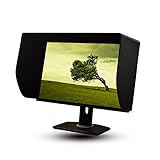
The iLooker-23E is sized for 23 and 24 inch LCD and LED monitors with an ultra-slim frame. It follows the same style as the 27S but at a smaller size, which suits a mid-size editing or gaming screen.
- Strength: covers two common sizes, 23 and 24 inch.
- Strength: brand compatibility list in the title.
- Limit: fixed to slim-frame displays, so thick bezels need a check on the listing.
Skip it if your monitor is larger than 24 inches or has an unusual bezel.
Which One Fits Your Situation
A sunny home office with one standard monitor
The TT TYTX hood is the simplest fit for 19 to 27 inch screens. Choose the strap-back model if you want a published frame-width range to check against. Either one can be folded away in the evening when the sun is gone and you want a wider view of the desk.
A large editing or gaming display
Go for the 17 to 32 inch portable hood, since it is the only listing here that reaches 32 inches. Make sure your panel is flat before buying.
A color-critical photo workstation
The iLooker-27S, named for EIZO and NEC panels in its title, is the better match for a 27 inch slim-frame monitor. The iLooker-23E does the same for 23 and 24 inch screens.
A compact streaming desk
Use the 21.5 inch shade on a secondary monitor that faces a window or a lamp, and keep the main screen shielded by a larger hood. That pairing is common for streamers who keep chat on one screen and the game or editing timeline on the other.
Common Mistakes
- Buying by diagonal only and skipping the outer frame width, which causes loose fits.
- Choosing a strap-back model for a monitor on a wall or arm mount with no space behind it.
- Using a hood built for flat panels on a curved or ultra-wide display.
- Expecting a hood to replace calibration, when it only reduces room light on the screen.
- Ignoring the interior finish and letting a shiny lining reflect light back.
Frequently Asked Questions
Will a monitor hood improve color accuracy?
It helps your eyes judge the image by cutting stray light, but it does not change what the panel displays. For accurate color, use a hood together with proper calibration.
Do hoods work on laptops?
The listings here are sized for desktop monitors, from 17 to 32 inches. Check the full spec sheet before trying one on a laptop screen, since the attachment method may not suit a thin lid.
Can I use one with a curved monitor?
Only some listings say anything about it. The 17 to 32 inch hood names flat screens, so confirm curved support on the product page before ordering.
How should I clean the fabric?
Brush off dust with a soft cloth or lint roller, and follow the care notes on the listing for anything beyond that. Avoid soaking the fabric, and let it dry flat before you fold it away so the shape stays crisp.