If your photo or video workflow involves a laptop, a pair of monitors, a card reader and a stack of fast drives, a Thunderbolt dock turns a tangle of cables into one connection. The catch is that “Thunderbolt dock” covers a wide range: some focus on display count, some on port variety, and some are built around a specific laptop brand or a Mac.
This guide is for photographers, editors and streamers who want a clean desk and fast offloading from cards and SSDs. The decisions that matter most are how many displays you need and at what refresh rate, how many high-speed ports remain after the dock takes its share of bandwidth, and whether the charging wattage covers your laptop under load.
Quick Picks
| Product | Best for | Key spec from the title |
|---|---|---|
| Dell Pro Thunderbolt 4 Smart Dock SD25TB4 | Multi-monitor desks | 130W, 4 displays at 4K, HDMI 2.1, 2.5GbE |
| Lenovo ThinkPad TB4 Smart Dock Gen 2 | Managed office and studio fleets | Integrated 1M Thunderbolt 4 cable, 40Gbps, remote management |
| UGREEN 8-in-1 TB4 Dock | Compact desks | Dual 4K at 60Hz, 3 TB4 ports, 85W charging |
| Lenovo ThinkPad Universal TB4 Dock | Four-display setups | Up to four 4K displays, 100W charging |
| Plugable TB4 Dock | MacBook users | 100W charging, dual monitor or single 6K |
| Microsoft Surface TB4 Docking Station | Surface laptops | Thunderbolt 4, black |
| WAVLINK TB4 Dock | Many monitors | 3 TB4 ports, quad 4K at 60Hz, 98W input |
| CalDigit TS4 | Port-heavy editing rigs | 18 ports, 98W, 3 TBT4, 2.5GbE, 2x 6K at 60Hz |
How to Choose
Display support and refresh rate
Count your monitors and note their resolution and refresh rate. Then compare that with the listing’s wording, such as “dual 4K at 60Hz” or “single 8K at 30Hz.” Remember that more displays usually means lower per-display bandwidth, and that some docks use DisplayLink technology instead of native Thunderbolt video. Confirm the connectors on the back match your monitor cables.
Port mix and data speed
Photographers need card readers, external SSDs and sometimes a tethered camera. Look for the number of Thunderbolt 4 ports at 40Gbps, plus USB-A or USB-C ports at 10Gbps. Find out if the dock includes an SD card slot, because some do not. Ports marked 10Gb/s are fine for most drives, but a fast NVMe enclosure belongs on a Thunderbolt port.
Power delivery and laptop compatibility
The dock’s charging wattage should meet or exceed your laptop charger. A dock that supplies 85W may leave a performance laptop short while editing. Check your laptop’s power adapter label, then compare it with the number in the listing. Brand-specific docks may also work with other laptops, but their special features, such as remote management, may need matching hardware.
Networking, cable and desk fit
If you move large files to a NAS, look for 2.5GbE or Gigabit Ethernet in the title. Check the host cable length and whether it is fixed or removable, as well as the dock’s footprint. Make sure the power brick fits under your desk, and confirm that any vertical stand or mounting option is available if you need one.
The 8 Best Options
Dell Pro Thunderbolt 4 Smart Dock SD25TB4

A feature-rich business dock for desks with several screens. The title names 130W power, four 4K displays, two DisplayPort 1.4 outputs, HDMI 2.1, two Thunderbolt 4 ports and 2.5GbE. It suits editors with a multi-monitor setup and a power-hungry laptop, particularly if they keep a color-critical monitor beside a timeline display.
- Strength: 130W and a rich display connector set.
- Strength: 2.5GbE for faster network transfers.
- Limit: a Dell-branded design, so check the full spec sheet for notes on non-Dell laptops.
Skip it if you want the widest port count for USB-A devices.
Lenovo ThinkPad Thunderbolt 4 Smart Dock Gen 2

A managed dock with an integrated 1M Thunderbolt 4 cable, 40Gbps data and remote hardware management. It suits studios and offices that deploy multiple laptops and want consistent setups, as well as ThinkPad users who like a single attached cable that never wanders off the desk.
- Strength: integrated 1M cable keeps the desk tidy.
- Strength: remote hardware management for fleets.
- Limit: the title is cut off, so check the spec sheet for ports and wattage.
Skip it if you want a removable host cable or a lot of detail on port count in the title.
UGREEN 8-in-1 Thunderbolt 4 Dock

A compact eight-port dock aimed at desks that need a small footprint. It lists three Thunderbolt 4 ports, dual 4K at 60Hz or a single 8K display, 85W charging, Gigabit Ethernet and three USB-A ports at 10Gbps.
- Strength: three TBT4 ports for fast drives and displays.
- Strength: three USB-A 10Gbps ports for card readers.
- Limit: 85W charging may fall short for power-hungry laptops.
Skip it if you need more than two monitors or faster-than-Gigabit networking.
Lenovo ThinkPad Universal Thunderbolt 4 Dock

The Universal dock supports up to four 4K displays and 100W charging with Thunderbolt 4 connectivity. It is a fit for users who want a large monitor wall for timelines, scopes and reference images, and who value brand-level compatibility with ThinkPad laptops. Photographers who tether to a laptop while reviewing frames on a second screen will find the display count useful.
- Strength: up to four 4K displays.
- Strength: 100W charging for many mainstream laptops.
- Limit: the title is cut off, so confirm port types and Ethernet speed.
Skip it if you want a Mac-focused or compact option.
Plugable Thunderbolt 4 Dock
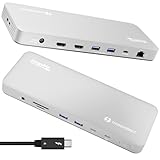
This dock is written for M4 and M5 MacBook Air and Pro owners. It lists driverless operation, 100W charging, dual 4K HDMI monitors or a single 6K display, with a port count that is cut off in the title. A strong fit for Mac editors who want plug-and-play and a clean one-cable desk.
- Strength: driverless design for MacBooks.
- Strength: 100W charging and flexible display options.
- Limit: the title is cut off, so check the full spec sheet for the remaining ports.
Skip it if you use a Windows laptop and want brand-specific features.
Microsoft Surface Thunderbolt 4 Docking Station

The title is short: a black Surface-branded Thunderbolt 4 dock. It makes sense for Surface owners who want matching hardware and a single-cable desk, though the listing provides no port, display or wattage details. Treat it as a candidate to research on the full spec sheet rather than a title-to-title comparison with the others.
- Strength: Thunderbolt 4 connectivity from a Surface-branded dock.
- Strength: a simple matching design for Surface setups.
- Limit: the title shows no ports, so check the full spec sheet.
Skip it if you need detailed specs in the listing or a non-Surface laptop focus.
WAVLINK Thunderbolt 4 Dock

A multi-monitor dock that mixes Thunderbolt 4 with DisplayLink technology. The title lists three 40Gbps TB4 ports, dual HDMI and DisplayPort, quad 4K at 60Hz, 98W input and a 2.5G Ethernet port, which makes it a candidate for big desks, especially where one cable must drive a wall of reference and editing screens.
- Strength: quad 4K at 60Hz through the display combination.
- Strength: three 40Gbps TB4 ports and 2.5G Ethernet.
- Limit: DisplayLink may need software, so check the driver notes.
Skip it if you want driverless operation or a plain native-video setup.
CalDigit TS4

An 18-port dock with 98W charging, three TBT4 ports at 40Gb/s, three USB-C and five USB-A at 10Gb/s, 2.5GbE and support for 8K at 30Hz or two 6K displays at 60Hz. It is a strong fit for editors with many peripherals, including card readers, audio interfaces, drives and a tethered camera. The title ends with Mac wording, so confirm laptop compatibility on the listing.
- Strength: 18 ports, including five USB-A and three USB-C.
- Strength: 2.5GbE and 6K dual-display support.
- Limit: 98W charging may be short for larger laptops.
Skip it if you want a small desk footprint or a brand-matched business dock.
Which One Fits Your Situation
A Mac-based photo editor
The Plugable Thunderbolt 4 Dock and the CalDigit TS4 both target Mac users. Choose the Plugable for a simpler setup, and the CalDigit if you have many peripherals and card readers.
A Windows workstation with multiple monitors
The Dell SD25TB4, Lenovo Universal dock and WAVLINK dock all push display counts. Match connector types to your monitors and compare the stated wattage with your laptop charger.
A tidy shared studio
The Lenovo Smart Dock Gen 2 suits a fleet of ThinkPad laptops that need remote management, while the Surface dock suits a Surface-only studio. For a mixed-laptop studio, the UGREEN dock is the compact, brand-neutral option to consider, provided two displays are enough.
Common Mistakes
- Assuming every dock supports every monitor combination without checking the wording.
- Ignoring charging wattage and then watching the laptop drain under load.
- Putting a fast SSD on a slower USB-A port instead of a Thunderbolt one.
- Forgetting card-reader needs, since many docks lack an SD slot.
- Skipping the power brick and cable placement plan for the desk.
Frequently Asked Questions
Is Thunderbolt 4 the same as USB-C?
They share a connector, but Thunderbolt 4 guarantees 40Gbps data speeds and display support, while many USB-C ports are slower. Look for the Thunderbolt logo.
Can I use a Thunderbolt dock with a Windows laptop?
Often yes, if the laptop has a Thunderbolt port. Brand-specific features may require matching hardware, so check the full spec sheet.
Do I need a dock with SD card slots?
Only if you use SD cards. Otherwise a dedicated card reader on a USB port works well.
How do I know if a dock charges my laptop fast enough?
Compare the dock’s wattage with your laptop’s original charger. Choose a dock at or above that figure.