A 3-way circuit looks simple from the wall — two switches, one light — but it is the setup most likely to defeat a smart switch upgrade. The real decision is not which app you like; it is whether your wiring can host smart hardware at all. Is there a neutral wire in either box? Which box holds the incoming power, and which holds the wire running to the light? And what happens at the second location: a matched companion, the old mechanical switch, or a wireless remote? Answer those questions first, and the right product usually picks itself.


This guide serves three groups: owners of newer homes with neutral wires who want clean two-location dimming, owners of older houses where a neutral may not exist at all, and mixed-platform households juggling Alexa, Google and Apple gear. Each pick below was chosen from the names and specifications on its Amazon product page, and the five split across matched kits, companion-switch systems and a wireless-remote approach so one of them matches your wiring.
Quick Picks
As an Amazon Associate we earn from qualifying purchases.
| Product | Best for | Key spec from title |
|---|---|---|
| Kasa Smart 3-Way Dimmer Switch Kit (KS230 KIT v2) | Matched dimming control at both ends of a staircase | Neutral wire needed, 2.4GHz Wi-Fi, no hub required |
| Lutron Caseta Diva Smart Dimmer (DVRFW-6L-WH-A) | A normal-looking paddle dimmer in a home with no neutral | No neutral, single-pole/3-way, Lutron Smart Hub required |
| Leviton Decora Smart Dimmer (D26HD-2RW) | Matter homes mixing Alexa, Google Assistant and Apple Home | Wi-Fi 2nd Gen, Matter, wired or wire-free 3-way |
| TREATLIFE 3-Way Smart Switch 4-Pack (SS02) | Plain on/off control across several 3-way circuits | Neutral wire required, 2.4GHz Wi-Fi, no hub required |
| Lutron Caseta 3-Way Smart Dimmer Kit (P-PKG1W-WH) | A second location that cannot be rewired | LED dimmer with wireless remote and wall bracket included |
How to Choose
Check for a Neutral Wire Before Anything Else
Kill the breaker, pull one of the existing switches out of its box, and look at what is actually inside. A bundle of white wires capped together at the back of the box means a neutral is present, which keeps every option in this guide open. Two travellers, a common wire and nothing else points to a switch loop, common in homes wired before the mid-1980s, and rules out most Wi-Fi switches. Colour alone proves nothing, so test before trusting. If you cannot identify the wires confidently, stop and book an electrician rather than guessing at line voltage.
Decide How the Second Location Will Work
Every system here handles the far switch differently, and the approaches are not interchangeable. Kasa ships a matched satellite in the box, so both locations get purpose-built hardware. Leviton expects a wired companion or one of its battery-powered wire-free companions, bought separately. Treatlife takes the opposite route: one smart switch per circuit, with a standard 3-way switch staying at the other end. Lutron splits its range — the Diva works with a mechanical switch or a Claro accessory, while the Caseta kit replaces the second switch with a battery remote. Pick the approach your wiring and budget tolerate.
Match the Hub and Ecosystem to Your Home
Three of these picks talk straight to your router over 2.4GHz Wi-Fi and need no hub at all. The two Lutron models instead use the Caseta Smart Hub, which keeps lighting off your Wi-Fi and is mandatory before apps or voice assistants can reach them. Platform support varies more than the boxes suggest: Leviton’s dimmer speaks Matter and works with Alexa, Google Assistant and Apple Home, Treatlife stops at Alexa and Google, and Kasa adds SmartThings. If your circuit turns out to be single-pole after inspection, the wider field in our guide to the best smart switches is worth a look before ordering.
Compare Load Ratings and Decide Dimmer or On/Off
Read the LED figure, not the headline wattage. Dimmers here handle up to 150W of LED load even when the same box advertises 600W for incandescent bulbs, so a large recessed-light circuit can overload a dimmer that looks generously rated. The Treatlife on/off switch carries the heaviest rating in this group at 1250W and 10 amps, which suits long runs of fixtures you never dim. Never put a ceiling fan or a non-dimmable bulb on a dimmer, and never pair a dimmer with smart bulbs — choose plain dimmable bulbs and let the switch do the work.
The 5 Best Options
Kasa Smart 3-Way Dimmer Switch Kit (KS230 KIT v2)
This is the straightforward answer for a staircase or hallway where both switch locations matter and a neutral is available. Kasa includes the satellite switch in the box, so both ends of the circuit get matching hardware that stays in sync instead of leaving a dumb switch to confuse the state of the light. Dimming runs from 1 to 100 percent at the wall or in the app, schedules can fade lights up gently in the morning, and the app walks through the wiring step by step during installation. For a first 3-way project in a modern home, it is the least improvisational route here.
Specs
- Model: KS230 KIT v2, main and satellite switches included
- Circuit type: 3-way
- Neutral wire: required
- Connectivity: 2.4GHz Wi-Fi, no hub required
- Dimming range: 1% to 100%, at the switch or in the Kasa and Tapo apps
- Load rating: up to 300W incandescent or 150W dimmable LED
- Voice control: Alexa, Google Assistant and SmartThings
- Certification: ETL certified
- Warranty: 2 years
Best for: A staircase, hallway or primary bedroom with neutral wiring where you want real dimming from both switch locations.
Watch out for: It needs a neutral wire and a 2.4GHz network, and its dimming does not work with smart bulbs, so check your bulb type before ordering.
ASIN: B0BC2MWTR9
Lutron Caseta Diva Smart Dimmer (DVRFW-6L-WH-A)
The Diva suits anyone who wants smart control that guests can operate without a tutorial. It keeps the familiar paddle-and-slider layout of Lutron’s standard Diva dimmer, works in the many homes that have no neutral wire, and can share a 3-way circuit with an ordinary mechanical switch or Lutron’s Claro smart accessory switch. That flexibility makes it the easiest retrofit in this group for older wiring. App control, schedules and voice assistants arrive through the Caseta Smart Hub, and this listing includes the coordinating wallplate that other Lutron packages often leave as a separate purchase.
Specs
- Model: DVRFW-6L-WH-A, wallplate included
- Operation mode: ON-DIM-OFF paddle with side slider
- Neutral wire: not required
- Circuit type: single pole or 3-way with Claro smart accessory switch
- Load rating: 150W dimmable LED or CFL, 600W incandescent or halogen
- Current rating: 1.25 amps at 120 volts
- Hub: Lutron Smart Hub required for app and voice control
- Compatible platforms: Alexa, Apple Home, Google Assistant, Ring, Serena shades and Sonos
Best for: Older homes without a neutral wire, and anyone who wants the second location to stay a familiar mechanical switch.
Watch out for: The hub is a separate purchase, and the dimmer is not rated for low-voltage loads such as track or landscape lighting transformers.
ASIN: B0BSHKS26L
Leviton Decora Smart Dimmer (D26HD-2RW)

Leviton’s second-generation Wi-Fi dimmer is the platform diplomat of this group. It connects directly to Wi-Fi with no hub, speaks Matter, and works with Alexa, Google Assistant and Apple Home from the same device, which makes it the safest choice for a household that has not settled on one ecosystem. Its 3-way support is the most flexible here: pair it with a wired DD00R or DD0SR companion over the existing travellers, or add a wire-free Anywhere companion where pulling wire is impractical. The My Leviton app handles schedules, preset levels and fade rates, and a screwless wallplate is included.
Specs
- Model: D26HD-2RW
- Neutral wire: required
- Connectivity: Wi-Fi 2nd Gen and Matter, My Leviton app, no hub required
- Circuit type: single pole, 3-way and multi-way
- 3-way options: DD00R or DD0SR wired companions, or DAWDC and DAWSC wire-free Anywhere companions
- Current rating: 10 amps at 120 volts
- Wattage: 600 watts
- Voice control: Alexa, Google Assistant and Apple Home with Siri
- Included: dimmer and screwless single-gang wallplate
- Warranty: 2-year limited
Best for: Mixed-platform homes that want Matter support and a choice between wired and wire-free companion switches.
Watch out for: Only one dimmer is in the box, so budget for a companion switch to finish the second location, and confirm a neutral is present first.
ASIN: B08RRM8VH5
TREATLIFE 3-Way Smart Switch 4-Pack (SS02)
Treatlife’s four-pack is built for the circuits nobody needs to dim: garage lights, porch lights, basement stairs and long hallways where on/off control from two doors is the whole job. Each switch replaces one end of a 3-way circuit while a standard switch keeps working at the other location, and the pack format brings the cost per circuit down when you are converting several rooms at once. Control runs through the Smart Life app with Alexa and Google Assistant voice support, scheduling and remote access included. There is no dimming and no Apple Home support, which is exactly the trade that keeps it simple.
Specs
- Model: SS02-4, four switches in the pack
- Circuit type: single pole or 3-way
- Neutral wire: required
- Maximum load: 1250W at 10 amps, 120 volts AC
- Operation: on/off only, this is not a dimmer
- Connectivity: 2.4GHz Wi-Fi, no hub required
- Voice control: Alexa and Google Home through the Smart Life app
- Apple HomeKit: not supported
- Certification: FCC certified
- Wall plate: screwless snap-on plate included
Best for: Converting several plain on/off 3-way circuits at once, such as a garage, porch and basement stair light.
Watch out for: Install only one Treatlife switch per 3-way circuit, on the power-source side, and skip it entirely if your boxes lack neutral wires.
ASIN: B07V3XB1QG
Lutron Caseta 3-Way Smart Dimmer Kit (P-PKG1W-WH)
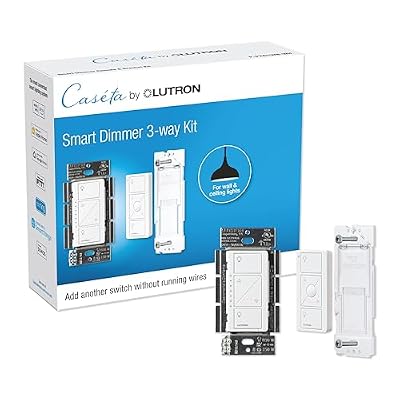
This kit solves the nastiest version of the 3-way problem: a second location with hostile wiring, no neutral, or travellers you do not want to touch. The wired Caseta dimmer goes in the main box, and the included Pico remote mounts on the wall at the other end using the supplied bracket, pretending to be a switch while actually working wirelessly. No new wire gets pulled and the old second switch simply comes out. The dimmer needs no neutral, and adding the Caseta Smart Hub later unlocks app control, schedules and voice assistants across the major platforms.
Specs
- Kit contents: Caseta smart dimmer (PD-6WCL), Pico wireless remote and Pico wallplate bracket
- Neutral wire: not required
- Load rating: 150W dimmable LED or CFL, 600W incandescent or halogen
- 3-way method: wireless Pico remote at the second location, no traveller rewiring
- Hub: Caseta Smart Hub required for app and voice control, not included
- Compatible platforms with hub: Alexa, Apple Home, Google Assistant, Ring, Serena shades and Sonos
- Control options: wall dimmer, Pico remote, app and voice once a hub is added
Best for: A 3-way circuit where the second box has no neutral or wiring you cannot identify, and older homes generally.
Watch out for: The Smart Hub is not in this kit, so app and voice control cost extra, and the second location gets a battery remote rather than a hardwired switch.
ASIN: B07HM6L48C
Which One Fits Your Situation
Your Staircase Has a Neutral and You Want Dimming at Both Ends
Choose the Kasa KS230 kit. Because the satellite switch is included and designed for the circuit, both locations dim and report the same state, and the guided app install reduces the wiring guesswork. It is the most complete single-box answer here when your wiring is modern.
Your Older Home Has No Neutral Wire
Start with Lutron. The Diva dimmer keeps a mechanical switch working at the second location, while the Caseta kit replaces that location with a wireless Pico when the wiring is too uncertain to reuse. Either way, confirm the load is dimmable LED within the 150W limit before you commit.
Your Household Mixes Alexa, Google and Apple
The Leviton D26HD is the pick. Matter support plus native Alexa, Google Assistant and Apple Home compatibility means the switch survives a change of voice assistant, and its wired or wire-free companion options cover almost any second location. You will need a neutral wire and a separate companion.
You Have Several Plain On/Off 3-Way Circuits
Buy the Treatlife four-pack and convert the garage, porch and hallway circuits in one weekend. One smart switch per circuit keeps the wiring simple, the standard switch at the far end keeps working, and the 1250W rating covers long fixture runs that would strain a dimmer.
Common Mistakes
- Buying a single-pole smart switch for a 3-way circuit because the listing headline never mentioned multi-location limits.
- Assuming a neutral wire exists without opening the box and checking for the capped white bundle.
- Installing two unrelated smart switches on the same 3-way circuit, which leaves both devices fighting over the travellers and the light’s state.
- Putting a dimmer on a ceiling fan, a non-dimmable bulb or a circuit of smart bulbs, all of which cause flicker, buzzing or dead switches.
- Forgetting the extras in the budget: a Caseta Smart Hub for Lutron app control, or a Leviton companion switch for the second location.
- Working with the breaker still on, or guessing which wire is line — if the wires cannot be identified with confidence, an electrician is the correct next step.
Frequently Asked Questions
Can I install just one smart switch in a 3-way circuit?
Usually, yes. Most systems replace one of the two existing switches and handle the second location with a companion, a standard switch or a wireless remote. Matched kits like the Kasa KS230 replace both ends with coordinated hardware. What you should not do is install two independent smart switches from different systems on the same circuit.
What if my switch box has no neutral wire?
Your options narrow but do not vanish. The Lutron Caseta Diva and the Caseta dimmer kit in this guide are designed to work without a neutral, which is why they suit older homes. The alternative is paying an electrician to run a neutral to the box. Never connect a switch that requires a neutral to the ground wire instead.
Do I need a hub for a 3-way smart switch?
It depends on the brand. The Kasa, Leviton and Treatlife picks connect directly to 2.4GHz Wi-Fi and work without one. Lutron’s Caseta models need the Caseta Smart Hub before any app, schedule or voice control works, although the switches and Pico remotes still operate locally without it. Factor that extra box into the Lutron price.
Should I hire an electrician for a 3-way conversion?
Hire one whenever the wiring does not match the diagram: unidentified wires, aluminium branch wiring, a missing ground, or a box too crowded to work in safely. A straightforward swap with a confirmed neutral is a common DIY job, but 3-way travellers are easy to cross, and an hour of professional labour is cheaper than a damaged switch or worse.