The Bluetooth version printed on the box is not the decision that matters here. What decides your evening is whether the exact controller in your hands — a DualSense, an Xbox Series pad, a Switch Pro — pairs on the first attempt, holds its connection across the room, and keeps its rumble and gyro working once Windows sees it. Dedicated controller adapters translate a console pad into an input your PC already understands, while a general dongle leaves the pairing to Windows itself, and those two routes behave very differently when something goes wrong.

This guide is for players who already own a console controller they love, couch PC gamers sitting too far away for a cable, and anyone whose desktop has no Bluetooth or only a weak built-in radio. Every pick below was chosen from the product names and specifications printed on its Amazon listing, including the controller compatibility lists, system support and stated connection limits.
Quick Picks
As an Amazon Associate we earn from qualifying purchases.
| Product | Best for | Key spec from title |
|---|---|---|
| 8BitDo USB Wireless Adapter 2 | One adapter for almost any modern controller | Compatible with Xbox Series X & S Controller, PS5/PS4/PS3 Controller |
| MAYFLASH Magic-S PRO 2 | Turbo, gyro and rumble features on PC and Switch | Wireless Bluetooth USB Adapter for PS4, Switch/Switch 2, macOS, Windows |
| MAYFLASH Magic-NS | Adjustable rumble and dead zones on Switch and PC | Wireless Bluetooth Controller USB Adapter for Switch/Switch 2, Steam Deck, Windows |
| BIGBIG WON R100 Pro | Moving one controller between PC, Switch and PS4 | Wireless Adapter for Xbox Series X |
| MAYFLASH Magic-S Ultimate | Arcade sticks on PS5 plus the full MAYFLASH feature set | Wireless Bluetooth USB Adapter for PS4, Switch/Switch 2, macOS, Windows |
How to Choose
Controller Compatibility by Brand
Start with the compatibility list, not the headline. Each listing names the controllers it accepts, and the gaps are easy to miss: early Xbox One controllers have no Bluetooth radio at all, so no adapter can pair them wirelessly, while the Elite Series 2 appears on some lists and not others. PlayStation players should also expect translation, not magic. A DualSense paired through an adapter arrives as a standard controller, so features such as adaptive triggers only survive in games and setups that support them natively.
Dedicated Adapter vs General Dongle
A dedicated adapter does the pairing itself and presents your pad to the PC as a familiar controller type, which is why the 8BitDo and MAYFLASH units below work on systems far beyond Windows. A general dongle simply gives the PC a Bluetooth radio, and Windows plus Steam Input handle the rest. Dongles are the flexible route for mixed peripherals; our roundup of the best Bluetooth adapters for PC covers those general-purpose options in depth.
Connection Stability and Range
None of these listings leads with a range figure, so judge stability by setup instead. A dongle buried in a rear port behind a metal case, next to USB 3.0 drives, will drop connections that the same adapter handles easily on a short extension cable at the front of the desk. Firmware matters just as much: 8BitDo and MAYFLASH both publish adapter firmware updates that add new controllers and fix pairing bugs, and controller firmware updates from Sony or Microsoft solve problems that look like adapter faults.
Multi-Controller and Audio Limits
Dedicated adapters are one-to-one devices. 8BitDo states it plainly in its listing: one adapter works for one controller, so two-player couch sessions mean two adapters or the dongle route. Audio is the other quiet limit. A controller’s headset jack rarely carries sound through an adapter, and the Magic-S PRO 2’s Bluetooth headset support applies to its PS4 and Switch modes, not to PC play. If you need voice chat, plan on a separate headset connection rather than assuming the adapter covers it.
The 5 Best Options
8BitDo USB Wireless Adapter 2
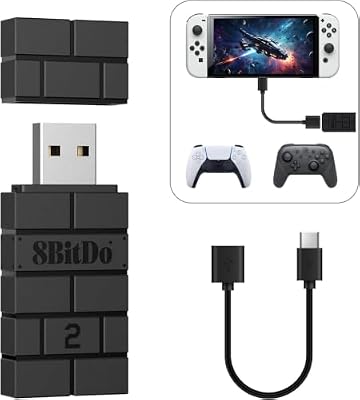
The Adapter 2 is the safe default for a mixed controller drawer. Its listing covers 8BitDo’s own pads and arcade sticks alongside Xbox Series and Xbox One Bluetooth controllers, the PS5, PS4 and PS3 pads, Switch Pro, Joy-Con and even the Wii Remote and Wii U Pro, and it presents the paired controller to the host in standard input modes. 8BitDo’s Ultimate Software on Windows and Mac adds button mapping and stick adjustments. Because it also works on Switch, Steam Deck and Raspberry Pi, one purchase covers most of a household’s screens.
Specs
- Controllers supported: 8BitDo Bluetooth controllers and arcade sticks, Xbox Series X/S, Xbox One Bluetooth, PS5/PS4/PS3, Switch Pro, Switch Joy-Con, Wii Remote, Wii U Pro
- Systems: Switch, Switch 2, Windows, macOS, Steam Deck, Raspberry Pi, Android TV box, Retrofreak
- One adapter works for one controller
- USB Type-A connector
- OTG cable included
- Model number 8Bitdo-NO
Best for: Players who want a single adapter that accepts nearly any modern Bluetooth controller.
Watch out for: It handles one controller at a time, and Switch 2 support depends on updating the adapter firmware before you pair.
ASIN: B0CB842CL2
MAYFLASH Magic-S PRO 2
Where the 8BitDo keeps things simple, the Magic-S PRO 2 piles on features. Turbo and Auto Fire can be assigned to buttons, 6-axis motion works in its PS4 and Switch modes, rumble carries across PS4, Switch, XInput and PS3 modes, and the DualSense or DualShock touch pad stays usable on PS4. An LED indicator shows which working mode the adapter is in, which matters because the feature set changes with the mode. It also accepts wired USB controllers through the same unit, so a pad with a dead battery can stay in the game over a cable.
Specs
- Bluetooth controllers: DualSense, DualShock 4, DualShock 3, Xbox Series X/S, Xbox One Bluetooth, Xbox Elite Wireless Controller Series 2, Switch Pro, Switch Joy-Con, Wii Remote, Wii U Pro
- Wired USB controllers also supported, including Logitech F310/F510 and ASTRO C40 TR
- Systems: PS4, Switch, Switch 2, Steam Deck, macOS, Windows, Raspberry Pi, PS3 and mini consoles
- Turbo and Auto Fire; 6-axis motion on PS4 and Switch; rumble on PS4, Switch, XInput and PS3
- Bluetooth headset support in PS4 and Switch modes
- USB Type-C cable included; firmware upgradable
- Dimensions 73 x 21 x 8.7 mm
Best for: Players who want turbo, gyro and rumble features to survive the move from console to PC.
Watch out for: Features depend on the working mode shown by the LED, so check the listing’s mode table before assuming gyro or headset support applies on PC.
ASIN: B09YRBZZQ3
MAYFLASH Magic-NS
The Magic-NS has been the budget workhorse of this category for years, and its listing shows why: the same long controller list as its PRO 2 sibling, plus adjustment tools the bigger adapter lacks. Vibration intensity and stick dead zone can each be set in seven levels, ABXY buttons can be remapped, and Turbo offers three speeds. A seven-colour LED shows the working mode, and the included USB Type-C cable makes it easy to plug into a Switch dock, a Steam Deck or a laptop port. For PC players it behaves as a straightforward XInput bridge.
Specs
- Bluetooth controllers: DualSense, DualShock 4, DualShock 3, Xbox Series X/S, Xbox One Bluetooth, Xbox Elite Wireless Controller Series 2, Switch Pro, Switch Joy-Con, Wii Remote, Wii U Pro
- Systems: Switch, Switch 2, Steam Deck, Windows, macOS, Raspberry Pi, PS3 and mini consoles
- Turbo and Auto Fire with three speeds (5, 15 or 20 times per second)
- 6-axis motion on Switch; rumble on Switch, XInput and PS3
- Vibration intensity and dead zone adjustable in seven levels; ABXY button remapping
- Includes Magic-NS adapter, USB Type-C cable and manual
- Model number MAGIC-NS; 2.87 x 0.83 x 0.35 inches
Best for: Switch and Steam Deck players who want to fine-tune rumble and stick dead zones.
Watch out for: The same listing sells MAGIC-NS, MAGIC-NS 2 and Lite variants with different controller lists — the Lite drops DualShock 3 — so confirm the variant selected before checkout.
ASIN: B079B5KHWQ
BIGBIG WON R100 Pro

The R100 Pro takes a narrower, console-first approach. Its listing names six controller families — Xbox Series X|S, Xbox One X|S, Elite Series 2, Switch Pro, DualSense and DualShock 4 — and three host platforms: Switch, PS4 and Windows 10 or 11 PCs. That makes it a tidy pick for a player whose pad travels between a PC and a Switch, and BIGBIG WON adds a joystick calibration feature for Switch use. It will not talk to an Xbox console at all, which the listing states openly and which shapes who should buy it.
Specs
- Controllers supported: Xbox Series X|S controller, Xbox One X|S controller, Xbox Elite Series 2, Switch Pro controller, DualSense (PS5), DualShock 4 (PS4)
- Platforms: Switch, PS4 and Windows 11/10 PC; Xbox consoles not supported
- Switch joystick calibration feature
- Model number ZG-R100Pro
- Package includes R100 Pro adapter, user manual and gift box
Best for: Players who move one favourite controller between PC, Switch and PS4.
Watch out for: PC support is listed for Windows 10 and 11 only, and it cannot connect a controller to an Xbox console, so check both limits against your setup.
ASIN: B09G6FS7FR
MAYFLASH Magic-S Ultimate

The Magic-S Ultimate is the feature-complete MAYFLASH option, and the one to pick if an arcade stick shares your desk. It carries the same Bluetooth controller list as the Magic-S PRO 2, adds the vibration and dead-zone adjustment in seven levels and ABXY remapping that the PRO 2 leaves out, and can connect MAYFLASH F300 and F500 series arcade sticks — plus some other brands’ hitbox-style controllers — so they work on PS5. Turbo and Auto Fire, 6-axis motion on PS4 and Switch, and a seven-colour LED showing the working mode round out a unit aimed at players who tweak.
Specs
- Bluetooth controllers: DualSense, DualShock 4, DualShock 3, Xbox Series X/S, Xbox One Bluetooth, Xbox Elite Wireless Controller Series 2, Switch Pro, Switch Joy-Con, Wii Remote, Wii U Pro
- Wired USB controllers also supported, including ASTRO C40 TR, SCUF Vantage 2 and Logitech F510/F310
- Systems: PS4, Switch, Switch 2, Steam Deck, macOS, Windows, Raspberry Pi, PS3 and mini consoles
- Turbo and Auto Fire with three speeds; 6-axis motion on PS4 and Switch; touch pad support on PS4
- Vibration intensity and dead zone adjustable in seven levels; ABXY button remapping
- Connects MAYFLASH F300/F500 series arcade sticks to work on PS5
- Includes MAGIC-S Ultimate adapter, USB Type-C cable and manual; firmware upgradable
Best for: Players who want the full MAYFLASH feature set plus arcade-stick support on PS5.
Watch out for: It still handles one controller at a time, and the listing advises updating your Xbox controller to the latest version first if a Series pad refuses to connect.
ASIN: B0B9MNG72J
Which One Fits Your Situation
You Have One Favourite Controller and a Gaming PC
Buy the 8BitDo Adapter 2. It accepts the widest controller list here, presents the pad cleanly to Windows, and its software lets you remap buttons and adjust sticks once instead of per game. If turbo fire and gyro matter in your library, step up to the Magic-S PRO 2 instead, since those features are its reason to exist.
You Play Local Multiplayer With Two or More Pads
Dedicated adapters multiply: one 8BitDo or MAYFLASH unit per controller, plus the USB ports to hold them. If your PC already has built-in Bluetooth, Windows can pair several pads natively, which suits casual co-op through Steam Input. Competitive players who want identical, isolated connections for each pad usually still prefer one adapter per controller.
You Split Time Between PC and Switch
The Magic-NS was built for exactly this commute. It keeps 6-axis motion and rumble alive on Switch, lets you tune dead zones for drifting-prone sticks, and moves to a PC or Steam Deck without new drivers. The Magic-S PRO 2 is the alternative if you also play on PS4 or want its touch pad support there.
Your PC Has No Bluetooth and You Also Use Wireless Peripherals
Choose the Magic-S Ultimate. It brings its own radio, so the PC needs no Bluetooth of its own, and its USB port also accepts wired controllers — a flat-battery pad, an older wired stick — through the same unit. It will not run a separate keyboard or headset the way a general dongle would, but for a desk built around controllers it covers both the wireless and wired halves of the drawer.
Common Mistakes
- Shopping by Bluetooth version number alone, when the controller compatibility list decides whether your pad connects at all.
- Assuming one dedicated adapter can run two controllers for couch co-op; these are one-to-one devices.
- Plugging the adapter into a rear port behind a metal case, where the chassis and nearby USB 3.0 drives weaken the signal.
- Troubleshooting a pairing failure for an hour before updating the adapter firmware and the controller firmware.
- Expecting every controller feature — adaptive triggers, touch pad, headset-jack audio — to carry over to PC through an adapter.
Frequently Asked Questions
Can one adapter connect two controllers at the same time?
Not with the dedicated adapters in this guide. 8BitDo states that one adapter works for one controller, and the MAYFLASH and BIGBIG WON units follow the same one-to-one design. For two pads, either fit one adapter per controller or, if your PC has built-in Bluetooth, pair both pads through Windows and let Steam Input sort out the players.
Does a Bluetooth adapter add input lag compared with a cable?
Any wireless link adds some delay, and a cable remains the lowest-latency option. In practice, these adapters are built around controller polling rather than file transfer, and a clear line of sight between pad and adapter keeps the connection consistent. Players sensitive to latency should seat the adapter on an extension cable at the desk edge instead of behind the PC, where interference causes the stutters people blame on lag.
Will my older Xbox One controller work with these adapters?
Only if it has Bluetooth. Xbox One controllers from the Xbox One S generation onward (model 1708 and later, plus all Series X|S pads) include a Bluetooth radio and pair happily. The earlier 1537 and 1697 models do not, and no Bluetooth adapter can change that; those pads need a USB cable on PC, which works with every game that accepts an Xbox controller.
Do these adapters work with a Steam Deck?
Three of them say so on the listing: the 8BitDo Adapter 2, the Magic-S PRO 2 and the Magic-NS all name Steam Deck among their supported systems, and each presents the controller as a standard input device the Deck already understands. Plug the adapter into a dock or a USB-C hub, pair once, and the same adapter can then move between the Deck and your desktop without reconfiguration.