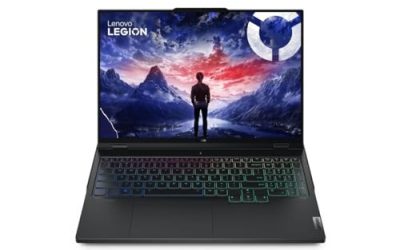
Rockstar’s printed recommended spec for Red Dead Redemption 2 — a GeForce GTX 1060 with 6GB of VRAM and 12GB of system memory — dates from the game’s PC launch, and the in-game settings menu reaches far past it. Texture quality, volumetrics and water physics all scale until they run out of graphics memory or GPU power, so the real decision is not whether a laptop clears the recommended line. It is how much graphics, VRAM and storage headroom you buy above that line before the frontier starts pushing back.


This guide serves three kinds of buyer: console players moving to PC for this game, story players who want high settings at 1080p or 1440p, and owners of older laptops that only meet the minimum tier. Every pick was chosen from the model names and specifications printed on its Amazon product page, then checked for processor, graphics card and power limit, display, memory, storage, ports, warranty and upgrade options for that exact model.
Quick Picks
As an Amazon Associate we earn from qualifying purchases.
| Product | Best for | Key spec from title |
|---|---|---|
| HP Victus 16 | The largest GPU step above the recommended spec | RTX 4070, Ryzen 7 8845HS, 16.1″ FHD 144Hz |
| Acer Nitro V 16S AI (ANV16S-41-R2AJ) | 32GB of memory and 1TB of storage fitted from day one | RTX 5060, 32GB DDR5, 16″ WUXGA 180Hz |
| ASUS ROG Strix G16 (2024) (G614JV-AS74) | A full-power RTX 4060 for a desk setup | RTX 4060 at 140W, Core i7-13650HX, 1TB SSD |
| Acer Nitro V 16 (ANV16-41-R5J0) | A terabyte of storage and a spare M.2 slot for less | RTX 4060, Ryzen 7 8845HS, 1TB Gen 4 SSD |
| GIGABYTE G6 KF (G6 KF-H3US853SH) | A firm budget that still leaves an upgrade path | RTX 4060, Core i7-13620H, 16″ WUXGA 165Hz |
How to Choose
Start from the game’s published requirements, not the genre
Open-world games have a reputation for running on anything, but Rockstar publishes two distinct tiers for this one. The minimum lists a Core i5-2500K or FX-6300, 8GB of RAM and a GTX 770 2GB or Radeon R9 280 3GB. The recommended tier raises that to a Core i7-4770K or Ryzen 5 1500X, 12GB of RAM and a GTX 1060 6GB or RX 480 4GB, with 150GB of available space at both levels. Our breakdown of the Red Dead Redemption 2 PC requirements walks through each tier in full; treat the recommended line as the floor for an enjoyable laptop, not the target.
Judge the graphics card by VRAM and wattage, not the badge
Every laptop here carries 8GB of graphics memory, which doubles the recommended RX 480 and clears the recommended GTX 1060 by a third, and that headroom is what the texture settings consume first. The chip name is only half the story, though. The RTX 4060 appears in this guide at a 140W maximum power rating in the ROG Strix G16, while slimmer designs run the same silicon far lower, and wattage decides how much of the card you actually get during a long ride across the map. HP likewise rates the Victus 16’s RTX 4070 at up to 120W. Check the wattage on the listing or the manufacturer’s page, not just the badge.
Plan the display and storage around a 150GB install
The published requirements ask for 150GB of available space before updates, so a 512GB drive surrenders nearly a third of its capacity to this one game. A 1TB drive, or a free second M.2 slot, removes the juggling entirely. Resolution matters just as much: the 1920 x 1080 and 1920 x 1200 panels in this guide are the natural match for RTX 4060 and 4070 class graphics at high settings, while a 1440p external monitor raises the GPU load sharply. Refresh rates of 144Hz and above still help, because panning across Saint Denis feels smoother even when frame rates sit below the panel’s ceiling.
Check the upgrade path, ports and warranty before you buy
All five laptops here keep their memory in SO-DIMM slots rather than soldering it, which matters because the recommended 12GB sits awkwardly below the 16GB most machines ship with. Confirm the slot count and the stated maximum on the listing, and look for a second M.2 bay if the fitted drive is 512GB. For ports, an HDMI 2.1 output covers most external monitors, while the G6 KF adds a Mini DisplayPort for older high-refresh screens. Finally, compare the warranty term printed on the listing — Acer fits this Nitro V 16S with a one-year international travellers warranty — and check whether opening the base to add parts affects it.
The 5 Best Options
HP Victus 16
The Victus 16 makes the largest single jump past the recommended graphics card in this group. Its Ryzen 7 8845HS is paired with an RTX 4070 that HP rates at up to 120W of graphics power, a full tier above the GTX 1060 Rockstar recommends, and the 16.1-inch FHD 144Hz panel is the right resolution for that card at high settings. Memory is 16GB of DDR5 in two accessible slots, so a later move to 32GB is straightforward. The compromise is storage: the 512GB SSD is the tightest fit here for a game whose published space requirement is 150GB.
Specs
- Processor: AMD Ryzen 7 8845HS
- Graphics: NVIDIA GeForce RTX 4070 Laptop GPU, 8GB GDDR6, up to 120W TGP per HP
- Display: 16.1-inch FHD 1920 x 1080 IPS, 144Hz
- Memory: 16GB DDR5, two accessible slots
- Storage: 512GB PCIe NVMe SSD
- Wireless: Wi-Fi 6
- Operating system: Windows 11
Best for: Players who want the strongest graphics headroom in this guide without moving to a larger, heavier chassis.
Watch out for: This model name covers several RAM and storage configurations on Amazon, so confirm the exact specification on the listing before ordering, and budget the 512GB drive against the game’s 150GB requirement.
ASIN: B0D3WD87NC
Acer Nitro V 16S AI (ANV16S-41-R2AJ)
This is the pick for players who never want to open the chassis. Acer fits 32GB of DDR5-5600 as standard — the model’s stated maximum, so the upgrade question is settled on day one — alongside a 1TB Gen 4 SSD with a second M.2 slot still free. The RTX 5060 brings 8GB of GDDR7 and DLSS 4 support to a game that already rewards DLSS at higher settings, and the 16-inch WUXGA 180Hz panel is the fastest screen here. At 4.63 pounds it is also the lightest laptop in the group, and it is sold by Amazon.com itself.
Specs
- Processor: AMD Ryzen 7 260
- Graphics: NVIDIA GeForce RTX 5060 Laptop GPU, 8GB GDDR7
- Display: 16-inch WUXGA 1920 x 1200 IPS, 180Hz, 100% sRGB
- Memory: 32GB DDR5-5600, 2 slots, 32GB maximum
- Storage: 1TB PCIe Gen 4 SSD, 2 M.2 slots with 1 available
- Wireless: Wi-Fi 6
- Weight: 4.63 pounds
- Warranty: One-year International Travelers Limited Warranty
Best for: Players who want memory, storage and the newest graphics generation settled in a single purchase.
Watch out for: The 32GB of memory is already the model’s ceiling, and the listing does not print a graphics wattage, so check Acer’s specification page if power limits matter to you.
ASIN: B0F195W823
ASUS ROG Strix G16 (2024) (G614JV-AS74)

The Strix G16 exists in this guide because of one number in its Amazon listing: 140W, the maximum graphics power for its RTX 4060. That is the full-power version of the chip, backed by a Core i7-13650HX and a 1TB PCIe Gen4 SSD, and it suits players who will keep the laptop on a desk, possibly driving an external monitor. The 16-inch FHD+ 165Hz display matches the GPU well at high settings. Memory sits in two SO-DIMM slots and storage in two M.2 bays, so both upgrade routes stay open after purchase.
Specs
- Processor: Intel Core i7-13650HX
- Graphics: NVIDIA GeForce RTX 4060 Laptop GPU, 8GB GDDR6, 140W Max TGP
- Display: 16-inch FHD+ 165Hz
- Memory: 16GB DDR5, 2 SO-DIMM slots
- Storage: 1TB PCIe Gen4 SSD, 2 M.2 slots
- Wireless: Wi-Fi 6E
- Operating system: Windows 11
Best for: Desk-based players who want the strongest version of the RTX 4060 and a terabyte of storage as standard.
Watch out for: This is the 2024 model year of the Strix G16, and newer model years share the name, so check the model number G614JV-AS74 on the listing before ordering.
ASIN: B0CRDCXRK2
Acer Nitro V 16 (ANV16-41-R5J0)
Acer’s other Nitro V is the storage value of the group. The Ryzen 7 8845HS and RTX 4060 are a familiar pairing, but the 1TB Gen 4 SSD and second M.2 slot mean Red Dead Redemption 2 and a full library coexist without deleting anything, and the 16GB of DDR5 can grow to 32GB across its two slots. The 16-inch WUXGA 165Hz screen keeps the same 1920 x 1200 shape as the 16S, and the port set is generous for the tier, including a USB4 Type-C port, HDMI 2.1 and wired Ethernet for stable online play in Red Dead Online.
Specs
- Processor: AMD Ryzen 7 8845HS
- Graphics: NVIDIA GeForce RTX 4060 Laptop GPU, 8GB GDDR6
- Display: 16-inch WUXGA 1920 x 1200 IPS, 165Hz
- Memory: 16GB DDR5, 2 slots, 32GB maximum
- Storage: 1TB PCIe Gen 4 SSD, 2 M.2 slots
- Ports: USB4 Type-C, HDMI 2.1, RJ-45 Ethernet
- Wireless: Wi-Fi 6E
- Operating system: Windows 11
Best for: Players who want a terabyte fitted now, upgrade room later, and wired networking for online sessions.
Watch out for: Acer does not print the graphics wattage in this listing’s title, so compare the full specification against the 140W Strix before assuming the two RTX 4060 machines perform alike.
ASIN: B0DFHBXG9T
GIGABYTE G6 KF (G6 KF-H3US853SH)

The G6 KF is the firm-budget route into this guide that does not strand you later. Its Core i7-13620H and RTX 4060 clear the recommended tier comfortably, the 16-inch WUXGA 165Hz panel gives the game more vertical room than a standard 1080p screen, and the chassis keeps two memory slots and a second M.2 bay behind the 512GB fitted drive. External display support is the quiet strength here: HDMI 2.1 and a Mini DisplayPort cover both modern and older high-refresh monitors. The trade-offs are DDR5-4800 memory and the smaller standard drive.
Specs
- Processor: Intel Core i7-13620H
- Graphics: NVIDIA GeForce RTX 4060 Laptop GPU, 8GB GDDR6
- Display: 16-inch WUXGA 1920 x 1200, 165Hz
- Memory: 16GB DDR5-4800, 2 slots
- Storage: 512GB SSD, second M.2 bay available
- Ports: HDMI 2.1, Mini DisplayPort 1.4, USB Type-C, RJ-45 Ethernet
- Wireless: Wi-Fi 6E
- Operating system: Windows 11 Home
Best for: Buyers with a firm budget who will add a second drive later and may dock to an external monitor.
Watch out for: The standard 512GB SSD leaves the least room in this guide once the game’s 150GB requirement is met, so plan on using the spare M.2 bay.
ASIN: B0CJK3YVB2
Which One Fits Your Situation
You are leaving a console behind and this is your first gaming PC
Choose the HP Victus 16. The RTX 4070 gives you the widest margin over the recommended spec in this guide, so the settings menu becomes a choice rather than a compromise, and the 144Hz screen is an easy step up from a television. Its two memory slots leave a simple upgrade for later, and nothing about the machine needs configuring before your first session.
You want the game to look its best on the laptop’s own screen
Choose the Acer Nitro V 16S AI. Its 180Hz WUXGA panel is the fastest and joint-sharpest here, the RTX 5060 supports the newest DLSS generation for holding image quality at higher settings, and 32GB of memory plus a 1TB drive mean neither the game nor your library forces a decision. It is the only pick that needs nothing added.
The laptop lives on a desk, possibly with an external monitor
Choose the ASUS ROG Strix G16. Its RTX 4060 runs at the full 140W maximum stated in the listing, which is the version of the chip that holds up best when a 1440p monitor raises the load. The Core i7-13650HX, 1TB drive and twin M.2 bays suit a permanent desk setup that grows over time rather than travelling.
Your budget is firm, but the laptop has to last
Choose the GIGABYTE G6 KF. It clears the recommended tier on processor, graphics and memory today, and its second M.2 bay plus two memory slots give it a cheap second wind when storage fills. The Mini DisplayPort and HDMI 2.1 outputs also mean a better monitor can join the setup later without replacing the laptop itself.
Common Mistakes
- Buying to the printed minimum spec — a GTX 770-era laptop technically launches the game but leaves the settings menu, and your experience, at the floor.
- Comparing graphics cards by name alone and missing that the same RTX 4060 ships at very different wattages, which changes what the chip delivers in a long session.
- Choosing a 512GB drive without checking for a second M.2 slot, then discovering that one game claims 150GB of it.
- Turning every advanced slider to maximum at once; water physics, volumetrics and MSAA in this game cost more performance than their visual gain justifies, so raise them one at a time.
- Assuming a thin gaming laptop can always take more memory, when some designs solder it — every pick here uses slots, but verify before buying anything else.
Frequently Asked Questions
Can a laptop with an RTX 4060 run Red Dead Redemption 2 well?
Yes, comfortably above the published recommended tier. Rockstar recommends a desktop GTX 1060 with 6GB of VRAM, and a laptop RTX 4060 carries 8GB with a far newer architecture, plus DLSS support that the older card lacks. Expect the smoothest results at 1080p or 1920 x 1200 on high settings, and prefer a full-power implementation such as the 140W Strix G16 if you plan to use an external 1440p monitor.
How much storage does Red Dead Redemption 2 need on a laptop?
The published requirements ask for 150GB of available space at both the minimum and recommended tiers, before updates. A 512GB SSD can hold the game, but it will dominate the drive once Windows and a second title are installed. That is why three picks here ship with 1TB, and why the two 512GB models were only included because each offers a second M.2 slot for a later drive.
Is 16GB of RAM enough for Red Dead Redemption 2?
Yes. Rockstar’s recommended tier lists 12GB, so the 16GB fitted to four of these laptops clears it with room for a browser and voice chat alongside. The case for 32GB, as in the Nitro V 16S AI, is multitasking headroom and longevity rather than this game alone. Whichever size you choose, confirm the memory sits in SO-DIMM slots, as all five picks here do, so a later upgrade stays possible.
Does VRAM matter if every laptop here has 8GB?
It matters because the game’s texture and advanced settings scale against the VRAM figure the in-game menu reports. The recommended cards carry 6GB and 4GB, so 8GB buys real headroom at 1080p and 1200p with high textures. At 1440p, watch the menu’s memory estimate and lower texture or volumetric settings first if it approaches the limit, rather than cutting resolution.