

🛒 Best Price Today on Amazon
Prime members get fast, free shipping on everything above, plus member-only deals. New members get a 30-day free trial — cancel anytime.
- Top Routers Guest Network Picks for 2026
- Best Routers with Guest Network at a Glance
- 1. TP-Link Deco X55 AX3000 WiFi 6 Mesh System, Covers up to 6500 Sq.Ft
- 2. Amazon eero 6 Mesh WiFi System, Internet Plans up to 500 Mbps
- 3. TP-Link Deco S4 Mesh AC1900 WiFi System, Up to 5500 Sq.Ft
- 4. TP-Link Deco M5 Mesh WiFi System with HomeCare Security
- 5. TP-Link Festa FR365 AX3000 WiFi 6 VPN Router, 5 Gb WAN + USB
- 6. TP-Link AX1800 WiFi 6 Router (Archer AX21 V5), Dual-Band Gigabit
- How to Choose a Router with a Guest Network
- Frequently Asked Questions
- Related Guides
- Related Articles
Top Routers Guest Network Picks for 2026
Here are our current top routers guest network picks, compared on real Amazon owner reviews, price, and features. Live prices update below.
As an Amazon Associate we earn from qualifying purchases at no extra cost to you.



A guest network is one of those router features that sounds minor but quietly improves both your security and your convenience. It lets you spin up a separate WiFi name (SSID) for visitors and smart-home gadgets, keeping them off your main network and away from your personal devices and files — and with client isolation enabled, even away from each other. The honest reality worth stating up front is that a guest network is now a near-universal feature: every router and mesh system on this list supports one, as do the vast majority of modern routers. So this guide is less about which routers have the feature and more about which routers deliver it well, alongside the coverage, speed and ease of setup that actually distinguish them.
Our picks were chosen on the things that matter once you take the guest network as a given: how easy the guest SSID and isolation are to enable (typically via a phone app), whole-home coverage, WiFi standard and speed, reliability, and value — with prices from around $52 to around $150. The list deliberately mixes easy-to-manage mesh systems, which make guest setup especially painless, with capable standalone WiFi 6 routers. Below is an at-a-glance comparison of all six, then a closer look at each and a buyer’s guide to choosing a router whose guest network — and everything around it — fits your home.
Best Routers with Guest Network at a Glance
| Router | Best For | Standout Spec | Approx Price |
|---|---|---|---|
| TP-Link Deco X55 AX3000 WiFi 6 Mesh | Easy guest setup, big coverage | WiFi 6, app-managed mesh, ~6500 sq ft | around $150 |
| Amazon eero 6 Mesh WiFi System | Simplest guest sharing | WiFi 6 mesh, eero app, smart-home hub | around $140 |
| TP-Link Deco S4 Mesh AC1900 | Budget whole-home mesh | AC1900 mesh, ~5500 sq ft | around $96 |
| TP-Link Deco M5 Mesh WiFi System | Mesh with built-in security | AC1300 mesh, HomeCare security | around $140 |
| TP-Link Festa FR365 AX3000 VPN Router | Guest network plus VPN | WiFi 6, 5Gb WAN, USB, VPN | around $99 |
| TP-Link Archer AX21 (AX1800) WiFi 6 | Budget standalone WiFi 6 | Dual-band WiFi 6, gigabit | around $52 |
1. TP-Link Deco X55 AX3000 WiFi 6 Mesh System, Covers up to 6500 Sq.Ft

TP-Link Deco X55 AX3000 WiFi 6 Mesh System, Deco X55(3-Pack) | Covers up to 6500 Sq.Ft. , Replaces Wireless Router and Extender, 3 Gigabit ports per unit, supports Ethernet Backhaul




As an Amazon Associate we earn from qualifying purchases. Product prices and availability are accurate as of the date/time indicated.
The TP-Link Deco X55 is the pick for the easiest guest setup paired with serious coverage. It is an AX3000 WiFi 6 mesh system that blankets up to around 6500 square feet, and the Deco app makes creating an isolated guest network genuinely a few-taps affair — flip it on, set a password, and share it. At around $150 it is the most coverage-focused option here and a strong all-rounder.
For guest-network purposes, mesh systems like the Deco X55 are a joy because the whole thing is managed from a clean phone app: enabling a guest SSID, toggling client isolation so guests cannot see your devices, and even sharing the QR code with a visitor are all simple. Layered on top is robust WiFi 6 performance and wide, seamless coverage across a larger home, so guests and your own devices get a fast, reliable connection in every room. If you want a painless guest network and whole-home WiFi in one tidy package, the Deco X55 leads the list.
Pros: App-managed guest SSID and isolation, WiFi 6 AX3000, ~6500 sq ft coverage, seamless mesh.
Cons: Priciest pick here; three-unit kit is more than very small homes need.
2. Amazon eero 6 Mesh WiFi System, Internet Plans up to 500 Mbps

The Amazon eero 6 is the pick for the simplest possible guest sharing. It is a WiFi 6 mesh system designed around eero’s famously beginner-friendly app, and creating a guest network — then sharing it with a tap or a QR code — is about as effortless as networking gets. It supports internet plans up to 500 Mbps and doubles as a smart-home hub. At around $140 it is the choice for people who want zero hassle.
Guest networking is where eero’s simplicity really pays off: the app walks you through enabling a separate guest SSID and lets you share access instantly, keeping visitors off your main network without any menu-diving. The WiFi 6 mesh delivers reliable whole-home coverage, the system expands easily if you add units, and the built-in smart-home hub is a bonus for connected gadgets — which are exactly the kind of devices many people like to quarantine on a guest or IoT network. For the least technical, most seamless guest experience, the eero 6 is hard to beat.

Pros: Effortless guest sharing via the eero app, WiFi 6 mesh, smart-home hub, easy expansion.
Cons: Some advanced controls live behind eero Plus; tied to Amazon’s ecosystem.
3. TP-Link Deco S4 Mesh AC1900 WiFi System, Up to 5500 Sq.Ft

TP-Link Deco S4 Mesh AC1900 WiFi System, Deco S4(3-Pack) | Up to 5,500 Sq.ft. Coverage, Replaces WiFi Router and Extender, Gigabit Ports, Works with Alexa



As an Amazon Associate we earn from qualifying purchases. Product prices and availability are accurate as of the date/time indicated.
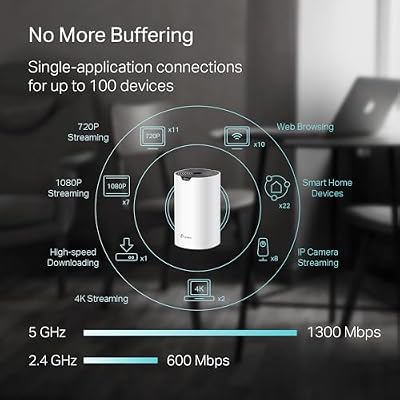
The TP-Link Deco S4 is the budget whole-home mesh pick. It is an AC1900 (WiFi 5) mesh system covering up to around 5500 square feet, and like the rest of the Deco range it offers a straightforward, app-driven guest network with isolation. At around $96 it is the most affordable way onto the mesh ladder here, trading the newer WiFi 6 standard for a wallet-friendly price.
This is the system to choose when you want easy mesh coverage and a simple guest network without paying for WiFi 6. Setting up a guest SSID is the same few-taps process in the Deco app, so visitors and smart devices stay off your main network just as cleanly. The AC1900 hardware is plenty for typical broadband speeds and everyday browsing, streaming and calls across a larger home. For a budget-conscious household that values whole-home coverage and an easy guest network over cutting-edge WiFi 6 throughput, the Deco S4 is a sensible, well-priced choice.
Pros: Affordable mesh, easy app-based guest network, ~5500 sq ft coverage, simple setup.
Cons: WiFi 5 (AC1900) rather than WiFi 6; lower top speeds than the newer kits.
4. TP-Link Deco M5 Mesh WiFi System with HomeCare Security

TP-Link Deco M5 Mesh WiFi System Deco M5 3-Pack | Up to 5,500 sq. ft. Whole Home Coverage and 100+ Devices,WiFi Router/Extender Replacement, Anitivirus


As an Amazon Associate we earn from qualifying purchases. Product prices and availability are accurate as of the date/time indicated.
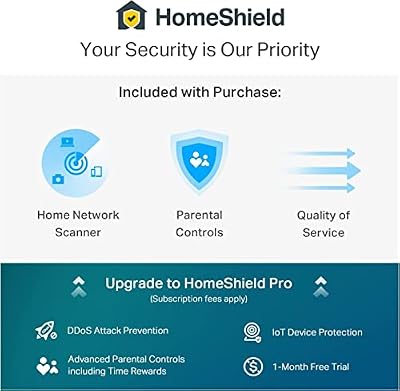
The TP-Link Deco M5 is the pick for a mesh system with built-in security to complement the guest network. It is an AC1300 WiFi 5 mesh covering up to around 5500 square feet, and its standout is TP-Link HomeCare, which adds antivirus, parental controls and quality-of-service alongside the standard easy guest SSID. At around $140 it bundles whole-home coverage with extra protection.
For a security-minded household, the M5 pairs nicely with the guest-network concept: you can quarantine visitors and IoT gadgets on an isolated guest SSID from the Deco app, then lean on HomeCare’s antivirus and parental controls to keep the main network safer too. Coverage is solid across a larger home, and the app keeps management simple. While it runs on WiFi 5 rather than WiFi 6, the added security suite is the reason to pick it. For families who want easy guest networking plus baked-in protection and parental controls, the Deco M5 is a thoughtful option.
Pros: Easy guest SSID plus HomeCare antivirus and parental controls, ~5500 sq ft mesh coverage.
Cons: WiFi 5 (AC1300) speeds; some HomeCare features may need a subscription over time.
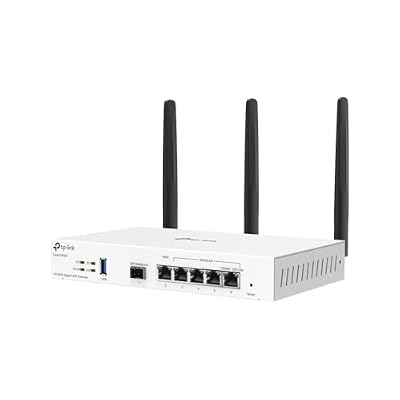
5. TP-Link Festa FR365 AX3000 WiFi 6 VPN Router, 5 Gb WAN + USB

TP-Link Festa FR365, AX3000 WiFi 6 VPN Router | Up to 5 Gigabit WAN + 1 USB 3.0 WAN + 1 SFP, Self-Organizing Network, Free Cloud, Seamless Roaming, Not Work with Omada



As an Amazon Associate we earn from qualifying purchases. Product prices and availability are accurate as of the date/time indicated.
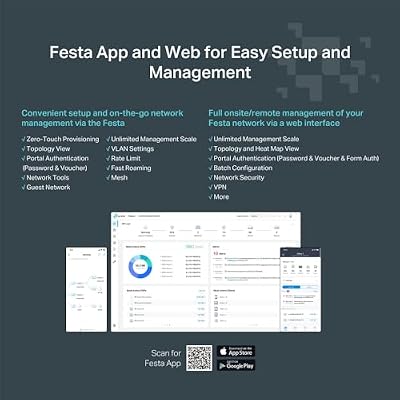
The TP-Link Festa FR365 is the pick for a guest network paired with VPN and more advanced controls. It is a standalone AX3000 WiFi 6 router with a fast 5-Gigabit WAN port and a USB 3.0 port, aimed at prosumers and small offices that want robust networking features — including, of course, an isolated guest network — beyond what a simple mesh offers. At around $99 it packs a lot of capability.
This is the router for someone whose guest-network need sits alongside other demands: built-in VPN support for secure remote access, a high-speed WAN port for fast broadband, and USB connectivity for storage or other uses. The guest SSID with isolation is straightforward to configure, keeping visitors and IoT devices walled off from your main LAN, while the VPN and richer management suit a home office or small business. If you want a feature-rich standalone WiFi 6 router where the guest network is one tool among many, the Festa FR365 is a capable, well-equipped choice.
Pros: WiFi 6 with VPN support, 5 Gb WAN, USB 3.0, configurable guest network and isolation.
Cons: Standalone router (not mesh) so coverage depends on home size; setup is more advanced.
6. TP-Link AX1800 WiFi 6 Router (Archer AX21 V5), Dual-Band Gigabit
Rounding out the list is the TP-Link Archer AX21 (AX1800), the budget standalone WiFi 6 pick and one of the most popular value routers around. It is a dual-band WiFi 6 router with gigabit ports, and it includes an easy guest network you can enable from the TP-Link Tether app or web interface. At around $52 it is the cheapest option here and an excellent entry into WiFi 6.
This is the router to choose when you want modern WiFi 6, a simple guest network, and gigabit wired ports without spending much. Enabling a guest SSID with isolation is quick in the app, so visitors and smart devices stay off your main network even on a budget. As a single unit it best suits smaller homes and apartments where one router can cover the space, rather than a large multi-floor house that calls for mesh. For affordable WiFi 6 with a no-nonsense guest network, the Archer AX21 is a deservedly popular, great-value pick.

Pros: Very affordable WiFi 6, easy guest SSID and isolation, gigabit ports, popular and reliable.
Cons: Single router suits smaller spaces; less coverage than the multi-unit mesh kits.
How to Choose a Router with a Guest Network
Start with a reassuring fact: a guest network is now a near-universal feature, and every router and mesh system on this list has one. So rather than hunting for the feature itself, focus on how well it is implemented and how easy it is to use. The best implementations let you enable a separate guest SSID, set its own password, and turn on client isolation — which stops guests from seeing your personal devices, and often each other — in just a few taps. Mesh systems managed by a polished phone app, like the TP-Link Deco range and Amazon eero, make this especially painless, which is worth weighing if simplicity matters to you.
Coverage is usually the bigger real-world decision, because a guest network is only as useful as the WiFi reaching your guests. For a larger or multi-floor home, a mesh system such as the Deco X55, Deco S4, Deco M5 or eero 6 spreads a seamless signal across thousands of square feet using multiple units. For a smaller home or apartment, a single capable router like the Archer AX21 or the Festa FR365 can cover the space on its own at lower cost. Match the hardware to your square footage and layout first, since coverage is what most people actually notice day to day.
WiFi standard, speed and extra features come next. WiFi 6 (as on the Deco X55, eero 6, Festa FR365 and Archer AX21) offers better speeds and efficiency than WiFi 5 (the Deco S4 and Deco M5), which especially helps in homes packed with devices — and a guest or IoT network is a great place to offload smart-home gadgets. Beyond raw speed, consider extras that matter to you: HomeCare security and parental controls on the Deco M5, VPN support and a 5Gb WAN on the Festa FR365, or a smart-home hub on the eero 6. Decide which of these genuinely earn their place in your home.
Finally, weigh management style and budget together. If you want the least technical experience, an app-first mesh like eero or Deco makes setting up and sharing a guest network effortless. If you want deeper control — VPN, advanced firewall rules, USB sharing — a standalone router like the Festa FR365 gives you more to configure. Set your budget across this list’s roughly $52 to $150 range, decide between mesh coverage and a single router, and pick the model whose guest network, coverage and features fit how your household actually connects.
Frequently Asked Questions
Do all modern routers have a guest network?
Very nearly. A guest network is now a near-universal feature — every router and mesh system on this list supports one, as do the vast majority of modern routers. So the real question is not whether a router has the feature, but how easy it is to enable and how good the isolation is. App-managed mesh systems like the TP-Link Deco range and Amazon eero make creating and sharing a guest SSID particularly simple.
What does ‘client isolation’ on a guest network actually do?
Client isolation keeps devices on the guest network from communicating with your main network — and often from seeing each other too. That means a visitor’s laptop or a smart-home gadget on the guest SSID cannot reach your personal computers, files or other private devices. It is the security heart of a guest network, and the routers here let you enable it easily, usually with a single toggle in the app alongside the guest SSID setting.
Should I put my smart-home devices on the guest network?
It is a popular and sensible practice. Many smart-home gadgets are less secure than your phone or PC, so placing them on an isolated guest or IoT network limits what they can reach if one is ever compromised. WiFi 6 systems like the Deco X55, eero 6 or Archer AX21 handle a houseful of connected devices well, and the eero 6 and Deco M5 add smart-home or security features that complement this approach.
Is a mesh system or a single router better for guest networking?
Both support guest networks; the choice comes down to coverage and management. A mesh system like the Deco X55 or eero 6 covers a larger, multi-floor home seamlessly and tends to make guest setup especially easy via its app. A single router like the Archer AX21 or Festa FR365 is more affordable and fine for smaller homes, with the Festa adding advanced features like VPN. Pick based on your home’s size first, then the management style you prefer.
Related Guides
- Best WiFi Routers
- Best Mesh WiFi Systems
- Best Gaming Routers
- Best WiFi 6 Routers
- Best Network Switches
- Best Powerline Adapters
Affiliate Disclosure: As an Amazon Associate, we earn from qualifying purchases. If you click a link and make a purchase, we may earn a small commission at no extra cost to you. Prices and availability are accurate as of publication and may change.










