

Two hundred dollars is the line where home networking gets interesting: stay under it and you can still buy a genuinely fast Wi-Fi 6 router or even a whole-home mesh system, without paying flagship money. The good news for anyone shopping with that ceiling in mind is that the sub-$200 bracket is where most people get the best value, since the jump to ultra-premium routers delivers diminishing returns for typical homes and internet plans. This guide rounds up the best routers under $200 in 2026, every one of them priced comfortably below the cap, spanning value standalone units, fast single routers and multi-pack mesh systems.
- Best Routers under $200 at a Glance
- 1. TP-Link AX1800 WiFi 6 Router (Archer AX21 V5), Dual Band Gigabit
- 2. TP-Link Deco X55 AX3000 WiFi 6 Mesh System (covers up to 6,500 sq ft)
- 3. TP-Link AC1200 Gigabit WiFi Router (Archer A6), Dual Band MU-MIMO
- 4. TP-Link WiFi 6 Router (Archer AX10), 4 Gigabit LAN Ports, Dual Band
- 5. Amazon eero 6+ Mesh WiFi Router, Gigabit support
- 6. TP-Link AC1900 Smart WiFi Router, Beamforming Dual Band Gigabit
- How to Choose a Router under $200
- Frequently Asked Questions
- Related Guides
- Related Articles
Our picks were chosen on what genuinely matters when $200 is the hard limit: real coverage for your home size, the Wi-Fi speed tier relative to your internet plan, whether a standalone router or a mesh system suits your layout, and value. Prices here run from around $40 up to around $150, leaving headroom under the ceiling rather than scraping it. The list mixes budget-friendly dual-band routers, a Wi-Fi 6 mesh kit that blankets a large home, and proven single units. Below is an at-a-glance comparison of all six, then a closer look at each and a buyer’s guide built around coverage, speed and the standalone-versus-mesh decision — the criteria that decide value under $200.
As an Amazon Associate we earn from qualifying purchases at no extra cost to you.




🛒 Best Price Today on Amazon
Prime members get fast, free shipping on everything above, plus member-only deals. New members get a 30-day free trial — cancel anytime.
Best Routers under $200 at a Glance
| Router | Best For | Standout Spec | Approx Price |
|---|---|---|---|
| TP-Link Archer AX21 (AX1800 Wi-Fi 6) | Best value Wi-Fi 6 pick | AX1800 dual-band Wi-Fi 6 | around $52 |
| TP-Link Deco X55 (AX3000 Mesh) | Whole-home coverage | Mesh, up to 6,500 sq ft | around $150 |
| TP-Link Archer A6 (AC1200) | Tightest budget router | AC1200 dual-band MU-MIMO | around $40 |
| TP-Link Archer AX10 (AX1500 Wi-Fi 6) | Entry Wi-Fi 6 upgrade | Wi-Fi 6, 4 Gigabit LAN | around $60 |
| Amazon eero 6+ (Mesh, Gigabit) | Simplest mesh setup | Wi-Fi 6 mesh, Gigabit support | around $140 |
| TP-Link Archer AC1900 (Beamforming) | Wide single-router coverage | AC1900 beamforming dual-band | around $140 |
1. TP-Link AX1800 WiFi 6 Router (Archer AX21 V5), Dual Band Gigabit
The TP-Link Archer AX21 is the best-value pick under $200, and at around $52 it leaves enormous headroom beneath the ceiling. It is an AX1800 dual-band Wi-Fi 6 router with Gigabit ports, OFDMA and the efficiency gains of the Wi-Fi 6 standard, making it one of the most popular routers in its class for exactly that reason: it does the important things well for very little money.
For most homes shopping with a $200 limit, this is the smart starting point rather than the most you can spend. Wi-Fi 6 handles a busy household of phones, laptops, consoles and smart devices more gracefully than older standards, the AX1800 tier comfortably covers common broadband plans, and the Gigabit ports keep wired gaming rigs fast. If you want the best balance of modern features and price well under the cap, the Archer AX21 is the obvious default.
Pros: Modern Wi-Fi 6 at a low price, Gigabit ports, handles busy households well.
Cons: Mid-tier AX1800 speed; single unit covers one home, not a sprawling layout.
2. TP-Link Deco X55 AX3000 WiFi 6 Mesh System (covers up to 6,500 sq ft)

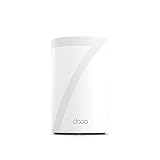
TP-Link Deco X55 AX3000 WiFi 6 Mesh System, Deco X55(3-Pack) | Covers up to 6500 Sq.Ft. , Replaces Wireless Router and Extender, 3 Gigabit ports per unit, supports Ethernet Backhaul





As an Amazon Associate we earn from qualifying purchases. Product prices and availability are accurate as of the date/time indicated.
The TP-Link Deco X55 is the whole-home coverage pick, and it stays under $200 while doing it. It is an AX3000 Wi-Fi 6 mesh system designed to blanket up to 6,500 square feet from multiple units working as one seamless network, replacing dead-spot-prone single-router setups. At around $150 it is the value mesh choice for larger or multi-level homes.
For a $200 budget where coverage is the real problem, this is the pick that solves it. The mesh design spreads a single Wi-Fi name across a big footprint so you roam from room to room without dropouts, the AX3000 Wi-Fi 6 tier keeps speeds healthy on every node, and setup through the Deco app is famously simple. If your house is too large for one router and you want reliable wall-to-wall Wi-Fi without breaking the cap, the Deco X55 is the standout.
Pros: Whole-home mesh up to 6,500 sq ft, seamless roaming, easy app setup, Wi-Fi 6.
Cons: Costs more than a single router; speed tier shared across the mesh.
3. TP-Link AC1200 Gigabit WiFi Router (Archer A6), Dual Band MU-MIMO

TP-Link AC1200 Gigabit Dual Band WiFi Router (Archer A6) | MU-MIMO Wireless Internet Router, 4 x Antennas, OneMesh and AP Mode, Long Range Coverage


As an Amazon Associate we earn from qualifying purchases. Product prices and availability are accurate as of the date/time indicated.
The TP-Link Archer A6 is the tightest-budget pick on the list. It is an AC1200 dual-band router with Gigabit and MU-MIMO support, and at around $40 it is the cheapest way to get a capable, reliable router well under $200. It skips Wi-Fi 6, but for many homes the older AC1200 standard is plenty.
For a $200 budget where you want to spend as little as possible, this is the value floor. The AC1200 dual-band radios cover everyday browsing, streaming and gaming for a modest number of devices, MU-MIMO helps the router serve several clients at once, and the Gigabit ports keep wired connections quick. It will not future-proof you the way Wi-Fi 6 does, but as a dependable, rock-bottom-priced router for a smaller home or a simple setup, the Archer A6 is hard to beat on cost.
Pros: Lowest price here, reliable AC1200 dual-band, MU-MIMO, Gigabit ports.
Cons: No Wi-Fi 6; speed tier and future-proofing are modest.
4. TP-Link WiFi 6 Router (Archer AX10), 4 Gigabit LAN Ports, Dual Band
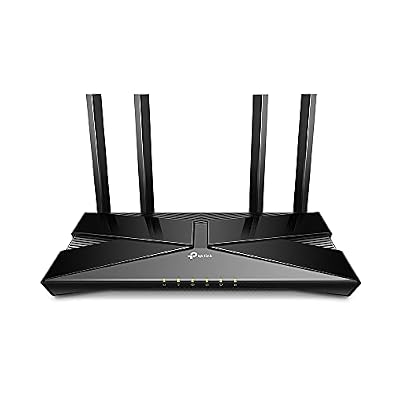
TP-Link Smart WiFi 6 Dual Band Router 4 Gigabit LAN Ports | 802.11AX Router, Beamforming, OFDMA, MU-MIMO, Parental Controls, Dual-Core 900MHz Processor, Works with Alexa (Archer AX10)


As an Amazon Associate we earn from qualifying purchases. Product prices and availability are accurate as of the date/time indicated.
The TP-Link Archer AX10 is the entry Wi-Fi 6 upgrade pick. It brings the Wi-Fi 6 standard in at a budget price, pairing dual-band AX1500-class radios with four Gigabit LAN ports for wired devices. At around $60 it is a low-cost way to step up from older Wi-Fi to a modern router while staying far under the $200 line.
For a $200 budget where you want Wi-Fi 6 specifically but at the lowest possible cost, this is the entry door. Wi-Fi 6 improves how the router handles many connected devices at once compared with older standards, the four Gigabit LAN ports give wired gaming PCs and consoles solid connections, and the price leaves plenty of room under the cap. It sits a tier below the AX21 on raw speed, but as an affordable first Wi-Fi 6 router, the Archer AX10 does the job well.
Pros: Affordable entry to Wi-Fi 6, four Gigabit LAN ports, good for wired devices.
Cons: Entry-level Wi-Fi 6 tier; sits below the AX21 on throughput.
5. Amazon eero 6+ Mesh WiFi Router, Gigabit support

Amazon eero 6+ mesh wifi router - Supports internet plans up to a Gigabit, Coverage up to 1,500 sq. ft., Connect 75+ devices, 1-pack


As an Amazon Associate we earn from qualifying purchases. Product prices and availability are accurate as of the date/time indicated.
The Amazon eero 6+ is the simplest-setup mesh pick, and it lands under $200. It is a Wi-Fi 6 mesh router that supports internet plans up to a Gigabit and extends coverage across the home, with the famously fuss-free eero app handling setup and management. At around $140 it is the choice for people who value simplicity as much as coverage.
For a $200 budget where you want mesh coverage without the complexity, the eero 6+ is the friendliest option. The eero ecosystem is known for near-effortless setup and reliable, hands-off operation, the Wi-Fi 6 radios support fast Gigabit plans, and you can add more eero units later to grow the network. It leans on the Amazon and eero app experience rather than deep manual controls, but if you want mesh Wi-Fi that simply works and stays under the cap, it is an excellent pick.
Pros: Very easy app setup, Wi-Fi 6 mesh, supports Gigabit plans, expandable later.
Cons: Fewer advanced manual controls; some features tie into the eero ecosystem.
6. TP-Link AC1900 Smart WiFi Router, Beamforming Dual Band Gigabit

TP-Link AC1900 Smart WiFi Router Dual Band Router for Wireless Internet | High Speed MU-MIMO Wireless Router, Dual Band Router for Wireless Internet, Gigabit, Supports Guest WiFi (Archer A8)


As an Amazon Associate we earn from qualifying purchases. Product prices and availability are accurate as of the date/time indicated.
Rounding out the list is the TP-Link Archer AC1900, the wide single-router coverage pick. It is an AC1900 dual-band router with beamforming, which focuses the wireless signal toward your devices to improve range and stability across a home, plus Gigabit ports. At around $140 it is a strong single-unit option that stays under the $200 ceiling.
For a $200 budget where you prefer one capable router over a mesh kit, this is the pick. The AC1900 tier delivers solid dual-band throughput for streaming and gaming, beamforming helps push reliable coverage to the edges of a typical home, and the Gigabit ports keep wired rigs fast. It is an older standard than Wi-Fi 6, but for a proven, wide-coverage single router under the cap, the Archer AC1900 remains a dependable choice.
Pros: Beamforming for wider coverage, solid AC1900 dual-band speed, Gigabit ports.
Cons: AC standard rather than Wi-Fi 6; single unit, not a mesh for huge homes.
How to Choose a Router under $200
With a $200 ceiling, the first decision is standalone router versus mesh system, and it comes down to your home’s size and shape. A single router like the Archer AX21 or AC1900 broadcasts from one spot and is ideal for apartments, smaller houses and open layouts. A mesh system like the Deco X55 or eero 6+ uses several units to blanket a large or multi-level home with one seamless network, eliminating dead spots that defeat a single router. Match the type to your floor plan before you compare speeds.
Speed tier matters, but only in relation to your internet plan and device count. The AX or AC number — AX1800, AX3000, AC1200, AC1900 — indicates the router’s wireless throughput class, and there is little point paying for a tier far beyond what your broadband delivers. For most homes on common plans, an AX1800 router like the AX21 is plenty; reserve the higher tiers for fast Gigabit connections or households with many simultaneous heavy users. Buy the tier your plan and usage actually justify.
Wi-Fi 6 is the feature worth prioritising under $200 if you can. Compared with older Wi-Fi 5 (AC) routers, Wi-Fi 6 (AX) handles many connected devices more efficiently, which matters in a modern home full of phones, consoles, smart speakers and laptops. The AX21, AX10, Deco X55 and eero 6+ here are all Wi-Fi 6; the Archer A6 and AC1900 are capable Wi-Fi 5 units at lower prices. If future-proofing and a busy network matter to you, lean Wi-Fi 6; if budget is everything, the AC options still perform well.
Finally, check the wired ports and remember the ceiling buys you headroom, not just a router. Gigabit LAN ports — and several of them, as on the Archer AX10 — give gaming PCs and consoles the most consistent connection, so count the ports if you hard-wire devices. Because every pick here sits comfortably under $200, you can choose based on fit rather than stretching the budget. Decide standalone or mesh, match the speed tier to your plan, favour Wi-Fi 6 where it counts, and pick the router on this list that suits your home.
Frequently Asked Questions
Do I really need to spend close to $200 on a router?
Usually not. The sub-$200 bracket is where home networking offers the best value, and for most homes a router well under the cap — like the around-$52 TP-Link Archer AX21 — delivers everything you need. Spend more only if you have a very large home that needs mesh coverage, a fast Gigabit plan, or a household with many simultaneous heavy users. The ceiling is a limit, not a target.
Should I buy a single router or a mesh system under $200?
It depends on your home’s size and layout. A single router like the Archer AX21 or AC1900 is ideal for apartments and smaller or open-plan houses. A mesh system like the Deco X55 or eero 6+ uses multiple units to cover a large or multi-level home with one seamless network, which solves the dead spots a single router struggles with. Both fit under $200 here, so choose by floor plan.
Is Wi-Fi 6 worth it in a router under $200?
Yes, if your budget allows, and several picks here prove you do not have to pay much for it. Wi-Fi 6 handles a home full of connected devices more efficiently than older Wi-Fi 5, which helps when phones, consoles, laptops and smart gadgets all compete for bandwidth. The TP-Link Archer AX21, AX10, Deco X55 and eero 6+ are all Wi-Fi 6 and comfortably under the cap.
Will a router under $200 be good enough for gaming?
Absolutely. For gaming, low, consistent latency and a reliable connection matter more than headline speed, and a solid sub-$200 router delivers both — especially over a wired Gigabit LAN port. The TP-Link Archer AX21 or the four-LAN-port Archer AX10 give gaming PCs and consoles a fast, stable link, and Wi-Fi 6 helps keep wireless gaming smooth in a busy household.
Related Guides
- Best Routers
- Best Wi-Fi 6 Routers
- Best Mesh Wi-Fi Systems
- Best Gaming Routers
- Best Wi-Fi Extenders
- Best Budget Gaming Setup
Affiliate Disclosure: As an Amazon Associate, we earn from qualifying purchases. If you click a link and make a purchase, we may earn a small commission at no extra cost to you. Prices and availability are accurate as of publication and may change.










