

- Top Pick: TP-Link BE6500 Dual-Band WiFi 7 Router (BE400)
- Best Value: NETGEAR Nighthawk Dual-Band WiFi 7 Router (RS90) – Router Only, BE3600 Wireless Speed (up to 3.6 Gbps) – Covers up to 2,000 sq. ft., 50 Devices – 2.5 Gig Internet Port – Free Expert Help
- Premium Choice: TP-Link AXE5400 Tri-Band WiFi 6E Router, 2025 PCMag Editors' Choice
Smooth streaming is less about peak speed and more about consistency. A movie in HD or a live stream does not need enormous bandwidth, but it does need a steady, uninterrupted connection — one that does not stutter when someone else joins the Wi-Fi, that reaches the room with the TV, and that prioritises video when the network gets busy. That is what separates a good streaming router from a cheap one. This guide rounds up the best routers for streaming in 2026, focused on stable whole-home coverage, sensible Quality-of-Service controls, and reliable Wi-Fi 6 performance for buffer-free HD video.
- Best Routers for Streaming at a Glance
- 1. TP-Link Deco X55 AX3000 WiFi 6 Mesh System – Covers up to 2,500 Sq.Ft.
- 2. Amazon eero 6 mesh wifi system – Supports internet plans up to 500 Mbps
- 3. TP-Link AX1800 WiFi 6 Router (Archer AX21 V5) – Dual Band Gigabit
- 4. TP-Link Deco XE75 AXE5400 Tri-Band WiFi 6E Mesh System
- 5. Amazon eero Pro 6E mesh wifi router – Supports internet plans up to 2.5 Gbps
- 6. ASUS AC2900 WiFi Gaming Router (RT-AC86U) – Dual Band Gigabit
- How to Choose a Router for Streaming
- Frequently Asked Questions
- Related Guides
- Related Articles
Our picks were chosen on what genuinely keeps a stream stable: consistent coverage across the home, QoS or band-steering features that protect video traffic, dependable Wi-Fi 6 connectivity, and value. We have avoided quoting invented speed-test numbers — instead we explain where each router fits and who it is for, with prices from around $52 up to around $200. The list spans affordable single-unit Wi-Fi 6 routers, easy mesh systems for larger or awkward homes, and a higher-end tri-band option. Below is an at-a-glance comparison of all six, then a closer look at each and a buyer’s guide built around coverage, QoS and reliability — the things that actually matter for streaming.
As an Amazon Associate we earn from qualifying purchases at no extra cost to you. Product prices and availability are accurate as of the date shown and are subject to change.





🛒 Best Price Today on Amazon
Prime members get fast, free shipping on everything above, plus member-only deals. New members get a 30-day free trial — cancel anytime.
Start 30-Day Prime Free Trial →See Today’s Amazon DealsBest Routers for Streaming at a Glance
| Router | Best For | Standout Spec | Approx Price |
|---|---|---|---|
| TP-Link Deco X55 AX3000 Mesh | Whole-home stream coverage | Mesh, up to 2,500 sq ft | around $70 |
| Amazon eero 6 Mesh System | Simple stable mesh | Mesh, plans up to 500 Mbps | around $140 |
| TP-Link Archer AX21 (AX1800) | Budget Wi-Fi 6 single unit | Dual-band Wi-Fi 6, gigabit | around $52 |
| TP-Link Deco XE75 AXE5400 Tri-Band | Larger homes, less congestion | Tri-band Wi-Fi 6E mesh | around $100 |
| Amazon eero Pro 6E Mesh | High-end whole-home reliability | Wi-Fi 6E, plans up to 2.5 Gbps | around $200 |
| ASUS RT-AC86U AC2900 | QoS-focused single router | Dual-band, adaptive QoS | around $113 |
1. TP-Link Deco X55 AX3000 WiFi 6 Mesh System – Covers up to 2,500 Sq.Ft.

TP-Link Deco X55 AX3000 WiFi 6 Mesh System - Covers up to 2500 Sq.Ft., Replaces Wireless Router and Extender, 3 Gigabit Ports, Supports Ethernet Backhaul, Deco X55(1-Pack)




As an Amazon Associate we earn from qualifying purchases. Product prices and availability are accurate as of the date/time indicated.
The TP-Link Deco X55 is our lead pick for streaming because it tackles the most common cause of buffering head-on: weak coverage in the room where you actually watch. It is a Wi-Fi 6 mesh system rated to blanket up to 2,500 square feet, with AX3000 dual-band speeds and TP-Link’s easy Deco app setup. At around $70 it delivers whole-home mesh coverage at a genuinely affordable price.
For stable streaming this is exactly the intent it serves. A mesh system spreads several units around the home so the stream stays strong as you move from the living room to the bedroom, eliminating the dead spots that cause a single router’s signal to drop and a video to stutter. The Wi-Fi 6 standard handles a house full of connected devices gracefully, and the Deco app makes QoS and guest networks simple. For reliable, buffer-free HD streaming throughout the home, the Deco X55 is the value standout.
Pros: Whole-home mesh coverage up to 2,500 sq ft, Wi-Fi 6, easy Deco app, excellent value.
Cons: Dual-band only; very large homes may want extra units.
2. Amazon eero 6 mesh wifi system – Supports internet plans up to 500 Mbps

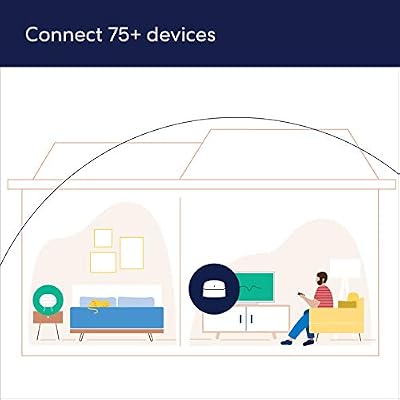
Amazon eero 6 mesh wifi system - Supports internet plans up to 500 Mbps, Coverage up to 3,000 sq. ft., Connect 75+ devices, 2-pack (1 router + 1 extender)



As an Amazon Associate we earn from qualifying purchases. Product prices and availability are accurate as of the date/time indicated.
The Amazon eero 6 is the simple-and-stable mesh pick. It is a Wi-Fi 6 mesh system designed for fuss-free setup through the eero app, supporting internet plans up to 500 Mbps and spreading a reliable signal across the home. At around $140 it is the choice for people who value effortless, dependable coverage over tinkering with settings.
For streaming, the eero 6’s strength is its set-and-forget reliability. The mesh design keeps the connection steady from room to room so a film does not stall when you carry a tablet to the kitchen, the eero app handles updates and device management automatically, and Wi-Fi 6 copes well with a busy household network. A 500 Mbps ceiling is ample for multiple simultaneous HD streams. If you want a stable streaming network that simply works without ongoing attention, the eero 6 is an easy recommendation.
Pros: Effortless eero app setup, stable Wi-Fi 6 mesh, ample headroom for HD streams.
Cons: 500 Mbps plan ceiling; deeper controls live behind an optional subscription.
3. TP-Link AX1800 WiFi 6 Router (Archer AX21 V5) – Dual Band Gigabit
The TP-Link Archer AX21 is the budget single-unit pick, and a superb starting point for smaller homes. It is a dual-band Wi-Fi 6 (AX1800) router with gigabit ports and TP-Link’s straightforward setup, and at around $52 it is the most affordable router on this list. For an apartment or a home where one router can reach every room, it covers streaming needs without overspending.
For stable streaming in a single-router space, the Archer AX21 does the essentials well. Wi-Fi 6 keeps the connection efficient when several devices are online at once, so a stream stays smooth even while phones and laptops are active, and the gigabit ports let you wire the TV or a console directly for the most reliable feed of all. It will not blanket a large multi-storey house like a mesh system, but for a flat or modest home, this is dependable, affordable streaming connectivity.
Pros: Affordable Wi-Fi 6, gigabit ports for wired streaming, easy setup, great for smaller homes.
Cons: Single unit; coverage is limited in large or multi-floor homes.
4. TP-Link Deco XE75 AXE5400 Tri-Band WiFi 6E Mesh System

TP-Link Deco XE75 AXE5400 Tri-Band WiFi 6E Mesh System - Covers up to 2900 Sq.Ft, Replaces WiFi Router and Extender, AI-Driven Mesh, New 6GHz Band, 1-Pack


As an Amazon Associate we earn from qualifying purchases. Product prices and availability are accurate as of the date/time indicated.
The TP-Link Deco XE75 steps the mesh idea up to tri-band Wi-Fi 6E. On top of the usual 2.4GHz and 5GHz bands it adds a third 6GHz band, and it is rated to cover larger homes of up to around 2,900 square feet. At around $100 it is a strong choice for busy households that want both wide coverage and relief from congestion.
For streaming in a device-heavy home, the XE75’s extra band is the draw. The additional 6GHz spectrum gives newer devices a clearer lane, easing congestion so video traffic is less likely to compete with everything else for airtime during peak evening use. Combined with whole-home mesh coverage and Wi-Fi 6E, it keeps streams stable even when the household is at its busiest. For a larger home or one with many connected gadgets where reliable streaming matters, the Deco XE75 is a smart, future-minded pick.
Pros: Tri-band Wi-Fi 6E mesh, wide coverage, extra 6GHz band eases congestion for busy homes.
Cons: More than a small home needs; 6GHz benefits only newer devices.
5. Amazon eero Pro 6E mesh wifi router – Supports internet plans up to 2.5 Gbps

Amazon eero Pro 6E mesh wifi router - Supports internet plans up to 2.5 Gbps, Coverage up to 2,000 sq. ft., Connect 100+ devices, 1-pack


As an Amazon Associate we earn from qualifying purchases. Product prices and availability are accurate as of the date/time indicated.
The Amazon eero Pro 6E is the high-end whole-home pick. It is a Wi-Fi 6E mesh router that supports internet plans up to 2.5 Gbps and pairs the eero ecosystem’s renowned ease of use with tri-band performance and a third 6GHz band. At around $200 it is the premium option here, aimed at homes that want the most reliable streaming network eero offers.
For streaming, the Pro 6E combines everything that makes mesh dependable with extra headroom. The tri-band design and 6GHz lane keep video stable even on a crowded network, the 2.5 Gbps support suits fast modern internet plans, and the eero app keeps the whole system updated and managed with no effort. It is more capability than a casual streamer strictly needs, but for a larger or device-dense home that wants premium, set-and-forget streaming reliability, the eero Pro 6E is the standout.
Pros: Tri-band Wi-Fi 6E mesh, supports up to 2.5 Gbps plans, effortless eero management.
Cons: Highest price here; advanced features may need an eero subscription.
6. ASUS AC2900 WiFi Gaming Router (RT-AC86U) – Dual Band Gigabit

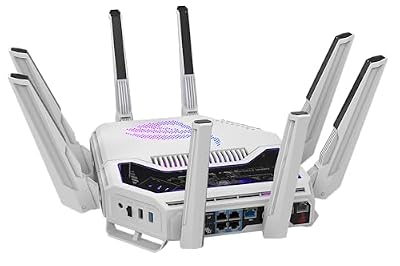
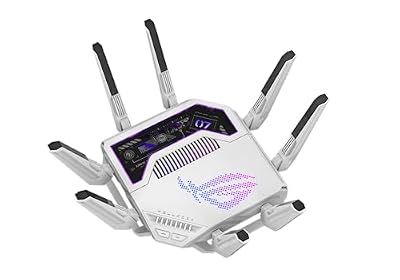
ASUS GT-BE19000AI Tri-Band WiFi 7 AI Gaming Router - 10G, AI Game Boost








As an Amazon Associate we earn from qualifying purchases. Product prices and availability are accurate as of the date/time indicated.
Rounding out the list is the ASUS RT-AC86U, the pick for hands-on QoS control. It is a dual-band AC2900 router with gigabit ports and ASUS’s well-regarded firmware, including adaptive QoS that lets you prioritise certain traffic. At around $113 it is the choice for streamers who want to actively shape how their network handles video.
For stable streaming, the RT-AC86U’s adaptive QoS is the headline. It lets you give streaming and media traffic priority over background downloads and other activity, so a film keeps its bandwidth even when someone else is hammering the connection — exactly the kind of control that prevents evening buffering. The robust ASUS firmware and gigabit ports add flexibility for wired devices too. It is a single router rather than a mesh, but for a streamer who wants granular QoS to keep video smooth, the RT-AC86U is a capable, enthusiast-friendly pick.
Pros: Adaptive QoS prioritises video traffic, robust ASUS firmware, gigabit ports.
Cons: Wi-Fi 5 (AC) rather than Wi-Fi 6; single-unit coverage.
How to Choose a Router for Streaming
For streaming, coverage is the first thing to get right, because most buffering comes from a weak signal in the room where you watch rather than from a slow internet plan. If your home is small or a single room, a good single router like the TP-Link Archer AX21 can reach everywhere. If you have multiple rooms, floors or thick walls, a mesh system such as the Deco X55, eero 6 or Deco XE75 spreads several units around the house so the stream stays strong wherever you settle. Match the coverage type to your home’s size and layout first.
Quality-of-Service and band steering are what keep video stable when the network gets busy. QoS lets the router prioritise streaming traffic over background activity — the ASUS RT-AC86U’s adaptive QoS is a good example — so a film keeps its bandwidth even while someone else downloads or backs up. Band steering and a tri-band design, as on the Deco XE75 and eero Pro 6E, give devices clearer lanes and ease congestion. For households where several people stream at once, these features matter as much as raw coverage.
Wi-Fi standard and wired options affect how reliably the stream holds up. Wi-Fi 6 — on the Archer AX21, Deco X55 and eero 6 — handles a house full of connected devices more gracefully than older standards, which keeps each stream steadier on a busy network. And do not overlook the gigabit ports: wiring a smart TV or streaming box directly to the router with an Ethernet cable gives the single most reliable, interference-free feed there is. Where you can run a cable to the main streaming device, do it.
Finally, match the router to your household and budget. A streamer in a small flat is well served by an affordable single Wi-Fi 6 unit; a family in a larger home with many devices benefits from mesh coverage and QoS; and anyone wanting premium, set-and-forget reliability can step up to a tri-band 6E system. You do not need the fastest possible router to stream well — you need stable coverage and sensible traffic management. Decide on coverage, prioritise QoS and reliability, and pick the router on this list that fits your home. That is how you get buffer-free streaming.
Frequently Asked Questions
What router is best for streaming and gaming?
Look for WiFi 6/6E (or 7), strong QoS to prioritise game and stream traffic, and gigabit LAN ports. ASUS ROG, Netgear Nighthawk and TP-Link Archer models handle simultaneous 4K streaming and low-latency gaming well — and wired Ethernet to the PC is still ideal.
How fast does my internet need to be for streaming?
Less than most people expect. HD streaming needs only a few Mbps per stream, and even several simultaneous HD streams sit comfortably within a 500 Mbps plan like the eero 6 supports. What matters more than raw speed is a stable, consistent connection that reaches the room with your TV without dropping, which is why coverage and reliability are the things to prioritise in a streaming router.
Do I need a mesh system for streaming?
Only if a single router cannot reach every room reliably. In a small home or apartment, a single Wi-Fi 6 router like the TP-Link Archer AX21 is plenty. In a larger house, a multi-storey home, or one with thick walls and dead spots, a mesh system such as the Deco X55 or eero 6 spreads the signal so your stream stays strong as you move around. Match the choice to your home’s size and layout.
What is QoS and does it help streaming?
QoS, or Quality of Service, lets a router prioritise certain types of traffic. For streaming, it can give video priority over background downloads and backups, so a film keeps its bandwidth and does not buffer when the network gets busy. Routers like the ASUS RT-AC86U offer adaptive QoS controls, which are valuable in households where several people use the connection at the same time.
Should I connect my streaming device with a cable?
If you can, yes. A wired Ethernet connection to your smart TV or streaming box gives the most reliable, interference-free feed there is, free from the fluctuations Wi-Fi can suffer in a busy home. Every router here includes gigabit ports for the purpose. Where running a cable is practical, wiring your main streaming device is the single most effective way to eliminate buffering.
Related Guides
- Best Routers for 4K Streaming
- Best Gaming Routers
- Best Mesh Wi-Fi Systems
- Best Wi-Fi Extenders
- Best Ethernet Cables
- Best Budget Gaming Setup
Affiliate Disclosure: As an Amazon Associate, we earn from qualifying purchases. If you click a link and make a purchase, we may earn a small commission at no extra cost to you. Prices and availability are accurate as of publication and may change.
Ready to decide? Our #1 pick for 2026 is the TP-Link Deco X55 AX3000 Mesh.
Live price & availability on Amazon.


