

4K streaming raises the bar. Ultra HD video carries several times the data of standard HD, so a router that copes fine with regular streaming can start to stutter when you push 4K — especially across Wi-Fi, and especially when more than one device is doing it at once. The priority shifts from merely stable coverage to sustained throughput: a strong, fast 5GHz or 6GHz connection, headroom for higher-bandwidth streams, and ideally a wired link to the screen. This guide rounds up the best routers for 4K streaming in 2026, focused on high-throughput Wi-Fi 6 and 6E performance and the gigabit wired options that keep Ultra HD smooth.
- Best Routers for 4K Streaming at a Glance
- 1. Amazon eero Pro 6E mesh wifi router – Supports internet plans up to 2.5 Gbps
- 2. ASUS RT-AX3000 Ultra-Fast Dual Band Gigabit Wireless Router, Next Gen WiFi 6
- 3. TP-Link AX1800 WiFi 6 Router (Archer AX21 V5) – Dual Band Gigabit
- 4. ASUS AC2900 WiFi Gaming Router (RT-AC86U) – Dual Band Gigabit
- 5. Amazon eero 6 mesh wifi system – Supports internet plans up to 500 Mbps
- 6. TP-Link AC1200 Gigabit WiFi Router (Archer A6) – Dual Band MU-MIMO
- How to Choose a Router for 4K Streaming
- Frequently Asked Questions
- Related Guides
- Related Articles
Our picks were chosen on what genuinely sustains a 4K stream: throughput on the faster bands, support for higher-bandwidth internet plans, gigabit wired ports for the most reliable feed, and value. We have avoided quoting invented speed-test numbers — instead we explain where each router fits and who it is for, with prices from around $40 up to around $200. The list spans an affordable wired-first router, fast Wi-Fi 6 single units, and tri-band 6E mesh systems with the most headroom. Below is an at-a-glance comparison of all six, then a closer look at each and a buyer’s guide built around throughput, the 5GHz/6GHz bands and wired backhaul — what actually matters for 4K.
As an Amazon Associate we earn from qualifying purchases at no extra cost to you.








🛒 Best Price Today on Amazon
Prime members get fast, free shipping on everything above, plus member-only deals. New members get a 30-day free trial — cancel anytime.
Best Routers for 4K Streaming at a Glance
| Router | Best For | Standout Spec | Approx Price |
|---|---|---|---|
| Amazon eero Pro 6E Mesh | Premium 4K across the home | Wi-Fi 6E, plans up to 2.5 Gbps | around $200 |
| ASUS RT-AX3000 Wi-Fi 6 | Fast single-room 4K | Dual-band Wi-Fi 6, AiMesh | around $90 |
| TP-Link Archer AX21 (AX1800) | Affordable Wi-Fi 6 4K | Wi-Fi 6, gigabit ports | around $52 |
| ASUS RT-AC86U AC2900 | Wired-backhaul 4K setups | Strong 5GHz, gigabit ports | around $113 |
| Amazon eero 6 Mesh System | Whole-home single-stream 4K | Mesh, plans up to 500 Mbps | around $140 |
| TP-Link Archer A6 (AC1200) | Budget wired 4K to the TV | Gigabit, MU-MIMO dual-band | around $40 |
1. Amazon eero Pro 6E mesh wifi router – Supports internet plans up to 2.5 Gbps

Amazon eero Pro 6E mesh wifi router - Supports internet plans up to 2.5 Gbps, Coverage up to 2,000 sq. ft., Connect 100+ devices, 1-pack


As an Amazon Associate we earn from qualifying purchases. Product prices and availability are accurate as of the date/time indicated.
For 4K streaming we lead with the Amazon eero Pro 6E, because Ultra HD rewards raw headroom and this router has the most of any here. It is a tri-band Wi-Fi 6E mesh system that supports internet plans up to 2.5 Gbps and adds a dedicated 6GHz band on top of 2.4GHz and 5GHz. At around $200 it is the premium pick, and the high-throughput design is exactly what demanding 4K calls for.
For 4K specifically, the Pro 6E’s tri-band capacity is the draw. The extra 6GHz band gives a clear, high-throughput lane for bandwidth-hungry Ultra HD streams, keeping them smooth even when other devices are busy, and the mesh design carries that performance to every room. The 2.5 Gbps support means a fast internet plan is not bottlenecked at the router, and eero’s app keeps it all effortless. For reliable 4K streaming throughout a larger or device-dense home, the eero Pro 6E is the standout.
Pros: Tri-band Wi-Fi 6E with a clear 6GHz lane, up to 2.5 Gbps, whole-home mesh.
Cons: Highest price here; the 6GHz band benefits only newer 6E devices.
2. ASUS RT-AX3000 Ultra-Fast Dual Band Gigabit Wireless Router, Next Gen WiFi 6
![ASUS AC1900 Wireless Dual Band (5GHz + 2.4GHz) Gigabit Wi-Fi Router [RT-AC68U] Ultra-Fast 802.11ac 1900 Mbps Speed, 5X Gigabit LAN Ports, Broadcam TurboQAM Wi-Fi Acceleration, AiProtection Security](https://m.media-amazon.com/images/I/41AQkd3zfKL._SL400_.jpg)
ASUS AC1900 Wireless Dual Band (5GHz + 2.4GHz) Gigabit Wi-Fi Router [RT-AC68U] Ultra-Fast 802.11ac 1900 Mbps Speed, 5X Gigabit LAN Ports, Broadcam TurboQAM Wi-Fi Acceleration, AiProtection Security


As an Amazon Associate we earn from qualifying purchases. Product prices and availability are accurate as of the date/time indicated.
The ASUS RT-AX3000 is the fast single-room 4K pick. It is a dual-band Wi-Fi 6 router built for high throughput, with gigabit ports, ASUS’s capable firmware, and AiMesh support so you can expand to a mesh later. As a single unit it delivers a strong, fast connection ideal for driving 4K to a nearby screen, and it does so at a sensible mid-range price.
For 4K, the RT-AX3000’s strength is a robust, high-throughput 5GHz band that comfortably carries Ultra HD to a TV or PC within good range of the router. Wi-Fi 6 keeps performance steady when several devices share the network, the gigabit ports let you wire the screen directly for a rock-solid feed, and AiMesh means you can add a second node if you later need whole-home 4K. For a fast, flexible single router that handles 4K well in the rooms that matter most, the RT-AX3000 is an excellent choice.
Pros: Fast Wi-Fi 6 throughput, strong 5GHz band, gigabit ports, AiMesh-expandable.
Cons: Single unit; distant rooms may need an AiMesh node for 4K.
3. TP-Link AX1800 WiFi 6 Router (Archer AX21 V5) – Dual Band Gigabit
The TP-Link Archer AX21 is the affordable Wi-Fi 6 pick for 4K. It is a dual-band AX1800 router with gigabit ports and easy setup, and at around $52 it is one of the cheapest ways to get genuine Wi-Fi 6 throughput. For a single room or a smaller home where the router sits near the screen, it has the speed to handle Ultra HD without breaking the budget.
For 4K, the Archer AX21 leans on Wi-Fi 6 efficiency and its gigabit ports. The 5GHz Wi-Fi 6 band has enough throughput to carry a 4K stream to a nearby TV, and because the router includes gigabit Ethernet, the surest route to stutter-free Ultra HD is to wire the streaming device directly — turning a budget router into a reliable 4K hub. It will not cover a large house alone, but for affordable 4K in a flat or compact home, the AX21 is hard to beat on value.
Pros: Genuine Wi-Fi 6 throughput, gigabit ports for wired 4K, very affordable.
Cons: Single unit; entry-level Wi-Fi 6 with limited coverage range.
4. ASUS AC2900 WiFi Gaming Router (RT-AC86U) – Dual Band Gigabit

ASUS GT-BE19000AI Tri-Band WiFi 7 AI Gaming Router - 10G, Game Boost | Coverage up to 3,500 Sq. Ft., 10G Port x2, 2.5G Port x4. Game Boost for Low Latency Gaming & Streaming. VPN support





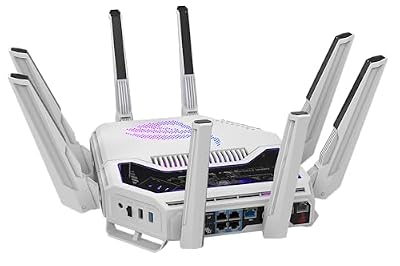

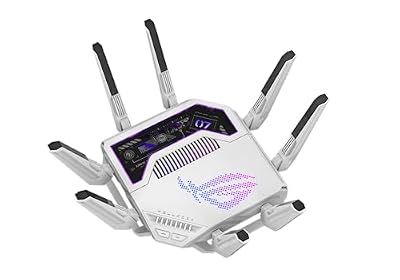


As an Amazon Associate we earn from qualifying purchases. Product prices and availability are accurate as of the date/time indicated.
The ASUS RT-AC86U is the wired-backhaul pick for 4K. It is a dual-band AC2900 router with a notably strong 5GHz band, gigabit ports and robust ASUS firmware with QoS controls. At around $113 it suits the 4K streamer who plans to lean on a wired connection to the screen and wants a high-quality 5GHz band for everything else.
For 4K, the RT-AC86U pairs a powerful 5GHz radio with practical wired options. The strong 5GHz band carries Ultra HD well at close-to-medium range, while the gigabit ports let you run an Ethernet cable straight to a smart TV or streaming box for the most dependable 4K feed of all — no Wi-Fi fluctuations to cause a stutter. Adaptive QoS lets you prioritise that video traffic too. It is a Wi-Fi 5 router rather than Wi-Fi 6, but for a wired-first 4K setup with a robust 5GHz fallback, it remains a capable, well-priced pick.
Pros: Strong 5GHz band, gigabit ports ideal for wired 4K, adaptive QoS for video.
Cons: Wi-Fi 5 (AC) not Wi-Fi 6; best paired with a wired streaming device.
5. Amazon eero 6 mesh wifi system – Supports internet plans up to 500 Mbps

The Amazon eero 6 is the whole-home pick for single-stream 4K. It is a Wi-Fi 6 mesh system with effortless app setup that supports internet plans up to 500 Mbps and spreads coverage across the house. At around $140 it suits the streamer who wants reliable 4K in any room and values simplicity over hands-on tuning.
For 4K, the eero 6’s mesh coverage is the key benefit. By carrying a strong Wi-Fi 6 signal to every room, it keeps an Ultra HD stream stable wherever your TV sits, avoiding the distance-related drop-offs that make a single router stutter on 4K in a far bedroom. A 500 Mbps plan comfortably feeds a 4K stream, and the eero app keeps everything updated automatically. It has less raw headroom than the tri-band 6E systems, so it is best for one or two 4K streams rather than many at once — but for dependable whole-home 4K, it is a strong, simple choice.
Pros: Whole-home Wi-Fi 6 mesh, ample for single 4K streams, effortless eero setup.
Cons: Dual-band with a 500 Mbps ceiling; limited headroom for many simultaneous 4K streams.
6. TP-Link AC1200 Gigabit WiFi Router (Archer A6) – Dual Band MU-MIMO

TP-Link AC1200 Gigabit Dual Band WiFi Router (Archer A6) | MU-MIMO Wireless Internet Router, 4 x Antennas, OneMesh and AP Mode, Long Range Coverage


As an Amazon Associate we earn from qualifying purchases. Product prices and availability are accurate as of the date/time indicated.
Rounding out the list is the TP-Link Archer A6, the budget wired-to-the-TV pick. It is an affordable dual-band AC1200 router with gigabit Ethernet ports and MU-MIMO, and at around $40 it is the cheapest option here. It is not built for pushing many 4K streams over Wi-Fi, but as an inexpensive hub for a wired 4K setup, it does a specific job well.
For 4K, the honest way to use the Archer A6 is to play to its strength: the gigabit ports. Run an Ethernet cable from this router to your smart TV or streaming box and you get a stable, interference-free 4K feed that does not depend on the modest AC1200 Wi-Fi. MU-MIMO helps the wireless side serve a few devices at once for lighter tasks. It is an entry-level router, so wireless 4K at range is not its forte — but for a budget-conscious wired 4K hub, the Archer A6 is a sensible, low-cost option that rounds out the list.
Pros: Cheapest pick here, gigabit ports for reliable wired 4K, MU-MIMO dual-band.
Cons: Entry-level AC1200 Wi-Fi; wireless 4K at range is not its strength.
How to Choose a Router for 4K Streaming
For 4K, throughput is the priority, because Ultra HD carries several times the data of standard HD and a router that handles regular streaming can stutter when pushed. Look for a strong, fast 5GHz band at minimum — as on the ASUS RT-AX3000 and RT-AC86U — and ideally a tri-band 6E design like the eero Pro 6E, whose dedicated 6GHz band gives bandwidth-hungry 4K its own clear lane. The more 4K streams you run at once, the more this raw headroom matters, so weigh throughput more heavily than you would for ordinary HD streaming.
Wired backhaul and gigabit ports are arguably the single best thing you can do for 4K. A wired Ethernet connection from the router to your smart TV or streaming box delivers a rock-solid, interference-free feed that Wi-Fi cannot match — which is exactly why a budget router like the Archer A6 or the strong 5GHz RT-AC86U can serve 4K beautifully when the screen is cabled in. If your main 4K device is near the router or you can run a cable, prioritise gigabit ports and wire it; the wireless spec then matters far less.
The 5GHz and 6GHz bands carry 4K far better than 2.4GHz, so band steering and tri-band design pay off when you stream wirelessly. The 2.4GHz band is slower and more congested, fine for smart-home gadgets but not ideal for Ultra HD. A router that steers your TV onto a fast 5GHz or 6GHz band — and a tri-band system like the eero Pro 6E that keeps a band free for high-throughput devices — helps a 4K stream hold its bandwidth. Make sure your streaming device connects on the fastest band available, not the 2.4GHz one.
Finally, match the router to how and where you watch 4K. For premium, whole-home wireless 4K across many devices, a tri-band 6E mesh like the eero Pro 6E is the answer. For fast 4K in the main room, a strong single Wi-Fi 6 router such as the RT-AX3000 or affordable Archer AX21 does the job, especially with the screen wired in. And for a tight budget, a wired hub like the Archer A6 feeding an Ethernet 4K stream is genuinely effective. Decide whether you need wireless or wired 4K, weigh throughput and bands, and pick the router on this list that fits — that is how you get stutter-free Ultra HD.
Frequently Asked Questions
What internet speed do I need for 4K streaming?
More than for HD, but still modest. A single 4K stream typically needs around 25 Mbps, so even a 500 Mbps plan like the eero 6 supports comfortably handles several 4K streams at once. The bigger challenge is sustaining that bandwidth reliably to the screen — which is why throughput on the faster bands, and ideally a wired connection, matter more than your plan’s headline number for 4K.
Why does 4K streaming stutter on Wi-Fi when HD does not?
Because 4K carries several times the data of HD, so it needs sustained, high-throughput bandwidth that a weaker or distant Wi-Fi signal struggles to hold. A slow 2.4GHz band, a far-away room, or a congested network that copes with HD can fall short for Ultra HD. A strong 5GHz or 6GHz connection — or better still a wired link — keeps the higher bandwidth steady and stops 4K from buffering.
Is a wired connection better for 4K streaming?
Yes, decisively. A wired Ethernet connection from the router to your TV or streaming box gives a stable, interference-free feed with the consistent bandwidth 4K demands, free from the fluctuations Wi-Fi can suffer. Every router here has gigabit ports for the purpose, and even budget models like the Archer A6 make excellent 4K hubs when the screen is cabled in. Where you can run a cable, it is the most reliable route to flawless 4K.
Do I need Wi-Fi 6E for 4K streaming?
Not strictly, but it helps for demanding setups. Wi-Fi 6E adds a dedicated 6GHz band — as on the eero Pro 6E — giving bandwidth-hungry 4K streams a clear lane and easing congestion when many devices are active. For a single 4K stream, a strong Wi-Fi 6 router like the RT-AX3000, or any router with the screen wired in, is plenty. Wi-Fi 6E is most worthwhile for multiple simultaneous 4K streams in a busy home.
Related Guides
- Best Routers for Streaming
- Best Gaming Routers
- Best Mesh Wi-Fi Systems
- Best Ethernet Cables
- Best Wi-Fi Extenders
- Best Budget Gaming Setup
Affiliate Disclosure: As an Amazon Associate, we earn from qualifying purchases. If you click a link and make a purchase, we may earn a small commission at no extra cost to you. Prices and availability are accurate as of publication and may change.













