

A reliable home network is now as essential to working from home as a desk and a laptop. A home office router has to do more than serve one device: it needs to cover the room you work in with a steady signal, keep video calls and cloud apps responsive while the rest of the household streams and browses, and offer work-from-home conveniences like guest networks and traffic prioritisation. This guide rounds up the best routers for a home office in 2026, leading with picks that deliver dependable coverage and the steady, all-day reliability remote work demands.
- Best Routers for Home Office at a Glance
- 1. TP-Link Deco S4 Mesh AC1900 WiFi System – Up to 5,500 Sq.ft. Coverage
- 2. TP-Link AX1800 WiFi 6 Router (Archer AX21 V5) – Dual Band Wireless Internet
- 3. Amazon eero 6 mesh wifi system – Supports internet plans up to 500 Mbps
- 4. TP-Link Deco M5 Mesh WiFi System – Up to 5,500 sq. ft. Whole Home Coverage
- 5. TP-Link Deco X55 AX3000 WiFi 6 Mesh System – Covers up to 2500 Sq.Ft.
- 6. TP-Link Deco WiFi 6 Mesh WiFi System (Deco X20) – Covers up to 2200 Sq.Ft
- How to Choose a Router for a Home Office
- Frequently Asked Questions
- Related Guides
- Related Articles
Our picks were chosen on what genuinely matters for working from home: reliable coverage of your workspace and the wider house, steady performance under a mixed household load, useful WFH features such as QoS and guest access, and value. We have included a price spread from around $52 to around $140, spanning affordable single routers and whole-home mesh systems. We are clear about which picks blanket a large home versus a single-floor office. Below is an at-a-glance comparison of all six, then a closer look at each and a buyer’s guide built around coverage, reliability and work-from-home features.
As an Amazon Associate we earn from qualifying purchases at no extra cost to you.

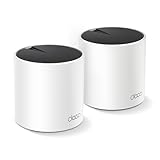


🛒 Best Price Today on Amazon
Prime members get fast, free shipping on everything above, plus member-only deals. New members get a 30-day free trial — cancel anytime.
Best Routers for Home Office at a Glance
| Router / System | Best For | Standout Spec | Approx Price |
|---|---|---|---|
| TP-Link Deco S4 Mesh (AC1900) | Reliable whole-home WFH | Up to 5,500 sq.ft mesh | around $96 |
| TP-Link Archer AX21 (WiFi 6) | Single-office upgrade | WiFi 6, QoS, guest network | around $52 |
| Amazon eero 6 Mesh | Set-and-forget reliability | WiFi 6 mesh, simple app | around $140 |
| TP-Link Deco M5 Mesh | Busy home + security | Up to 5,500 sq.ft, security | around $140 |
| TP-Link Deco X55 (AX3000 Mesh) | WiFi 6 mesh value | WiFi 6 mesh, 2,500 sq.ft | around $70 |
| TP-Link Deco X20 (WiFi 6 Mesh) | Compact WiFi 6 office | WiFi 6 mesh, 2,200 sq.ft | around $70 |
1. TP-Link Deco S4 Mesh AC1900 WiFi System – Up to 5,500 Sq.ft. Coverage

TP-Link Deco S4 Mesh AC1900 WiFi System, Deco S4(3-Pack) | Up to 5,500 Sq.ft. Coverage, Replaces WiFi Router and Extender, Gigabit Ports, Works with Alexa



As an Amazon Associate we earn from qualifying purchases. Product prices and availability are accurate as of the date/time indicated.
The TP-Link Deco S4 is the lead pick for a home office because reliable coverage is the foundation of working from home, and this AC1900 mesh delivers it across up to 5,500 square feet. With seamless roaming between units, your work device keeps a steady signal whether your office is upstairs, in a converted garage or at the back of the house. At around $96 it is a well-rounded WFH foundation.
For a home office, the intent this serves is dependable, whole-home connectivity. The mesh eliminates the dead spots that interrupt cloud apps and calls, the single seamless network means you stay connected as you move between your desk and the kitchen, and the system handles your work traffic alongside the household’s streaming and browsing. If your priority is a reliable signal that reaches your workspace no matter where it sits in the house, the Deco S4 is the obvious starting point for working from home.
Pros: Whole-home mesh up to 5,500 sq.ft, seamless roaming, reliable WFH coverage.
Cons: WiFi 5 class; coverage-focused rather than feature-heavy.
2. TP-Link AX1800 WiFi 6 Router (Archer AX21 V5) – Dual Band Wireless Internet
The TP-Link Archer AX21 is the pick for upgrading a single home office. This AX1800 WiFi 6 router brings modern efficiency, built-in QoS and a guest network to an affordable price, covering a room or single floor with a fast, steady signal. At around $52 it is an excellent-value choice for a dedicated work-from-home space.
This is the router for a home worker whose office sits within range of one strong unit. WiFi 6 keeps performance steady even with the household’s many devices connected, the QoS feature lets you prioritise work traffic like calls and cloud apps over background streaming, and a guest network keeps visitors off your work devices for better security. It is a single router rather than a mesh, so it suits compact homes or a nearby office, but for a feature-rich, affordable WFH upgrade, the Archer AX21 packs in the work-from-home essentials at a great price.
Pros: WiFi 6 performance, QoS for work traffic, guest network, affordable WFH upgrade.
Cons: Single router coverage; best for a room or single floor.
3. Amazon eero 6 mesh wifi system – Supports internet plans up to 500 Mbps

The Amazon eero 6 is the pick for set-and-forget home-office reliability. This WiFi 6 mesh system supports plans up to 500 Mbps and blankets a wide area with eero’s hallmark hands-off dependability. At around $140 it is the easiest way to get steady whole-home coverage that keeps your work running smoothly with no ongoing maintenance.
This is the system for a remote worker who wants their network to simply work and never think about it again. The WiFi 6 mesh keeps connections steady and low-latency across the house, eero automatically manages and updates the network for consistent performance, and the app makes setup and any changes effortless. It favours automatic optimisation over manual controls, but for reliable, low-maintenance coverage that keeps a home office productive day after day, the eero 6 is a polished, dependable choice that takes the admin out of your network.
Pros: WiFi 6 mesh, automatic management and updates, effortless setup, very reliable.
Cons: Higher price; fewer manual controls than enthusiast routers.
4. TP-Link Deco M5 Mesh WiFi System – Up to 5,500 sq. ft. Whole Home Coverage

TP-Link Deco M5 Mesh WiFi System Deco M5 3-Pack | Up to 5,500 sq. ft. Whole Home Coverage and 100+ Devices,WiFi Router/Extender Replacement, Anitivirus


As an Amazon Associate we earn from qualifying purchases. Product prices and availability are accurate as of the date/time indicated.
The TP-Link Deco M5 is the pick for a busy household that needs both coverage and security. This mesh system blankets up to 5,500 square feet, handles a large number of connected devices, and bundles built-in network security features — a real plus when work data shares the same network as the family’s devices. At around $140 it pairs whole-home reach with peace of mind.
This is the system to choose for a home office in a full, device-heavy household. The wide mesh coverage keeps your workspace connected wherever it sits, the system copes with many simultaneous devices so your work traffic is not crowded out, and the integrated security tools help protect against threats on a network that now carries sensitive work activity. For a remote worker who wants reliable coverage plus an extra layer of protection for the whole home, the Deco M5 is a strong, well-rounded pick.
Pros: Whole-home mesh, handles many devices, built-in network security for work data.
Cons: WiFi 5 class; priced at the top of the range here.
5. TP-Link Deco X55 AX3000 WiFi 6 Mesh System – Covers up to 2500 Sq.Ft.

TP-Link Deco X55 AX3000 WiFi 6 Mesh System, Deco X55(1-Pack) | Covers up to 2500 Sq.Ft., Replaces Wireless Router and Extender, 3 Gigabit Ports, Supports Ethernet Backhaul




As an Amazon Associate we earn from qualifying purchases. Product prices and availability are accurate as of the date/time indicated.
The TP-Link Deco X55 is the WiFi 6 mesh value pick for a home office. It combines WiFi 6 efficiency with mesh coverage of up to 2,500 square feet, giving a mid-size home both modern performance and seamless roaming. At around $70 it is one of the most affordable WiFi 6 mesh systems here and a sweet spot for remote work on a budget.
This is the system for a home worker who wants WiFi 6 reliability and true whole-home coverage without overspending. WiFi 6 keeps your work device steady even on a crowded household network, the mesh extends a single seamless network into a home office that sits away from the main room, and the price keeps it accessible. For a mid-size home that values modern standards and dependable coverage for working from home at a fair price, the Deco X55 is a compelling, well-balanced choice.
Pros: WiFi 6 mesh, seamless roaming, steady on busy networks, strong WFH value.
Cons: Coverage tier (2,500 sq.ft) suits small-to-mid homes.
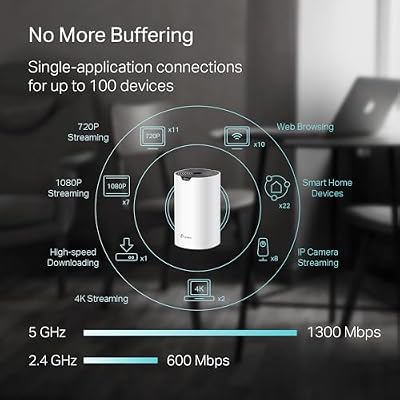
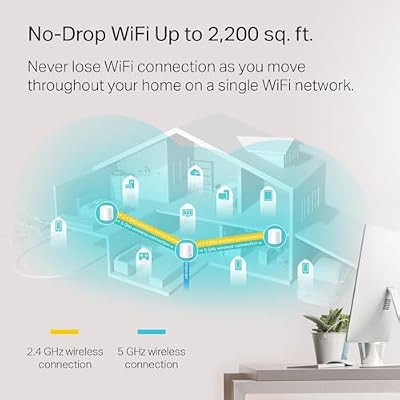
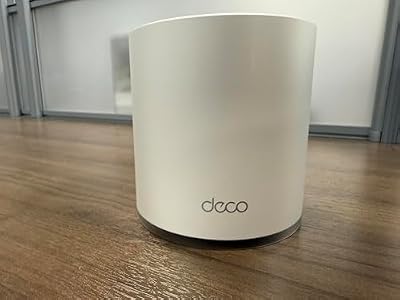
6. TP-Link Deco WiFi 6 Mesh WiFi System (Deco X20) – Covers up to 2200 Sq.Ft

TP-Link Deco WiFi 6 Mesh WiFi System Deco X20(1-Pack) | Covers up to 2200 Sq.Ft, Replaces Wireless Internet Routers and Extenders





As an Amazon Associate we earn from qualifying purchases. Product prices and availability are accurate as of the date/time indicated.
Rounding out the list is the TP-Link Deco X20, the compact WiFi 6 mesh pick for a home office. This mesh system brings WiFi 6 efficiency to coverage of up to 2,200 square feet, delivering steady, low-latency performance for a smaller home or apartment. At around $70 it is an affordable, modern foundation for reliable remote work in a more compact space.
This is the system to choose for a smaller home or flat where you still want WiFi 6 and seamless whole-home coverage. WiFi 6 keeps your work connection steady when phones, TVs and laptops are all online, the mesh design hands your device off smoothly as you move between your office and other rooms, and the compact coverage area is well matched to apartments and smaller houses. As a tidy, affordable WiFi 6 mesh that keeps a home office reliably connected in a more compact footprint, the Deco X20 is a sensible, well-priced pick to close out the list.
Pros: WiFi 6 mesh, seamless roaming, steady performance, ideal for smaller homes.
Cons: Smallest coverage tier here (2,200 sq.ft); best for compact spaces.
How to Choose a Router for a Home Office
For a home office, reliable coverage is the foundation everything else builds on. A dropped signal in the middle of a workday is more than an annoyance — it interrupts calls, stalls cloud apps and costs you time. Match the coverage to your home: a whole-home mesh like the Deco S4, Deco M5, eero 6, Deco X55 or Deco X20 blankets a house with one seamless network and is ideal if your office sits far from the modem, while a strong single router like the Archer AX21 suits a compact home or an office within range of one unit.
Steady, all-day reliability under a mixed load is the next priority, because a home office rarely has the network to itself. While you work, the household is likely streaming, gaming and browsing, and your work traffic has to stay steady through all of it. WiFi 6 systems like the Archer AX21, eero 6, Deco X55 and Deco X20 handle crowded networks more efficiently than older WiFi 5 routers, keeping your connection consistent when many devices are active — exactly what all-day remote work needs.
Work-from-home features can meaningfully improve your day. Quality-of-service controls, like those in the Archer AX21, let you prioritise work traffic such as video calls and cloud apps over background streaming, a guest network keeps visitors’ devices separate from the ones holding your work data, and built-in security — as bundled with the Deco M5 — adds protection on a network that now carries sensitive activity. Decide which of these features matter to your workflow and favour a router that includes them.
Finally, weigh management style and budget against your needs. Some systems, like the eero 6, lean on automatic optimisation and effortless app-based management for a hands-off experience, while others give you more manual control. Consider how much you want to tinker, set a realistic budget — there are capable WiFi 6 mesh options around $70 as well as fuller-featured kits — and prioritise reliable coverage of your workspace above all. Match the coverage, standard and features to how and where you work, and pick the router on this list that keeps your home office productive.
Frequently Asked Questions
What is the most important feature in a home-office router?
Reliable coverage of your workspace comes first, because a dropped signal interrupts calls and stalls work. If your office sits far from the modem, a whole-home mesh like the Deco S4 or Deco X20 is ideal; if it is within range of one unit, a strong single router like the Archer AX21 works well. After coverage, steady performance under a busy household load and WFH features like QoS round out a good home-office router.
Do I need WiFi 6 for working from home?
It is not strictly required, but it helps. WiFi 6 systems like the Archer AX21, eero 6, Deco X55 and Deco X20 handle crowded networks more efficiently than older WiFi 5 routers, keeping your work connection steady while the household streams and browses. If you are upgrading anyway, WiFi 6 is the sensible choice for all-day reliability; an older WiFi 5 mesh like the Deco S4 still works well if coverage is your main concern.
Why does a guest network matter for a home office?
A guest network keeps visitors’ devices on a separate connection from the one holding your work data and devices, which is good practice for security when you handle sensitive information at home. Routers like the Archer AX21 include a guest network as standard. Combined with QoS to prioritise work traffic and built-in security like the Deco M5 offers, it helps keep a work-from-home network both fast and safe.
Should I choose a mesh system or a single router for working from home?
It depends on your home’s size and your office’s location. A mesh like the Deco S4, eero 6 or Deco X20 covers a whole house with one seamless network and is best when your office sits away from the modem or you move between rooms. A single router like the Archer AX21 is more affordable and ideal for a compact home or an office within range of one unit. Match the choice to where you actually work.
Related Guides
- Best Routers
- Best Mesh WiFi Systems
- Best WiFi 6 Routers
- Best Office Chairs for Working From Home
- Best Webcams for Video Calls
- Best WiFi Extenders
Affiliate Disclosure: As an Amazon Associate, we earn from qualifying purchases. If you click a link and make a purchase, we may earn a small commission at no extra cost to you. Prices and availability are accurate as of publication and may change.










