

- Top Pick: ASUS GT-BE19000AI Tri-Band WiFi 7 AI Gaming Router – 10G, AI Game Boost
- Best Value: TP-Link AX1800 WiFi 6 Router (Archer AX21 V5)
- Premium Choice: ASUS RT-AX1800S Dual Band WiFi 6 Extendable Router, Subscription-Free Network Security, Parental Control, Built-in VPN, AiMesh Compatible, Gaming & Streaming, Smart Home
Let us be honest up front: there is no such thing as an ‘AI router.’ A router does not run a model or speed up your prompts. What modern AI workflows genuinely demand from a network is something more practical — plenty of bandwidth for syncing datasets and pulling models, low and consistent latency for cloud notebooks, remote desktops and AI APIs, and the headroom to keep many devices connected without choking. This guide rounds up the best routers for an AI-heavy, cloud-connected setup in 2026, judged on those real qualities rather than marketing buzzwords.
- Best Routers for AI Workflows at a Glance
- 1. TP-Link Deco XE75 AXE5400 Tri-Band WiFi 6E Mesh System
- 2. TP-Link Deco X55 AX3000 WiFi 6 Mesh System
- 3. TP-Link AX1800 WiFi 6 Router (Archer AX21 V5), Dual Band Gigabit
- 4. ASUS AC2900 WiFi Gaming Router (RT-AC86U), Dual Band Gigabit
- 5. TP-Link AC1900 Smart WiFi Router (Archer A8), MU-MIMO Gigabit
- 6. GL.iNet GL-SFT1200 (Opal) Portable WiFi Travel Router, Mini VPN Router
- How to Choose a Router for AI and Cloud Work
- Frequently Asked Questions
- Related Guides
- Related Articles
Our picks were chosen on what actually helps when your day involves cloud AI tools, large downloads and uploads, video calls and a house full of connected devices: WiFi 6 or 6E for efficiency under load, gigabit-class throughput, stable low-latency performance, and good multi-device handling. We have included single routers, whole-home mesh systems and even a pocket travel router, with prices from around $40 to around $113, and we are straight about where each one fits — including the picks that are really gaming or travel routers rather than home-network workhorses. Below is an at-a-glance comparison, then a closer look at each and an honest buyer’s guide built around bandwidth, latency and device count.
As an Amazon Associate we earn from qualifying purchases at no extra cost to you.


🛒 Best Price Today on Amazon
Prime members get fast, free shipping on everything above, plus member-only deals. New members get a 30-day free trial — cancel anytime.
Best Routers for AI Workflows at a Glance
| Router | Best For | Standout Spec | Approx Price |
|---|---|---|---|
| TP-Link Deco XE75 (AXE5400) | Best whole-home for AI work | WiFi 6E tri-band mesh, ~2900 sq ft | around $100 |
| TP-Link Deco X55 (AX3000) | Easy mesh for many devices | WiFi 6 mesh, ~2500 sq ft | around $70 |
| TP-Link Archer AX21 (AX1800) | Value WiFi 6 single router | Dual-band WiFi 6, gigabit | around $52 |
| ASUS RT-AC86U (AC2900) | Low-latency single router | Dual-band, strong QoS | around $113 |
| TP-Link Archer A8 (AC1900) | Budget many-device router | AC1900 MU-MIMO, gigabit | around $50 |
| GL.iNet GL-SFT1200 (Opal) | Travel/remote AI access | Pocket VPN travel router | around $40 |
1. TP-Link Deco XE75 AXE5400 Tri-Band WiFi 6E Mesh System

TP-Link Deco XE75 AXE5400 Tri-Band WiFi 6E Mesh System, 1-Pack | Whole Home WiFi Router Replacement, Covers up to 2900 Sq.Ft, Gaming & Streaming WiFi, 6GHz Band, WPA3, AI-Driven


As an Amazon Associate we earn from qualifying purchases. Product prices and availability are accurate as of the date/time indicated.
The TP-Link Deco XE75 is our top pick for a serious AI-heavy home network, and the reason is its WiFi 6E tri-band mesh design. The extra 6GHz band adds a clean, high-bandwidth lane that newer devices can use for fast, congestion-free transfers, while the mesh nodes blanket up to around 2900 square feet so coverage stays consistent across a home or office. At around $100 it is a capable, modern foundation for a demanding connection.
For AI workflows this is exactly the right kind of router. Pulling large models, syncing datasets to the cloud and keeping cloud notebooks or remote desktops responsive all benefit from the abundant bandwidth and reduced congestion that 6E and tri-band provide, and the mesh keeps latency steady wherever you work rather than dropping in a back room. If your day mixes heavy data transfer, cloud AI tools and a full house of devices, the Deco XE75 is the standout choice on this list.
Pros: WiFi 6E tri-band mesh, abundant bandwidth, wide coverage, strong multi-device handling.
Cons: Pricier than basic routers; 6GHz benefits need 6E-capable devices.
2. TP-Link Deco X55 AX3000 WiFi 6 Mesh System

TP-Link Deco X55 AX3000 WiFi 6 Mesh System, Deco X55(1-Pack) | Covers up to 2500 Sq.Ft., Replaces Wireless Router and Extender, 3 Gigabit Ports, Supports Ethernet Backhaul




As an Amazon Associate we earn from qualifying purchases. Product prices and availability are accurate as of the date/time indicated.
The TP-Link Deco X55 is the easy whole-home mesh pick for busy, device-dense setups. It is a WiFi 6 (AX3000) mesh system covering up to around 2500 square feet, designed to spread fast, stable WiFi across a home and handle the swarm of phones, laptops, smart devices and consoles a modern household runs. At around $70 it is a well-priced step into reliable mesh networking.
For an AI-connected home this matters because consistency under load is what keeps cloud tools and large transfers smooth. WiFi 6 improves efficiency when many devices are active at once, so your dataset upload or cloud session is less likely to stutter because someone else is streaming. The mesh removes dead zones so latency stays steady wherever you sit. If you want dependable, whole-home coverage for plenty of devices without paying for 6E, the Deco X55 is a smart, value-focused choice.
Pros: WiFi 6 mesh, wide coverage, efficient with many devices, great value.
Cons: Dual-band (no 6GHz); raw peak speed below tri-band 6E systems.
3. TP-Link AX1800 WiFi 6 Router (Archer AX21 V5), Dual Band Gigabit
The TP-Link Archer AX21 is the value single-router pick, and one of the most popular WiFi 6 routers around. It is a dual-band AX1800 router with gigabit wired ports that brings the efficiency gains of WiFi 6 to a single, easy-to-set-up unit. At around $52 it is an affordable, sensible upgrade for a small-to-medium home that does not need a full mesh.
For AI and cloud work in a smaller space this is plenty of router. WiFi 6 handles a busy household of devices more gracefully than older standards, the gigabit ports give you a fast wired link for a desktop doing heavy uploads or model downloads, and the dual-band design keeps things simple and stable. It will not cover a large home on its own like a mesh will, but for an apartment or a single-floor setup that wants reliable, low-latency bandwidth on a budget, the Archer AX21 is an easy recommendation.
Pros: Affordable WiFi 6, gigabit wired ports, easy setup, efficient under load.
Cons: Single dual-band unit; coverage and device ceiling below a mesh.
4. ASUS AC2900 WiFi Gaming Router (RT-AC86U), Dual Band Gigabit

ASUS GT-BE19000AI Tri-Band WiFi 7 AI Gaming Router - 10G, Game Boost | Coverage up to 3,500 Sq. Ft., 10G Port x2, 2.5G Port x4. Game Boost for Low Latency Gaming & Streaming. VPN support





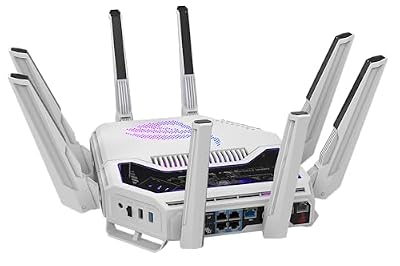

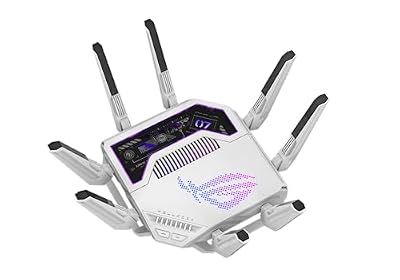


As an Amazon Associate we earn from qualifying purchases. Product prices and availability are accurate as of the date/time indicated.
The ASUS RT-AC86U is included here for one quality AI workflows care about: low, consistent latency. It is marketed as a gaming router — and that is what it is — but the same traits that make it good for gaming, namely strong adaptive QoS, robust dual-band AC2900 performance and capable traffic prioritisation, also help keep cloud notebooks, remote desktops and AI APIs feeling responsive. At around $113 it is the priciest single router here.
To be clear, this is a previous-generation WiFi 5 (AC) router rather than a WiFi 6 model, so it is not the choice if peak modern bandwidth is your goal. Where it shines is stability and latency control: its QoS can prioritise your interactive cloud session over background traffic, keeping ping low when the network is busy. If a rock-steady, low-latency wired-and-wireless experience for interactive AI tools matters more to you than chasing WiFi 6 speeds, the RT-AC86U is a strong, if older, option.
Pros: Strong QoS and latency control, stable AC2900 performance, good for interactive cloud sessions.
Cons: WiFi 5 (not WiFi 6); a gaming router, and the most expensive single unit here.
5. TP-Link AC1900 Smart WiFi Router (Archer A8), MU-MIMO Gigabit

TP-Link AC1900 Smart WiFi Router Dual Band Router for Wireless Internet | High Speed MU-MIMO Wireless Router, Dual Band Router for Wireless Internet, Gigabit, Supports Guest WiFi (Archer A8)


As an Amazon Associate we earn from qualifying purchases. Product prices and availability are accurate as of the date/time indicated.
The TP-Link Archer A8 is the budget many-device pick. It is a dual-band AC1900 router with MU-MIMO and gigabit ports, designed to serve a household of devices reliably without costing much. At around $50 it is an inexpensive way to get steady, gigabit-class wired connectivity and dependable WiFi for a connected home.
Honesty matters here too: this is a WiFi 5 (AC) router, not WiFi 6, so it trails the newer picks on efficiency when the air is crowded. That said, MU-MIMO helps it serve several devices at once, the gigabit ports give a fast wired path for a desktop doing AI downloads or cloud syncs, and AC1900 is plenty of bandwidth for most cloud tools. For a tight budget where you want reliable wired speed and solid multi-device WiFi rather than the latest standard, the Archer A8 is a practical, low-cost choice.
Pros: Very affordable, gigabit wired ports, MU-MIMO for several devices, reliable basics.
Cons: WiFi 5 (AC), not WiFi 6; less efficient than newer routers under heavy load.
6. GL.iNet GL-SFT1200 (Opal) Portable WiFi Travel Router, Mini VPN Router

GL.iNet GL-SFT1200 Opal Travel Router, AC1200 Dual-Band Wi-Fi | AC1200 dual-band Wi-Fi, 3 gigabit ports, OpenWrt with OpenVPN and WireGuard, 30+ VPN services, pocket 145g





As an Amazon Associate we earn from qualifying purchases. Product prices and availability are accurate as of the date/time indicated.
Rounding out the list is the GL.iNet GL-SFT1200 ‘Opal’, and it is a different tool entirely — a pocket-sized travel router, not a home-network workhorse. It is a compact dual-band WiFi router with built-in VPN client support, made to create a small, secure private network from a hotel, cafe or remote location. At around $40 it is the cheapest pick here and the most specialised.
We include it honestly for the AI developer or remote worker who needs secure access to cloud tools and AI APIs while travelling, not for whole-home coverage. The Opal lets you spin up your own protected WiFi over an untrusted connection and route traffic through a VPN, which is genuinely useful for reaching private notebooks, internal services or APIs safely from the road. Just set expectations: it is a low-power travel device with modest range and throughput, ideal as a portable secure-access companion rather than your main router.
Pros: Pocket-sized, built-in VPN client, secure private network on the road, lowest price here.
Cons: A travel router, not a home router: limited range, throughput and device capacity.
How to Choose a Router for AI and Cloud Work
Start by ignoring the phrase ‘AI router’ — it is marketing, not a feature. A router cannot speed up a model or your prompts; what it can do is deliver the bandwidth, low latency and stability that AI and cloud workflows lean on. So shift your attention to the three things that genuinely matter: how much throughput the router provides, how consistently it keeps latency low, and how many devices it can serve at once without bogging down. Judge routers on those real-world qualities and the right pick becomes clear.
Bandwidth and WiFi standard come first for heavy data work. Syncing large datasets, pulling models and uploading to the cloud all reward fast, uncongested connections, which is where WiFi 6 and especially WiFi 6E shine — the Deco XE75’s extra 6GHz band and the Deco X55 and Archer AX21’s WiFi 6 efficiency handle busy networks far better than older WiFi 5 units like the Archer A8 and RT-AC86U. Wherever possible, also use a gigabit wired connection for the machine doing the heaviest transfers — it is the most stable path of all.
Latency and multi-device handling matter most for interactive cloud tools. Cloud notebooks, remote desktops and AI APIs feel responsive only when ping stays low and steady, even while the rest of the house is online. Quality QoS can prioritise your interactive session over background traffic — the ASUS RT-AC86U is built around exactly that — while mesh systems like the Deco models keep latency consistent across a whole home by eliminating dead zones. If many devices share your network, favour WiFi 6 efficiency or a mesh over a single older router.
Finally, match the form factor to your situation and be honest about off-category picks. A whole-home mesh like the Deco XE75 or X55 suits a house full of devices; a single router like the Archer AX21 fits an apartment; a gaming router like the RT-AC86U is really about latency control; and a travel router like the GL.iNet Opal is a portable secure-access tool, not a main router. Decide whether you need coverage, raw bandwidth, latency control or portable security, then pick the router on this list that fits — no buzzwords required.
Frequently Asked Questions
Is there really such a thing as an ‘AI router’?
No. A router does not run AI models or speed up your prompts, so ‘AI router’ is marketing rather than a real feature. What AI and cloud workflows actually need from a network is plenty of bandwidth for big transfers, low and steady latency for cloud tools, and the headroom to keep many devices connected. Judge routers on those qualities — which is exactly how the picks here were chosen.
What router specs matter most for AI development and cloud tools?
Three things: throughput, latency and device handling. WiFi 6 or 6E and gigabit wired ports give the bandwidth for syncing datasets and pulling models; consistent low latency and good QoS keep cloud notebooks, remote desktops and APIs responsive; and efficient multi-device handling (WiFi 6 or a mesh) stops a busy household from disrupting your session. A wired gigabit link for your main machine is the most stable option of all.
Do I need WiFi 6E, or is WiFi 6 enough?
WiFi 6 is plenty for most people — the Deco X55 and Archer AX21 handle busy networks and cloud work well. WiFi 6E, as on the Deco XE75, adds a 6GHz band that gives newer devices a clean, high-bandwidth lane, which helps if you move large amounts of data and own 6E-capable hardware. If your devices are not 6E-ready, the extra band sits unused, so match the router to the gear you actually have.
Can a travel router like the GL.iNet Opal be my main router?
Not really. The GL.iNet Opal is a pocket travel router built to create a small, secure VPN-protected network from hotels or cafes, which is great for reaching cloud tools and APIs safely while travelling. As a home’s main router it falls short on range, throughput and device capacity. Use it as a portable secure-access companion alongside a proper home router or mesh like the Deco systems.
Related Guides
- Best Gaming Routers
- Best Mesh WiFi Systems
- Best WiFi 6 Routers
- Best Network Switches
- Best Powerline Adapters
- Best Budget Gaming Setup
Affiliate Disclosure: As an Amazon Associate, we earn from qualifying purchases. If you click a link and make a purchase, we may earn a small commission at no extra cost to you. Prices and availability are accurate as of publication and may change.













