This is the tier where 16GB of video memory stops being a luxury and becomes the standard. Below this tier, many machines still ship with 8GB graphics cards that fill up fast at 1440p once texture settings climb. Here, every pick carries a full 16GB of video memory, which matters most for how long a machine stays relevant.
The five machines below are compared on the same four questions: video memory headroom, CPU headroom, system memory, and power supply headroom for a future graphics card swap.
As an Amazon Associate, we earn from qualifying purchases.
Quick Answer
Buy a machine with a 16GB graphics card, a Ryzen 7 7800X3D or Core i7-14700F processor, 32GB of DDR5 memory, a 1TB NVMe Gen4 SSD, and a 750W or stronger power supply. The Skytech Azure 3 leads this roundup for longevity thanks to its 850W supply, while the iBUYPOWER Slate is the gaming-first alternative with the same CPU and memory.
Why 16GB of Video Memory Matters Here
Video memory is where games store textures, and modern titles at 1440p use more of it every year. An 8GB card forces texture settings down once a game outgrows it, while a 16GB card keeps high settings available for years. The card name alone is not enough: the RTX 5060 Ti and the RX 9060 XT both ship in 8GB and 16GB versions, so confirm the listing states 16GB and check the current price and offers on the Amazon product page.
Skytech Azure 3: 7800X3D and RX 9060 XT 16GB
This is the longevity pick, thanks to the power supply. An 850W Gold unit leaves real room for a future graphics card swap, the upgrade most buyers eventually make. Around it sits the strongest gaming combination in this tier: a Ryzen 7 7800X3D processor, an RX 9060 XT with a full 16GB of GDDR6 video memory, and 32GB of DDR5 memory. Storage is a 1TB Gen4 NVMe SSD, and a 360mm liquid cooler keeps the processor cool.
The AMD graphics card is the honest trade here: strong raster performance and the full 16GB buffer, with FSR upscaling support, but weaker ray tracing than Nvidia. One conflict to note: the listing title states DDR5 6000 memory, while one product-information field lists 5200 MHz. Confirm the memory speed on the product page before ordering.
Specs
| Component | Detail |
|---|---|
| GPU | AMD Radeon RX 9060 XT, 16GB GDDR6 |
| CPU | AMD Ryzen 7 7800X3D, 8 cores |
| RAM | 32GB DDR5 |
| Storage | 1TB NVMe Gen4 SSD |
| PSU | 850W Gold ATX 3.0 |
| Cooling | 360mm ARGB AIO liquid cooler |

iBUYPOWER Slate SBA7N56T01: 7800X3D and RTX 5060 Ti 16GB

This is the gaming-first pick: the same Ryzen 7 7800X3D processor with an RTX 5060 Ti carrying 16GB of GDDR7 video memory, adding Nvidia ray tracing and DLSS support. Memory is 32GB of DDR5 RGB at 5200 MHz in a two-stick kit, storage is a 1TB NVMe SSD, and a 240mm AW4 liquid cooler handles the processor. A gaming keyboard and mouse are included.
Two things deserve a careful look. First, the listing title states 32GB of DDR5 memory, but one product-information field reads 16GB while another reads 32GB, so confirm the 32GB configuration on the product page. Second, the power supply wattage is not stated in the listing excerpts available. If a future graphics card swap is part of your plan, confirm the power supply on the product page first.
Specs
| Component | Detail |
|---|---|
| GPU | NVIDIA GeForce RTX 5060 Ti, 16GB GDDR7 |
| CPU | AMD Ryzen 7 7800X3D, 8 cores |
| RAM | 32GB DDR5 RGB 5200MHz |
| Storage | 1TB NVMe SSD |
| PSU | Not stated |
| Cooling | 240mm AW4 liquid cooler |
Skytech Shadow 4 ST-SHADOW4-1909-B-AM: 14700F and RTX 5060 Ti 16GB

This is the balanced Intel pick, and its strength is the processor. The Core i7-14700F carries twenty cores, which makes it the best choice here for gaming alongside streaming, editing, or heavy multitasking. The graphics card is an RTX 5060 Ti with 16GB of GDDR7 video memory, memory is 16GB of DDR5 at 5200 MHz, and storage is a 1TB Gen4 NVMe SSD. A 650W Gold power supply and a 360mm liquid cooler round out the build, with four memory slots for a later upgrade.
The 16GB of system memory is the trade against the two picks above: enough for gaming today, but heavy multitaskers should plan a memory upgrade, which the four slots make easy. This configuration was confirmed from the Canadian listing and import mirrors, so check current stock on the Amazon product page before ordering.
Specs
| Component | Detail |
|---|---|
| GPU | NVIDIA GeForce RTX 5060 Ti, 16GB GDDR7 |
| CPU | Intel Core i7-14700F, 20 cores |
| RAM | 16GB DDR5 5200MHz |
| Storage | 1TB Gen4 NVMe SSD |
| PSU | 650W Gold |
| Cooling | 360mm ARGB AIO liquid cooler |
Skytech Shadow 4 ST-SHADOW4-2835-B-AM: 7800X3D and RX 9060 XT 16GB
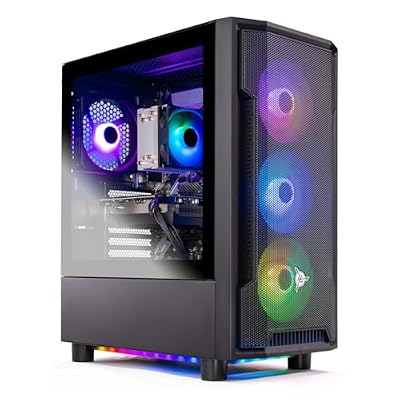
This is the AMD value pick. It carries the same Ryzen 7 7800X3D processor and the same RX 9060 XT with 16GB of video memory as the Azure 3 above, so gaming performance today is in the same class. The difference is the supporting hardware: 16GB of DDR5 memory instead of 32GB, and a 650W Gold power supply instead of 850W. Storage is the same 1TB Gen4 NVMe SSD, with the same 360mm liquid cooler.
If you play games and little else, the smaller memory and power supply cost you nothing today, and you can add memory later. If you multitask heavily or already plan a graphics card swap, the Azure 3 is worth the step up. The power supply wattage here comes from the listing title, so confirm it on the product page along with current stock.
Specs
| Component | Detail |
|---|---|
| GPU | AMD Radeon RX 9060 XT, 16GB GDDR6 |
| CPU | AMD Ryzen 7 7800X3D, 8 cores |
| RAM | 16GB DDR5 5200MHz |
| Storage | 1TB Gen4 NVMe SSD |
| PSU | 650W Gold |
| Cooling | 360mm ARGB AIO liquid cooler |
CyberPowerPC Gamer Xtreme GXiVR8040A17: 14700F and RTX 5060 Ti 16GB

This is the straightforward Intel pick. A Core i7-14700F processor and an RTX 5060 Ti with 16GB of video memory sit beside 16GB of DDR5 memory and a 1TB PCIe 4.0 SSD, a clean combination that covers modern gaming well. The twenty-core processor still leaves room for streaming and everyday multitasking alongside games.
The one thing to check is the power supply, because its wattage is not stated in any listing excerpt available. That matters only if a future graphics card swap is part of your plan. Also take care with the model code: the sibling GXiVR8040A19 carries the 8GB version of the same graphics card, so confirm the listing you order states 16GB of video memory. Check the current price and offers on the Amazon product page before ordering.
Specs
| Component | Detail |
|---|---|
| GPU | NVIDIA GeForce RTX 5060 Ti, 16GB GDDR7 |
| CPU | Intel Core i7-14700F, 20 cores |
| RAM | 16GB DDR5 |
| Storage | 1TB PCIe 4.0 SSD |
| PSU | Not stated |
| Cooling | Air cooling |
When to Move Up or Down a Tier
Moving to the 1600 tier prebuilt guide buys a step up in graphics class, not just memory. That tier moves to RTX 5070 or RX 9070 class graphics plus a 2TB SSD, which means stronger performance at 1440p and double the storage for a large game library. Step up if you want the next graphics tier, the larger drive, or extra headroom at high refresh rates.
Drop to the 1300 tier prebuilt guide if you are comfortable with an 8GB graphics card, or with the same 16GB RX 9060 XT paired with less memory and a smaller power supply. That tier suits lighter titles, everyday use, and buyers who would rather save the difference and upgrade memory later. Stay here if you want 16GB of video memory with real upgrade headroom, and step down only if you will not miss either one.
How to Choose
Start with video memory: it is the one specification you cannot upgrade later. At this tier the floor is 16GB, and the listing must state that figure explicitly. The RTX 5060 Ti and RX 9060 XT both exist in 8GB versions under the same name, so read the listing, not just the card name. Next, balance the processor: the Ryzen 7 7800X3D is the gaming-first choice, while the Core i7-14700F adds cores for streaming and editing.
Then look at memory and storage: 32GB of DDR5 removes the memory question for years, while 16GB is fine for gaming today with an upgrade later. One terabyte is the storage floor here, and a Gen4 NVMe drive keeps load times short. Finally, check the power supply: a 750W or stronger unit leaves room for a future graphics card swap, and if the wattage is not stated, confirm it on the product page.
Who Should Skip It
Skip this tier if you only play light titles or spend most of your time in a browser and everyday applications. A lower tier covers that use well, and the extra video memory here would go unused. Skip it as well if you want maximum settings at 4K, which needs the next graphics tier up. Buyers with a small desk should check the case dimensions first, since all five machines here are full mid-tower systems. If you need a guaranteed power supply wattage, avoid the two picks where it is not stated until you have confirmed it on the product page.
Frequently Asked Questions
Is 16GB of video memory really necessary at this tier?
Yes, if you want the machine to stay relevant. Modern games at 1440p already use more than 8GB of video memory with high texture settings, and that demand grows every year. A 16GB card keeps high settings available for years, while an 8GB card forces settings down sooner.
Should I pick the Ryzen 7 7800X3D or the Core i7-14700F?
Pick the Ryzen 7 7800X3D if gaming comes first, since its large cache is built for game performance. Pick the Core i7-14700F if you also stream, edit video, or run many applications at once, since its twenty cores handle multitasking better.
Is 16GB of system memory enough, or do I need 32GB?
Sixteen gigabytes is enough for gaming today. Thirty-two gigabytes is the better choice if you multitask heavily, keep many browser tabs open while gaming, or want to remove the memory question for years. The 16GB machines here all have room to add memory later.
Can I upgrade the graphics card later?
Yes, as long as the power supply has headroom. A 750W or stronger unit covers most future graphics card swaps, and the Azure 3 with its 850W supply is the roomiest pick here. Check the power supply wattage on the product page, and confirm the case has room for longer cards.
Final Verdict
The Skytech Azure 3 is the pick for buyers who want the longest-lived machine in this tier, thanks to its 850W power supply, 32GB of memory, and full 16GB of video memory. The iBUYPOWER Slate is the gaming-first alternative with the same processor and memory plus Nvidia ray tracing support. The two Shadow 4 machines cover the Intel and AMD value angles, and the CyberPowerPC is the straightforward Intel choice. Whichever you choose, confirm the 16GB video memory figure and the current price and offers on the Amazon product page. To compare with the next tier up, see the 1500 tier guide.