As an Amazon Associate we earn from qualifying purchases.


A prebuilt gaming PC in the top tier is a different purchase from a midrange tower. The goal is a complete system that handles demanding games at high resolution, runs creative work without slowing down, and stays relevant for years without a major rebuild. Every system in this guide pairs a flagship graphics card with a high-end processor, generous memory, and fast storage.
The five systems below cover the two graphics cards that define this class: the GeForce RTX 5090 with 32GB of video memory and the GeForce RTX 5080 with 16GB of video memory. The RTX 5090 systems suit 4K gaming with maximum detail and heavy multitasking, while the RTX 5080 systems still deliver strong high-resolution gaming.
How to Read the Top Tier
Start with the graphics card and its video memory. The RTX 5090 carries 32GB of GDDR7 video memory, giving it room for very high-resolution textures and creative workloads. The RTX 5080 carries 16GB of GDDR7 video memory, which is ample for high-resolution gaming and most creative work. Both support the current generation of rendering features, including ray tracing and AI-assisted upscaling, so the difference is headroom rather than capability.
Next, look at the processor. The systems here use the Intel Core Ultra 9 285K, a 24-core processor, or AMD Ryzen 9 and Ryzen 7 processors from the 9000 series, including the 3D V-Cache models popular for gaming. A high core count helps with streaming and encoding.
Memory comes third. Thirty-two gigabytes of DDR5 is a solid baseline for gaming, while 64GB gives room for streaming, video editing, and heavy multitasking without closing applications. The systems here use DDR5 at 5200MHz or 6000MHz.
Storage comes fourth. Modern games are large, so the systems here start at 2TB and go up to 4TB, all on fast NVMe solid-state drives.
Cooling and the power supply come fifth. Flagship parts produce a lot of heat, so a prebuilt needs cooling that can handle long sessions. Several systems here use 360mm liquid cooling for the processor. The systems that publish a power supply figure use 850W Gold-rated units or larger, including a 1500W unit in the most powerful system in this guide.
Finally, check upgradeability. A standard tower with accessible memory slots, spare storage slots, and a standard power supply is easy to upgrade later. A compact or proprietary design can limit your options.
Comparison Table
| System | CPU | GPU | RAM | SSD | Upgrade Notes |
|---|---|---|---|---|---|
| Alienware Area-51 | Intel Core Ultra 9 285K | RTX 5090 32GB | 64GB DDR5 | 4TB | Large tower, 1500W PSU, room for more storage |
| CyberPowerPC Gamer Supreme | AMD Ryzen 9 9950X | RTX 5090 32GB | 64GB DDR5 | 4TB PCIe 4.0 | Standard tower, memory and storage are the usual first upgrades |
| Skytech King 95 | AMD Ryzen 7 9850X3D | RTX 5080 16GB | 32GB DDR5 6000 | 2TB Gen4 NVMe | Standard tower, 850W Gold PSU, add storage or memory later |
| iBUYPOWER Y40 PRO | AMD Ryzen 9 9900X | RTX 5080 16GB | 32GB DDR5 5200MHz | 2TB NVMe | HYTE Y40 case, 240mm liquid cooling, keyboard and mouse included |
| Skytech O11 Vision | AMD Ryzen 7 9850X3D | RTX 5080 16GB | 64GB DDR5 6000 | 4TB Gen4 NVMe | X870 board, 850W Gold PSU, showcase case with room to grow |
1. Alienware Area-51
The Alienware Area-51 is the flagship of this guide. It pairs the Intel Core Ultra 9 285K processor with the GeForce RTX 5090 graphics card, 64GB of DDR5 memory, and 4TB of solid-state storage. The 1500W power supply and 360mm liquid cooling show that this system is built to sustain heavy loads without compromise.
Choose this system when you want the strongest graphics card available and do not want to think about upgrades for a long time. The RTX 5090 handles the most demanding games at high resolution, and the 64GB of memory and 4TB of storage cover streaming, editing, and a large game library. Confirm the exact configuration, seller, and warranty terms on the listing before ordering.
Specs
- CPU: Intel Core Ultra 9 285K, 24 cores; GPU: NVIDIA GeForce RTX 5090, 32GB GDDR7; RAM: 64GB DDR5 XMP; Storage: 4TB SSD; Cooling: 360mm liquid cooling; PSU: 1500W; Connectivity: Wi-Fi 7, Ethernet; OS: Windows 11 Home; Case: tempered glass door tower; ASIN: B0G577CQQY
2. CyberPowerPC Gamer Supreme
The CyberPowerPC Gamer Supreme pairs the AMD Ryzen 9 9950X processor with the GeForce RTX 5090 graphics card, 64GB of DDR5 memory, and a 4TB PCIe 4.0 solid-state drive. It is a straightforward flagship configuration for gaming, streaming, and content creation at the same time.
The Ryzen 9 9950X is a strong choice for buyers who do more than game. Its high core count helps with video encoding, rendering, and multitasking, while the RTX 5090 handles the graphics side of any workload. Built in a standard tower, it is easy to upgrade later. The system is Wi-Fi ready and ships with Windows 11 Home. Confirm the cooling setup and power supply on the listing before ordering.
Specs
- CPU: AMD Ryzen 9 9950X; GPU: NVIDIA GeForce RTX 5090, 32GB; RAM: 64GB DDR5; Storage: 4TB PCIe 4.0 SSD; Connectivity: Wi-Fi ready; OS: Windows 11 Home; Model: SLCAI5000A3; ASIN: B0DXVH7NZM
3. Skytech King 95

The Skytech King 95 is the gaming-first pick in this guide. It pairs the AMD Ryzen 7 9850X3D processor with the GeForce RTX 5080 graphics card, 32GB of DDR5 6000 memory, and a 2TB Gen4 NVMe solid-state drive. The 9850X3D is a 3D V-Cache processor built for gaming, with a base clock of 4.7GHz and a boost clock of up to 5.6GHz, and the RTX 5080 with 16GB of GDDR7 video memory is a strong match for high-resolution gaming.
The King 95 uses a 360mm ARGB liquid cooler for the processor and an 850W Gold ATX 3 power supply. This system suits a buyer who wants flagship gaming performance and is comfortable adding storage or memory later. Plan for a storage addition if your library is large. One detail from the listing is worth noting: the graphics card brand may vary, which is common for prebuilt systems that source cards from more than one board partner. The model and memory capacity are as listed, but the exact card brand is not guaranteed.
Specs
- CPU: AMD Ryzen 7 9850X3D, 4.7GHz, up to 5.6GHz boost; GPU: NVIDIA GeForce RTX 5080, 16GB GDDR7, brand may vary; RAM: 32GB DDR5 6000; Storage: 2TB Gen4 NVMe SSD; Cooling: 360mm ARGB AIO liquid cooler; PSU: 850W Gold ATX 3; Connectivity: Wi-Fi 5; OS: Windows 11; ASIN: B0GPWNQN9H
4. iBUYPOWER Y40 PRO
The iBUYPOWER Y40 PRO pairs the AMD Ryzen 9 9900X processor with the GeForce RTX 5080 graphics card, 32GB of DDR5 RGB memory at 5200MHz, and a 2TB NVMe solid-state drive. It is built in the HYTE Y40 PRO case, a distinctive tower with a panoramic glass design, and it uses a 240mm liquid CPU cooler.
The Ryzen 9 9900X gives this system more processor headroom than a gaming-only build, which helps when you stream or run creative applications. It includes a keyboard and mouse. The HYTE Y40 case is the defining feature here: a showcase-style case that displays the components behind glass. Before ordering, confirm the power supply and the warranty terms on the listing, since the listing excerpt does not describe the power supply in detail.
Specs
- CPU: AMD Ryzen 9 9900X; GPU: NVIDIA GeForce RTX 5080, 16GB; RAM: 32GB DDR5 RGB 5200MHz; Storage: 2TB NVMe SSD; Cooling: 240mm liquid CPU cooler; Case: HYTE Y40 PRO Black; Included: keyboard and mouse; OS: Windows 11 Home; Model: Y40BA9N5801; ASIN: B0DTP3XPYV
5. Skytech O11 Vision
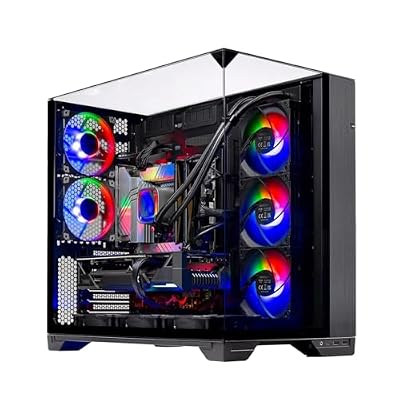
The Skytech O11 Vision takes a different approach from the King 95. It uses the same Ryzen 7 9850X3D processor and RTX 5080 graphics card, but it doubles the memory to 64GB of DDR5 6000 and doubles the storage to a 4TB Gen4 NVMe drive. It is built on an X870 board in a Lian Li O11 Vision case, with a 360mm ARGB liquid cooler, an 850W Gold ATX 3 power supply, Wi-Fi 7, and Windows 11.
Choose this system for the gaming performance of the 9850X3D and RTX 5080 combination with no compromises on memory or storage. The 64GB of memory is ample for streaming, editing, and heavy multitasking, and the 4TB drive holds a large library without management. As with the King 95, the listing notes that the graphics card brand may vary. The card model and memory capacity are as listed, but the exact board partner is not guaranteed, so confirm the current listing details before ordering.
Specs
- CPU: AMD Ryzen 7 9850X3D, 4.7GHz, up to 5.6GHz boost; GPU: NVIDIA GeForce RTX 5080, 16GB GDDR7, brand may vary; RAM: 64GB DDR5 6000; Storage: 4TB Gen4 NVMe SSD; Motherboard: X870; Cooling: 360mm ARGB AIO liquid cooler; PSU: 850W Gold ATX 3; Connectivity: Wi-Fi 7; OS: Windows 11; ASIN: B0GPX4LQKM
Choosing Between the Five
The choice starts with the graphics card. For the strongest graphics card and the most headroom, choose one of the two RTX 5090 systems: the Alienware Area-51 or the CyberPowerPC Gamer Supreme. The Area-51 is the more complete package, with the largest power supply and the most powerful cooling setup, while the Gamer Supreme offers a similar core configuration in a standard tower.
For flagship gaming performance with a 3D V-Cache processor, choose one of the two Skytech systems. The King 95 is the lighter configuration, with 32GB of memory and a 2TB drive, and it suits a buyer who is comfortable adding storage later. The O11 Vision is the fuller configuration, with 64GB of memory and a 4TB drive, and it suits a buyer who wants everything in place on day one.
The iBUYPOWER Y40 PRO sits between those two groups. It pairs a high core-count Ryzen 9 processor with the RTX 5080, which makes it a good choice for a buyer who streams or creates content as well as games. The HYTE Y40 case is the most distinctive enclosure in this guide.
For a wider look at systems in this tier, see our best prebuilt gaming PC 5000 dollar and up guide for more context on what this tier includes.
Setup and Upgrade Checklist
Once the system arrives, update Windows and install the latest graphics driver from the card manufacturer. Check that the memory and storage shown in the system settings match the listing.
For upgrades, start with storage. A second NVMe drive is the most common first addition, and it is also the easiest. Memory is the next step: moving from 32GB to 64GB helps with streaming and creative work, and it is a straightforward change in a standard tower. A graphics card upgrade is a longer-term option, and it is worth checking the power supply headroom and the case dimensions before planning one.
Warranty and support are worth a look before you order. Check the length of the parts and labour coverage, whether support is provided by the manufacturer or the seller, and what the return window is. Keep the box, packing, and a copy of the listing and order confirmation.
Frequently Asked Questions
Is a prebuilt in this tier enough for 4K gaming and streaming at the same time?
Yes, in general terms. A system with an RTX 5090 or RTX 5080 graphics card, a high-end processor, and 64GB of memory has the headroom to run a demanding game at high resolution while encoding a stream. The 64GB configurations are the safer choice when streaming is regular.
Should I choose 32GB or 64GB of memory for a flagship prebuilt?
Choose 64GB when you stream, edit video, or run several demanding applications at once. Choose 32GB when gaming is the main use and you are comfortable adding memory later. Memory is one of the easiest components to add later.
What should I check on the listing before ordering a high-end prebuilt?
Check the exact processor, graphics card, memory, storage, cooling setup, power supply, operating system, and warranty terms. Confirm the seller and the return window as well. The listing is the authoritative source for the configuration you will receive.
Can I upgrade the storage or memory in these systems later?
Yes, in most cases. The standard towers here have room for additional memory and storage, the most common first upgrades. Confirm the number of spare slots and the supported memory capacity on the listing or the manufacturer page before buying parts.
Conclusion
The Alienware Area-51 and CyberPowerPC Gamer Supreme offer the strongest graphics card here, the Skytech King 95 and O11 Vision offer gaming-first performance with a 3D V-Cache processor, and the iBUYPOWER Y40 PRO balances a high core-count processor with a distinctive case. Compare the table, check the listing details, and choose the configuration that matches your games and workload.