

A gaming mouse with side buttons changes how you play the moment your thumb takes over work your keyboard used to do. In an MMO, that means abilities, potions, and mounts sitting under one thumb instead of spread across number keys you have to look down to find. In a shooter, it means push-to-talk, melee, and weapon swaps without lifting a finger off movement keys. The real decision is not whether side buttons help, but how many you need, where they sit, and whether your thumb can tell them apart in the middle of a fight.


This guide is for MMO and MOBA players who want a full thumb grid, shooter players who want a few well-placed thumb buttons, and anyone who wants one mouse to cover both gaming and daily shortcuts. Every mouse below was chosen from its Amazon listing title and specifications, with attention to button count, sensor, weight, and connection type, so you can match the hardware to the way you actually play.
Quick Picks
As an Amazon Associate we earn from qualifying purchases.
| Product | Best for | Key spec from title |
|---|---|---|
| Logitech G502 HERO | Shooters and all-round play with a few thumb buttons | HERO 25K sensor, 25,600 DPI, 11 buttons |
| Razer Basilisk V3 | Ergonomic comfort with a tilt scroll wheel | Focus+ 26K DPI optical sensor, 11 programmable buttons |
| Corsair Scimitar RGB Elite | MMO and MOBA players who want a full 12-button side grid | 18,000 DPI, 17 programmable buttons, Key Slider |
| Razer Naga V2 Pro | Players who want swappable side plates for any genre | Focus Pro 30K sensor, 19+1 programmable buttons |
How to Choose
Count the side buttons you will actually use
A mouse with two thumb buttons covers push-to-talk, melee, and a couple of shortcuts, and it keeps the side clean enough that you never press the wrong one by accident. A 12-button thumb grid suits MMO rotations, where a full bar of abilities needs to live under your thumb, but it demands a week or two of practice before the layout feels natural. Count the abilities you cast constantly in your main game, then add two or three for mounts, potions, and menus. If that number is under six, a smaller layout will serve you better than a grid you only half use.
Check the layout and spacing of the thumb cluster
Button count means little if your thumb cannot find the right key without looking. A staggered grid with raised edges between rows lets you feel your position, while flat, tightly packed buttons blur together during fast play. Mice with a sliding side panel, like the Corsair Scimitar RGB Elite, let you shift the whole cluster forward or back to match your thumb length, which matters more than most buyers expect. Before settling on a model, look at the side profile in the listing photos and imagine your thumb resting there for a three-hour session.
Match the sensor and weight to your games
High-DPI sensors matter most when you play at low sensitivity and make large arm movements, because a sensor that tracks cleanly at speed keeps your aim consistent through fast flicks. Weight matters just as much: a 120-gram mouse feels planted and steady for MMO play and sniping, while a lighter body suits players who lift and reposition constantly in fast shooters. Neither choice is wrong on its own. Pick the sensor range and weight that fit your main genre, and remember that a mouse with a tuning weight system lets you adjust the balance after you buy it.
Confirm the software and connection fit your setup
Programmable side buttons are only useful if the software lets you assign macros, remap keys, and save profiles without a fight. Check whether the mouse stores profiles on board, so your bindings travel with the mouse to another computer, and whether the software runs on your operating system. Wired mice remove battery worries and keep latency low, while wireless models need a charging routine you will actually follow. If you play on a console as well as a PC, confirm the listing names your platform, since not every gaming mouse supports console play.
The 4 Best Options
Logitech G502 HERO
The G502 HERO suits players who want a strong all-round mouse with enough side buttons for shooters and everyday shortcuts, without committing to a full MMO grid. Eleven programmable buttons cover push-to-talk, weapon swaps, and ability keys, while the dual-mode scroll wheel switches between precise notches and free spinning for long documents and inventory lists. Five removable weights let you tune the balance, and on-board memory keeps your profiles on the mouse itself. Its right-handed ergonomic shape fits palm and claw grips, and the HERO 25K sensor tracks cleanly across its full sensitivity range.
Specs
- Sensor: HERO 25K optical sensor, up to 25,600 DPI
- Buttons: 11 programmable buttons
- Scroll wheel: Dual-mode hyper-fast scroll wheel with tilt
- Weight: 121 grams, plus five removable 3.6-gram weights
- Memory: On-board memory for up to five profiles
- Connection: Wired USB
- Lighting: Customizable RGB lighting
Best for: Shooter and all-round players who want several thumb buttons and adjustable weight.
Watch out for: The 121-gram body feels heavy for flick-heavy play, and the right-handed shape does not suit left-handed players.
Razer Basilisk V3
The Basilisk V3 fits players who spend long sessions in-game and want thumb buttons that stay comfortable hour after hour. Its right-handed ergonomic body includes a thumb rest that supports the hand, and the HyperScroll tilt wheel adds sideways scrolling alongside the usual notched and free-spin modes. Eleven programmable buttons give you room for push-to-talk, pings, and ability keys, while the Focus+ optical sensor reaches 26,000 DPI. Eleven Chroma RGB zones light up the body, and the second-generation optical switches are built for fast, consistent clicks.
Specs
- Sensor: Razer Focus+ optical sensor, up to 26,000 DPI
- Buttons: 11 programmable buttons
- Scroll wheel: HyperScroll tilt wheel with tactile, free-spin, and Smart-Reel modes
- Switches: Razer Optical Mouse Switches Gen-2
- Lighting: 11 Chroma RGB lighting zones
- Weight: 101 grams
- Connection: Wired USB
Best for: Players who want an ergonomic mouse with a versatile tilt scroll wheel and a modest thumb cluster.
Watch out for: It is wired only, so players who want a cable-free desk should look at a wireless model instead.
Corsair Scimitar RGB Elite
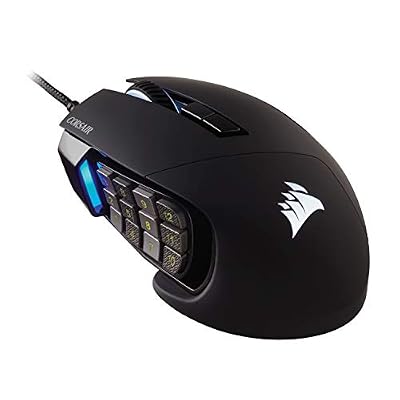
The Scimitar RGB Elite is built for MMO and MOBA players who want a full side grid without guessing where each button sits. Twelve mechanical side buttons form a thumb keypad, and the patented Key Slider system lets you slide the whole panel forward or back by eight millimetres to match your grip. Seventeen programmable buttons in total give you room for a full ability bar plus macros, and the PixArt PMW3391 sensor reaches 18,000 DPI with adjustment in single-DPI steps. Omron switches rated for 50 million clicks sit under the main buttons, and iCUE software handles macros, lighting, and profiles.
Specs
- Sensor: Custom PixArt PMW3391 optical sensor, up to 18,000 DPI
- Buttons: 17 programmable buttons, including 12 side buttons
- Side panel: Patented Key Slider control system repositions the 12 side buttons
- Switches: Omron switches rated for 50 million clicks
- Weight: 122 grams
- Connection: Wired USB with braided cable
- Software: CORSAIR iCUE for macros, RGB lighting, and profiles
Best for: MMO and MOBA players who want a full 12-button thumb grid they can slide to fit their hand.
Watch out for: The wide body and dense side grid take a week or two to learn, and the mouse is wired only.
Razer Naga V2 Pro

The Naga V2 Pro suits players who switch genres and want the side layout to switch with them. Three magnetic side plates swap in seconds: a two-button plate for shooters, a six-button plate for a lighter MMO setup, and a twelve-button plate for a full ability bar. That adds up to 22 programmable controls with the twelve-button plate fitted, and the HyperScroll Pro wheel switches between tactile, free-spin, and smart modes. The Focus Pro 30K optical sensor tracks at high sensitivity, and tri-mode connectivity covers HyperSpeed wireless, Bluetooth, and wired play, with up to 300 hours of battery life on Bluetooth.
Specs
- Sensor: Razer Focus Pro 30K optical sensor
- Buttons: 19+1 programmable buttons, up to 22 programmable controls with the 12-button plate
- Side plates: Three swappable magnetic plates with 2, 6, and 12 button layouts
- Scroll wheel: HyperScroll Pro wheel with multiple scroll modes
- Switches: Razer Optical Mouse Switches Gen-3
- Connectivity: Razer HyperSpeed Wireless, Bluetooth, and wired USB-C
- Battery: Up to 300 hours on Bluetooth
Best for: Players who play several genres and want one mouse whose side layout adapts to each of them.
Watch out for: The side plates need somewhere safe to live when swapped out, and the full twelve-button plate has a learning curve like any thumb grid.
Which One Fits Your Situation
You mainly play MMOs or MOBAs
Pick the Corsair Scimitar RGB Elite if your rotation fills a full action bar, since its twelve-button grid and sliding panel keep every ability under your thumb. If you also play shooters on the side, the Razer Naga V2 Pro with its swappable plates covers both worlds, letting you fit the twelve-button plate for raids and the two-button plate for aim-heavy nights.
You mainly play shooters and want a few extra buttons
Choose the Logitech G502 HERO or the Razer Basilisk V3. The G502 HERO gives you eleven programmable buttons plus adjustable weights, which suits players who like a planted, steady feel. The Basilisk V3 trades the weight tuning for a thumb rest and a tilt scroll wheel, which suits longer sessions where comfort matters more than heft.
You want one mouse for gaming and daily work
The Razer Basilisk V3 is the strongest fit here, because its tilt wheel handles sideways scrolling in spreadsheets and timelines, and its programmable buttons map neatly to copy, paste, and app shortcuts. The G502 HERO is a close second, with its free-spinning wheel and on-board profiles carrying your setup between computers.
You want wireless freedom with side buttons
Take the Razer Naga V2 Pro, the only wireless pick in this guide. Its HyperSpeed wireless connection keeps latency low for competitive play, Bluetooth stretches battery life for travel, and the wired mode covers you while it charges. Keep the charging cable within reach so a dead battery never ends a session early.
Common Mistakes
- Buying a twelve-button grid for a game that only needs four bindings, then pressing the wrong ability in every fight while you learn the layout.
- Ignoring hand size and grip style, so a wide MMO mouse strains your thumb or a small mouse cramps your palm during long sessions.
- Leaving the side buttons on their default bindings and never opening the software to map the commands you actually use.
- Choosing a mouse by its maximum DPI number instead of checking the sensor, weight, and button layout that decide how it feels in play.
- Forgetting to check whether the mouse stores profiles on board, then losing your bindings when you plug it into another computer.
Frequently Asked Questions
How many side buttons do I need for MMO games?
Most MMO players use between eight and twelve side buttons, enough for a core rotation plus potions and mounts. A twelve-button grid covers a full action bar, while a six-button cluster suits players who keep their most-used abilities on the mouse and the rest on the keyboard. Count the abilities you cast every few seconds in your main game, and let that number decide the layout.
Are gaming mice with side buttons good for shooters?
Yes, as long as the layout stays simple. Two to six thumb buttons work well for push-to-talk, melee, weapon swaps, and ability keys, because your thumb can find them without looking. A full twelve-button grid can slow you down in a fast shooter, since the buttons sit close together and a wrong press costs a duel.
Can I program the side buttons for work as well as games?
Yes. The software bundled with these mice lets you assign keyboard shortcuts, macros, and media controls to any side button, and on-board memory keeps those bindings on the mouse. Many players map copy, paste, undo, and browser navigation to thumb buttons, which speeds up daily work as much as it speeds up gaming.
Do wireless gaming mice with side buttons lag behind wired ones?
Modern wireless gaming mice use low-latency wireless connections that feel the same as wired play for most players, and the Razer Naga V2 Pro in this guide includes a wired mode as well. Battery life matters more than latency: check the rated hours for your connection type, and keep the charging cable handy so the mouse never dies mid-match.

















