

- Top Pick: Anker 737 Power Bank (PowerCore 24K)
- Runner-up: tomtoc Carrying Case for Steam Deck
- Also consider: JSAUX 6-in-1 Docking Station (HB0603)
The Steam Deck is the rare gaming PC that genuinely leaves the house well. SteamOS sleeps and wakes like a console, the whole library rides in one bag, and a long flight turns into play time. But travel punishes the unprepared: a half-finished download, a battery that fades over the ocean, or a hotel TV that never shows a picture can end the fun before it starts.
This guide is the road playbook: the preparation, power, sleep, docking, and protection habits that make a Deck boring in the best possible way. It deliberately leaves two topics to its companion guides. The docked-mode guide covers the permanent desk and TV setup at home, and the battery-health guide covers long-term charge limits and cell care. Here, everything is about the trip itself.
As an Amazon Associate, we earn from qualifying purchases.
Quick answer
A good Steam Deck travel setup is built the night before: finish every download, launch each game once, switch on offline mode to prove it works, then pack a high-capacity power bank, a hard case, and a compact dock. Cap frame rates, lean on sleep instead of shutdowns, and your Deck plays through flights, commutes, and hotel nights without surprises.
The night before: downloads and the offline check
Travel prep starts at home, on your own fast connection. Open the Downloads page and let every game and update finish completely, including shader pre-caching, because a Deck that wants a multi-gigabyte patch at the gate is a Deck that does not play on the plane. If storage is tight, this is also the moment to move rarely played titles to a microSD card rather than deleting them.
Next, launch each game you plan to play at least once while still online. Some titles check in with a launcher or licence server on first start, and a few need one clean online launch before they will run happily without a connection. Then turn on Offline Mode in the Internet settings and launch the games again. This two-minute rehearsal is the whole secret: any title that complains will complain now, while you can still fix it, rather than at cruising altitude.
Finally, pause the habits that assume a connection. Cloud saves will queue quietly and sync when you are back online, but automatic updates, friend activity, and store browsing all stop mattering until the trip ends. Charge the Deck fully the night before, and charge the power bank too.
Power strategy: carry watt-hours, not hope
Valve publishes the figures that matter, and they set honest expectations. The original LCD model carries a 40 Wh battery that Valve rates for roughly two to eight hours of gameplay, while the OLED model carries a 50 Wh battery rated for roughly three to twelve hours. Light indie games live near the top of those ranges; heavy AAA titles live near the bottom.
Build your plan around the low end. A high-capacity power bank in the 24,000 mAh class stores enough energy for about one full recharge of the Deck plus a useful top-up, after conversion losses. That turns a demanding game from a one-flight ration into an all-day supply, and it covers the phone as well. The bank must travel in your cabin bag, not checked luggage, under standard airline rules for lithium batteries, and a bank of this size sits within the usual carry-on capacity limits.
In-game settings are the other half of the strategy. A frame-rate cap of 30 or 40 frames per second, a modest TDP limit set per game, and one notch less screen brightness stretch a charge further than any accessory can. Save those settings as per-game profiles so the travel tuning never touches your home setup. At the hotel, a compact multi-port wall charger refills the Deck and the bank overnight from a single outlet.
Sleep and resume habits that survive a commute
SteamOS’s best travel feature is its sleep. A short press of the power button suspends the game in seconds, and another press puts you back exactly where you stood, which makes the Deck ideal for journeys measured in stops rather than hours. Use sleep for commutes, queues, and boarding calls; it is the correct default almost all the time.
Two habits keep sleep reliable. First, let a suspended game sit for a few seconds before the Deck goes into a bag, so a stray stick press does not wake it against fabric. Second, if the Deck will sit unused for several days, shut it down fully instead; sleep draws a small amount of power, and a forgotten Deck can greet you empty a week later. For storage measured in weeks, Valve provides a battery storage mode in the BIOS that parks the pack at a healthier charge level.
On travel days, wake the Deck once before leaving Wi-Fi behind, confirm the game is running, then sleep it again.
The hotel dock setup
A compact dock turns a hotel TV into the evening’s big screen, and it weighs less than the charger you already carry. The routine is simple: dock the Deck, connect HDMI to the TV, switch the TV to that input, and pair a controller you already own over Bluetooth. SteamOS handles the display switch, and most hotel TVs accept the signal without any settings fight.
Keep expectations matched to the hardware. The Deck’s screen is 1280 by 800, and it is happiest driving a TV at 1080p for demanding games; lighter titles can go higher. Wired Ethernet on the dock is a genuine bonus in hotels, where it can rescue a game download from congested Wi-Fi, though some properties gate their wired ports. If the TV’s USB ports are the only power nearby, ignore them and use your own wall charger, because TV ports rarely feed a dock properly.
Pack the dock only when the trip includes evenings in one place. For pure commuting, it is dead weight, and the Deck’s own screen is the whole point.
Protecting the Deck and the data on it
The Deck’s most fragile parts are its sticks and screen, and both suffer in bags. A hard-shell case that holds the sticks uncompressed is the single most valuable travel accessory; soft sleeves protect against scratches but not against a bag dropped on a platform. Keep the case zipped whenever the Deck is not in your hands, and never let it ride loose against keys, chargers, or a metal water bottle.
Data deserves the same care. Your saves are the irreplaceable cargo: cloud saves protect anything synced before you left, but offline progress made on the road exists only on the device until you reconnect. Reconnect at the hotel each evening, even briefly, so the day’s progress syncs before the Deck spends another day in transit. A device PIN or lock screen is worth setting before any trip, since a Deck holds a signed-in Steam account, and Desktop Mode files ride along too. Finally, a fast, large microSD card doubles as overflow storage, keeping the internal drive free for the titles that matter most.
How to choose
Match the kit to the trip length. For a daily commute, the Deck, its case, and a frame-rate cap are the entire setup; add nothing you would resent carrying twice a day. For a flight or a weekend away, add the high-capacity power bank and the large microSD card, because power and storage are the two limits a short trip actually hits. For a hotel stay of several nights, add the compact dock and the multi-port wall charger, which together rebuild your home setup on a nightstand. Buy capacity and protection before convenience: a bigger bank and a harder case solve problems mid-journey, while extra cables and stands mostly solve problems you could have left at home.
Who should skip this
Skip the full kit if your Deck never leaves one room, because the home docked setup already does this job better. Skip the power bank if your journeys are under an hour, since the internal battery covers them comfortably. And skip the travel dock if you dislike playing on hotel TVs; the money serves you better as storage.
The travel kit
Anker 737 Power Bank (PowerCore 24K)

The anchor of the kit: enough stored energy for a full Deck recharge plus a top-up, with a display that shows exactly what is left.
Specs:
– Capacity: 24,000 mAh
– Output: up to 140W two-way charging, USB PD 3.1
– Ports: 2 USB-C, 1 USB-A
– Display: smart digital status screen
– Model: A1289
– In the box: 140W USB-C cable, travel pouch
tomtoc Carrying Case for Steam Deck
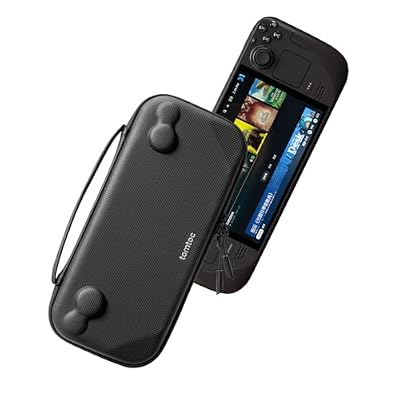
A slim hard-shell case shaped for the Deck, so the sticks travel uncompressed and the screen never meets the contents of your bag.
Specs:
– Fit: Steam Deck and Steam Deck OLED
– Shell: hard protective exterior
– Design: slim profile for daily carry
– Closure: zipper
– Colour: Black
JSAUX 6-in-1 Docking Station (HB0603)

The hotel half of the setup: one small dock that adds TV output, wired networking, and controller ports while charging the Deck.
Specs:
– Video: HDMI output up to 4K at 60 Hz
– Network: Gigabit Ethernet
– USB: 3 USB-A 3.0 ports
– Charging: USB-C PD input up to 100W
– Model: HB0603
SanDisk 1TB Extreme microSDXC Card
Fast overflow storage for the games that would otherwise fight over the internal drive, with A2 app performance for shorter load times.
Specs:
– Capacity: 1TB
– Rating: UHS-I, U3, V30, A2
– Read speed: up to 190 MB/s
– Write speed: up to 130 MB/s
– Model: SDSQXAV-1T00-GN6MA
– Included: full-size SD adapter
Anker 735 Charger (GaNPrime 65W)
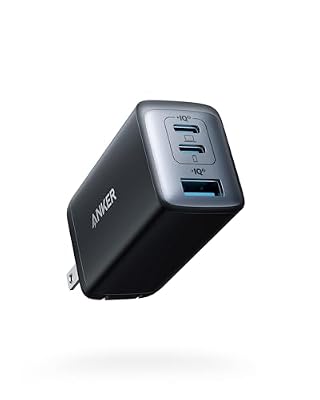
One small wall charger that refills the Deck and the power bank overnight, with folding prongs that survive life in a bag.
Specs:
– Output: 65W maximum
– Ports: 2 USB-C, 1 USB-A
– Technology: GaNPrime, foldable prongs
– Input: 100 to 240V for hotel outlets worldwide
– Model: A2668
FAQ
Can I use a Steam Deck on a plane?
Yes. The Deck is a handheld console, and offline mode exists for exactly this. Keep the Deck and any power bank in your cabin baggage, finish downloads before leaving, and switch on airplane-friendly settings once aboard.
How many Deck charges does a big power bank give?
Think in watt-hours rather than headline capacity. The LCD Deck holds 40 Wh and the OLED 50 Wh, and a 24,000 mAh class bank carries roughly enough for one full recharge plus a solid top-up once conversion losses are counted.
Sleep or shut down while travelling?
Sleep for anything measured in hours, because resume is nearly instant and the draw is small. Shut down fully if the Deck will sit for several days, and use the BIOS battery storage mode for longer parking.
Do cloud saves work offline?
They queue on the device and sync the next time the Deck connects. Play normally, but reconnect before switching to another machine, or Steam may ask which version of a save to keep.
Final verdict
A Steam Deck travel setup is mostly discipline, lightly accessorised: finish the downloads, prove offline mode works, cap the frame rate, and protect the sticks. Add a serious power bank for flights, a dock for hotel nights, and storage for the library, and the Deck becomes the most reliable travel console you own, because it was a Linux PC all along.










