As an Amazon Associate we earn from qualifying purchases.


The Ryzen 7 9700X is an 8-core, 16-thread Zen 5 processor with a boost clock up to 5.5 GHz and a 65W TDP, and it runs on the AM5 socket, which takes DDR5 memory only. There is no DDR4 fallback on this platform, so the memory kit you pick is a decision you make once and live with for the life of the build. AMD lists DDR5-5600 as the officially supported speed for Ryzen 9000, and independent testing has repeatedly found that a 32GB DDR5-6000 kit with tight CL30 timings is the practical sweet spot for this processor. How-To Geek, summarizing testing by TechPowerUp, notes that DDR5-6000 memory with tight timings remains the sweet spot for Zen 5 CPUs, and Hardware Unboxed reached a similar conclusion. This guide covers the five DDR5 kits sold on Amazon US that fit a Ryzen 7 9700X build.
How the Ryzen 7 9700X Handles DDR5 Memory
The memory controller inside the Ryzen 7 9700X runs most efficiently when its clock matches the memory clock in a 1 to 1 ratio. A DDR5-6000 kit has a real memory clock of 3000 MHz, and that speed sits close to the range where the controller and the Infinity Fabric can keep pace without falling back to a divided mode. Fit a much faster kit and the controller drops to half the memory clock to keep up, which adds delay to every memory request and cancels out much of the extra speed. That is why DDR5-6000 has become the consensus target for AM5 gaming builds rather than the fastest kit on the shelf.
Two sticks are the safer configuration. AMD lists DDR5-5600 as the official speed with two sticks and DDR5-3600 with four sticks on Ryzen 9000, so a four-stick setup usually forces a slower speed or needs manual tuning. A 2x16GB kit fills both memory channels, gives the processor its full dual-channel bandwidth. Every kit in this guide is 2x16GB, and every one carries an AMD EXPO profile, the one-setting BIOS option that applies the rated speed and timings. Without EXPO enabled, a DDR5-6000 kit boots at its slower JEDEC speed, so enabling the profile is part of the installation. Before buying, update the motherboard BIOS and check its memory support list for the exact kit model number.
What to Look For in a DDR5 Kit for the 9700X
Capacity comes first. A 32GB kit is the right size for a gaming build in 2026: 16GB is enough for many current games on its own, but 32GB leaves room for a browser, voice chat, streaming software and background tasks running beside the game.
Speed and timings have to be read together. The headline number, such as DDR5-6000, is the transfer rate in millions of transfers per second. The CAS latency, such as CL30, counts clock cycles before the first data arrives, and the full timing string, such as 30-38-38-96, lists the primary timings in order. Combined, they give 10 nanoseconds of true latency for a DDR5-6000 CL30 kit.
Voltage is the third number worth checking. Most DDR5-6000 CL30 kits run at 1.35V, while some run at 1.40V. Both voltages are within the normal range for overclocked DDR5 on AM5, and the difference has no practical effect on gaming.
Heat spreader height matters when a large air cooler sits over the memory slots. Low-profile kits clear almost any cooler, while tall RGB kits can clash with the front fan of a dual-tower air cooler.
What Sourced Benchmarks Say About DDR5 Speed on Ryzen
The numbers below come from named sources and are labelled with the hardware they were measured on. TechSpot measured memory scaling on Zen 4 Ryzen processors and found that a Ryzen 7 7700X averaged 17 percent greater gaming performance with DDR5-6000 CL30 memory than with DDR5-5200 CL40 memory. In individual games the gap was 18 percent in Shadow of the Tomb Raider and 10 percent in Watch Dogs Legion on a Ryzen 9 7950X3D, Those are Zen 4 results, measured at 1080p with a high-end graphics card so the processor was the limiting part.
The reason those Zen 4 results still matter for the 9700X is that the memory controller and Infinity Fabric behavior did not change in a way that moves the sweet spot. How-To Geek, citing TechPowerUp testing, reports that DDR5-6000 with tight timings remains the sweet spot for Zen 5 CPUs, and Hardware Unboxed reached the same conclusion, finding that faster kits such as DDR5-8000 add only a couple of extra frames in most games.
Resolution changes how much of that gain you see. At 1080p with a strong graphics card, the processor and memory are often the limit, so memory speed shows up clearly in frame rates. At 1440p the graphics card carries more of the load, and at 4K it carries almost all of it, so the gap between DDR5-5600 and DDR5-6000 narrows. That does not make the faster kit pointless at 1440p, because 1 percent low frame rates, which describe the slowest frames rather than the average, still benefit from lower memory latency.
The Five Kits Compared
| Kit | Capacity | Speed | Timings | Voltage | Profile |
|---|---|---|---|---|---|
| G.SKILL Trident Z5 Neo RGB | 32GB (2x16GB) | DDR5-6000 | CL30-38-38-96 | 1.35V | AMD EXPO |
| Corsair Vengeance RGB | 32GB (2x16GB) | DDR5-6000 | CL30-36-36-76 | 1.40V | AMD EXPO, Intel XMP 3.0 |
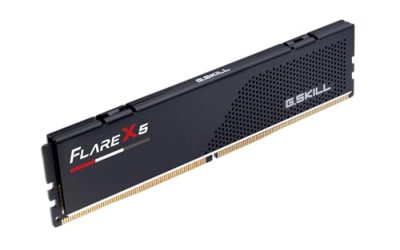
| G.SKILL Flare X5 | 32GB (2x16GB) | DDR5-6000 | CL30-38-38-96 | 1.35V | AMD EXPO |
| Kingston FURY Beast | 32GB (2x16GB) | 6000MT/s | CL30 | See listing | AMD EXPO |
| TEAMGROUP T-Force Delta RGB | 32GB (2x16GB) | DDR5-6000 | CL30-36-36-76 | 1.35V | AMD EXPO, Intel XMP 3.0 |
All five kits are 32GB DDR5-6000 CL30 kits with AMD EXPO support, because that specification is the documented sweet spot for the Ryzen 7 9700X.
1. G.SKILL Trident Z5 Neo RGB 32GB DDR5-6000 CL30
The Trident Z5 Neo RGB is the AMD-focused version of G.SKILL’s flagship DDR5 line, and the kit most often recommended for Ryzen 9000 builds. Its EXPO profile is tuned for AM5, and its 6000MT/s speed with CL30 timings matches the sweet spot described in the benchmark section. The RGB light bar runs the full length of the heat spreader, but it is the tallest design in this guide, so confirm cooler clearance before ordering if you use a large dual-tower air cooler.
Specs
- 32GB (2x16GB) DDR5-6000, CL30-38-38-96, 1.35V, AMD EXPO, 288-pin U-DIMM, matte black with RGB light bar. Model F5-6000J3038F16GX2-TZ5NR. ASIN B0BF8FVLSL. https://www.amazon.com/dp/B0BF8FVLSL
Choose this kit if you want the best-known AMD-tuned DDR5-6000 CL30 kit and you have the cooler clearance for a tall RGB module.
2. Corsair Vengeance RGB 32GB DDR5-6000 CL30
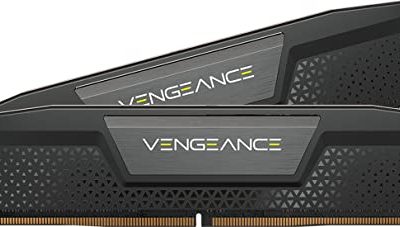
The Vengeance RGB is Corsair’s mainstream DDR5 kit, and this version carries both AMD EXPO and Intel XMP 3.0 profiles. Its secondary timings of 36-36-76 are tighter than the 38-38-96 timings on the G.SKILL kits in this guide, which gives it a small latency advantage on paper at the same speed and CAS latency. Lighting is controlled through Corsair iCUE software, with ten individually addressable RGB zones per stick. The kit runs at 1.40V under its EXPO profile, which is the voltage Corsair validated for this model. Its SPD speed is 4800MHz, the speed it boots at before EXPO is enabled, so remember to turn the profile on.
Specs
- 32GB (2x16GB) DDR5-6000, CL30-36-36-76, 1.40V, AMD EXPO and Intel XMP 3.0, iCUE RGB, gray finish, SPD speed 4800MHz. Model CMH32GX5M2B6000Z30K. ASIN B0BPTKD797. https://www.amazon.com/dp/B0BPTKD797
Choose this kit if you already use Corsair iCUE gear, or if you want the tightest secondary timings in this guide and a kit that also carries an Intel XMP profile.
3. G.SKILL Flare X5 32GB DDR5-6000 CL30
The Flare X5 is the low-profile sibling of the Trident Z5 Neo RGB, with the same 32GB capacity, DDR5-6000 speed, CL30-38-38-96 timings and 1.35V voltage, but a compact heat spreader with no RGB lighting. That makes it the right choice when a large air cooler overhangs the memory slots, because it clears coolers that taller kits cannot. It carries an AMD EXPO profile tuned for AM5.
Specs
- 32GB (2x16GB) DDR5-6000, CL30-38-38-96, 1.35V, AMD EXPO, 288-pin U-DIMM, low-profile matte black heat spreader, no RGB. Model F5-6000J3038F16GX2-FX5. ASIN B0C1TKSDKR. https://www.amazon.com/s?k=G.SKILL%20Flare%20X5%20Series%20DDR5%20RAM
Choose this kit if you run a large air cooler, if you prefer a build without lighting, or if you want the same AMD-tuned specification as the Trident Z5 Neo RGB in a shorter module.
4. Kingston FURY Beast 32GB 6000MT/s DDR5 CL30

The FURY Beast is Kingston’s mainstream performance kit, and this version is built around AMD EXPO with Plug N Play, a Kingston feature that automatically applies the highest listed speed the system BIOS allows. The kit is a straightforward 32GB DDR5-6000 CL30 pair in a black heat spreader, without RGB lighting. The Amazon listing for this model confirms 6000MT/s, CL30 and AMD EXPO, but it does not publish the full secondary timings or the rated voltage in the listing details, so confirm those two values on the listing before buying if they matter to your build.
Specs
- 32GB (2x16GB) 6000MT/s DDR5, CL30, AMD EXPO, Plug N Play, black heat spreader, no RGB. Model KF560C30BBEK2-32. ASIN B0CYHC58P6. https://www.amazon.com/dp/B0CYHC58P6
Choose this kit if you want a no-lighting DDR5-6000 CL30 kit with automatic speed setup and you are comfortable confirming the secondary timings and voltage on the listing before ordering.
5. TEAMGROUP T-Force Delta RGB 32GB DDR5-6000 CL30

The T-Force Delta RGB rounds out the guide with the same 32GB DDR5-6000 CL30 specification, tight 36-36-76 secondary timings and 1.35V voltage, plus a wide RGB light bar that covers most of the top edge of each module. It carries both AMD EXPO and Intel XMP 3.0 profiles, so like the Corsair kit it can move between AMD and Intel builds. Its heat spreader is tall, so the same cooler clearance check applies as with the other RGB kits in this guide.
Specs
- 32GB (2x16GB) DDR5-6000 (PC5-48000), CL30-36-36-76, 1.35V, AMD EXPO and Intel XMP 3.0, RGB light bar, black finish. Model FF3D532G6000HC30DC01. ASIN B0B3HHB3Z9. https://www.amazon.com/dp/B0B3HHB3Z9
Choose this kit if you want RGB lighting and tight secondary timings at the lowest outlay of the five kits, and you have the clearance for a tall module.
Setting Up DDR5 on a Ryzen 7 9700X Build
Install the two modules in the second and fourth slots from the processor, usually labelled A2 and B2, because those are the slots the motherboard maker validates for two-stick operation. Push each module straight down until both clips snap shut. After the first boot, open the BIOS and enable the AMD EXPO profile for the kit. The system will reboot and train the memory, which can take longer than a normal boot the first time, so let it finish without cutting the power. If the system fails to boot at the rated speed, update the BIOS to the latest version and try again.
If you are upgrading from an older AM5 kit, remove the old modules and install the new kit on its own rather than mixing kits. For more DDR5 options across Ryzen processors, see our guide to the best DDR5 RAM for Ryzen.
Frequently Asked Questions
Is 32GB of DDR5 enough for a Ryzen 7 9700X gaming PC?
Yes, 32GB is enough for gaming in 2026 and leaves room for a browser, voice chat and streaming software running beside the game.
Does the Ryzen 7 9700X need DDR5-6000 memory?
The processor officially supports DDR5-5600, and it runs well on that speed, but DDR5-6000 CL30 is the sweet spot identified by TechPowerUp and Hardware Unboxed testing. Faster kits add little once you pass DDR5-6000.
Should I enable EXPO on my DDR5 kit?
Yes, enable the AMD EXPO profile in the BIOS after installing the kit. Without it the memory boots at its slower JEDEC speed, usually DDR5-4800, and you lose the speed and timings you bought the kit for.
Can I use four sticks of DDR5 with the Ryzen 7 9700X?
You can, but AMD lists DDR5-3600 as the official speed with four sticks on Ryzen 9000, so a four-stick setup usually runs slower than a two-stick kit or needs manual tuning.
Conclusion
The best DDR5 RAM for the Ryzen 7 9700X is a 32GB DDR5-6000 CL30 kit with AMD EXPO, and all five kits in this guide meet that specification. Pick the Trident Z5 Neo RGB for the best-known AMD-tuned kit, the Vengeance RGB for iCUE lighting and tight timings, the Flare X5 for cooler clearance, the FURY Beast for a plain automatic setup, or the Delta RGB for the same specification with wide lighting. Install your pick in the A2 and B2 slots, enable EXPO in the BIOS, and confirm the model number against your motherboard memory support list before ordering.