The best four-inch desktop shipping label printers for back-office teams turn a packing bench into a smooth operation. A four-inch printer handles the standard 4×6 shipping label that carriers expect, plus smaller address, barcode and inventory labels, all without ink or toner. Direct thermal printing uses heat-sensitive label stock, so there are no cartridges to replace and no smudged ink on a label that needs to scan cleanly at every handoff.
For a back-office team, the printer is shared infrastructure. Several people may send jobs to it from different workstations, labels may be printed in batches at the end of the day, and a jam or a driver problem can stall the whole shipping queue. That is why connectivity, driver support and media handling matter as much as print speed. The three models below are all four-inch desktop direct thermal printers with a track record in small offices and warehouses.
What to Look For
Print width is the defining specification. A four-inch printer accepts label stock up to about 4 inches wide, which covers 4×6 shipping labels, 4×4 labels and narrower address labels. Confirm the maximum print width as well as the media width, since the printable area is slightly narrower than the roll.
Resolution decides how sharp barcodes and small text look. Most shipping printers run at 203 dpi, which is plenty for carrier barcodes and address text. A 300 dpi model prints crisper small barcodes and dense text, which helps when labels carry small fonts, QR codes or detailed return instructions.
Connectivity determines how a team shares the printer. USB suits a single dedicated packing station, while Wi-Fi and Ethernet let several workstations send jobs to one printer without moving it. Bluetooth is useful for printing from phones and tablets at a packing bench, and AirPrint support simplifies printing from Apple devices.
Media handling covers how labels feed and cut. Look for adjustable guides that hold rolls and fanfold stock straight, a sensor that detects gaps between die-cut labels, and an automatic cutter if your team prints batches and wants clean separation. Some printers also accept thermal transfer ribbons for labels that must resist heat and sunlight, which direct thermal stock does not.
Software and driver support are easy to overlook and hard to fix later. Check that the printer works with your shipping platform and OS versions, including Windows and macOS, and that the maker provides label design software or a driver that plays well with the tools your team already uses.
The 3 Best Four-Inch Desktop Shipping Label Printers for Back-Office Teams
Rollo Wireless Shipping Label Printer X1040

The Rollo X1040 is a direct thermal printer built around 4×6 shipping labels, printing at 203 dpi with a listed speed of up to 150 mm per second. It accepts label widths from 1.57 to 4.1 inches, covering shipping labels, barcode labels and small round labels, and it works with roll or fanfold stock from any brand. Connectivity includes Wi-Fi with AirPrint certification plus USB, and Bluetooth is provided for initial setup. Rollo’s free label design app and Ship platform connect to major marketplaces and carriers for printing straight from an order queue.
This printer suits back-office teams that want wireless printing from any workstation on the network, including phones and tablets. The AirPrint support is a real advantage in mixed-device offices, and the open media policy means the team is not locked into one label supplier. One consideration is resolution: at 203 dpi it is built for shipping labels rather than fine print, so teams printing very small barcodes should look at a 300 dpi model instead.
Zebra ZD421 Direct Thermal Desktop Label Printer
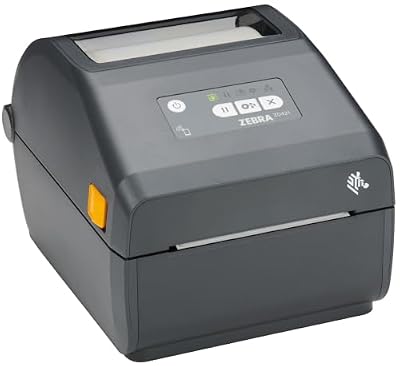
The Zebra ZD421 is a four-inch desktop printer in a direct thermal configuration, model number ZD4A042-D01M00EZ, printing at 203 dpi with a maximum print width of 4 inches. Zebra lists print speeds up to 6 inches per second at 203 dpi, and the printer connects over USB with a USB host port for accessories. It runs on Zebra’s Print DNA software suite, which covers setup, management and security, and it supports ZPL and EPL programming languages, so it integrates with warehouse and shipping systems that already speak Zebra.
This printer suits teams that need a dependable workhorse with enterprise-grade management and broad software compatibility. Zebra’s long history in barcode printing means drivers and integrations are mature, and the compact desktop footprint fits a crowded packing bench. One consideration is connectivity on this configuration: it is a USB model, so teams that need network sharing should confirm the right variant or add a print server.
Brother QL-1110NWB Wide Format Label Printer

The Brother QL-1110NWB is a wide-format direct thermal label printer that prints labels up to 4 inches wide at 300 dpi, with a listed speed of up to 110 mm per second. It connects over USB, Ethernet, Wi-Fi and Bluetooth, so one printer can serve several workstations and mobile devices across a back office. An automatic cutter trims each label, and the printer uses Brother DK rolls and continuous tape, including large shipping labels and address labels, with a built-in editor for designing labels on Windows and Mac.
This printer suits teams that print a mix of label types and need the sharpest output in this guide. The 300 dpi resolution keeps small barcodes and dense text crisp, and the four connectivity options make it the easiest of the three to share across a team. One consideration is media: the QL-1110NWB uses Brother DK label rolls, so confirm that the label sizes your carriers require are available in that format before committing.
Comparison Table
| Product | Print Method | Resolution | Max Label Width | Connectivity | Cutter |
|---|---|---|---|---|---|
| Rollo X1040 | Direct thermal | 203 dpi | 4.1 inches | Wi-Fi, USB, Bluetooth for setup | No |
| Zebra ZD421 | Direct thermal | 203 dpi | 4 inches | USB | No |
| Brother QL-1110NWB | Direct thermal | 300 dpi | 4 inches | USB, Ethernet, Wi-Fi, Bluetooth | Automatic |
FAQ
Do direct thermal label printers need ink or toner?
No. Direct thermal printers use heat to darken specially coated label stock, so there are no ink cartridges or toner to replace. The trade-off is that direct thermal labels can fade with heat and sunlight over time, so they suit shipping labels that are used within weeks rather than archived for years.
Can these printers print 4×6 shipping labels?
Yes, all three models in this guide handle 4×6 shipping labels, which is the standard size for most carriers. Check that your label stock matches the printer’s media type, and confirm the label width range in the listing before ordering rolls in bulk.
How do multiple people share one label printer?
Through a network connection. Wi-Fi and Ethernet let several workstations send jobs to the same printer, while a USB-only model like the Zebra ZD421 configuration here is best attached to one packing station or shared through a print server on the office network.
What is the difference between direct thermal and thermal transfer?
Direct thermal printing uses heat-sensitive paper and no ribbon, which keeps running costs and maintenance low. Thermal transfer uses a ribbon to print onto plain label stock, producing labels that resist heat, sunlight and abrasion for longer. The Zebra ZD421 family includes thermal transfer variants for teams that need durable labels.
Conclusion
The best four-inch desktop shipping label printers for back-office teams balance print width, connectivity and media flexibility. The Rollo X1040 is the most flexible wireless choice for mixed-device offices, the Zebra ZD421 is the dependable enterprise-grade workhorse, and the Brother QL-1110NWB brings the sharpest output and the widest connectivity. Pick the one that matches how your team shares the printer and which label sizes you print most.
Disclosure: As an Amazon Associate, we earn from qualifying purchases.