As an Amazon Associate we earn from qualifying purchases.

A student laptop has two jobs. It must carry a full day of lectures, notes, research and assignments, and it must also handle light gaming when classes end. The best budget laptop for students and light gaming does both: a processor fast enough for multitasking, graphics that run popular esports and indie titles at 1080p, enough memory and storage for a growing pile of files, and a screen that stays comfortable through long study sessions.
This guide compares five laptops currently sold on Amazon US: two with a dedicated graphics chip for stronger gaming, and three with integrated graphics for lighter titles and study work. Every model is a 15.6-inch Windows 11 Home laptop with a full HD display.
What Light Gaming Means for a Student Laptop
Light gaming usually means esports games such as League of Legends, Valorant, Rocket League and Counter-Strike 2, plus indie games, older AAA titles and casual games that do not demand the newest hardware. These run well at 1080p on medium settings with a modern processor and either integrated graphics or an entry-level dedicated graphics chip. Study work leans on the processor, memory and storage, while gaming leans on the graphics chip and display.
How to Choose a Budget Student Laptop
CPU and Graphics
A current Intel Core i5 or AMD Ryzen 5 handles lectures, research and multitasking with room to spare, while a Ryzen 7 or Core i7 adds headroom for heavier coursework. Integrated graphics such as Intel Iris Xe or AMD Radeon Graphics handle esports titles and older games at 1080p on modest settings. A dedicated chip such as the NVIDIA GeForce RTX 4050 opens up newer titles and higher settings. One caution: the Amazon listings for these models do not publish a wattage limit for the processor or the graphics chip, so confirm the adapter and power figures on the listing before buying.
Memory and Storage
Memory is the single most important number for a student. Eight gigabytes is the floor for comfortable study use in 2026, and it works when most of your work is documents, browsing and video calls. Sixteen gigabytes is the safer choice: it keeps dozens of tabs, a video call and a game open at once without the machine slowing down. Three of the five laptops below ship with 16GB, and the two that ship with 8GB are the ones where an upgrade is worth planning for. A 512GB SSD is the practical minimum, and all five picks ship with one.
Display, Ports and Battery
Every laptop here has a 15.6-inch full HD display: large enough for split-screen notes, small enough for a backpack. Two of the picks add a 144Hz panel, which makes fast motion in games look smoother. The other three use standard panels, and their listings do not state a refresh rate, so confirm it on the listing if a high refresh rate matters to you. A touchscreen is a bonus on three of the picks, useful for note-taking apps. Look for at least one USB-C port, several USB-A ports, an HDMI port and Wi-Fi 6; all five picks list Wi-Fi 6. The listings do not publish a single battery-life figure that applies to every configuration, so confirm the battery details on the listing for the exact model you buy. Warranty terms vary by seller, so read them on the listing before buying.
The Five Best Budget Laptops for Students and Light Gaming
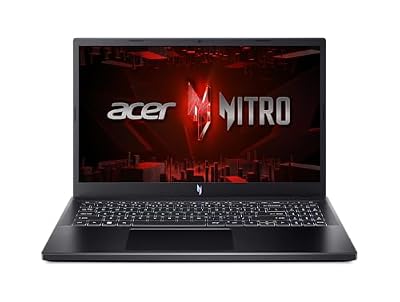
1. Acer Nitro V 15 ANV15-51-51H9
The Acer Nitro V 15 is the strongest gaming pick in this guide, and the most obvious choice for a student who plays regularly. Its Intel Core i5-13420H processor and NVIDIA GeForce RTX 4050 laptop graphics give it a dedicated graphics chip. The 15.6-inch full HD IPS display runs at 144Hz. With 8GB of DDR5 memory and a 512GB Gen 4 SSD, it has the storage a student needs, though 16GB is the safer long-term choice. It also lists Wi-Fi 6 and a backlit keyboard.
Specs
- Processor: Intel Core i5-13420H
- Graphics: NVIDIA GeForce RTX 4050 laptop GPU
- Display: 15.6-inch Full HD IPS, 144Hz
- Memory: 8GB DDR5
- Storage: 512GB Gen 4 SSD
- Connectivity: Wi-Fi 6
- Keyboard: Backlit keyboard
- OS: Windows 11 Home
- ASIN: B0CP8D4SM2 — https://www.amazon.com/dp/B0CP8D4SM2
Upgrade options: the listing shows 8GB DDR5 memory and a 512GB Gen 4 SSD. Before ordering extra memory, confirm the spare slots for model ANV15-51-51H9 on the listing.
2. MSI Thin 15 B12VE-2023US
The MSI Thin 15 pairs a dedicated RTX 4050 with the strongest memory configuration in this guide, making it the best balanced pick for gaming power and multitasking headroom in one machine. Its Intel Core i7-12650H processor has more cores than the other picks, and the 16GB of DDR5 memory means you can keep a browser full of research tabs, a video call and a game open without the machine slowing down. Its 512GB NVMe SSD and 15.6-inch full HD 144Hz display match the Acer for storage and smooth motion. Its Cooler Boost 5 dual-fan cooling moves heat away during long sessions.
Specs
- Processor: Intel Core i7-12650H
- Graphics: NVIDIA GeForce RTX 4050
- Display: 15.6-inch Full HD, 144Hz
- Memory: 16GB DDR5
- Storage: 512GB NVMe SSD
- Cooling: Cooler Boost 5 dual-fan cooling
- OS: Windows 11 Home
- ASIN: B0CXV8YGLV — https://www.amazon.com/dp/B0CXV8YGLV
Upgrade options: the listing shows 16GB DDR5 memory and a 512GB NVMe SSD, which is already the comfortable configuration for study and light gaming. Before ordering extra memory or storage, confirm the spare slots for model B12VE-2023US on the listing.
3. Lenovo IdeaPad Slim 3 15ABR8
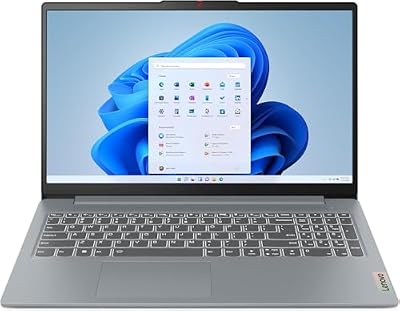
The Lenovo IdeaPad Slim 3 is the best study-first pick in this guide. Its AMD Ryzen 7 5825U processor has eight cores for strong multitasking, and its AMD Radeon Graphics handle esports titles and older games at 1080p on modest settings. The 16GB of DDR4 memory and the 512GB SSD cover daily use well, and the 15.6-inch full HD touchscreen is handy for navigating notes by hand. Lenovo lists Wi-Fi 6, Bluetooth 5.2 and a 720p HD camera on this model, for campus wireless, headphones and video calls. It suits the student whose first priority is classwork.
Specs
- Processor: AMD Ryzen 7 5825U, 8 cores
- Graphics: AMD Radeon Graphics
- Display: 15.6-inch Full HD 1920 x 1080 touchscreen
- Memory: 16GB DDR4
- Storage: 512GB SSD
- Connectivity: Wi-Fi 6, Bluetooth 5.2
- Camera: 720p HD camera
- OS: Windows 11 Home
- ASIN: B0F2MLQPL3 — https://www.amazon.com/dp/B0F2MLQPL3
Upgrade options: the listing shows 16GB DDR4 memory and a 512GB SSD, which is already the comfortable configuration for study and light gaming. Before ordering extra memory or storage, confirm the spare slots for model 82XM on the listing.
4. HP 15-fd0154wm
The HP 15-fd0154wm is the most straightforward pick in this guide: a current-generation Intel laptop with a touchscreen and solid everyday performance. Its Intel Core i5-1334U processor has ten cores and reaches up to 4.6GHz with Intel Turbo Boost, and its Intel Iris Xe Graphics handle esports titles and older games at 1080p on modest settings. Its 8GB of DDR4 memory and 512GB SSD cover the basics for study work. Choose it for reliable, easy everyday use for classes and genuinely light gaming. The 8GB of memory is the one limit to plan around, so check the memory configuration and upgrade path for this exact model number before buying.
Specs
- Processor: Intel Core i5-1334U, up to 4.6GHz, 10 cores, 12MB Intel L3 cache
- Graphics: Intel Iris Xe Graphics
- Display: 15.6-inch Full HD IPS touchscreen
- Memory: 8GB DDR4
- Storage: 512GB SSD
- OS: Windows 11 Home
- ASIN: B0G43JGF7B — https://www.amazon.com/dp/B0G43JGF7B
Upgrade options: the listing shows 8GB DDR4 memory and a 512GB SSD. Before ordering extra memory, confirm the spare slots for model 15-fd0154wm on the listing.
5. Acer Aspire 3 A315-24PT-R0UX
The Acer Aspire 3 is the best value pick in this guide. Its AMD Ryzen 5 7520U quad-core processor and AMD Radeon Graphics handle study work and light gaming with ease, and its 16GB of LPDDR5 memory is the generous configuration that keeps multitasking smooth. Its 512GB NVMe SSD and 15.6-inch full HD IPS touchscreen cover storage and note-taking. It lists Wi-Fi 6 and Windows 11 Home. The Aspire 3 is the pick for the student who wants a dependable everyday laptop with a touchscreen, 16GB of memory and a 512GB SSD, for esports titles, indie games and older games.
Specs
- Processor: AMD Ryzen 5 7520U, quad-core
- Graphics: AMD Radeon Graphics
- Display: 15.6-inch Full HD IPS touchscreen
- Memory: 16GB LPDDR5
- Storage: 512GB NVMe SSD
- Connectivity: Wi-Fi 6
- OS: Windows 11 Home
- ASIN: B0CJV41KZN — https://www.amazon.com/dp/B0CJV41KZN
Upgrade options: the listing shows 16GB LPDDR5 memory and a 512GB NVMe SSD, which is already the comfortable configuration for study and light gaming. Before ordering extra memory or storage, confirm the spare slots for model A315-24PT-R0UX on the listing.
Quick Comparison
| Laptop | Processor | Graphics | Memory | Storage | Display |
|---|---|---|---|---|---|
| Acer Nitro V 15 ANV15-51-51H9 | Intel Core i5-13420H | NVIDIA GeForce RTX 4050 | 8GB DDR5 | 512GB Gen 4 SSD | 15.6-inch Full HD IPS, 144Hz |
| MSI Thin 15 B12VE-2023US | Intel Core i7-12650H | NVIDIA GeForce RTX 4050 | 16GB DDR5 | 512GB NVMe SSD | 15.6-inch Full HD, 144Hz |
| Lenovo IdeaPad Slim 3 15ABR8 | AMD Ryzen 7 5825U | AMD Radeon Graphics | 16GB DDR4 | 512GB SSD | 15.6-inch Full HD touchscreen |
| HP 15-fd0154wm | Intel Core i5-1334U | Intel Iris Xe Graphics | 8GB DDR4 | 512GB SSD | 15.6-inch Full HD IPS touchscreen |
| Acer Aspire 3 A315-24PT-R0UX | AMD Ryzen 5 7520U | AMD Radeon Graphics | 16GB LPDDR5 | 512GB NVMe SSD | 15.6-inch Full HD IPS touchscreen |
The table makes the trade-off clear. The two RTX 4050 laptops are the gaming picks, with the MSI Thin 15 stronger for its 16GB of memory and faster processor. The three integrated-graphics laptops are the study picks, with the Lenovo and Acer Aspire 3 stronger for their 16GB of memory.
Which Laptop Fits Your Courses
Your courses decide which pick makes sense. A computer science or engineering student who compiles code, runs virtual machines or edits video will feel the difference of the MSI Thin 15 or the Lenovo IdeaPad Slim 3. A business or humanities student will be well served by any of the five, and the Acer Aspire 3 adds 16GB of memory and a touchscreen. A student who plays every day should choose one of the two RTX 4050 laptops, and the MSI Thin 15 needs no memory upgrade. For more student laptop options, see our guide to the best budget laptops for students before you decide. Before you buy, match the model number on the listing to the one in this guide, and confirm the exact configuration and availability.
FAQ
How much RAM does a student need for light gaming?
Sixteen gigabytes is the safer choice, keeping many tabs, a video call and a game open at once without slowing down. Eight gigabytes works for documents, browsing and video calls, but it leaves less headroom, so plan a memory upgrade for the two 8GB laptops in this guide.
Is a dedicated graphics chip necessary for light gaming?
A dedicated graphics chip is not necessary for esports titles, indie games and older games, which run well on modern integrated graphics at 1080p on modest settings. A dedicated chip such as the RTX 4050 becomes worth it when you play newer titles, want higher settings, or play every day.
Can a budget laptop handle both schoolwork and gaming?
Yes, when the laptop has a current processor, at least 8GB of memory and a 512GB SSD. The balance matters more than any single spec: a strong processor and enough memory for study work, plus graphics that match the games you actually play.
Should a student choose a touchscreen laptop?
A touchscreen is a useful bonus for note-taking apps and for navigating Windows by hand, but it is not a requirement for study or gaming. Three of the picks in this guide have a touchscreen, so choose it when you will use it for notes.
Conclusion
The best budget laptop for students and light gaming matches how you actually spend your day. The MSI Thin 15 is the best all-rounder in this guide, with a dedicated RTX 4050, a Core i7 processor and 16GB of memory. The Acer Nitro V 15 is the best choice for daily gaming, and the Lenovo IdeaPad Slim 3 is the best study-first pick. The Acer Aspire 3 is the best value, and the HP 15 is the simplest pick. Confirm the exact model number and availability on the listing before you buy.