

Choosing a configurable system in this budget class is really a decision about control. Do you accept a fixed specification chosen by a retailer, or do you pick a builder and a configuration family where the processor, graphics card, memory and storage combination is yours to select before the machine is assembled? That choice decides where the money lands. Spend too much on a faster processor and the graphics card suffers; chase storage capacity and the power supply may leave no room to grow.

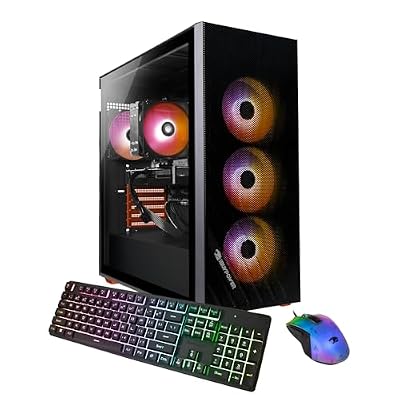
This guide is for first-time buyers who want that control without building from loose parts, for upgraders who plan to swap a graphics card later, and for gift buyers comparing named configurations. Every pick below was chosen from the names and specifications shown on its Amazon product page.
Quick Picks
As an Amazon Associate we earn from qualifying purchases
| Product | Best for | Key spec from title |
|---|---|---|
| Skytech Nebula (ST-NEBULA-1343-B-AM) | Strongest graphics in this set | NVIDIA RTX 4060 8GB |
| CyberPowerPC Gamer Xtreme VR (GXiVR8060A24) | A newer memory platform | 16GB DDR5 |
| iBUYPOWER Scale (SCA5N3501) | A lower-cost configurable starting point | NVIDIA GeForce RTX 3050 6GB |
| CyberPowerPC Gamer Master (GMA3100A) | The simplest entry configuration | Radeon RX 6400 4GB |
How to Choose
What Configurable Really Covers on the Listing
On Amazon, custom rarely means a blank-sheet build designed for you. Usually it means one of three things, and the listing wording tells you which. Some builders, including Skytech Gaming, describe themselves as manufacturers of custom and pre-built gaming PCs, so the named configuration is one assembled version of a wider family. Others present several Style Name variations under one listing, each pairing a different processor and graphics card, which is a configurator rendered as a menu. A third group builds to a named model code also sold in other combinations. Read the style selector and model code together before assuming any part can be changed after ordering.
Put the Graphics Card First in This Budget Class
At this level, the graphics card should absorb the largest share of the budget, because it sets the ceiling for settings long after launch day. A sensible order is to fix the graphics card first, then choose a processor that will not hold it back, and then divide what remains between memory and storage. Sixteen gigabytes of memory appears in every system, which reflects how builders in this class balance configurations. Storage varies from half a terabyte to a terabyte, and that difference is easier to live with or remedy later than a weak graphics card, so treat it as the flexible line rather than the headline.
Check Motherboard and Power Supply Headroom for Upgrades
A configurable purchase pays off only if the machine can accept the swap you are imagining. Start with the chipset named on the listing, where given: a B550 board in one pick below and a B760 board in another point to different processor families and different memory generations, so a future upgrade follows the platform, not just the socket. Then look for the power supply figure. The Skytech systems here name a 650W Gold unit in the title, which gives a clearer starting point for a later graphics swap than listings that omit wattage. Finally, note the memory format, because DDR4 and DDR5 sticks are not interchangeable.
Understand Warranty Cover on a Custom Order
A custom-order machine is assembled for one buyer, so warranty wording deserves attention equal to the specification. Listings carry terms such as one year on parts and labor with lifetime technical support, and Skytech states its systems are assembled in the USA. When a component fails, the claim runs through the builder, not part makers. Before ordering, confirm who handles a graphics card and whether opening the case to add storage affects cover. Keep the configuration confirmation and model code, since support will ask for both.
If you skip configuration decisions, our roundup of fixed prebuilt gaming desktops in this budget class covers systems where the specification is settled.
The 4 Best Options
Skytech Nebula (ST-NEBULA-1343-B-AM)
Skytech describes itself as a manufacturer of custom and pre-built gaming PCs, and the Nebula family shows what that means: the case and platform appear in several processor and graphics combinations, and you select the configuration before assembly. This version pairs a Ryzen 5 5500 processor with an RTX 4060 graphics card, 16GB of DDR4 memory and a 1TB NVMe SSD, backed by a 650W Gold power supply named in the title. That supply figure is the upgrade story, because it leaves more room for a later graphics swap than an unspecified unit, while the memory slots support adding DDR4 memory later.
Specs
- Processor: AMD Ryzen 5 5500 3.6 GHz (4.2GHz Turbo Boost)
- Graphics: NVIDIA GeForce RTX 4060 8GB GDDR6X (brand may vary)
- Memory: 16GB DDR4 RAM 3200 with heat spreader
- Storage: 1TB NVMe M.2 SSD
- Power supply: 650W Gold PSU
- Operating system: Windows 11 Home 64-bit
- Case: Skytech Nebula Gaming Case, Black
- Wireless: 802.11AC Wi-Fi
Best for: Buyers who want the strongest graphics card in this set from a builder that presents custom assembly as its core offer.
Watch out for: The listing states the graphics card brand may vary, so confirm you are comfortable receiving any board partner version before ordering.
ASIN: B0D9KVXPP6
CyberPowerPC Gamer Xtreme VR (GXiVR8060A24)
CyberPowerPC built its name on configurable systems, and this Gamer Xtreme VR listing follows that pattern through its Style Name selector, which pairs processor and graphics combinations under one product family. The configuration combines an Intel Core i5-13400F processor with an RTX 4060 graphics card, 16GB of DDR5 memory and a 1TB PCIe Gen4 SSD on the Intel B760 chipset named in model documentation. That DDR5 platform is the upgrade path here, since memory and processor upgrades stay within the newer generation rather than the DDR4 ecosystem used by the other picks, making this the choice for buyers planning around longevity.
Specs
- Processor: Intel Core i5-13400F 2.5GHz
- Chipset: Intel B760
- Graphics: NVIDIA GeForce RTX 4060 8GB
- Memory: 16GB DDR5
- Storage: 1TB PCIe Gen4 SSD
- Operating system: Windows 11 Home
- Included: Desktop, keyboard and mouse
Best for: Buyers who want a configurable Intel system on a DDR5 platform with a terabyte of fast storage from the start.
Watch out for: The listing does not headline a power supply wattage in its title, so check the full specification table for the exact unit before planning a graphics upgrade.
ASIN: B0DCMPRRFD
iBUYPOWER Scale (SCA5N3501)
iBUYPOWER sells ready systems and custom builds, and the Scale family reaches Amazon as a set of Style Name configurations that share a case and platform while varying the processor and graphics pairing. This configuration uses a Ryzen 5 5500 processor with an RTX 3050 graphics card, 16GB of DDR4 memory as two 8GB sticks, and a 500GB NVMe SSD. The two-stick memory layout matters for a configurable purchase, because it confirms dual-channel operation from day one and shows what a memory upgrade would need to replace or match. Treat this as the starting-point build: capable as ordered, with storage the first addition.
Specs
- Processor: AMD Ryzen 5 5500
- Graphics: NVIDIA GeForce RTX 3050 6GB
- Memory: 16GB DDR4 Non-RGB 3200MHz RAM (8×2)
- Storage: 500GB NVMe SSD
- Operating system: Windows 11 Home
- Connectivity: WiFi Ready
Best for: Buyers who want the lowest-commitment entry into a named, configurable system and expect to add storage soon after arrival.
Watch out for: The 500GB SSD fills quickly with modern game installs, so budget attention for a second drive or a larger replacement early in ownership.
ASIN: B0DFLGNQG4
CyberPowerPC Gamer Master (GMA3100A)
The second CyberPowerPC entry takes the opposite approach to its stablemate: instead of the newer Intel platform, it uses the AMD B550 chipset, which the listing names in its system summary. The configuration pairs a Ryzen 5 5500 processor at 3.6GHz across six cores with a Radeon RX 6400 graphics card, 16GB of DDR4 memory and a 500GB PCIe Gen4 SSD. Custom RGB lighting and a tempered side panel are part of the package. Because the platform is established, upgrades are straightforward: memory stays DDR4, storage can grow, and a stronger graphics card is the swap, subject to checking the power supply.
Specs
- Processor: AMD Ryzen 5 5500 3.6GHz, 6 cores
- Chipset: AMD B550
- Graphics: AMD Radeon RX 6400 4GB
- Memory: 16GB DDR4
- Storage: 500GB PCIe Gen4 NVMe SSD
- Operating system: Windows 11 Home 64-bit
- Warranty: 1 Year Parts and Labor Warranty, Free Lifetime Tech Support
Best for: Buyers who want the simplest configurable starting point on a named B550 platform, with a clear graphics upgrade planned later.
Watch out for: The RX 6400 carries 4GB of graphics memory, the smallest figure here, so check the requirements of the specific games you play before choosing this configuration.
ASIN: B0DCMH6T7X
Which One Fits Your Situation
You Want the Best Graphics Available in This Class
Choose the Skytech Nebula configuration. Its RTX 4060 is matched by only one other system here, and it combines that card with a full terabyte of storage and a named 650W Gold power supply, so no immediate compromise follows you home. Buyers who expect to keep the same graphics card for several years benefit most from starting at this level rather than planning an early replacement.
You Plan to Upgrade Memory and Processor Over Time
The CyberPowerPC Gamer Xtreme VR fits this plan, because its DDR5 memory and B760 chipset keep you inside the newer Intel platform generation. Upgrades still need checking part by part, yet the direction of travel is simpler when the base machine already uses current memory. This is the pick for a buyer who treats the first order as stage one of a longer build.
You Need the Lowest-Cost Way Into a Named System
Start with the iBUYPOWER Scale. The RTX 3050 configuration keeps the initial commitment down while still arriving with 16GB of memory in two sticks and a proper NVMe drive. Accept the trade openly: storage is modest, and a drive addition belongs in the first-year plan. For a first gaming PC bought for a teenager or a spare room, that staged spending often suits household budgets better than one large outlay.
You Prefer a Mature Platform With a Planned Graphics Swap
The Gamer Master on B550 suits a buyer who values a well-understood platform and already knows the graphics card is a temporary resident. Order it for its processor, memory and storage foundation, enjoy lighter games as configured, and then make the graphics change once you have confirmed the power supply fitted to your exact build. Patience, in this case, is part of the configuration strategy.
Common Mistakes
- Assuming custom on a marketplace listing means every part can be changed at checkout, when the real choice is usually between named configurations or style variations.
- Comparing headline configurations without opening the style selector, then ordering a different processor and graphics pairing from the one described in the title.
- Ignoring the power supply because the first configuration runs well, only to find a planned graphics upgrade needs a different unit.
- Mixing DDR4 and DDR5 expectations when planning memory upgrades, even though the two formats are physically and electrically incompatible.
- Discarding the configuration confirmation and model code, which support teams request first when a custom-order warranty claim begins.
Frequently Asked Questions
What does custom actually mean for a gaming PC bought on Amazon?
Usually it means the system comes from a builder that assembles to order or in named configurations, and you choose between configurations, style variations or model codes on the listing. It rarely means selecting components individually. The product page wording, style selector and model code show how much choice a listing offers before assembly.
Is a configurable system better than a fixed prebuilt at this level?
Neither format is better. A configurable system suits buyers who know which component matters most and want that priority reflected in the build, or who plan an upgrade. A fixed prebuilt suits buyers who want the decision finished. The answer follows your upgrade intentions and your patience for comparing configurations, not the label.
Which component should I upgrade first on one of these systems?
Storage is the common first upgrade, because two systems ship with 500GB drives that game libraries fill quickly. After that, the answer depends on the configuration: the RX 6400 system points toward a graphics upgrade, while the RTX 4060 systems gain more from memory or storage first. Always confirm power supply capacity before a change.
How do I verify the configuration I ordered is the one that arrives?
Match the model code on the paperwork against the listing, then check the processor, graphics card, memory and drive capacity in the panel on boot. Do this inside the return window, while a mismatch is easiest to resolve. Photograph screens and keep them with your confirmation until the warranty period is underway.

















