

When your palm hangs off the back of a standard mouse and your ring finger drags along the desk, the problem is not your aim. It is the shell. A mouse built for average hands forces large hands into a cramped claw, and that cramp shows up as missed flicks, sore wrists, and a grip that slips during long sessions. The fix is a longer, wider body with a high hump and a real thumb rest, so the whole hand rests on the mouse instead of curling around it.


This guide is for palm-grip players, MMO fans who map a dozen commands, and anyone whose fingers run past the front buttons of a normal mouse. Every pick below is a large gaming mouse chosen from its Amazon listing title and specifications: shell length, width, weight, sensor, and button count. No pick here is a compact esports shell, and none asks you to shrink your grip to fit the hardware.
Quick Picks
As an Amazon Associate we earn from qualifying purchases.
| Product | Best for | Key spec from title |
|---|---|---|
| Logitech G502 HERO | MMO and productivity players who want many buttons | HERO 25K sensor, 25,600 DPI, 11 buttons |
| Razer Basilisk V3 | Players who want a tilt scroll wheel and thumb rest | Focus+ 26K DPI optical sensor, 11 buttons |
| Razer DeathAdder V3 Pro | Competitive FPS players who want a light wireless shell | Focus Pro 30K optical sensor, 63 g, 90-hour battery |
| Logitech G502 Lightspeed | Wireless players who want tunable weight | HERO 25K sensor, 25,600 DPI, LIGHTSPEED wireless |
| SteelSeries Rival 5 | Multi-genre players who want a thumb panel | TrueMove Air sensor, 18,000 CPI, 9 buttons |
How to Choose
Measure length and width, not just your hand
Begin with a ruler. Measure from the base of your palm to the tip of your middle finger, then across your knuckles. Hands longer than 19 cm usually need a shell at least 125 mm long, and hands wider than 9 cm need a body around 68 mm across or more, so the thumb and ring finger stop sliding off the sides. Every mouse in this guide clears those marks, with bodies from 128 mm to 132 mm long. If your current mouse leaves your palm unsupported at the back, length is the first number to fix. A shell that is too short forces the wrist to carry weight the mouse should carry, and that strain builds over hours.
Pick a right-handed ergonomic shape with a thumb rest
Most large mice are sculpted for the right hand, with a raised hump under the palm and a ledge where the thumb sits. That ledge matters more than it looks: it keeps the thumb off the desk, stops accidental side-button presses, and gives the hand a place to rest between fights. Look for a hump positioned toward the middle or rear of the shell, which supports the palm instead of pushing the wrist upward. A low, flat, ambidextrous shell may look sleek, but it leaves a large palm with nothing to hold on to. Here, every pick except the Rival 5 has a thumb rest, and the Rival 5 compensates with a wide side panel and a high rear hump.
Treat weight as a tuning choice, not a spec race
Light mice dominate competitive chatter, but a 63-gram shell can feel twitchy under a large hand that is used to planted, deliberate movement. Heavier mice around 100 to 121 grams give big hands more stability for tracking and less drift when the hand relaxes. Two picks in this guide ship with removable weights, so you can add grams to the rear for steadier aim or strip them out for faster flicks. Try the mouse at its stock weight first, then change one weight at a time and play a full session before judging. Chasing the lowest weight on the box is the wrong goal here; the right weight is the one your hand stops noticing.
Match buttons, sensor, and connection to your games
A large mouse earns its size when the extra surface carries controls you actually use. MMO and strategy players should look for ten or more programmable buttons, including a thumb cluster and a sniper or DPI-shift button. FPS players need fewer buttons but a clean, consistent sensor and a high polling rate, so the cursor never lags behind the hand. Sensor ceilings above 18,000 DPI sound impressive, yet most players settle far below the maximum, so treat the ceiling as headroom, not a target. For connection, a wired mouse removes charging from your routine, while a wireless mouse removes cable drag; both work, and the better choice is the one that fits how your desk is set up.
The 5 Best Options
Logitech G502 HERO
The G502 HERO is the default answer for big hands, and its shape explains why. At 132 mm long and 75 mm wide, it fills a large palm completely, with a thumb rest and a sniper button placed where a long thumb lands without stretching. Eleven programmable buttons cover MMO rotations, productivity macros, and DPI shifts, while the dual-mode scroll wheel flips between notched steps and free spin. Five removable weights let you tune the balance toward the rear for steadier tracking. It is wired, heavy, and unapologetically right-handed, which is exactly what a large palm-grip player wants from a daily mouse.
Specs
- Sensor: HERO 25K optical, 100 to 25,600 DPI
- Buttons: 11 programmable buttons
- Scroll wheel: Dual-mode hyper-fast scroll wheel with tilt
- Weight: 121 g, plus five removable 3.6 g weights
- Dimensions: 132 x 75 x 40 mm (5.2 x 2.95 x 1.57 in)
- Connection: Wired USB
- Memory: On-board memory for 5 profiles
- Lighting: LIGHTSYNC RGB
Best for: Palm-grip players who want maximum buttons and tunable weight in a wired mouse.
Watch out for: The 121 g base weight feels heavy if you play fast flick-heavy shooters, and the right-handed shell excludes left-handed players.
Razer Basilisk V3
The Basilisk V3 takes the same ergonomic idea in a slightly narrower direction, with a 130 mm body, a deep thumb rest, and a scroll wheel that does more than scroll. Its HyperScroll tilt wheel switches between tactile steps, free spin, and an automatic Smart-Reel mode, and it tilts sideways for extra binds. Eleven programmable controls include a multi-function trigger under the thumb, and the Focus+ 26K sensor tracks cleanly across the DPI range. At 101 grams it sits between the featherweight esports shells and the heavier G502, which suits players who want a planted feel without a fully loaded frame.
Specs
- Sensor: Razer Focus+ 26K optical, up to 26,000 DPI, 650 IPS
- Buttons: 11 programmable buttons
- Scroll wheel: HyperScroll tilt wheel with tactile, free-spin, and Smart-Reel modes
- Switches: Gen-2 optical switches rated for 70 million clicks
- Weight: 101 g
- Dimensions: 130 x 60 x 42 mm
- Connection: Wired USB with 1.8 m Speedflex braided cable
- Lighting: 11 Chroma RGB zones with underglow
Best for: Players who want a versatile tilt scroll wheel and a thumb rest in a mid-weight wired mouse.
Watch out for: The scroll wheel is the most commonly reported weak point in owner feedback, so test it thoroughly during the return window.
Razer DeathAdder V3 Pro
The DeathAdder V3 Pro proves a large mouse does not have to be heavy. Its 128 mm shell fits medium to large hands, yet it weighs only 63 grams, so long sessions feel less tiring and fast flicks need less effort. The Focus Pro 30K sensor tracks on glass as well as cloth pads, and the wireless link holds a 1,000 Hz polling rate out of the box, with an 8,000 Hz upgrade via a separate dongle. Five programmable buttons keep the layout simple, and the battery runs up to 90 hours. It is the pick for big-handed FPS players who want wireless freedom without giving up shell size.
Specs
- Sensor: Razer Focus Pro 30K optical, up to 30,000 DPI, 750 IPS
- Buttons: 5 programmable buttons
- Switches: Gen-3 optical switches
- Weight: 63 g
- Dimensions: 128 x 68 x 44 mm
- Connection: HyperSpeed wireless, USB-C charging
- Battery: Up to 90 hours
- Polling rate: 1,000 Hz, upgradeable to 8,000 Hz with separate dongle
Best for: Competitive FPS players with big hands who want a light wireless mouse.
Watch out for: Only five buttons and no tilt wheel, so MMO players will run out of binds, and the 8,000 Hz dongle is sold separately.
Logitech G502 Lightspeed
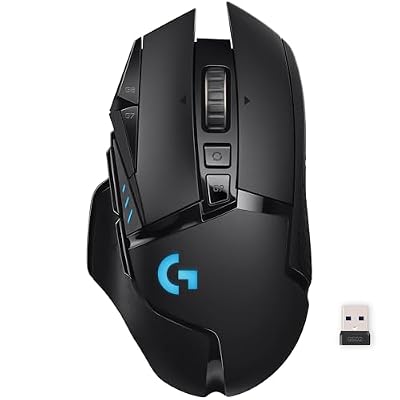
The G502 Lightspeed keeps the HERO’s large right-handed shell and cuts the cord. It measures 132 mm long with the same thumb rest and eleven-button layout, but the wireless link responds in 1 ms and the battery lasts up to 60 hours per charge. Six adjustable weights, two 4-gram and four 2-gram pieces, tune the balance, and the mouse works with the PowerPlay charging mat for continuous charging during play. On-board memory stores profiles, so the setup travels with the mouse. It is the strongest wireless option here for players who already know they like the G502 shape and want it without a cable.
Specs
- Sensor: HERO 25K optical, 100 to 25,600 DPI
- Buttons: 11 programmable buttons
- Connection: LIGHTSPEED wireless, 1 ms response
- Battery: Up to 60 hours
- Weight: 114 g, plus six adjustable weights (two 4 g, four 2 g)
- Dimensions: 132 x 75 x 40 mm (5.19 x 2.95 x 1.57 in)
- Memory: On-board memory
- Lighting: LIGHTSYNC RGB
- Charging: PowerPlay wireless charging compatible
Best for: Wireless players who love the G502 shape and want tunable weight without a cable.
Watch out for: The 114 g weight is heavy for fast flick shooters, and PowerPlay charging needs a separately sold mat.
SteelSeries Rival 5

The Rival 5 is the lightest-feeling large mouse in this guide, and the most button-dense for its size. Its 128.8 mm shell is long enough for big hands, while the 85-gram frame and a five-button thumb panel with a two-way paddle give MMO, MOBA, and battle royale players quick access to commands. The TrueMove Air sensor tracks at up to 18,000 CPI with true one-to-one movement, and the Golden Micro switches are sealed against dust and splashes. PrismSync RGB runs along the body, and the wired connection keeps polling at a steady 1,000 Hz. It suits players who want a big shell, a busy thumb, and a lighter lift.
Specs
- Sensor: SteelSeries TrueMove Air optical, 100 to 18,000 CPI
- Buttons: 9 programmable buttons
- Switches: Golden Micro IP54 mechanical, rated for 80 million clicks
- Weight: 85 g
- Dimensions: 128.8 x 68.15 x 42 mm
- Connection: Wired USB
- Polling rate: 1,000 Hz
- Lighting: PrismSync RGB
Best for: Multi-genre players who want a light large mouse with a full thumb panel.
Watch out for: The thumb panel is crowded, so players with very wide thumbs should check the paddle spacing before committing.
Which One Fits Your Situation
You play MMOs or strategy for hours at a time
Pick the G502 HERO or the G502 Lightspeed. Both give you eleven programmable buttons, a thumb rest, and a sniper button, so rotations and macros sit under your thumb instead of on the keyboard. Choose the wired HERO if the mouse never leaves your desk, and the Lightspeed if you want the same layout without a cable. The Rival 5 is the fallback if you want a lighter shell with a thumb panel.
You play competitive FPS and want speed
Pick the DeathAdder V3 Pro. Its 63-gram shell and 30K sensor make flicks and tracking feel effortless, and the 128 mm body still supports a large palm. The Basilisk V3 is the wired alternative if you prefer a thumb rest and a tilt wheel over raw lightness. Skip the heavier G502 models here, since their weight slows fast repositioning.
You hate cable drag but want a big shell
Pick the G502 Lightspeed or the DeathAdder V3 Pro. The Lightspeed suits players who want buttons and tunable weight, while the DeathAdder suits players who want the lightest wireless shell available. Both hold a 1,000 Hz polling rate and run for days on a charge. Keep the charging cable handy for long sessions, and confirm the receiver sits close to the mouse for a stable link.
You want one mouse for every genre
Pick the Rival 5 or the Basilisk V3. The Rival 5 covers MMO, MOBA, and battle royale with nine buttons and a light frame, while the Basilisk V3 adds a tilt scroll wheel and a stronger sensor for mixed play. Either one handles workdays as well as game nights. Choose the Rival 5 for a lighter lift and the Basilisk V3 for scroll-wheel control.
Common Mistakes
- Buying by DPI alone: a 30,000 DPI ceiling means little if the shell is too short for your palm, so size comes first and sensor second.
- Measuring only length: a long, narrow mouse still lets the thumb and ring finger slip, so check width and height before you commit.
- Choosing a low, ambidextrous shell for a palm grip: flat mice leave a large palm unsupported, and the wrist pays for it over long sessions.
- Loading every weight at once: maximum weight feels planted for an hour and tiring after four, so tune one weight at a time.
- Skipping the fit test: use the mouse for a full week of normal play before deciding, since a shell that feels fine for ten minutes can still cramp after two hours.
Frequently Asked Questions
What size counts as a large gaming mouse?
A large gaming mouse is usually at least 125 mm long, 65 mm wide, and 40 mm tall, with a high rear hump and a thumb rest. Hands longer than 19 cm or wider than 9 cm at the knuckles generally fit this class. Every mouse in this guide meets those measurements, so any of them will support a full palm grip.
Are heavy gaming mice bad for big hands?
Not necessarily. A heavier mouse around 100 to 121 grams can feel steadier under a large hand, since the extra mass resists accidental drift. Problems begin when the weight forces the wrist to work harder during fast flicks. If you play shooters, favor the lighter picks here; if you play MMOs or strategy, the heavier models usually feel more controlled.
Should big hands use palm grip or claw grip?
Palm grip usually suits big hands best, because the whole hand rests on the shell and the fingers stay relaxed. Claw grip works too, but it needs a tall hump to support the arched fingers, and it tires the hand faster over long sessions. If your current mouse forces your fingers into a tight arch, switch to a longer palm-grip shell first.
Do I need a wireless mouse for big hands?
No. Wireless removes cable drag, but a wired mouse avoids charging and keeps the connection simple. The deciding factor is your desk: a clean setup with a bungee suits wired mice, while a shared or cluttered desk favors wireless. Both the G502 HERO and the DeathAdder V3 Pro prove either connection can fit big hands.

















