

- Top Pick: amFilm Tempered Glass Screen Protector for Nintendo Switch 2017 (2-Pack)
- Best Value: NEW'C for Nintendo Switch Screen Protector Tempered Glass | 3 Pack, HD Clear, 6.2 Inches, 9H Hardness, Scratch Resistant, Bubble Free, Oleophobic, Touch Sensitive
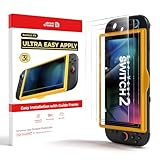
- Premium Choice: ZAGG Glass+ Nintendo Switch 2 Screen Protector | 3X Stronger Tempered Glass, Reinforced Edges, Scratch & Smudge Resistant, InvisibleShield, Easy Installation, Smooth Touch
The best Nintendo Switch screen protector for most owners is a tempered glass model made for your exact console, and amFilm is the brand reviewers name most often as the budget-friendly all-rounder, with Orzly, iVoler and Supershieldz cited as alternatives. The deciding factor is fit: the Switch Lite, original Switch, Switch OLED and Switch 2 have different screen sizes, so a protector sold for one will not fit another. This guide compares glass, film and matte finishes, explains fit and installation, and gives decision tables by budget tier.
- Quick picks
- At a glance
- Glass versus film
- Fit by console model
- Features worth comparing
- How to install without bubbles
- OLED-specific considerations
- Pick X if…
- Alternatives
- Budget tiers
- Compatibility with cases and docks
- What a protector will and will not do
- Buying checklist
- Care and replacement
- Frequently Asked Questions
As an Amazon Associate we earn from qualifying purchases at no extra cost to you.


Quick picks
- Best all-rounder at a budget tier: amFilm tempered glass, named by GameSpot and TheGamer.
- Thin profile that docks easily: Orzly, according to GameSpot and Inverse.
- OLED model: iVoler, listed by GameSpot as its OLED pick.
- Households with children: Supershieldz 0.33mm glass, suggested by GameSpot.
- Premium for Switch 2: dbrand’s Prism line, mentioned in 2026 Switch 2 accessory roundups.
At a glance
| Protector | Best for | Reviewer-stated details | Limits |
|---|---|---|---|
| amFilm tempered glass | Budget buyers, all models | Sold in multi-packs; models for Switch, OLED and Lite; Digital Trends notes the Lite pack includes wet wipes and a cloth | Some older roundups cover earlier sizes only |
| Orzly glass | Thin protection | Inverse says it is thin enough for smooth docking, citing 94 percent light transmission | Thinner glass can feel less robust |
| iVoler glass (including matte) | OLED owners | GameSpot’s OLED pick; matte glass variants are listed | Matte finish can slightly soften sharpness |
| Supershieldz 0.33mm | Kids and rough use | Multi-pack for Switch, OLED and Lite | Thicker glass can affect edge feel |
| Spigen | Brand-conscious buyers | XDA says it costs slightly more than the Hori protector | Check the model listing carefully |
| Maexus / Hestia Goods | Lowest cost multi-packs | Digital Trends calls Maexus among the cheapest decent glass; Inverse notes Hestia’s anti-glare multi-pack | Fewer installation extras |
| dbrand Prism | Switch 2 premium protection | Roundups list it as the premium pick, with amFilm as budget | Premium tier |
Glass versus film
GameSpot recommends tempered glass over plastic because it protects better against scratches, lasts longer and is easier to apply correctly. Film is thinner and flexible, can bubble if installed poorly and scratches more readily, though it can be cheaper and has a tiny profile. Tempered glass offers a harder surface and the feel of the original screen. Neither type will necessarily stop a hard impact from damaging the display, so treat a protector as scratch defense rather than drop insurance.
Fit by console model
The screen size changes by console, and so does the cutout. The original Switch has a 6.2-inch screen, the OLED model has a 7-inch screen and the Lite is smaller at 5.5 inches, while reviewers list Switch 2 at 7.9 inches. TheGamer’s picks target the original 6.2-inch Switch and are not OLED-compatible. The product listing should name your exact console; if it says Switch without specifying OLED, assume the original. Packs that lump Lite and standard models together deserve a second look at the sizing details.
| Console | Screen size | What to buy |
|---|---|---|
| Switch Lite | 5.5-inch LCD | Lite-specific protector |
| Switch (original) | 6.2-inch LCD | Standard Switch protector |
| Switch OLED | 7-inch OLED | OLED-specific protector |
| Switch 2 | 7.9-inch, per reviewers | Switch 2-specific protector |
Features worth comparing
- Thickness: thin glass docks easily; thicker glass adds rigidity. Some cases fit tightly, so extremely thick protectors can interfere.
- Finish: clear glass keeps maximum sharpness; matte and anti-glare reduce reflections but may soften the image slightly and add a slight texture.
- Installation aids: alignment frames, wipes, dust stickers and microfiber cloths make a clean install much easier.
- Pack size: two-packs and three-packs give a spare if the first attempt traps dust.
- Edge coverage: flat protectors leave the bezel exposed; rounded edges can lift if they interact with the case.
- Touch response: all makers claim full sensitivity; thin glass is least likely to dull touches.
How to install without bubbles
- Wash hands and work in a low-dust room, such as a bathroom after a hot shower.
- Turn the console off and clean the screen with the supplied wipe, then the microfiber cloth.
- Lift stray dust with the sticker included in many kits.
- Use the alignment frame if provided; otherwise line up the cutouts and lower the glass from one edge.
- Press from the center outward with the cloth to push out air.
- Wait before docking or putting the console in a case so adhesive settles.
If a bubble remains, small ones around dust specks sometimes need the protector lifted and reapplied. Follow the instructions in your kit.
OLED-specific considerations
OLED screens benefit from protection just as LCD models do. Some buyers choose matte glass to reduce glare in bright environments, though it can reduce the punch reviewers praise on the display. If you play on the go in sunlight, anti-glare may be a net gain; if you mostly play indoors, clear glass preserves the display quality.
Pick X if…
| If you… | Pick |
|---|---|
| Want the cheapest reliable choice | amFilm tempered glass for your model |
| Dock often and want a thin profile | Orzly |
| Own a Switch OLED | iVoler, or an OLED-specific amFilm |
| Have kids or a rough carry routine | Supershieldz 0.33mm glass |
| Play outdoors often | Matte or anti-glare glass |
| Own a Switch 2 and want premium | dbrand Prism 2.0 or a Switch 2-specific glass pack |
Alternatives
- Official licensed protectors (Hori): XDA positions these as a reference point for pricing and fit.
- Cases with built-in screen guards: some shells include a protective layer, saving a separate purchase.
- Carrying case only: skip the protector if you play docked almost exclusively, though scratches can still occur in a bag.
Budget tiers
| Tier | What to expect | Examples named by reviewers |
|---|---|---|
| Budget | Multi-pack glass with basic wipes | Hestia Goods, Maexus, amFilm |
| Mid-range | Quality glass with alignment aids and a thin profile | Orzly, iVoler, Supershieldz, Spigen |
| Premium | Brand-backed glass with refined finishes | dbrand Prism for Switch 2 |
Compatibility with cases and docks
Protectors sit on the screen, but cases can press on the edges. Rounded-edge glass may lift if a tight case squeezes it, while flat glass stays put more easily. If you use a grip shell or a charging case, read its listing for notes about protector clearance. Thin options such as Orzly are noted by Inverse as dock-friendly, and the console should still slide in and out of the dock smoothly after installation. If you notice resistance, remove the protector rather than forcing the console into the dock.
What a protector will and will not do
A tempered glass layer is designed to take scratches and light knocks instead of the console’s own screen, and many makers also advertise a coating that resists fingerprints. It is not a guarantee against cracks from a hard fall, and no reviewer in the roundups above claims otherwise. Pair a protector with a padded case for the best protection when travelling. Also remember that a protector slightly changes how the screen feels under your finger, and a very cheap film can add a faint rainbow effect or a grainy look in bright light. If you are unsure, start with a mid-tier clear glass pack, which is the safest option for most buyers, and move to matte only if reflections bother you.
Buying checklist
- Confirm your exact console model, including whether it is the OLED, Lite or Switch 2.
- Match the listing’s stated model to yours rather than relying on the pack photo.
- Choose clear or matte based on where you play.
- Look for a pack with an alignment frame and a spare sheet.
- Check the return policy in case the size is wrong.
Care and replacement
- Clean the protector with a microfiber cloth; avoid harsh chemicals that can degrade coatings.
- Replace a protector if it cracks, since sharp edges can catch fingers or lift further.
- Buy multi-packs so you have a spare for when the first one collects scratches.
- Do not press hard on a cracked protector, and take care when peeling it off to avoid scratching the screen beneath.
Frequently Asked Questions
Do I need a screen protector for the Switch?
It is optional but inexpensive. If you play handheld or carry the console in a bag, a protector helps prevent scratches that glare and wear can make more visible.
Is tempered glass better than film?
GameSpot recommends glass for better scratch protection, longer life and easier installation. Film can be a lower-cost alternative but is more prone to bubbles and scratches.
Will a Switch protector fit the OLED model?
Not unless it is made for the OLED. The OLED has a 7-inch screen, and reviewers note some popular picks are sized for the original 6.2-inch Switch.
Will a protector stop the Switch from docking?
Thin, correctly sized glass should not. Inverse notes Orzly is thin enough for smooth docking, but check the maker’s notes if you use a tight case.
What do I do if bubbles appear?
Small bubbles often come from dust or incomplete pressing. Lift the protector with the corner tab, clean the screen and reapply, or use the spare from a multi-pack.
Does a matte protector change the picture?
It reduces reflections but can slightly soften sharpness and add a faint texture. Choose clear glass if image quality matters most and matte if you play in bright light.







