Most desks end up with two mice: a fast gaming mouse that is miserable in a spreadsheet, and a comfortable office mouse that falls apart in a shooter. A true dual-use mouse has to clear two bars at once. For gaming, it needs a flawless optical sensor, a polling rate of at least 1,000 Hz, and lag-free switches. For work, it needs the hardware gaming mice usually skip: multi-device pairing, a free-spin scroll wheel, long battery life, and clicks quiet enough for calls.
As an Amazon Associate we earn from qualifying purchases.
This guide applies that two-bar test strictly. Every pick below has a gaming-grade sensor and at least two genuine productivity features, and the list runs in both directions: gaming mice that added real work hardware, and productivity mice built around sensors that can keep up in games. If your priority is a gaming mouse judged mainly on office work, our guide to the best gaming mouse for productivity takes that gaming-first angle; here, work and play carry equal weight.
Quick Comparison
| Mouse | Sensor | Max polling | Connections | Scroll wheel | Battery (manufacturer figure) | Weight |
|---|---|---|---|---|---|---|
| Razer Basilisk V3 Pro | Focus Pro 30K optical | 1,000 Hz (8,000 Hz with separate dongle) | 2.4 GHz, Bluetooth, wired | HyperScroll tilt wheel, free-spin and tactile modes | Up to 90 hours (HyperSpeed) | Approx. 112 g |
| Logitech G502 X Plus | HERO 25K optical | 1,000 Hz | LIGHTSPEED 2.4 GHz, wired | Dual-mode ratchet and free-spin | Up to 130 hours (lighting off) | 106 g |
| Keychron M6 8K | PixArt 3950 | 8,000 Hz | 2.4 GHz, Bluetooth, wired | Dual wheels, infinite-scroll mode | Varies with polling rate | 86 g |
| Razer Pro Click V2 Vertical | Focus Pro optical, 30,000 DPI | 1,000 Hz | 2.4 GHz, Bluetooth, wired | Tactile wheel, vertical design | Long-life cell, USB-C charging | Not listed here |
| Logitech MX Master 3S | Darkfield, 8,000 DPI | 125 Hz | Bluetooth, Logi Bolt receiver | MagSpeed free-spin wheel plus thumb wheel | Up to 70 days | 141 g |
What Separates a Dual-Use Mouse From a Compromise
The gaming bar. Sensor first: every pick here tracks at high IPS with no smoothing or acceleration surprises, because aiming consistency depends on it. Polling rate second: 1,000 Hz is the working minimum for gaming, and one pick reaches 8,000 Hz. Switches third: optical and silent mechanical switches both avoid the double-click failures of cheap office mice, though they feel very different.
The work bar. Multi-device pairing matters if you switch between a work laptop and a gaming PC; Bluetooth plus a 2.4 GHz dongle is the flexible combination. A free-spin wheel mode is the biggest quality-of-life feature for documents, code, and timelines. Battery life decides whether the mouse is a desk fixture or a charging chore, and quiet clicks decide whether it survives a day of calls.
Razer Basilisk V3 Pro — Best All-Round Dual-Use Mouse
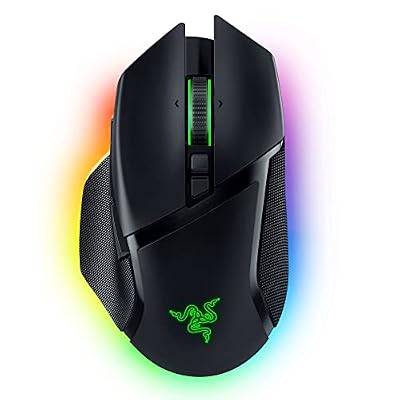
The Basilisk V3 Pro is the most complete answer to the two-bar test. Its Focus Pro 30K optical sensor and Gen-3 optical switches are flagship gaming hardware, and HyperSpeed 2.4 GHz polls at 1,000 Hz. The work side is just as strong: the HyperScroll tilt wheel switches between tactile notches and free-spin, and tilts for four-way scrolling in wide spreadsheets. Bluetooth is built in, so the mouse can live on a gaming PC over the dongle and hop to a laptop without re-pairing.
Razer quotes up to 90 hours of battery life on HyperSpeed as a manufacturer figure. The honest limitations are weight and polling ceiling: at roughly 112 g it is an ergonomic cruiser rather than an ultralight esports shape, and 8,000 Hz polling requires Razer’s separate HyperPolling dongle.
Specs
- Sensor: Razer Focus Pro 30K optical, up to 30,000 DPI
- Switches: Razer Optical Mouse Switches Gen-3
- Connectivity: HyperSpeed 2.4 GHz, Bluetooth, wired
- Scroll wheel: HyperScroll tilt wheel with free-spin and tactile modes
- Controls: 13 customizable controls
- Battery: up to 90 hours on HyperSpeed (manufacturer figure)
- Weight: approx. 112 g
See the Razer Basilisk V3 Pro on Amazon
Logitech G502 X Plus — Best for Gaming-First Desks

The G502 X Plus leans gaming-first while keeping the one work feature that matters most: its dual-mode scroll wheel clicks between precise ratchet steps and a free-spinning infinite scroll, the same trick that made the original G502 a dual-use favourite. The HERO 25K sensor and LIGHTFORCE hybrid optical-mechanical switches are pure gaming hardware, and LIGHTSPEED wireless keeps polling at 1,000 Hz.
Battery life is the headline work spec: Logitech rates it at up to 120 hours with RGB on and up to 130 hours with lighting off, both manufacturer figures, and it supports PowerPlay wireless charging. The trade-off is connectivity: there is no Bluetooth, so a second machine means moving the LIGHTSPEED receiver or plugging in.
Specs
- Sensor: Logitech HERO 25K optical, up to 25,600 DPI
- Switches: LIGHTFORCE hybrid optical-mechanical
- Connectivity: LIGHTSPEED 2.4 GHz wireless, USB-C wired (no Bluetooth)
- Scroll wheel: dual-mode ratchet and free-spin (infinite scroll)
- Buttons: 13 programmable buttons
- Battery: up to 130 hours with lighting off (manufacturer figure)
- Weight: 106 g
See the Logitech G502 X Plus on Amazon
Keychron M6 8K — Best Quiet-Click Hybrid
The M6 8K is the crossover pick: an ergonomic, MX Master-style shell with a thumb rest and two scroll wheels, built around a flagship PixArt 3950 sensor that polls at up to 8,000 Hz over its 2.4 GHz dongle. That combination matches dedicated esports mice, yet the all-silent Huano micro switches make it one of the quietest mice here — a genuine work feature for open offices. The main wheel offers an infinite-scroll mode, and a separate side wheel handles horizontal scrolling.
Connectivity covers every desk layout with 2.4 GHz, Bluetooth, and wired modes across Windows, Mac, and Linux. The caveat is battery behaviour: 8,000 Hz polling drains the cell far faster than office rates, so the smart setup is high polling on the gaming PC and Bluetooth on the work machine. At 86 g it is also the lightest ergonomic option here.
Specs
- Sensor: PixArt 3950 optical, up to 30,000 DPI, 750 IPS
- Polling rate: up to 8,000 Hz over 2.4 GHz and wired
- Switches: Huano silent micro switches
- Scroll wheels: main wheel with infinite-scroll mode plus side thumb wheel
- Connectivity: 2.4 GHz, Bluetooth, wired
- Weight: 86 g
See the Keychron M6 8K on Amazon
Razer Pro Click V2 Vertical — Best for Wrist Comfort

The Pro Click V2 Vertical approaches dual use from the productivity side. The vertical handshake shape is designed to reduce forearm strain across a full workday, but underneath sits Razer’s Focus Pro optical sensor with up to 30,000 DPI — far beyond what any office mouse needs, and enough for smooth, accurate play in strategy games, MMOs, and casual shooters. Multi-device connectivity runs across 2.4 GHz HyperSpeed, Bluetooth, and USB-C wired modes, and the AI Prompt Master button adds a work shortcut layer through Razer Synapse 4.
The shape is the limitation as much as the strength. A vertical mouse is a poor fit for fast, low-sensitivity FPS aiming, so competitive players should look at the Basilisk V3 Pro instead. For players whose gaming is turn-based, isometric, or relaxed — and whose wrists complain after long workdays — this is the one pick that treats comfort as the primary spec without giving up a real gaming sensor.
Specs
- Sensor: Razer Focus Pro optical, up to 30,000 DPI
- Shape: vertical ergonomic design for a handshake grip
- Buttons: 6 buttons, including the AI Prompt Master shortcut button
- Connectivity: 2.4 GHz HyperSpeed, Bluetooth, USB-C wired; multi-device connectivity
- Software: Razer Synapse 4, Chroma RGB underglow
- Compatibility: Windows and Mac
See the Razer Pro Click V2 Vertical on Amazon
Logitech MX Master 3S — Best Work-First Pick, With an Honest Limit

The MX Master 3S is the benchmark productivity mouse: a Darkfield sensor that tracks on glass at up to 8,000 DPI, Quiet Clicks switches, a MagSpeed electromagnetic wheel that free-spins through documents, a thumb wheel, and pairing with up to three devices over Bluetooth or the Logi Bolt receiver, with Flow moving the cursor between computers. Logitech rates the battery at up to 70 days per charge as a manufacturer figure.
Its gaming limit must be stated plainly: it polls at 125 Hz, which feels visibly steppy on a high-refresh monitor and is far below the 1,000 Hz gaming standard. It is a legitimate pick for turn-based games, city builders, and slow-paced titles — and the wrong pick for competitive shooters. It earns its place because many dual-use buyers game casually and work seriously, and for them its work hardware is still the best available.
Specs
- Sensor: Logitech Darkfield, up to 8,000 DPI, tracks on glass
- Switches: Quiet Clicks
- Polling rate: 125 Hz (the gaming limitation)
- Scroll wheels: MagSpeed free-spin wheel plus thumb wheel
- Connectivity: Bluetooth and Logi Bolt USB receiver; pairs with up to 3 devices, Flow support
- Battery: up to 70 days per charge (manufacturer figure), USB-C quick charging
- Weight: 141 g
See the Logitech MX Master 3S on Amazon
How to Choose Between Them
Start with your device count. Two or more machines demand Bluetooth plus a dongle, which narrows the field to the Basilisk V3 Pro, the M6 8K, the Pro Click V2 Vertical, and the MX Master 3S. Next, be honest about your games: anything competitive on a high-refresh monitor rules out the 125 Hz MX Master 3S and the vertical shape, while turn-based or single-player games keep all five in play. Then weigh the scroll wheel — free-spin modes on the Basilisk, G502 X Plus, M6, and MX Master 3S transform document work — and noise: the silent switches on the M6 and the Quiet Clicks on the MX Master 3S suit shared spaces, while optical gaming switches are built for speed, not silence.
Verdict
For most people who split their desk time, the Razer Basilisk V3 Pro is the best mouse for both gaming and productivity: flagship sensor, free-spin tilt wheel, and Bluetooth in one shell. The Logitech G502 X Plus suits gaming-first users who still live in documents. The Keychron M6 8K is the value hybrid — esports-grade internals, quiet clicks, two scroll wheels. The Razer Pro Click V2 Vertical wins on wrist comfort, and the Logitech MX Master 3S remains the work-first champion for casual gaming, its 125 Hz polling clearly understood.
Product and ASIN Reference
| Product | ASIN |
|---|---|
| Razer Basilisk V3 Pro | B0B6Y3XYFG |
| Logitech G502 X Plus | B092CB69Q4 |
| Keychron M6 8K | B0FP2F8843 |
| Razer Pro Click V2 Vertical | B0DVD5RTZ5 |
| Logitech MX Master 3S | B09HM94VDS |
FAQ
Can one mouse really handle both gaming and work?
Yes, if it clears both bars: a gaming-grade sensor with at least 1,000 Hz polling for play, and productivity hardware such as multi-device pairing, a free-spin wheel, and long battery life for work. The Basilisk V3 Pro and Keychron M6 8K meet both sets of requirements without a serious weakness either way.
Does polling rate matter outside gaming?
Barely. For office tasks, even 125 Hz feels smooth on a 60 Hz display. It becomes visible in games on high-refresh monitors, where a 125 Hz mouse such as the MX Master 3S can look steppy next to a 1,000 Hz gaming mouse.
Is Bluetooth good enough for gaming?
Bluetooth adds latency and usually caps polling well below gaming dongles, so it is best treated as the work connection. The flexible setup used by most picks here is a 2.4 GHz dongle on the gaming PC for full polling rate, with Bluetooth reserved for the work laptop.
Which pick suits a mostly-work, sometimes-gaming desk?
The Logitech MX Master 3S if your games are slow-paced, or the Razer Pro Click V2 Vertical if wrist comfort is the priority — both are productivity mice with sensors strong enough for casual play. If your gaming includes shooters, step up to the Keychron M6 8K, which keeps the quiet clicks and dual wheels while adding a true gaming sensor and 8,000 Hz polling.