Gaming memory guides usually stop at 32GB, because that is all most games need. Creator workloads play by different rules. A 4K video timeline with effects, a large Photoshop canvas, a Blender scene with high-resolution textures, or a stack of virtual instruments can consume memory far faster than any game, and when a system runs out of RAM it starts swapping to storage, which slows everything down. That is why the best DDR5 RAM kits for creator PCs start at 64GB and climb to 128GB.
As an Amazon Associate we earn from qualifying purchases.
This guide is capacity-first. Every kit below uses two modules, because two-DIMM configurations are the most reliable way to run DDR5 at its specified speed on current AMD and Intel platforms. If your priority is gaming frame rates rather than workstation capacity, our roundup of the best DDR5 RAM kits for gaming covers the faster, smaller kits instead. Here, the focus is on memory that lets editing, rendering, and multitasking breathe.
How Much RAM Does a Creator PC Actually Need?
Capacity should be decided by the heaviest application you run, not by averages. As a practical guide:
- 32GB is workable for photo editing, light 1080p video work, and coding, but it leaves little headroom when several creative apps stay open at once.
- 64GB is the sensible default for a creator PC in 2026. It handles 4K editing timelines, large Lightroom catalogues, moderate 3D scenes, and game development projects without constant swapping.
- 96GB suits heavy multitaskers: editors who keep Premiere Pro, After Effects, and a browser full of reference material open together, or 3D artists working with dense scenes.
- 128GB is for the top end of desktop creation: very large 3D environments, high-resolution compositing, virtual machines, local AI workloads, and professional colour pipelines.
Going beyond your platform’s comfortable capacity has a cost beyond the sticker. Very large kits often run at lower specified speeds, and filling all four slots on a consumer board can force the memory controller to slow down further. The sections below explain why two big modules usually beat four smaller ones.
Speed and Latency: What Matters for Creator Workloads
For creator applications, capacity almost always matters more than raw speed. A render or export that fits entirely in memory will finish far sooner than one that keeps swapping to an SSD, even if the faster kit has tighter timings. Once capacity is covered, look at speed and latency as a pair: DDR5-6000 with CL30 timings is a widely used balance point on AMD AM5 systems, while Intel platforms can typically sustain higher specified frequencies.
Timings are written as a sequence such as 30-36-36-76, where the first number is the CAS latency (CL). Lower is better at a given speed, but the difference between CL30 and CL36 at DDR5-6000 is small in most creator applications compared with the difference between having enough capacity and not having it. Buy capacity first, then the best speed and latency combination your platform supports reliably.
EXPO vs XMP: Match the Profile to Your Platform
DDR5 kits reach their advertised speed through an overclocking profile stored on the module. Intel’s version is XMP 3.0; AMD’s is EXPO. The two are not interchangeable labels for the same thing:
- An XMP-only kit is tuned and validated for Intel platforms. It will still run on an AMD board at default JEDEC speeds, but the one-click profile may not be offered or may be less stable.
- An EXPO kit is tuned for AMD AM5 platforms, with timings chosen for Ryzen memory controllers.
- Dual-profile kits carry both XMP and EXPO data, which makes them the flexible choice if you might switch platforms later.
All specifications below are the manufacturers’ published figures for each kit. Check which profiles a kit carries before ordering, and match them to your motherboard and CPU rather than to the brand name on the box.
Two Sticks vs Four Sticks: The Stability Caveat
Modern DDR5 memory controllers, especially on AMD AM5, strongly prefer two modules. Running four DDR5 DIMMs at high specified speeds is a common source of failed boots and instability, and many boards automatically drop the memory speed when all four slots are populated. High capacities make this worse: a 4x32GB configuration asks more of the controller than a 2x64GB kit at the same total capacity.
For a creator PC, the practical rule is simple: reach your target capacity with two modules. That is why every kit in this guide is a two-stick kit, including the 128GB option, which uses two 64GB modules. If you genuinely need four slots filled, expect to run at a reduced speed and validate stability with a memory stress test before trusting the machine with paid work.
The Kits
1. Corsair Vengeance DDR5 64GB (2x32GB) 6000MHz CL30 — Best All-Round Creator Kit

Corsair’s Vengeance line is the straightforward recommendation for most creator builds: a low-profile 64GB kit at DDR5-6000 CL30 that carries both AMD EXPO and Intel XMP profiles, so it suits Ryzen and Core systems equally. The compact heatspreader clears most large air coolers, which matters in workstation builds that favour big tower coolers over liquid cooling.
Specs (manufacturer-published):
- Capacity: 64GB (2x32GB)
- Speed: DDR5-6000
- Timings: CL30-36-36-76
- Voltage: 1.4V
- Profiles: AMD EXPO and Intel XMP 3.0
- Form factor: 288-pin UDIMM, low-profile heatspreader
- Model: CMK64GX5M2B6000Z30
Check the Corsair Vengeance 64GB kit on Amazon
2. G.SKILL Trident Z5 Neo RGB 64GB (2x32GB) 6000MHz CL30 — Best for AMD EXPO Builds
The Trident Z5 Neo RGB is G.SKILL’s AMD-focused line, tuned specifically for EXPO platforms. It matches the Corsair kit on capacity and headline timings but is the cleaner pick for a Ryzen creator PC, where EXPO validation is the priority. The RGB light bar is a matter of taste; the underlying specification is what earns it a place here.
Specs (manufacturer-published):
- Capacity: 64GB (2x32GB)
- Speed: DDR5-6000
- Timings: CL30-40-40-96
- Voltage: 1.40V
- Profiles: AMD EXPO
- Form factor: 288-pin UDIMM with RGB heatspreader
- Model: F5-6000J3040G32GX2-TZ5NR
Check the G.SKILL Trident Z5 Neo RGB 64GB kit on Amazon
3. TEAMGROUP T-Create Expert 64GB (2x32GB) 6000MHz CL34 — Built for Creator Workstations
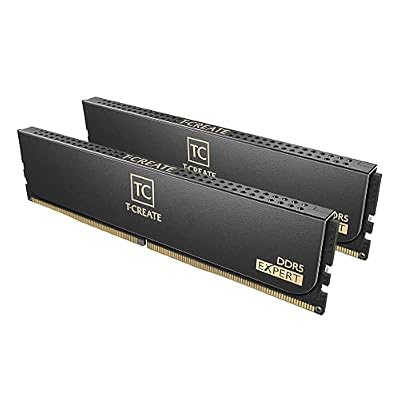
The T-Create Expert line is TEAMGROUP’s creator-oriented range, designed for workstation-style builds rather than gaming aesthetics. This 64GB kit runs DDR5-6000 at CL34 and supports both Intel XMP 3.0 and AMD EXPO according to TEAMGROUP, with a plain heatspreader and no lighting. For a machine that sits under a desk rendering all day, that restraint is a feature.
Specs (manufacturer-published):
- Capacity: 64GB (2x32GB)
- Speed: DDR5-6000
- Latency: CL34
- Profiles: Intel XMP 3.0 and AMD EXPO
- Form factor: 288-pin UDIMM, non-ECC unbuffered
- Model: CTCED564G6000HC34BDC01
Check the TEAMGROUP T-Create Expert 64GB kit on Amazon
4. Corsair Vengeance DDR5 96GB (2x48GB) 6000MHz CL36 — The Heavy Multitasker

Ninety-six gigabytes is the in-between step that suits editors and 3D artists who find 64GB tight but do not need a full 128GB. This kit reaches 96GB with two 48GB modules, keeping the two-DIMM advantage, and still runs at DDR5-6000, albeit with looser CL36 timings that reflect the higher density. It carries both EXPO and XMP profiles.
Specs (manufacturer-published):
- Capacity: 96GB (2x48GB)
- Speed: DDR5-6000
- Timings: CL36-44-44-96
- Voltage: 1.4V
- Profiles: AMD EXPO and Intel XMP 3.0
- Form factor: 288-pin UDIMM, low-profile heatspreader
- Model: CMK96GX5M2E6000Z36
Check the Corsair Vengeance 96GB kit on Amazon
5. Crucial 128GB Kit (2x64GB) DDR5-5600 CL46 — Maximum Capacity in Two Slots
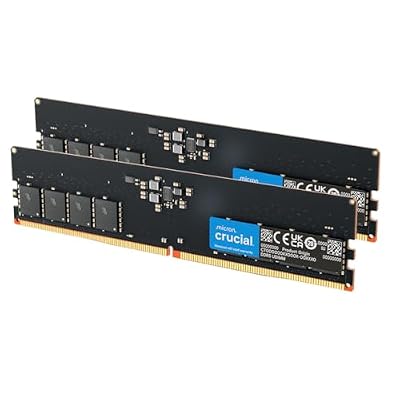
When the workload genuinely demands 128GB — huge scenes, virtual machines, local AI models, or all three at once — this Crucial kit is the practical route. Two 64GB UDIMMs deliver the full capacity while leaving two slots empty, avoiding the worst four-DIMM stability problems. The trade-off is speed: DDR5-5600 CL46 is a JEDEC-style specification rather than a tuned overclocking profile, though Crucial lists XMP 3.0 and EXPO support on the modules. At this capacity, stability and headroom matter more than frequency.
Specs (manufacturer-published):
- Capacity: 128GB (2x64GB)
- Speed: DDR5-5600 (also supports 5200 and 4800 fallback speeds)
- Latency: CL46
- Voltage: 1.1V
- Profiles: Intel XMP 3.0 and AMD EXPO
- Form factor: 288-pin UDIMM
- Model: CT2K64G56C46U5
Check the Crucial 128GB kit on Amazon
Compatibility Checks Before You Buy
A few minutes of checking prevents the most common DDR5 disappointments:
- Check the motherboard QVL. Every board maker publishes a qualified vendor list of memory kits validated on that board. A kit on the QVL at your target speed is the safest purchase.
- Update the BIOS. Memory support improves with BIOS revisions, especially for 48GB and 64GB modules. Update before installing a high-capacity kit.
- Confirm slot count and layout. Most consumer boards have four slots; use the two slots your manual specifies for a two-module kit (usually the second and fourth from the CPU).
- Mind cooler clearance. Tall RGB heatspreaders can foul large air coolers. Low-profile kits such as the Corsair Vengeance avoid the problem.
- Verify the platform ceiling. Some boards cap supported capacity per slot. A 64GB module only helps if your board and CPU support 128GB totals.
Verdict: Which Kit Should You Buy?
For most creator PCs, the Corsair Vengeance 64GB DDR5-6000 CL30 is the default answer: dual profiles, sensible timings, and a heatspreader that fits anywhere. Ryzen builders who want EXPO-specific tuning should take the G.SKILL Trident Z5 Neo RGB 64GB, while the TEAMGROUP T-Create Expert 64GB suits creators who prefer a no-nonsense workstation part from a creator-focused line. If your projects regularly push past 64GB, step up to the Corsair Vengeance 96GB kit rather than adding two more sticks later. Reserve the Crucial 128GB kit for genuinely memory-bound work; it trades speed for the largest two-slot capacity available, and for the right workload that trade is worth making every time.
FAQ
Is 64GB of RAM overkill for video editing?
No. Mainstream 4K editing in applications such as Premiere Pro and DaVinci Resolve can use well over 32GB once effects, colour work, and background exports are involved. 64GB gives a creator PC comfortable headroom, and 96GB or 128GB makes sense for especially heavy timelines and 3D work.
Can I mix two DDR5 kits to reach 128GB?
It is not recommended. Mixing kits — even of the same model — can cause instability because modules are validated as matched sets, and four DDR5 modules often force lower speeds. A single 2x64GB kit such as the Crucial 128GB set is the more reliable route.
Does EXPO or XMP actually matter for a creator PC?
Yes, because the profile is what makes the kit run at its advertised speed instead of the slower default. Match the profile to your platform: EXPO for AMD Ryzen systems, XMP 3.0 for Intel systems, or a dual-profile kit if you want flexibility.
Will a 96GB or 128GB kit work on any DDR5 motherboard?
Not automatically. Check the board’s specifications for maximum supported capacity and per-slot limits, consult its QVL, and update the BIOS. Support for 48GB and 64GB modules arrived through BIOS updates on many boards, so an older board on an early BIOS may not recognise them.
Product and ASIN Reference
| Product | Capacity | Speed / Timings | ASIN |
|---|---|---|---|
| Corsair Vengeance DDR5 (CMK64GX5M2B6000Z30) | 64GB (2x32GB) | DDR5-6000 CL30-36-36-76 | B0C5M7J967 |
| G.SKILL Trident Z5 Neo RGB (F5-6000J3040G32GX2-TZ5NR) | 64GB (2x32GB) | DDR5-6000 CL30-40-40-96 | B0BJNTLJ5X |
| TEAMGROUP T-Create Expert (CTCED564G6000HC34BDC01) | 64GB (2x32GB) | DDR5-6000 CL34 | B0BPHSL93T |
| Corsair Vengeance DDR5 (CMK96GX5M2E6000Z36) | 96GB (2x48GB) | DDR5-6000 CL36-44-44-96 | B0F7RY9V4N |
| Crucial DDR5 Kit (CT2K64G56C46U5) | 128GB (2x64GB) | DDR5-5600 CL46 | B0DSQWFYPP |