Like a Dragon: Ishin! is not a demanding modern release by gaming laptop standards, which is good news: you do not need a flagship machine to play it well. You need a laptop that comfortably clears its recommended specification, holds steady frame rates during busy street fights in Kyo, and still has headroom for other games in the series. Every pick below uses an NVIDIA GeForce RTX 4060 Laptop GPU with 8GB of VRAM, a modern multi-core Intel processor, at least 16GB of DDR5 memory, and a fast NVMe SSD, so each one sits well above the level Sega lists for 1080p High play.
As an Amazon Associate we earn from qualifying purchases
What Like a Dragon: Ishin! Actually Requires on PC
The PC requirements published on Steam set a low floor and a modest target. The minimum specification, aimed at 1080p Low at 30 FPS, calls for an Intel Core i5-3470 or AMD Ryzen 3 1200, 8GB of RAM, and a GeForce GTX 960 or Radeon RX 460 with 2GB of VRAM. The recommended specification, aimed at 1080p High at 60 FPS, raises that to an Intel Core i7-4790 or AMD Ryzen 5 1600, 8GB of RAM, and a GeForce RTX 2060 with 6GB or a Radeon RX Vega 56 with 8GB. The game needs 60GB of available storage and DirectX 12 either way, and Steam notes that the processor must support the AVX and SSE4.2 instruction sets.
That recommended tier is the right benchmark for shopping. Any current gaming laptop with an RTX 4060, a recent Core i7 HX processor, and 16GB of RAM clears it on every line: more CPU cores, double the memory, more VRAM, and a GPU generation two steps newer. If you are also working through the wider series, our guide to the Like a Dragon: Pirate Yakuza in Hawaii PC requirements shows how the newer entry compares, so you can judge how much extra headroom is worth having.
How to Choose a Laptop for Ishin
GPU and power limits. The laptop version of the RTX 4060 performs differently depending on its power limit, so check the total graphics power where a listing states it. The ASUS and Lenovo picks below are listed at a 140W maximum TGP, which is the full-power implementation of this GPU. A higher power limit matters more for heavier games than for Ishin itself, but it protects your purchase for future titles.
CPU. Ishin only asks for older quad-core processors, but its Unreal Engine 4 world streams assets as you move through districts, and a modern HX processor with many more cores keeps frame pacing smoother while Windows, launchers, and voice chat run in the background.
Display. The game targets 1080p, so a 1920 x 1200 or 2560 x 1600 panel at 144Hz or 165Hz is a comfortable match. A higher resolution panel gives you the option to render at native resolution for a sharper image, since the RTX 4060 has performance to spare at the settings this game uses.
RAM and storage. Treat 16GB as the practical minimum even though the game lists 8GB, and look for an SSD of at least 1TB if you keep several large games installed. Ishin alone takes 60GB, and a small drive fills quickly once you add a few more series entries.
Ports and warranty. An HDMI output for a TV or monitor, USB-C with DisplayPort support, and wired Ethernet all make a gaming laptop easier to live with. Warranty terms vary by seller and region, so check the exact listing for the coverage that applies to the configuration you are buying rather than assuming terms from another market.
The Picks
ASUS ROG Strix G16 (G614JV-AS74)

This is the straightforward full-power choice. The Amazon US listing for this model pairs an Intel Core i7-13650HX with an RTX 4060 Laptop GPU listed at 140W maximum TGP, which puts it firmly ahead of the RTX 2060 Sega recommends.
- Amazon US: https://www.amazon.com/dp/B0CRDCXRK2
- CPU / GPU: Intel Core i7-13650HX / NVIDIA GeForce RTX 4060, 8GB GDDR6, 140W max TGP as listed
- Display: 16-inch, 165Hz, 1920 x 1200
- Memory / storage: 16GB DDR5 / 1TB PCIe Gen4 SSD
- Ports: Thunderbolt 4, USB-C 3.2 Gen 2 with DisplayPort and power delivery, two USB-A 3.2 Gen 2, HDMI 2.1, RJ45 Ethernet, combo audio jack
- Wireless: Wi-Fi 6E
- Warranty: terms vary by seller and region, so confirm coverage on the listing before ordering
Upgradeability is a strength of this exact model. Spec sheets for the G614JV list two SO-DIMM slots supporting up to 32GB of DDR5-4800 in total, and two M.2 slots for PCIe 4.0 SSDs, with one slot free beyond the fitted drive. That means you can add storage without removing the original SSD, and move to a larger matched memory kit later.
Acer Predator Helios 16 (PH16-71-74UU)
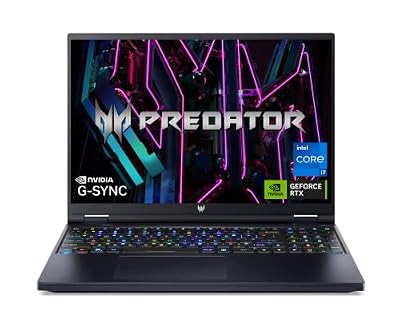
The Helios 16 suits players who want a sharper built-in screen. Its 2560 x 1600 panel runs at 165Hz with G-SYNC support, which is a step up in clarity for reading subtitle-heavy cutscenes and exploring detailed street scenes, while the RTX 4060 still has enough headroom to drive this game at high settings.
- Amazon US: https://www.amazon.com/dp/B0BXMNSXDD
- CPU / GPU: Intel Core i7-13700HX / NVIDIA GeForce RTX 4060
- Display: 16-inch, 2560 x 1600, 165Hz, G-SYNC
- Memory / storage: 16GB DDR5 / 1TB PCIe Gen4 SSD
- Wireless: Killer Wi-Fi 6E
- GPU power and warranty: Acer sells this chassis in several configurations, so confirm the GPU power limit and the warranty terms shown for the PH16-71-74UU listing itself
For upgradeability, do not assume slot counts from other Helios configurations. Check the exact PH16-71-74UU listing and Acer’s support information for this model to confirm how its memory is populated and whether a second M.2 slot is available before planning a RAM or SSD upgrade. That caution aside, the fitted 16GB and 1TB combination is already the right capacity for Ishin and a healthy game library.
Lenovo Legion 5i (RTX 4060, 32GB Configuration)

This Legion 5i listing is the pick for buyers who want more memory fitted from day one. It doubles the RAM of the other two machines, which helps if you keep a browser, capture software, and chat apps open alongside the game, and it matches them on GPU power.
- Amazon US: https://www.amazon.com/dp/B0DPWQ6WSS
- CPU / GPU: Intel Core i7-13650HX / NVIDIA GeForce RTX 4060, 8GB GDDR6, listed at 140W TGP
- Display: 16-inch QHD, 165Hz, G-SYNC
- Memory / storage: 32GB DDR5-4800, fitted as two 16GB modules / 1TB PCIe NVMe SSD
- Cooling: Legion Coldfront 5.0, as described in the listing
- Warranty: this is a seller-configured listing, so check who provides the warranty and for how long on the listing page
On upgradeability, the memory is already at a comfortable 32GB and both modules are populated, so a future memory upgrade would mean replacing the fitted kit rather than adding to it. Before planning extra internal storage, confirm the spare slot situation for this exact configuration with the seller, since upgraded listings can differ from Lenovo’s factory builds.
Which One Fits You?
Choose the ROG Strix G16 if you value clearly documented upgrade paths: two memory slots, a spare M.2 slot, and a full-power GPU in a 16-inch chassis. Choose the Predator Helios 16 if the display is your priority and you want 2560 x 1600 resolution for this game and for desktop use. Choose the Legion 5i configuration if you would rather have 32GB of memory fitted immediately and do not want to open the laptop at all.
All three comfortably exceed the recommended specification for Ishin, so the decision comes down to screen, memory, and how much you care about upgrading later rather than whether the game will run. It will, at high settings, on any of them.
FAQ
Can a laptop with an RTX 4050 run Like a Dragon: Ishin! well?
Yes, in principle. The recommended GPU on Steam is the RTX 2060, and a modern RTX 4050 Laptop GPU sits in a similar performance class with newer features. The RTX 4060 picks above simply give more headroom, which helps at higher resolutions and in newer games.
How much storage do I need for Ishin and the rest of the series?
Ishin needs 60GB of available space on its own. If you plan to keep several Like a Dragon games installed at once, a 1TB SSD is the sensible starting point, and a laptop with a spare M.2 slot, like the Strix G16 above, makes expanding later simple.
Is 16GB of RAM enough, or should I get 32GB?
The game lists 8GB for both its minimum and recommended specifications, so 16GB gives comfortable margin for the game plus background apps. The 32GB Legion configuration is worth it mainly for heavier multitasking or creative work alongside gaming, not because Ishin requires it.
Does the processor in my laptop need anything special for this game?
Steam notes that the game requires a CPU supporting the AVX and SSE4.2 instruction sets. Every processor in the laptops above is a modern Intel HX chip that supports these, so this is only a concern for much older hardware.
Conclusion
Like a Dragon: Ishin! asks little of modern hardware, so the best gaming laptop for it is simply a well-balanced RTX 4060 machine that beats the recommended specification with room to spare. The ROG Strix G16 is the most upgrade-friendly option, the Predator Helios 16 brings the sharpest screen, and the 32GB Legion 5i is ready for heavy multitasking out of the box. Pick based on the display and upgrade path you prefer, install the game, and enjoy Kyo.