

- Top Pick: HP 17 Inch FHD Laptop Computer 2026 Business Student, 16GB RAM 1TB Storage | Win 11 Pro w/ Office Suite, 512GB SSD + 500GB Ext, 17.3" IPS Display, Wi-Fi 6, HubxcelAccs, Numeric Keypad, AI Copilot
- Best Value: HP 255 G10 Laptop for Home or Work, 16GB RAM, 1TB SSD, 15.6" Full HD, Ryzen 3 7330U (Beat Intel i5-1135G7), HDMI, USB-C, Windows 11 Pro, Business and Fun Ready
- Premium Choice: HP 17 Laptop Essential Computer, 17.3 IPS FHD Business PC, 6-Core AMD Ryzen 5, 32GB RAM, 1.5TB Storage (1TB SSD + 500GB Ext), Windows 11 Pro Copilot AI + Office, HubxcelAddons, Number Pad
One terabyte of storage sounds simple until you read the fine print. Some listings mean a single 1TB solid-state drive inside the chassis. Others add a 512GB internal drive to a 500GB external one, or count cloud storage that disappears when the internet does. If you are collecting game libraries, photo archives, lecture recordings or large project files, that difference decides whether the laptop actually holds everything you own.
This guide is for students, home-office workers and creators who want a lot of local space on a Windows laptop without carrying an add-on drive. Every pick below is described only by what its title states, from memory and processor to screen size and ports. A listing with only cloud storage and an external hard drive were removed because neither is a laptop with onboard 1TB. The year 2026 appears in several titles, so check the exact configuration before you order.
Quick Picks
As an Amazon Associate we earn from qualifying purchases at no extra cost to you.




| Product | Best for | Key spec from the title |
|---|---|---|
| HP 17-inch FHD Laptop (512GB + 500GB external) | Big screen, entry tier | 17.3-inch IPS, 16GB RAM, 512GB SSD plus 500GB external |
| HP 255 G10 | Home and office basics | Ryzen 3 7330U, 16GB RAM, 1TB SSD, 15.6-inch FHD |
| HP 17-inch Ryzen 5 Laptop | Heavy multitasking | 6-core Ryzen 5, 32GB RAM, 1TB SSD plus 500GB external |
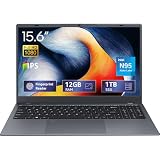
| UOWAMOU 15.6-inch Laptop | Light student use | N95 quad core, 12GB LPDDR5, 1TB NVMe SSD |
| Lenovo V15 Gen 4 | Business and security features | Ryzen 3 7320U, 16GB LPDDR5, Ethernet, webcam shutter |
| YOZISUAN 16-inch Laptop | Taller screen, backlit typing | Core i5, 16GB RAM, 1TB SSD, 1920 x 1200 |
| Dell 16 Touch Business Laptop | Power users who want a touch screen | Ryzen AI 7 350, 32GB DDR5, 1TB SSD |
How to Choose
Read how the terabyte is counted
The cleanest listings state a 1TB SSD or 1TB NVMe SSD. Others combine drives, such as 512GB internal plus a 500GB external, which totals 1TB or 1.5TB on paper but leaves you carrying a separate drive. Cloud storage is not local space at all. If you plan to edit video, store game installs or work offline, insist on internal capacity listed as SSD.
Memory and processor thresholds
16GB of RAM is the practical floor for a laptop with this much storage, since big libraries usually go with heavier multitasking. 12GB works for light browsing and documents; 32GB suits virtual machines, large spreadsheets and editing. Among processors, entry chips such as the N95 and Ryzen 3 handle office work, while the 6-core Ryzen 5, Core i5 and Ryzen AI 7 steps are for demanding sessions.
Display, ports and keyboard
Look for FHD or better resolution, and note aspect ratio: 1920 x 1200 gives extra vertical space over 1920 x 1080. A 17.3-inch screen and a numeric keypad suit spreadsheet work but weigh more. Check for HDMI, USB-C and, if you work wired, an Ethernet port. A backlit keyboard helps in dim lecture halls and flights. Also look at the screen finish: an anti-glare coating reduces reflections near windows, while a touch panel adds convenience for note-taking but can make the display more reflective.
Where budget models cut corners
Entry laptops often pair a large drive with a modest processor, plastic chassis, a 60Hz display and a slow wireless standard. Wi-Fi 5 is slower than Wi-Fi 6, and low-brightness panels wash out near windows. Business-branded models add security features, such as a TPM chip and webcam shutter, which matter more in an office than a dorm. Ignore bundled software lists and promotional wording; they say little about the hardware you will live with for years.
The 7 Best Options
HP 17-inch FHD Laptop (512GB + 500GB External)
This listing pairs a 17.3-inch IPS display with 16GB RAM, Windows 11 Pro and a numeric keypad. The 1TB headline combines a 512GB internal SSD with a 500GB external drive, so it suits buyers who do not mind a separate device. A bookkeeper, a teacher grading at a desk or a family sharing a living-room computer gets room for a big screen, an Office-style bundle mentioned in the title and extra space for backups without learning anything new.
- Strength: large 17.3-inch IPS screen with a numeric keypad for data entry.
- Strength: Wi-Fi 6 and Windows 11 Pro named in the title.
- Trade-off: only 512GB sits inside the laptop; the rest is external.
Skip it if you need a full terabyte inside the chassis or a compact body.
HP 255 G10
A straightforward 15.6-inch Full HD laptop with a Ryzen 3 7330U, 16GB RAM and a true 1TB SSD. HDMI and USB-C ports and Windows 11 Pro make it a tidy daily driver for home or office work. It is the listing to open first when the requirement is simply a full terabyte inside the machine, with no add-on drives, bundles or unusual extras to sort through.
- Strength: full 1TB SSD inside the laptop.
- Strength: HDMI and USB-C for monitors and chargers or docks.
- Trade-off: Ryzen 3 is an entry chip, so it is not aimed at heavy editing.
Skip it if you want a workstation-level processor.
HP 17-inch Ryzen 5 Laptop
The most memory-heavy HP here: a 6-core Ryzen 5, 32GB RAM, a 17.3-inch IPS FHD screen and 1.5TB of total space through a 1TB SSD plus a 500GB external drive. It suits power multitaskers who prefer a big display, such as an analyst with many spreadsheets open, a student running several study tools together or a remote worker who keeps video calls and documents side by side all day.
- Strength: 32GB RAM and 6 cores for heavier workloads.
- Strength: 1TB internal SSD plus a 500GB external.
- Trade-off: a 17-inch chassis is bulky for commuting.
Skip it if you want a light carry-everywhere laptop.
UOWAMOU 15.6-inch Laptop
UOWAMOU lists a 15.6-inch IPS FHD screen, an N95 quad-core processor reaching 3.4GHz, 12GB LPDDR5 RAM and a 1TB NVMe SSD. It is aimed at students who need space for files rather than speed, for example someone storing lecture recordings, scanned textbooks and photos who rarely runs anything more demanding than a browser and a document editor.
- Strength: 1TB NVMe SSD inside a lightweight body.
- Strength: LPDDR5 memory and multiple ports named in the title.
- Trade-off: it is the only listing here that names Wi-Fi 5, an older wireless standard.
Skip it if you rely on a fast wireless network or demanding apps.
Lenovo V15 Gen 4
This business model offers a 15.6-inch anti-glare FHD screen, a Ryzen 3 7320U, 16GB LPDDR5 RAM and 1TB of storage. An RJ-45 Ethernet port, webcam shutter and TPM 2.0 chip are listed. Small offices, schools and anyone who docks into a wired network will find those details more useful than a long list of consumer extras.
- Strength: Ethernet, webcam shutter and TPM 2.0 for office security.
- Strength: anti-glare display suits bright rooms.
- Trade-off: the title says 1TB storage without naming SSD.
Skip it if you need confirmation of the drive type before buying.
YOZISUAN 16-inch Laptop
A 16-inch IPS laptop with a 1920 x 1200 panel, Core i5 processor reaching 3.6GHz, 16GB RAM and a 1TB SSD. A backlit keyboard makes it a decent study partner for evening sessions. Writers, coders and spreadsheet users who like a slightly taller screen than the standard 15.6-inch format will notice the extra vertical room right away.
- Strength: taller 16:10-style panel for documents and code.
- Strength: Core i5, 16GB RAM and 1TB SSD in one configuration.
- Trade-off: the brand name is unfamiliar, so check seller support details.
Skip it if you only buy from established laptop makers.
Dell 16 Touch Business Laptop
The highest-specification model: Ryzen AI 7 350, 32GB DDR5 RAM, a 1TB SSD and a 16-inch FHD+ touch display at 300 nits. Fingerprint reader, backlit keyboard, Wi-Fi 6 and a Copilot key complete the list. Consultants, engineers and creators who want local space for large files plus enough memory to keep many programs open will see the most benefit from this configuration.
- Strength: 32GB DDR5 and a modern AI-focused processor.
- Strength: touch screen, fingerprint reader and backlit keyboard.
- Trade-off: it sits at the premium tier and is overkill for note-taking.
Skip it if you only need basic word processing.
Which One Fits Your Situation
You need a full 1TB SSD for daily work
The HP 255 G10 lists 1TB of SSD space with 16GB RAM and standard ports, making it the simplest match. You do not have to plug in a second drive, and the 15.6-inch Full HD screen is a familiar size that fits most bags and desks.
You do spreadsheets and data entry
Choose the HP 17-inch Ryzen 5 Laptop for 32GB RAM, a numeric keypad and a big screen, or the HP 17-inch FHD Laptop if 16GB is enough. Both give a wide display, and both spread their storage across an internal drive and an external one, so keep the external unit with the laptop when you travel.
You work in a managed office
The Lenovo V15 Gen 4 brings Ethernet, a webcam shutter and TPM 2.0, which IT teams often like to see. Confirm with the seller that the 1TB is a solid-state drive, since the title does not say so, and keep an eye on the wired connection when a docking desk is part of the setup.
You want a premium all-rounder
The Dell 16 Touch Business Laptop has the most advanced processor and a touch screen, while the YOZISUAN 16-inch Laptop is a lighter-spec alternative with a taller display. Either way you get a 16-inch panel with 1920 x 1200 resolution and a full terabyte of SSD space, which suits long study or work sessions at a desk.
Common Mistakes
- Counting an external drive or cloud plan as internal storage.
- Pairing a huge drive with 8GB of memory and expecting smooth multitasking.
- Overlooking the Wi-Fi standard on entry models.
- Buying a 17-inch chassis and then carrying it daily.
- Skipping the port list and finding no HDMI or Ethernet at the desk.
Related guides
- Battery Operated Smoke And Carbon Monoxide Detectors
- Combination Smoke And Carbon Monoxide Detectors
- Aio Liquid Coolers For High Performance Gaming
Frequently Asked Questions
Is 1TB of storage enough for a laptop?
For most students and professionals, yes. Gamers and video editors may eventually want an additional external drive, because modern game installs and raw footage grow quickly. A sensible habit is keeping roughly a fifth of the drive free so the system stays responsive.
Is an SSD better than a hard drive?
Yes for speed and shock resistance. Every pick here lists SSD or NVMe except the Lenovo, whose title just says 1TB storage.
How much RAM should I get with 1TB storage?
16GB is a comfortable minimum. Go to 32GB for editing, virtual machines or large datasets. On these laptops memory is often soldered, so the capacity you pick on day one is the capacity you keep.
Does Windows 11 Pro matter?
It adds business features such as device encryption controls and domain join, useful for work laptops but not required for casual use.









