

- Top Pick: Yolanda Keyboard Wrist Rest Memory Foam, Easy Typing Pain Relief, Keyboard Mouse Pad Set for Computer, Laptop, Home & Office
- Best Value: Gimars Upgrade Enlarge Silky and Superfine Fabric Gel Memory Foam Keyboard Wrist Rest Set, Ergonomic Keyboard Mouse Wrist Support for Typing Pain Relief, Comfort for Office, Gaming, Computer, Black
- Premium Choice: GORILLA GRIP Memory Foam Wrist Rest for Computer Keyboard, 2 Piece Black
If you type for hours, the single cheapest upgrade to your comfort is keeping your wrists supported and neutral instead of bent up over the edge of a keyboard. A wrist rest, also called a palm rest, fills the gap so your hands float in a straighter, more relaxed line, which can ease the strain that builds up over a long day of typing or gaming. This guide rounds up the best keyboards with a wrist rest in 2026 — boards that either include a palm rest or are built for ergonomic comfort — and, to be straight with you, a couple of excellent standalone wrist rests you can add to any keyboard you already own.
- Best Keyboards with Wrist Rest at a Glance
- 1. Razer Ornata Chroma Gaming Keyboard with Plush Wrist Rest
- 2. Logitech MK345 Wireless Keyboard and Mouse Combo with Palm Rest
- 3. Logitech K350 Wireless Wave Ergonomic Keyboard with Cushioned Palm Rest
- 4. Gimars Upgrade Enlarge Gel Memory Foam Keyboard Wrist Rest
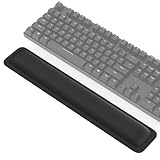
- 5. Yolanda Keyboard Wrist Rest Memory Foam (Keyboard and Mouse Set)
- 6. MageGee MK-Box 60% Mechanical Gaming Keyboard, LED Backlit Compact
- How to Choose a Keyboard with a Wrist Rest
- Frequently Asked Questions
- Related Guides
- Related Articles
- Related Guides
Our picks were chosen on what actually makes typing comfortable: whether a palm rest is included or the layout is ergonomically shaped, the quality and feel of the support, overall typing comfort, and value. We have been honest about what each product is — some are full keyboards with a rest, and two are dedicated wrist-rest accessories rather than keyboards — so you can build the comfortable setup that suits you, with prices from around $8 up to around $200. Below is an at-a-glance comparison of all six, then a closer look at each and a buyer’s guide built around palm-rest comfort and reducing wrist strain. Read the descriptions carefully so you know exactly what you are adding to your desk.
As an Amazon Associate we earn from qualifying purchases at no extra cost to you.



🛒 Best Price Today on Amazon
Prime members get fast, free shipping on everything above, plus member-only deals. New members get a 30-day free trial — cancel anytime.
Start 30-Day Prime Free Trial →See Today’s Amazon DealsBest Keyboards with Wrist Rest at a Glance
| Product | Best For | Standout Spec | Approx Price |
|---|---|---|---|
| Razer Ornata Chroma (with wrist rest) | Gaming with included rest | Hybrid switches, plush wrist rest | around $200 |
| Logitech MK345 Combo (with palm rest) | Comfortable everyday combo | Wireless combo, integrated palm rest | around $38 |
| Logitech K350 Wave Ergonomic | Built-in ergonomic cushion | Wave layout, cushioned palm rest | price varies |
| Gimars Memory Foam Wrist Rest | Plush add-on support | Gel memory foam, ergonomic | around $14 |
| Yolanda Memory Foam Wrist Rest | Budget add-on relief | Memory foam, keyboard + mouse | around $8 |
| MageGee MK-Box 60% Mechanical | Compact board (add a rest) | 60% mechanical, LED backlit | around $27 |
1. Razer Ornata Chroma Gaming Keyboard with Plush Wrist Rest


As an Amazon Associate we earn from qualifying purchases. Product prices and availability are accurate as of the date/time indicated.
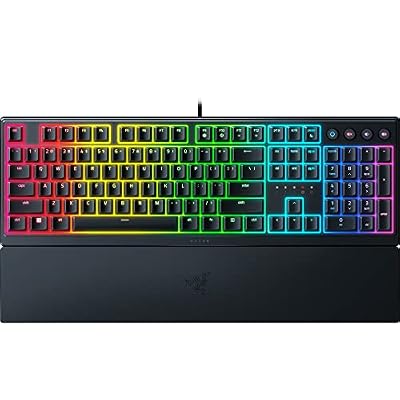
The Razer Ornata Chroma is our top pick for a gaming keyboard that comes with a wrist rest, because comfort is genuinely part of its design. It uses Razer’s hybrid mechanical-membrane switches for a tactile, cushioned keypress, adds Chroma RGB lighting, and ships with a plush, magnetically attaching wrist rest that supports your palms during long sessions. At around $200 it is the premium pick here and the most complete out-of-the-box comfort package.
This is the keyboard to choose if you want a gaming board where palm support is built in rather than an afterthought. The included plush wrist rest keeps your hands in a relaxed, neutral position through long gaming or work sessions, the hybrid switches offer a softer, quieter feel than full mechanical switches while staying tactile, and the Chroma lighting ties into Razer Synapse for a coordinated setup. If a comfortable, full-featured keyboard with a quality wrist rest in the box is what you are after, the Ornata Chroma is the standout.
Pros: Plush included wrist rest, comfortable hybrid switches, Chroma RGB, complete out-of-box comfort.
Cons: Highest price here; hybrid switches are not true full mechanical.
2. Logitech MK345 Wireless Keyboard and Mouse Combo with Palm Rest




As an Amazon Associate we earn from qualifying purchases. Product prices and availability are accurate as of the date/time indicated.
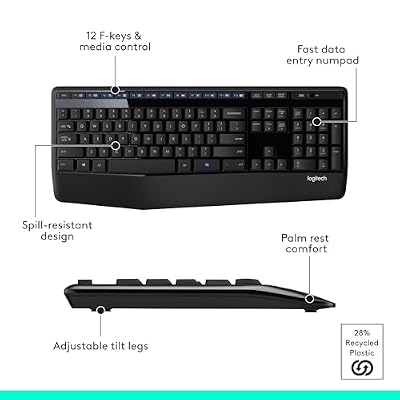
The Logitech MK345 combo is the comfortable everyday pick, and it earns its place by building the palm rest right into the keyboard. It is a full-size wireless keyboard and mouse set with an integrated, contoured palm rest along the front edge, running on Logitech’s reliable 2.4GHz wireless with a single USB receiver. At around $38 it is outstanding value for a comfortable, complete desktop setup.
This is the pick for home and office users who want wrist support without buying a separate accessory or a premium gaming board. The integrated palm rest keeps your hands supported and neutral through long days of typing and browsing, the full-size layout includes a number pad for spreadsheets and data entry, and the wireless combo keeps the desk tidy with the bundled mouse. For affordable, all-day typing comfort in a single wireless package, the MK345 is a dependable and very sensible choice.
Pros: Integrated palm rest, reliable wireless combo with mouse, full-size with number pad, great value.
Cons: Membrane keys are quieter but less tactile than mechanical; palm rest is fixed.
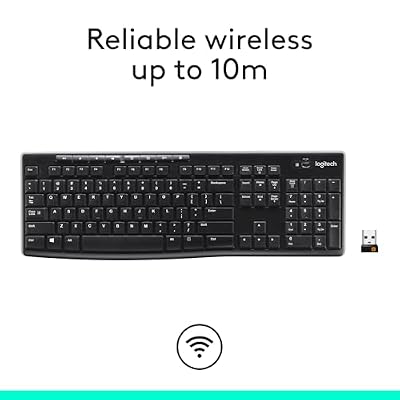
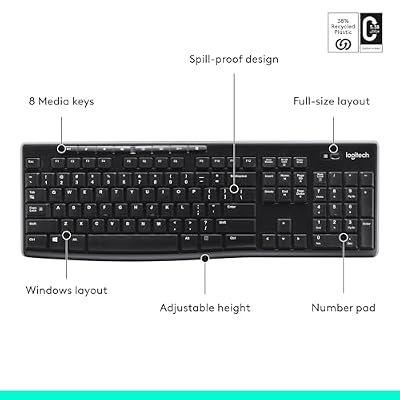
3. Logitech K350 Wireless Wave Ergonomic Keyboard with Cushioned Palm Rest






As an Amazon Associate we earn from qualifying purchases. Product prices and availability are accurate as of the date/time indicated.
The Logitech K350 Wave is the built-in ergonomic pick. Its signature feature is the curved, wave-shaped key layout combined with a constant cushioned palm rest, designed together to guide your hands into a more natural typing position and support your wrists at all times. It runs on Logitech’s Unifying wireless, and pricing varies with availability, but it remains a popular comfort-focused board.
This is the keyboard for someone who wants ergonomics designed in rather than bolted on. The wave layout positions the keys to suit the natural arc of your fingers, the integrated cushioned palm rest supports your wrists throughout a long typing day, and the full-size layout keeps a number pad on hand. It is a gentler introduction to ergonomic typing than a fully split keyboard, while still actively encouraging a more relaxed, neutral wrist position. If a comfort-first ergonomic board with a permanent cushioned rest appeals, the K350 Wave is a long-standing favorite.
Pros: Ergonomic wave layout, constant cushioned palm rest, reliable Unifying wireless, comfort-focused.
Cons: Wave layout takes adjustment; availability and pricing vary.
4. Gimars Upgrade Enlarge Gel Memory Foam Keyboard Wrist Rest

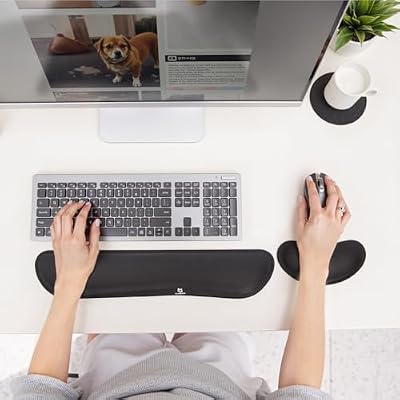
Gimars Upgrade Enlarge Silky and Superfine Fabric Gel Memory Foam Keyboard Wrist Rest Set, Ergonomic Keyboard Mouse Wrist Support for Typing Pain Relief, Comfort for Office, Gaming, Computer, Black




As an Amazon Associate we earn from qualifying purchases. Product prices and availability are accurate as of the date/time indicated.
The Gimars memory foam wrist rest is a standalone accessory rather than a keyboard, and that is exactly its strength: it lets you add quality palm support to any keyboard you already own. It uses a soft gel memory foam core wrapped in a silky, superfine fabric that resists wear, contoured to cradle your wrists. At around $14 it is an affordable, effective comfort upgrade for almost any setup.
This is the pick for someone who already has a keyboard they like and simply wants to add wrist support. The memory foam moulds to your wrists and holds your hands in a neutral line in front of the keys, the enlarged size suits full-size boards, and the fabric cover stays comfortable and grippy on the desk. Be clear that you are buying a wrist rest, not a keyboard — but as a way to make any board far more comfortable for long sessions, the Gimars rest is an easy, low-cost recommendation.
Pros: Soft gel memory foam, durable fabric cover, fits any keyboard, very affordable comfort add-on.
Cons: It is an accessory, not a keyboard; you supply your own board.
5. Yolanda Keyboard Wrist Rest Memory Foam (Keyboard and Mouse Set)

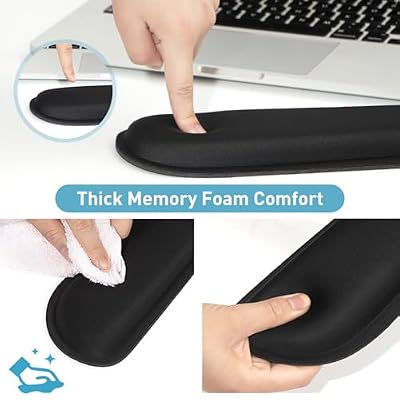
Yolanda Keyboard Wrist Rest Memory Foam, Easy Typing Pain Relief, Keyboard Mouse Pad Set for Computer, Laptop, Home & Office



As an Amazon Associate we earn from qualifying purchases. Product prices and availability are accurate as of the date/time indicated.
The Yolanda wrist rest is the budget add-on pick, and like the Gimars it is a standalone accessory rather than a keyboard. It is a memory foam wrist-rest set that typically includes a rest for both keyboard and mouse, designed for easy, pain-relieving typing support. At around $8 it is the cheapest way on this list to add wrist support to a setup you already own.
This is the choice for the tightest budgets, or for anyone who wants matching support under both their keyboard and mouse hand. The memory foam cushions your wrists and keeps them in a more neutral position to ease strain, and having a pad for the mouse as well as the keyboard means both hands are supported. As with the Gimars, set expectations: this is a wrist-rest accessory, not a keyboard. But for cheap, effective relief added to your existing gear, the Yolanda set does the job.
Pros: Memory foam comfort, keyboard and mouse rests included, cheapest support option here.
Cons: It is an accessory, not a keyboard; thinner and more basic than premium rests.
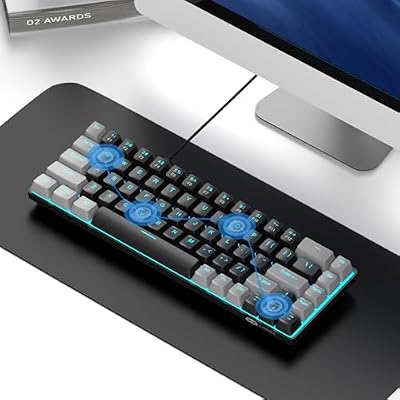
6. MageGee MK-Box 60% Mechanical Gaming Keyboard, LED Backlit Compact

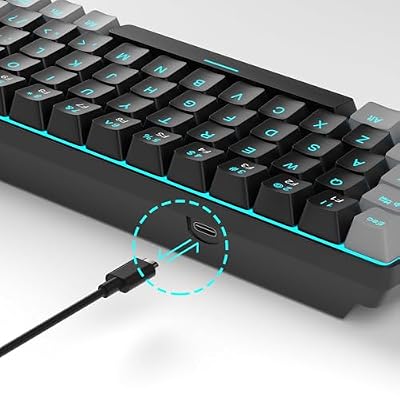
MageGee Portable 60% Mechanical Gaming Keyboard, MK-Box LED Backlit Compact 68 Keys Mini Wired Office Keyboard with Red Switch for Windows Laptop PC Mac - Black/Grey



As an Amazon Associate we earn from qualifying purchases. Product prices and availability are accurate as of the date/time indicated.
Rounding out the list is the MageGee MK-Box, a compact 60% mechanical keyboard that we include with an important caveat: it does not come with a wrist rest. It is a 68-key mechanical board with LED backlighting and real mechanical switches in a small, tidy footprint, available for around $27. We list it for the comfort-minded buyer because a low-profile compact board pairs especially well with a separate wrist rest like the Gimars or Yolanda above.
This is the pick for someone who wants a satisfying mechanical typing feel and a space-saving layout, and is happy to add their own palm support. The compact 60% size frees up desk room and brings the mouse closer, the mechanical switches deliver crisp, tactile keystrokes, and the LED backlighting looks smart. Because its low front edge sits comfortably behind an add-on wrist rest, it is a natural partner for one of the standalone rests here. Just remember the rest is sold separately — the MK-Box itself is keyboard only.
Pros: Real mechanical switches, compact 60% layout, LED backlit, pairs well with an add-on wrist rest.
Cons: No wrist rest included; 60% layout drops the number pad and some keys.
How to Choose a Keyboard with a Wrist Rest
The first thing to settle when shopping for wrist support is whether you want it built in or added on. An included or integrated palm rest, as on the Razer Ornata Chroma, the Logitech MK345 combo or the K350 Wave, gives you a complete, tuned comfort package out of the box with no extra purchase. A standalone wrist rest like the Gimars or Yolanda lets you add support to a keyboard you already love. Decide which path fits your situation before anything else, because it changes what you are actually buying.
If you go the built-in route, look at how the support is designed. A detachable plush rest like the Ornata’s gives gaming comfort you can remove when you want, an integrated rest like the MK345’s is permanently part of the board for tidy everyday use, and an ergonomic layout like the K350 Wave’s pairs a constant cushioned rest with a curved key arrangement that guides your hands into a more natural position. Match the style to whether you prioritise gaming feel, simple all-day comfort, or full ergonomic shaping.
If you go the add-on route, focus on the rest’s material and size. Memory foam, as used by both the Gimars and Yolanda rests, moulds to your wrists and holds them in a neutral line, while the cover fabric affects durability and how it feels under your skin over long sessions. Match the rest’s length to your keyboard — a full-size board wants a longer rest, a compact 60% board like the MageGee MK-Box wants a shorter one — and pick a low profile that keeps your wrists straight rather than propped too high.
Above all, remember the goal is a neutral wrist position, and that the rest is meant to support your palms during pauses rather than to be jammed against while you type. Set the rest so your wrists float roughly level with the keys, not bent up or pressed down. Be clear about what you are buying — a full keyboard with a rest, an ergonomic board, or a standalone accessory to pair with your own keyboard — set your budget, and pick the option on this list that builds the comfortable, strain-reducing setup you want. The best wrist support is the one you stop thinking about because your hands simply feel relaxed.
Frequently Asked Questions
Do you need a wrist rest for gaming?
A wrist rest is not essential, but it keeps your wrist in a neutral position and reduces strain during long sessions, especially with taller mechanical keyboards. A cushioned or memory-foam rest is a cheap, worthwhile comfort upgrade for most setups.
Do keyboard wrist rests actually help reduce strain?
Used correctly, they can help by supporting your palms so your wrists stay in a more neutral, straighter line instead of bending up over the keyboard edge. The key is to rest your palms on the support during pauses rather than pressing your wrists into it while typing, and to set it so your hands float roughly level with the keys. A memory foam rest like the Gimars or an integrated palm rest like the Logitech MK345’s both achieve this when positioned well.
Which products here are full keyboards and which are just wrist rests?
The Razer Ornata Chroma, Logitech MK345 combo, Logitech K350 Wave and MageGee MK-Box are keyboards — though the MK-Box does not include a rest. The Gimars and Yolanda products are standalone wrist-rest accessories, not keyboards: you add them to a board you already own. We have included both so you can either buy a complete keyboard-with-rest or upgrade your existing setup, but it is important to know which is which before you order.
Should I get a keyboard with a built-in rest or a separate wrist rest?
It depends on your setup. If you are buying a new keyboard anyway, a board with an included or integrated rest — like the Razer Ornata, Logitech MK345 or K350 Wave — gives you a tuned comfort package in one purchase. If you already have a keyboard you like, a standalone memory foam rest like the Gimars or Yolanda is a cheaper, flexible way to add support without replacing your board.
Can I add a wrist rest to a compact 60% keyboard?
Yes, and it often works very well. A compact board like the MageGee MK-Box has a low front edge that sits comfortably behind a separate rest, so pairing it with a shorter memory foam wrist rest like the Gimars or Yolanda gives you mechanical typing feel plus palm support. Just match the rest’s length to the smaller board so it lines up neatly with the keys.
Related Guides
- Best Mechanical Keyboards
- Best Gaming Keyboards
- Best Wireless Keyboards
- Best Keyboard Wrist Rests
- Best Wireless Gaming Mouse
- Best Mouse Pads for Gaming
Affiliate Disclosure: As an Amazon Associate, we earn from qualifying purchases. If you click a link and make a purchase, we may earn a small commission at no extra cost to you. Prices and availability are accurate as of publication and may change.
Ready to decide? Our #1 pick for 2026 is the Razer Ornata Chroma (with wrist rest).
Live price & availability on Amazon.


