

Graphic design is a marathon at the keyboard. Across Illustrator, Photoshop and InDesign you are constantly hopping between tools, nudging objects, toggling layers and firing off modifier-heavy shortcuts — and you are doing it for hours at a stretch. That makes two things matter most in a design keyboard: programmability, so you can bind your most-used commands to single keys, and comfort, so your hands survive a full day of work. This guide rounds up the best keyboards for graphic design in 2026, from affordable full-size combos to a genuine mechanical-feel flagship, so you can match your tools to your budget.
- Best Keyboards for Graphic Design at a Glance
- 1. Razer Ornata Chroma Gaming Keyboard, Hybrid Mechanical Switches
- 2. Redragon S101M-KS Gaming Keyboard and Mouse, Tri-Mode Wireless RGB
- 3. Redragon S101-3 PRO Gaming Keyboard and Mouse, RGB Programmable
- 4. Redragon K517 Pro Wireless Gaming Keyboard, Tri-Mode RGB
- 5. Logitech MK270 Wireless Keyboard and Mouse Combo, 2.4GHz
- 6. Gaming Keyboard and Mouse Combo, K1 RGB LED Backlit 104-Key
- How to Choose a Keyboard for Graphic Design
- Frequently Asked Questions
- Related Guides
- Related Articles
- Related Guides
Our picks were chosen on what a designer actually feels day to day: programmable or remappable keys for one-press commands, typing comfort and key feel for long sessions, a full layout with the modifiers and number pad design apps lean on, connectivity, and value. We have been straight about what each product is — a couple are budget gaming combos rather than purpose-built design decks — and we explain where each fits. Prices span from around $24 up to around $200, the priciest being a true mechanical board. Below is an at-a-glance comparison of all six, then a closer look at each and a buyer’s guide built around programmability, comfort and connectivity for design work.
As an Amazon Associate we earn from qualifying purchases at no extra cost to you.






🛒 Best Price Today on Amazon
Prime members get fast, free shipping on everything above, plus member-only deals. New members get a 30-day free trial — cancel anytime.
Best Keyboards for Graphic Design at a Glance
| Keyboard | Best For | Standout Spec | Approx Price |
|---|---|---|---|
| Razer Ornata Chroma | Premium programmable design deck | Hybrid mech switches, Synapse macros | around $200 |
| Redragon S101M-KS Tri-Mode Combo | Flexible wireless + macros | Tri-mode wireless, RGB, remappable | around $55 |
| Redragon S101-3 PRO Combo | Programmable on a budget | Programmable keys, RGB, full size | around $40 |
| Redragon K517 Pro Wireless | Compact tri-mode wireless | Tri-mode BT/2.4GHz/USB-C, RGB | around $32 |
| Logitech MK270 Combo | Quiet reliable basics | Full size + number pad, combo | around $24 |
| K1 RGB Gaming Keyboard Combo | Backlit budget starter | 104-key RGB backlit, combo | around $27 |
1. Razer Ornata Chroma Gaming Keyboard, Hybrid Mechanical Switches
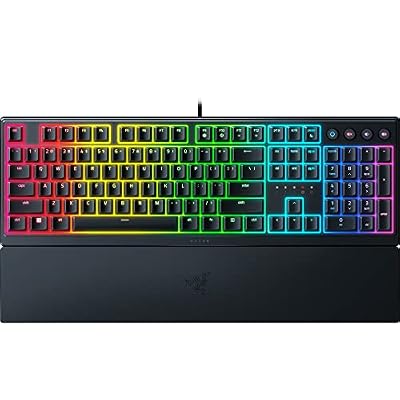
Razer Ornata V3 Gaming Keyboard, Low-Profile Keys, Black | Mecha-Membrane Switches, UV-Coated Keycaps, Backlit Media Keys, 10-Zone RGB Lighting, Snap Tap, Magnetic Wrist Wrest


As an Amazon Associate we earn from qualifying purchases. Product prices and availability are accurate as of the date/time indicated.
The Razer Ornata Chroma is the standout design deck of this list, and it earns its place by combining genuine programmability with a satisfying typing feel. It uses Razer’s hybrid mechanical switches — a blend of mechanical click and membrane cushioning — full per-key Chroma RGB, and a leatherette wrist rest, and every key is fully programmable through Razer Synapse. At around $200 it is the premium pick, and for a designer the customization and comfort justify it.
For graphic design this is the most powerful option here. Synapse lets you remap any key and build macros, so you can bind complex Illustrator or Photoshop commands, tool switches and actions to single presses and store per-application profiles that change as you move between apps. The hybrid switches give a crisp, responsive feel for fast shortcut work, the wrist rest supports your hands through a full day, and the Chroma lighting can highlight your mapped keys. If you want a true programmable, comfortable design keyboard and the budget allows, the Ornata Chroma is the clear leader.
Pros: Fully programmable via Synapse with per-app profiles, comfortable hybrid switches, wrist rest, per-key RGB.
Cons: By far the most expensive here; gaming branding rather than a pro design label.
2. Redragon S101M-KS Gaming Keyboard and Mouse, Tri-Mode Wireless RGB

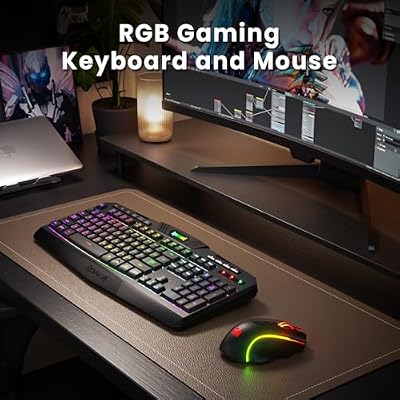
Redragon S101M-KS Gaming Keyboard and Mouse Wireless with Tri-Mode, RGB Keyboard and 4800 DPI Gaming Mouse, 10 Independent Multimedia Keys for Wins, PC, Computer, Wireless S101 Ideal for Gamer



As an Amazon Associate we earn from qualifying purchases. Product prices and availability are accurate as of the date/time indicated.
The Redragon S101M-KS is the flexible value pick for a designer who wants wireless freedom and remapping without flagship money. It is a tri-mode keyboard — Bluetooth, 2.4GHz and wired — with full RGB and a complete layout, bundled with a mouse. The tri-mode connectivity lets you swap it between a studio desktop and a laptop on the move. At around $55 it is the natural step-up from the budget combos.
For design work the draw is connectivity plus key remapping: Redragon’s software typically supports reassigning keys and building macros, so you can put frequent design commands a single press away, while Bluetooth and 2.4GHz let you move between machines freely. The full layout keeps the number pad and modifiers your apps need, and the RGB helps in a dim studio. It is a gaming board rather than a dedicated design tool, so the macro experience runs through software, but the flexibility and remapping make it a strong mid-range choice for a designer.
Pros: Tri-mode wireless for multi-device studios, remappable keys and macros, RGB, full layout.
Cons: Macro setup depends on Redragon software; mid-tier build quality.
3. Redragon S101-3 PRO Gaming Keyboard and Mouse, RGB Programmable

Redragon S101-3 PRO Gaming Keyboard and Mouse, RGB Backlit Programmable Keyboard Mouse with Software, Independent Macro Record Keys, Value Combo Set, New Update Version


As an Amazon Associate we earn from qualifying purchases. Product prices and availability are accurate as of the date/time indicated.
The Redragon S101-3 PRO is the programmable-on-a-budget pick for designers. It is a wired RGB keyboard advertised with programmable keys, paired with a mouse, on a full-size layout, for around $40. The programmability is the reason it makes a design list: assigning a repetitive Illustrator or InDesign command to a dedicated key removes friction from work you do hundreds of times a day, and you get that capability here cheaply.
This is the keyboard to choose when one-press commands matter but the budget is tight. You can map frequent actions to keys through the bundled software, the RGB backlight helps you find them in a darkened studio, and the full layout keeps every modifier and the number pad in place for design shortcuts. The wired connection gives consistent input with nothing to charge during a long session. As with most budget boards the macro experience is software-driven rather than seamless, but for the price the programmability is a real, useful advantage for a designer.
Pros: Programmable keys for one-press design commands, RGB backlight, full layout, affordable.
Cons: Software-driven macros; budget build and bundled mouse.
4. Redragon K517 Pro Wireless Gaming Keyboard, Tri-Mode RGB

Redragon K517 Pro Wireless Gaming Keyboard, RGB Backlit, Tri-Mode BT/2.4GHz/USB-C, Mechanical Feel 94 Keys Computer Keyboard with 4 Macro Keys, Number Pad, 4000mAh Battery for Win/MAC


As an Amazon Associate we earn from qualifying purchases. Product prices and availability are accurate as of the date/time indicated.
The Redragon K517 Pro is the compact wireless pick. It is a tri-mode keyboard — Bluetooth, 2.4GHz and USB-C wired — with RGB backlighting in a tidier, space-saving form factor, for around $32. For a designer with a busy desk or a hybrid work pattern, the combination of three connection modes and a smaller footprint makes it an easy board to live with across multiple machines.
This is the keyboard to choose when desk space and multi-device flexibility matter most. The tri-mode connectivity lets you pair it with a desktop, a laptop and a tablet and switch between them, the USB-C wired mode is there when you want guaranteed latency, and the RGB backlight suits a dim studio. A more compact layout trades away some of the spread of a full board, so confirm it keeps the keys your workflow needs, but for a flexible, modern wireless keyboard at a low price, the K517 Pro is a practical, well-rounded design companion.
Pros: Tri-mode BT/2.4GHz/USB-C connectivity, compact footprint, RGB backlight, low price.
Cons: Compact layout may drop keys a full board keeps; gaming-oriented.
5. Logitech MK270 Wireless Keyboard and Mouse Combo, 2.4GHz

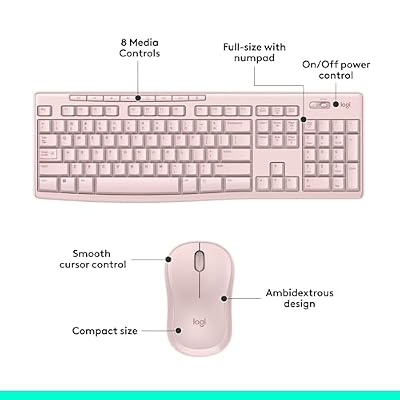
Logitech MK270 Full Size Wireless Keyboard and Mouse Combo - Rose | Full size keyboard with spill-resistant design, compact ambidextrous mouse, connect via single included USB-A Nano Receiver




As an Amazon Associate we earn from qualifying purchases. Product prices and availability are accurate as of the date/time indicated.
The Logitech MK270 combo is the quiet, reliable basics pick for a designer who wants a dependable full-size board and is not chasing macros. It is a 2.4GHz wireless keyboard with a complete layout and number pad, paired with a mouse, from a brand renowned for solid wireless. At around $24 it is the value foundation for a clean design desk.
For graphic design this combo covers the fundamentals well: every modifier and the number pad your apps use are present and where you expect them, the quiet keys suit a focused studio, and Logitech’s long-life wireless keeps the desk tidy. What it does not offer is programmability, so it is best seen as a reliable typing-and-shortcut foundation rather than a power-user deck. If you drive your design apps mostly with built-in shortcuts and value quiet reliability and a low price over macro keys, the MK270 is a sensible, no-nonsense choice.
Pros: Reliable Logitech wireless, full layout with number pad, quiet keys, excellent value.
Cons: No programmable keys; basic membrane feel, not mechanical.
6. Gaming Keyboard and Mouse Combo, K1 RGB LED Backlit 104-Key

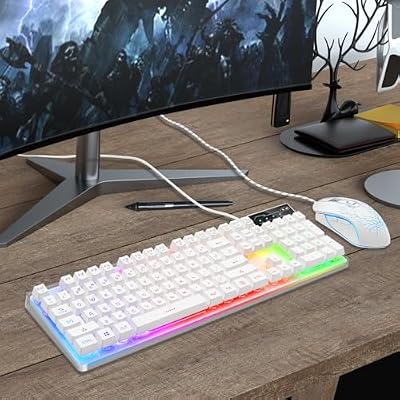
Gaming Keyboard and Mouse Combo, K1 RGB LED Backlit Keyboard with 104 Key for PC/Laptop(White)


As an Amazon Associate we earn from qualifying purchases. Product prices and availability are accurate as of the date/time indicated.
Rounding out the list is the K1 RGB combo, the backlit budget starter for designers. It is a full 104-key keyboard with RGB LED backlighting, bundled with a mouse, for around $27. The backlight is the practical hook for a studio with controlled, dim lighting, and the complete 104-key layout keeps the modifiers and number pad design apps rely on. It is an inexpensive way to get light and a full layout onto a starter design desk.
This is the keyboard to choose when you want illuminated keys and a complete layout on a tight budget, and a gaming-styled board on your desk does not bother you. The RGB backlight makes keys easy to find in low light, the full 104-key layout covers every design shortcut and the number pad, and the bundled mouse rounds out an entry setup. It is a basic combo rather than a programmable design deck, so value it for the light, the layout and the price. As an affordable starting point it does its job.
Pros: RGB backlight for dim studios, full 104-key layout, bundled mouse, very affordable.
Cons: Gaming styling and basic feel; no macro programming.
How to Choose a Keyboard for Graphic Design
Programmability should top a designer’s list, because design apps are command factories. Across Illustrator, Photoshop and InDesign you repeat the same tool switches, alignment commands and actions endlessly, and a keyboard that lets you bind those to single keys — like the Razer Ornata Chroma with Synapse, or the remappable Redragon boards — removes real friction from your day. The Ornata even stores per-application profiles, so the same keys do different things in different apps. If you can only optimise for one feature, make it programmability.
Comfort and key feel come next, because design is a long-haul activity and your hands pay the price of a bad board. A keyboard with a wrist rest, like the Ornata Chroma, supports you through full days, while switch feel is a personal call: the Ornata’s hybrid mechanical switches give a crisp, responsive press that many designers love for rapid shortcuts, whereas the quiet membrane combos suit those who prefer a softer, calmer keystroke. Try to match the feel to your own preference, and prioritise wrist support if you work long hours.
Connectivity and layout shape how the keyboard fits your studio. Tri-mode boards like the S101M-KS and K517 Pro let you move one keyboard between a desktop, a laptop and a tablet, which suits hybrid and multi-device designers, while a full-size layout keeps the modifiers and number pad your apps depend on within reach. Compact boards save space but can drop keys you use, so if you lean on the number pad or a particular cluster, confirm a smaller board keeps them before you buy.
Finally, set your budget and be honest about what each board is. The Ornata Chroma is a genuine programmable, comfortable design deck and is priced accordingly; the Redragon boards bring useful remapping and connectivity at mid-range and budget prices; and the plain combos are reliable, affordable foundations rather than power tools. Decide whether deep per-app macros, wireless flexibility, or simple dependable typing matters most to you, weigh it against price, and pick the design keyboard on this list that fits your workflow and your wallet.
Frequently Asked Questions
What keyboard features matter most for graphic design?
Programmability and comfort lead the list. Being able to bind frequent Illustrator, Photoshop or InDesign commands to single keys — as the Razer Ornata Chroma and remappable Redragon boards allow — speeds up repetitive work, and a comfortable board with a wrist rest keeps your hands fresh through long sessions. A full layout with the modifiers and number pad your apps use rounds out what a designer needs day to day.
Is the Razer Ornata Chroma worth it for design over a cheaper board?
If programmability and typing comfort are priorities, it can be. The Ornata offers full key remapping and macros through Synapse with per-application profiles, hybrid mechanical switches and a wrist rest — a genuinely capable, comfortable design deck. The budget Redragon boards offer useful remapping for far less, so the Ornata is worth the premium mainly if you want its switch feel, wrist support and deeper per-app customization.
Do I need a mechanical keyboard for graphic design?
Not necessarily — it comes down to feel. The Razer Ornata uses hybrid mechanical switches that many designers enjoy for crisp, responsive shortcut presses, but quiet membrane combos like the Logitech MK270 are perfectly capable for design work and some people prefer their softer keystroke. Choose based on the typing feel you like and the programmability you need rather than switch type alone.
Can I use one keyboard across my desktop, laptop and tablet?
Yes, if you pick a multi-device board. The tri-mode Redragon S101M-KS and K517 Pro support Bluetooth, 2.4GHz and wired connections, letting you pair with several machines and switch between them — handy for designers who move between a studio desktop and a portable setup. Just confirm the layout keeps the keys your apps rely on before committing.
Related Guides
- Best Mechanical Keyboards
- Best Wireless Keyboards
- Best Keyboards for Photo Editing
- Best Monitors for Content Creation
- Best RGB Keyboards
- Best Budget Gaming Setup
Affiliate Disclosure: As an Amazon Associate, we earn from qualifying purchases. If you click a link and make a purchase, we may earn a small commission at no extra cost to you. Prices and availability are accurate as of publication and may change.










