

- Top Pick: TP-Link Deco S4 Whole Home Mesh WiFi System, Deco S4(2-Pack)
- Best Value: Gryphon Guardian Mesh WiFi Router Parental Control System with Next-Gen Firewall & Content Filters Dual-Band 1.2 Gbps, Covers 1800 sq. ft. per Mesh Router Replace/Add-to Existing Network (Renewed)
- Premium Choice: TP-Link Deco M5 Mesh Dual Band Gigabit Wireless Router, Deco M5 1-Pack
🛒 Best Price Today on Amazon
Prime members get fast, free shipping on everything above, plus member-only deals. New members get a 30-day free trial — cancel anytime.
- Top Routers Parental Controls Picks for 2026
- Best Routers with Parental Controls at a Glance
- 1. TP-Link AXE5400 Tri-Band WiFi 6E Router (Archer AXE75)
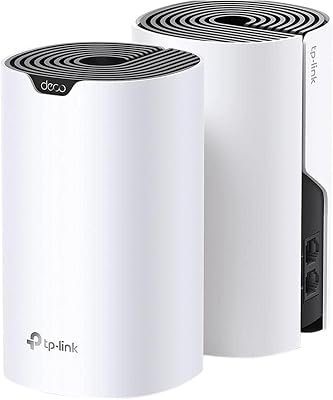
- 2. TP-Link Deco S4 Whole Home Mesh WiFi System, AC1900
- 3. TP-Link AX1800 WiFi 6 Router (Archer AX21 V5), Dual Band Gigabit
- 4. TP-Link Smart WiFi 6 Router (Archer AX10), 4 Gigabit LAN Ports
- 5. TP-Link AC1200 Gigabit WiFi Router (Archer A6), Dual Band MU-MIMO
- 6. ASUS N900 WiFi Router (RT-N66U), Dual Band Gigabit with AiProtection
- How to Choose a Router with Parental Controls
- Frequently Asked Questions
- Related Guides
- Related Articles
Top Routers Parental Controls Picks for 2026
Here are our current top routers parental controls picks, compared on real Amazon owner reviews, price, and features. Live prices update below.
As an Amazon Associate we earn from qualifying purchases at no extra cost to you.





For a family, the router is the single point where every phone, console, tablet and PC reaches the internet — which makes it the natural place to manage screen time and filter content. Modern routers do this through built-in parental controls: per-device or per-person profiles, content filtering by category, scheduled internet access and bedtimes, and pause buttons you can hit from a phone app. This guide rounds up the best routers with parental controls in 2026, focusing on the platforms — chiefly TP-Link HomeShield and ASUS AiProtection — that build family-management tools right into the router so you do not need extra hardware or subscriptions to get started.
Our picks were chosen on what genuinely matters for managing a family network: the depth and ease of the built-in parental controls, the quality of the companion app, Wi-Fi performance and coverage for the home, and value. We have included a whole-home mesh system, several standalone Wi-Fi 6 routers, a tri-band Wi-Fi 6E flagship and an older but capable model, with prices from around $40 up to around $100. We are honest where a router’s parental-control tools are more basic or where a model is dated. Below is an at-a-glance comparison of all six, then a closer look at each and a buyer’s guide built around filtering, scheduling and the app experience that families rely on.
Best Routers with Parental Controls at a Glance
| Router | Best For | Standout Spec | Approx Price |
|---|---|---|---|
| TP-Link Archer AXE75 (AXE5400) | Best overall family controls | Wi-Fi 6E tri-band, HomeShield | around $100 |
| TP-Link Deco S4 Mesh | Whole-home coverage + profiles | Mesh, up to 3,800 sq ft | around $90 |
| TP-Link Archer AX21 (AX1800) | Value Wi-Fi 6 with HomeShield | Wi-Fi 6 dual-band, gigabit | around $52 |
| TP-Link Archer AX10 (Wi-Fi 6) | Budget Wi-Fi 6 family router | Wi-Fi 6, 4 gigabit LAN | around $60 |
| TP-Link Archer A6 (AC1200) | Cheapest filtering pick | AC1200, MU-MIMO dual-band | around $40 |
| ASUS RT-N66U (N900) | AiProtection on older hardware | Dual-band, AiProtection | price varies |
1. TP-Link AXE5400 Tri-Band WiFi 6E Router (Archer AXE75)

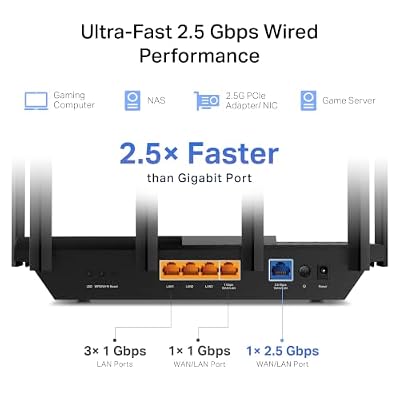
TP-Link AXE5400 Tri-Band WiFi 6E Router, 2025 PCMag Editors' Choice | 2.5Gbps WAN Port for Gaming & Streaming, 6GHz Band, 160MHz, OneMesh, Dual-Core CPU, VPN & WPA3 (Archer AXE75)




As an Amazon Associate we earn from qualifying purchases. Product prices and availability are accurate as of the date/time indicated.
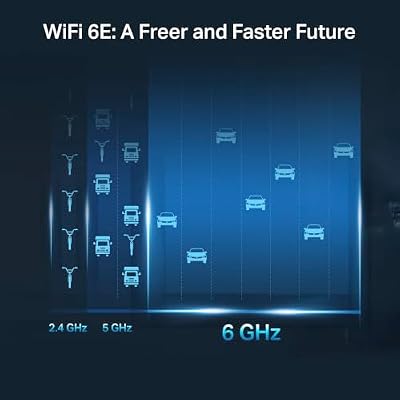
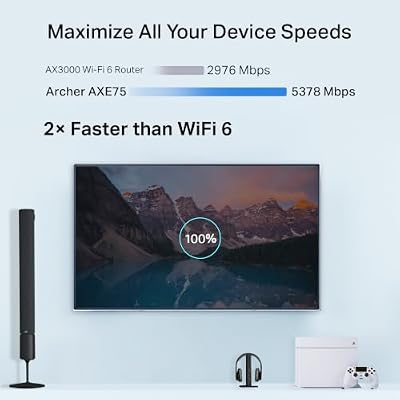
The TP-Link Archer AXE75 is the best overall pick for family parental controls, and it leads the list. It is a tri-band Wi-Fi 6E router — a 2025 PCMag Editors’ Choice — that pairs strong, modern wireless performance with TP-Link’s HomeShield parental-control suite. At around $100 it is the premium option here, delivering both a fast, future-ready network and the most capable family-management tools in the roundup.
This is the router to choose when you want serious parental controls without compromising on speed. HomeShield lets you create per-person profiles, filter content by category and age, set time limits and bedtimes, and pause the internet for a profile from the Tether app, with deeper features available on the optional HomeShield Pro tier. The Wi-Fi 6E tri-band hardware adds a clean 6GHz band for newer devices and handles a busy household with ease. For a family that wants the best blend of control and performance, the AXE75 is the standout.
Pros: Capable HomeShield controls, fast Wi-Fi 6E tri-band, easy Tether app, future-ready.
Cons: Highest price here; the deepest control features sit behind HomeShield Pro.
2. TP-Link Deco S4 Whole Home Mesh WiFi System, AC1900

TP-Link Deco S4 Whole Home Mesh WiFi System, Deco S4(2-Pack) | Up to 3,800 Sq.ft. Coverage, AC1900 WiFi Router and Extender Replacement, Parental Controls


As an Amazon Associate we earn from qualifying purchases. Product prices and availability are accurate as of the date/time indicated.
The TP-Link Deco S4 is the whole-home pick, combining mesh coverage with family profiles. It is an AC1900 mesh system rated for up to 3,800 square feet and managed entirely through the friendly Deco app, which includes built-in parental controls. At around $90 it is the choice for larger homes where a single router leaves dead zones the kids’ devices fall into.
This is the system for a family whose priority is reliable coverage in every room alongside the ability to manage each child’s access. The Deco app makes setup genuinely simple and lets you create profiles, filter content, set time limits and pause the internet across the whole mesh, so controls follow a device as it roams between units. Coverage up to 3,800 square feet blankets a typical house, eliminating the spots where a standalone router cannot reach. For whole-home Wi-Fi with straightforward family controls baked in, the Deco S4 is an excellent, easy-to-live-with choice.

Pros: Whole-home mesh coverage, very easy Deco app, profiles and filtering across the mesh.
Cons: AC1900 (Wi-Fi 5) rather than Wi-Fi 6; deepest controls may need a Pro tier.
3. TP-Link AX1800 WiFi 6 Router (Archer AX21 V5), Dual Band Gigabit
The TP-Link Archer AX21 is the value Wi-Fi 6 pick with full HomeShield support. It is a dual-band AX1800 router with gigabit ports and a strong reputation as one of the best-value Wi-Fi 6 routers around, and it runs the same HomeShield parental-control suite as TP-Link’s pricier models. At around $52 it delivers modern Wi-Fi 6 and capable family controls at a very reasonable price.
This is the router for a family that wants up-to-date wireless and proper parental controls without overspending. HomeShield, managed in the Tether app, provides per-profile content filtering, time scheduling, bedtimes and an internet pause, while the AX1800 Wi-Fi 6 hardware improves efficiency in homes with many connected devices over older standards. It is a hugely popular, well-supported model with a track record of reliable performance. For the best balance of price, Wi-Fi 6 performance and family-friendly controls, the AX21 is an easy recommendation.
Pros: Great value, modern Wi-Fi 6, full HomeShield controls, reliable and popular.
Cons: Dual-band only; advanced HomeShield features require the Pro subscription.
4. TP-Link Smart WiFi 6 Router (Archer AX10), 4 Gigabit LAN Ports
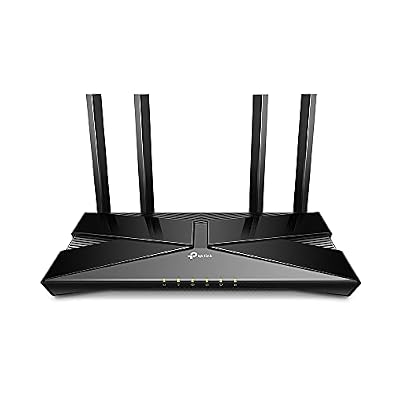
TP-Link Smart WiFi 6 Dual Band Router 4 Gigabit LAN Ports | 802.11AX Router, Beamforming, OFDMA, MU-MIMO, Parental Controls, Dual-Core 900MHz Processor, Works with Alexa (Archer AX10)


As an Amazon Associate we earn from qualifying purchases. Product prices and availability are accurate as of the date/time indicated.
The TP-Link Archer AX10 is the budget Wi-Fi 6 family pick. It is a dual-band 802.11ax router with four gigabit LAN ports that brings Wi-Fi 6 efficiency and TP-Link’s HomeShield parental controls to an affordable price point. At around $60 it is a sensible entry into Wi-Fi 6 for a household that also wants to manage screen time.
This is the router for a family upgrading to Wi-Fi 6 on a budget while still getting real parental controls. HomeShield in the Tether app handles profiles, content filtering, time limits and pausing, and the four gigabit LAN ports let you wire up a console, a desktop and a smart-TV box directly. Wi-Fi 6 helps the router cope with the many devices a modern family owns more gracefully than older routers. For an affordable Wi-Fi 6 router that still covers the family management essentials, the AX10 is a solid, sensible buy.

Pros: Affordable Wi-Fi 6, HomeShield controls, four gigabit LAN ports, good for many devices.
Cons: Entry-level Wi-Fi 6 performance; deeper controls need HomeShield Pro.
5. TP-Link AC1200 Gigabit WiFi Router (Archer A6), Dual Band MU-MIMO

TP-Link AC1200 Gigabit Dual Band WiFi Router (Archer A6) | MU-MIMO Wireless Internet Router, 4 x Antennas, OneMesh and AP Mode, Long Range Coverage


As an Amazon Associate we earn from qualifying purchases. Product prices and availability are accurate as of the date/time indicated.
The TP-Link Archer A6 is the cheapest filtering pick here. It is a dual-band AC1200 gigabit router with MU-MIMO, and at around $40 it is the most affordable way onto TP-Link’s ecosystem and its HomeShield-style parental controls. For a small home or a tight budget that still wants to manage children’s access, it is a practical entry point.
This is the router for a family with modest needs — a smaller home, fewer devices, or simply a tight budget — that still wants content filtering and scheduling. TP-Link’s app provides the familiar profile-based controls, content filtering and time limits, and the AC1200 dual-band hardware with MU-MIMO is enough for everyday browsing, streaming and homework across a handful of devices. It is Wi-Fi 5 rather than Wi-Fi 6, so it is best for lighter use, but as an inexpensive router with genuine parental controls, the Archer A6 does the job well.
Pros: Lowest price here, dual-band MU-MIMO, app-based parental controls, easy setup.
Cons: Wi-Fi 5 and entry-level throughput; control depth may need a Pro tier.
6. ASUS N900 WiFi Router (RT-N66U), Dual Band Gigabit with AiProtection
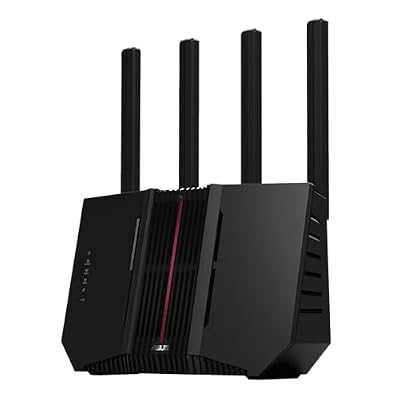
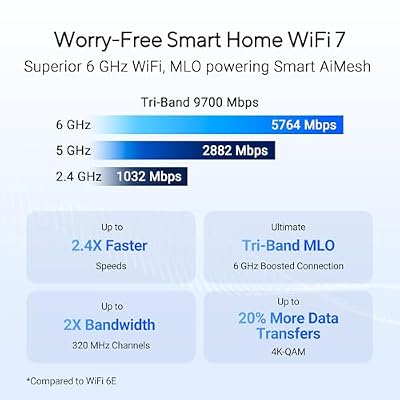
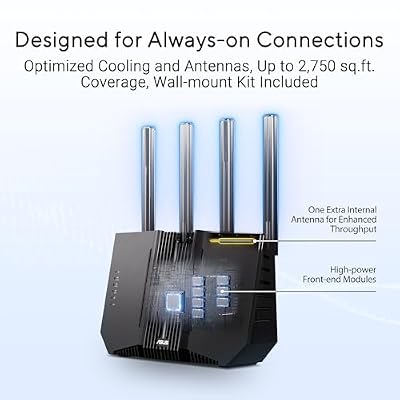
ASUS RT-BE92U WiFi 7 Router - Tri-Band (6GHz), 9.7 Gbps, x2 WAN, Mesh | Coverage up to 2,500 Sq. Ft., Subscription Free Network Security, Parental Controls Included, 2.5G Port x4, VPN support






As an Amazon Associate we earn from qualifying purchases. Product prices and availability are accurate as of the date/time indicated.
Rounding out the list is the ASUS RT-N66U, included for its AiProtection-style security and parental controls and as the one non-TP-Link option here. It is a dual-band N900 gigabit router from ASUS’s long-running line, and pricing varies as it is an older model. We include it honestly: it is dated hardware by modern standards, but it represents ASUS’s well-regarded approach to built-in family and security tools.
This is the router for someone already in or curious about the ASUS ecosystem who values AiProtection’s parental controls and network security, perhaps as a spare or a low-cost secondary router. ASUS’s parental controls let you filter content and schedule access per device through the ASUS app or web interface, and the brand’s firmware is generally praised. Be realistic, though: as an N900 (Wi-Fi 4-era) router it lacks the speed, efficiency and longevity of the Wi-Fi 6 and 6E models above, so it is best viewed as a budget or legacy choice rather than a primary router for a busy modern home.
Pros: ASUS AiProtection-style parental controls and security, trusted ASUS firmware, dual-band gigabit.
Cons: Dated N900 (older Wi-Fi) hardware; slower and less future-proof than the Wi-Fi 6/6E picks.
How to Choose a Router with Parental Controls
Start with the parental-control platform itself, because that is the feature you are really buying. The best routers build a complete family suite into the firmware and a phone app — TP-Link’s HomeShield and ASUS’s AiProtection are the two represented here. Look for per-person or per-device profiles, content filtering by category and age, time scheduling with bedtimes, and a one-tap pause for the internet. A polished app, like TP-Link’s Tether and Deco apps, makes these tools something you will actually use day to day rather than a buried menu you ignore.
Check what is free versus what needs a subscription. Several modern routers, including TP-Link’s HomeShield models, include a solid set of parental controls for free but reserve the most advanced filtering, reporting and time-management features for a paid tier such as HomeShield Pro. The free controls are enough for many families, but if you want granular per-app limits or detailed activity reports, factor the ongoing subscription cost into your decision rather than being surprised later.
Do not overlook Wi-Fi performance and coverage, since a router with great controls is useless if the signal does not reach. Match the hardware to your home: a standalone Wi-Fi 6 router like the Archer AX21 or AX10 suits most apartments and small-to-mid houses, a tri-band Wi-Fi 6E model like the AXE75 gives extra capacity and headroom for busy, device-heavy homes, and a mesh system like the Deco S4 is the answer for larger houses with dead zones. More modern Wi-Fi standards also handle the many devices a family owns more gracefully.
Finally, weigh ecosystem, longevity and budget together, and be honest about older hardware. Sticking within one ecosystem — for instance all TP-Link, or all ASUS — keeps the app experience consistent if you expand later. Newer Wi-Fi 6 and 6E routers like the AXE75 and AX21 will stay capable for years, whereas an older model such as the ASUS RT-N66U, while it offers AiProtection controls, is dated and best treated as a budget or secondary option. Decide how deep your control needs are, size the Wi-Fi to your home, account for any subscription, and pick the router on this list that fits your family.
Frequently Asked Questions
Do these routers’ parental controls cost extra?
It varies. TP-Link’s HomeShield, on models like the Archer AXE75, AX21 and AX10, includes a useful set of parental controls for free — profiles, content filtering, time limits and pausing — while reserving the most advanced features for the paid HomeShield Pro tier. ASUS’s AiProtection controls on the RT-N66U are likewise built in. Check the current free-versus-Pro split for the specific model, as the most granular tools may need a subscription.
What parental-control features should I look for in a router?
The most useful are per-person or per-device profiles, content filtering by category and age, time scheduling with bedtimes, and a quick way to pause the internet for a child from your phone. A clean companion app matters too — TP-Link’s Tether and Deco apps make these controls easy to use. All the TP-Link models here offer this through HomeShield, and the ASUS RT-N66U through AiProtection.
Should I get a mesh system or a single router for parental controls?
It depends on your home’s size. A single router like the Archer AX21 or AXE75 is ideal for apartments and small-to-mid homes, and applies the same parental controls across its coverage. For larger houses with dead zones, a mesh system like the TP-Link Deco S4 extends both Wi-Fi and the parental controls everywhere, so a child’s profile and limits follow their device as it roams between units.
Is the older ASUS RT-N66U still worth buying for parental controls?
Only in specific cases. It offers ASUS’s well-regarded AiProtection-style parental controls and security, and trusted firmware, but it is an older N900 router with slower, less efficient Wi-Fi than the modern Wi-Fi 6 and 6E models here. Consider it as a budget or secondary option if you specifically want the ASUS ecosystem; for a primary family router, a Wi-Fi 6 model like the Archer AX21 is the better long-term choice.
Related Guides
- Best Routers for Gaming
- Best Mesh Wi-Fi Systems
- Best Wi-Fi 6 Routers
- Best Network Switches
- Best Powerline Adapters
- Best Gaming PCs
Affiliate Disclosure: As an Amazon Associate, we earn from qualifying purchases. If you click a link and make a purchase, we may earn a small commission at no extra cost to you. Prices and availability are accurate as of publication and may change.










