

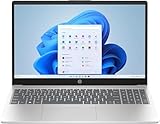
- Top Pick: HP 17 Inch FHD Laptop Computer 2026 Business Student, 16GB RAM 1TB Storage | Win 11 Pro w/ Office Suite, 512GB SSD + 500GB Ext, 17.3" IPS Display, Wi-Fi 6, HubxcelAccs, Numeric Keypad, AI Copilot
- Best Value: Lenovo ThinkPad E16 Gen 3, 16GB DDR5 RAM, 512GB SSD, 500GB External HDD | Intel Ultra 5 225H High Performance Processor, Business Laptop for Work, Data Processing, Backlit Keyboard, Windows 11 Pro
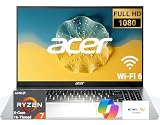
- Premium Choice: Acer Aspire Go 15.6" High-Performance Business Laptop, AMD Ryzen 7 7730U 8-Core 16-Thread, AMD Radeon Graphics, FHD (1920 x 1080) IPS Display, 32GB RAM, 1TB SSD, Wi-Fi 6, Windows 11, RJ-45 Ethernet
“High performance” and “business” pull a laptop in two directions. Business buyers want a machine that survives spreadsheets, video calls, a dozen browser tabs, and a docking routine without stalling, while the performance half of the phrase tempts shoppers toward spec-sheet bragging. The useful question is where the money in the processor, memory, and storage actually shows up in office work, and where a listing is simply stuffing keywords into its title.
This guide is for freelancers, small-office managers, and employees who handle their own equipment purchases in 2026. The nine listings below range from a Ryzen 7 machine with 32GB of memory down to an entry-level model with 4GB, so read the strengths and the trade-offs together. Everything here is judged from the facts in each product title only; confirm the finer details on the listing before you commit.
Quick Picks
As an Amazon Associate we earn from qualifying purchases at no extra cost to you.






| Product | Best for | Key spec from the title |
|---|---|---|
| HP 17-inch FHD Laptop | Big-screen number crunching | 17.3″ IPS, 16GB RAM, 512GB SSD plus 500GB external |
| Lenovo ThinkPad E16 Gen 3 | Traditional corporate work | Intel Ultra 5 225H, 16GB DDR5, Windows 11 Pro |
| Acer Aspire Go 15.6 | Heavy multitasking | Ryzen 7 7730U, 32GB RAM, 1TB SSD, RJ-45 Ethernet |
| Lenovo Business 15.6 FHD | Light office work on the move | 8GB DDR5, 128GB storage, USB-C, anti-glare screen |
| HP 15.6 Business Laptop | Quiet, entry-level productivity | 4-core Intel CPU, 128GB SSD, Microsoft 365 |
| HP Essential 17t | Secure sign-in with a touchscreen | Core i7-1355U, 16GB, 1TB SSD, fingerprint reader |
| HP 15.6-inch N100 Laptop | Memory-first budget buyers | N100 4-core, 16GB RAM, 512GB SSD, Windows 11 Pro |
| HP 14-inch HD Laptop | Basic tasks and travel | Athlon Silver 3050U, 4GB DDR4, 128GB SSD |
| 15.6-inch i5 Laptop with 24GB DDR5 | Memory-heavy browsing | 24GB DDR5, 512GB SSD, Intel Iris Xe |
How to Choose
Memory and storage are the real performance levers
For business work, 16GB of RAM is the practical floor if you run browsers, a video-call app, and Office at the same time. Eight gigabytes works for light use but gets tight quickly, and 4GB is a poor match for any modern workload. For storage, an SSD of at least 512GB is comfortable, while 128GB fills up fast after updates and a few project folders. Be careful with listings that add an external drive to reach a “1TB” total, because the extra space is not inside the laptop.
Read the processor name, not the adjectives
Titles love the phrase “high performance,” but only the model name tells the story. A Ryzen 7 with 8 cores and 16 threads, a Core i7-1355U, or an Intel Ultra 5 225H sit in a different class from an Intel N100 or an Athlon Silver. Core counts matter for exports and large spreadsheets, while efficient low-power chips matter more for battery and quiet operation. Treat vague phrases such as “Intel high-performance 4 cores” with caution.
Operating system and security features
If your company uses managed devices, Windows 11 Pro is the edition to look for, since it supports the management tools that Home does not. A fingerprint reader speeds up secure sign-in, and a backlit keyboard helps in dim conference rooms. Be wary of any listing that names an older edition such as Windows 10 S, which is more limited in what software it can run.
Ports, display, and what budget models skip
Look for Wi-Fi 6, USB-C, HDMI, and ideally an Ethernet port if you work in a wired office. A Full HD (1920 x 1080) IPS screen is the sensible target; HD resolution looks soft on a 15-inch panel. Budget models usually trim memory, storage, and display quality first, and unbranded listings often leave out service details. Ignore gaming labels on a business laptop, since they say little about reliability or support.
The 9 Best Options
HP 17-inch FHD Laptop
Built for people who live in wide spreadsheets and side-by-side windows. The title lists a 17.3″ IPS display, 16GB of RAM, Windows 11 Pro with an Office suite, Wi-Fi 6, a numeric keypad, and an AI Copilot feature. The 1TB storage figure combines a 512GB SSD with a 500GB external drive.
- Strength: the large IPS screen and numeric keypad suit data entry and finance work.
- Strength: Windows 11 Pro is the edition managed offices tend to prefer.
- Trade-off: the extra storage is external, and a 17-inch body is less portable.
Skip it if you carry your laptop daily or want all storage inside the chassis.
Lenovo ThinkPad E16 Gen 3
A fit for buyers who want the ThinkPad name and a business-first feature set. The title cites an Intel Ultra 5 225H processor, 16GB of DDR5 memory, a 512GB SSD, a 500GB external HDD, a backlit keyboard, and Windows 11 Pro. It reads like a conventional corporate laptop, aimed at people who value a familiar keyboard layout.
- Strength: DDR5 memory and a modern Intel Ultra chip are named outright.
- Strength: a backlit keyboard and Pro edition suit long office days.
- Trade-off: the 500GB drive is an external HDD, which is slower than internal SSD storage.
Skip it if you want the highest core count or an Ethernet port, since the title lists neither.
Acer Aspire Go 15.6
The strongest spec sheet in this roundup for sustained multitasking. The title lists an AMD Ryzen 7 7730U with 8 cores and 16 threads, Radeon graphics, a Full HD IPS display, 32GB of RAM, a 1TB SSD, Wi-Fi 6, and an RJ-45 Ethernet port. It is the one to shortlist first for analysts, consultants, and anyone who keeps many windows open all day.
- Strength: 32GB of memory and a 1TB SSD give long-term headroom.
- Strength: a built-in Ethernet port is handy for wired offices and conference rooms.
- Trade-off: the title says Windows 11 without specifying the Pro edition.
Skip it if your employer requires Windows 11 Pro for device management.
Lenovo Business 15.6 FHD
Aimed at light office duty, such as email, documents, and web apps. The title mentions an Intel processor, 8GB of DDR5, 128GB of storage, Office 365, Copilot AI, Wi-Fi 6, USB-C, an anti-glare screen, and long battery life. Think of it as a carry-along for sales visits, classes, and front-desk work rather than a workstation replacement.
- Strength: an anti-glare Full HD screen suits bright offices and window seats.
- Strength: USB-C and Wi-Fi 6 cover modern docking and wireless needs.
- Trade-off: 8GB of memory and 128GB of storage limit heavy multitasking.
Skip it if you run large files or many apps at once.
HP 15.6 Business Laptop
A quiet, entry-level machine for routine productivity. The title lists a 128GB SSD, an Intel 4-core processor described as high performance, Wi-Fi 6, long battery life, an ultra-quiet design, and Windows 11 with Microsoft 365. It fits a home office or a shared desk where fan noise would be a distraction and demands are modest.
- Strength: an ultra-quiet design suits libraries and shared offices.
- Strength: Microsoft 365 is named, so productivity apps are accounted for.
- Trade-off: the title does not state RAM, and 128GB of storage is small.
Skip it if you want a stated memory amount or a specific processor model.
HP Essential 17t
A good match for professionals who want a large touchscreen and secure sign-in. The title lists a 17.3″ HD+ touchscreen, an Intel Core i7-1355U, 16GB of RAM, a 1TB SSD, HDMI, a fingerprint reader, Wi-Fi 6, and Windows 11 Home. It targets professionals who present to clients, sign documents on screen, and want a large work area without a desktop.
- Strength: the Core i7 plus 16GB RAM and 1TB SSD form a balanced performance core.
- Strength: a fingerprint reader and HDMI output help with security and presentations.
- Trade-off: Windows 11 Home may lack management features that some employers require.
Skip it if you need Windows 11 Pro for a managed work environment.
HP 15.6-inch N100 Laptop
A pick for buyers who prioritize memory and a Pro operating system while staying in the budget tier. The title lists an Intel N100 4-core processor, 16GB of RAM, a 512GB SSD, long battery life, an ultra-quiet design, and Windows 11 Pro with Microsoft Office. It appeals to small-business owners who need a licensed, work-ready setup for daily documents, email, and video meetings.
- Strength: 16GB of RAM and 512GB of storage are strong numbers for the tier.
- Strength: Windows 11 Pro and Office are both included in the title.
- Trade-off: the N100 is an efficiency-focused chip, not a heavy-workload processor.
Skip it if you expect video editing or large data models.
HP 14-inch HD Laptop
The most basic machine in the group, suited to note taking, browsing, and travel. The title lists a 14-inch HD backlit display, an AMD Athlon Silver 3050U, 4GB of DDR4, a 128GB SSD, HDMI, Bluetooth, a webcam, an SD card reader, and Windows 10 S. Treat it as a secondary or backup laptop for simple tasks, since its specifications sit well below the rest of this list.
- Strength: a compact 14-inch body with an SD card reader and HDMI output.
- Strength: a backlit keyboard is rare at this tier.
- Trade-off: 4GB of RAM and Windows 10 S limit multitasking and software choice.
Skip it if the job truly demands high performance, despite the title’s wording.
15.6-inch i5 Laptop with 24GB DDR5
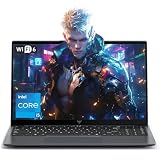
An unbranded listing aimed at shoppers who want lots of memory. The title lists 24GB of DDR5, a 512GB SSD, an Intel i5 processor with 12 cores and 16 threads that boosts up to 4.5GHz, Intel Iris Xe graphics, Wi-Fi 6, and a webcam. It may interest shoppers who work mainly in the browser and want generous memory without paying attention to brand names.
- Strength: 24GB of DDR5 is generous memory for the tier.
- Strength: Wi-Fi 6, a webcam, and a 15.6-inch screen cover the basics.
- Trade-off: the title uses gaming language and offers no brand or business support details.
Skip it if you want a recognizable brand behind warranty service.
Which One Fits Your Situation
You split time between spreadsheets and video calls
The Acer Aspire Go 15.6 combines a Ryzen 7, 32GB of memory, and a 1TB SSD, making it the strongest multitasker listed. Add the Ethernet port and it handles wired offices as well.
Your employer manages your device
Look at the Lenovo ThinkPad E16 Gen 3 or the HP 17-inch FHD, both of which list Windows 11 Pro. The ThinkPad’s backlit keyboard is an extra plus for long days.
You need the screen real estate
The HP Essential 17t offers a 17.3″ touchscreen with an i7 and a fingerprint reader. It is the most complete large-screen option here, provided you can live with the Home edition.
You want something quiet for email and documents
Choose the HP 15.6-inch N100 Laptop for its 16GB of memory and Pro edition, or the HP 15.6 Business Laptop if silence matters most.
Common Mistakes
- Counting an external drive as built-in storage when a title adds it to reach a 1TB total.
- Trusting the phrase “high performance” instead of reading the actual processor model.
- Buying 4GB or 8GB of memory for a role that involves many browser tabs and large files.
- Overlooking the operating system edition when your workplace requires Windows 11 Pro.
- Choosing a gaming-labeled unbranded laptop without checking who handles service and warranty.
Frequently Asked Questions
How much RAM does a business laptop need?
Sixteen gigabytes is a comfortable target for everyday multitasking. Eight gigabytes can work for lighter roles, but it leaves little headroom.
Is an N100 processor fast enough for office work?
It handles documents, email, and web apps, particularly with 16GB of RAM. Heavy spreadsheets, large exports, and video editing call for something like a Ryzen 7 or Core i7.
Do I need Windows 11 Pro?
Only if your employer uses managed-device tools or you want its extra security options. Many solo users are fine with Home.
Are external drives included in the storage figure?
Some titles combine internal and external storage into one total. Check how much is internal SSD before comparing models.









