Affiliate disclosure: As an Amazon Associate we earn from qualifying purchases. This post contains affiliate links — we may earn a small commission at no extra cost to you. This never affects our picks.
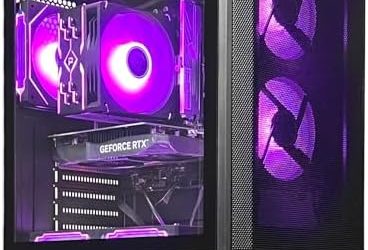
Quick answer: A good budget gaming PC pairs a recent mid-range graphics card with a capable six-core CPU, at least 16GB of dual-channel memory, an NVMe SSD and a power supply from a known brand. Check that the graphics card model is named on the listing, because vague wording such as “gaming ready” hides the part that matters most.
- The graphics card is the most important spec on a gaming PC listing, so look for its exact model name.
- Two memory sticks usually give dual-channel performance, which can help frame rates compared with one stick.
- An NVMe SSD loads games much faster than a mechanical hard drive.
- Standard-size parts make later upgrades easier than proprietary cases and power supplies.
- Confirm warranty terms and return policy on the product page before you commit.
Shopping for a good budget gaming PC is mostly about reading the listing correctly. Instead of a ranked list, this guide shows which specs to check, which shortcuts to avoid, and how to decide between a prebuilt and a custom build.
What Separates a Great Good Budget Gaming Pc From a Mediocre One
When we test and compare gaming pc options, four factors do most of the work in predicting whether you’ll be happy a year later:
- Reliability over time — the review count and rating in the table above are your best proxy for long-term durability.
- Right-sized features — paying for capability you’ll never touch is the most common buyer regret.
- Everyday usability — setup friction and daily ergonomics matter more than headline specs.
- Honest value — the sweet spot is where price, build, and features intersect, not the lowest sticker.
Before You Hit “Buy”: A Quick Checklist
- Pin down your budget ceiling so you don’t overspend on extras.
- List the one or two features you truly need and ignore the rest.
- Read the most recent owner reviews for real durability signals.
- Verify it fits your space, size, and current gear.
- Compare live prices on the picks above — they move often.
- Confirm the return policy in case it isn’t the right fit.
Common Mistakes to Avoid
Three mistakes sink most gaming pc purchases: buying more than you need, under-buying to save a few dollars on something you’ll replace, and overlooking warranty and returns. Match the pick to your actual use and the rest takes care of itself.

What the Specs Really Mean
Most gaming pc spec lines are noise. Zero in on the handful that affect real performance and fit, and use verified reviews to settle anything the numbers leave ambiguous. When two picks look close, let the owner-review volume in the table above break the tie.
How Do You Pick a Good Budget Gaming PC?
Treat the product listing like a spec sheet and read it in order of importance. This approach cuts through marketing language fast.
- Graphics card first: find the exact model. If the listing only says “dedicated graphics,” ask the seller or look elsewhere.
- CPU second: a recent six-core processor is enough for most games at this level. Avoid listings that hide the exact model.
- Memory and storage: look for two sticks totaling at least 16GB and an NVMe SSD. A tiny drive means deleting games often.
- Power supply: a named brand and a clear wattage rating are good signs. A missing brand is a warning.
- Upgrade path: a standard motherboard and case let you swap parts later.
Common mistakes: chasing a high RAM number while ignoring the graphics card, trusting a long feature list over actual specs, and overlooking the included operating system and warranty. Compare two or three candidates side by side on these points, then pick the one with the strongest graphics card for your monitor’s resolution.
More quick answers
Is a prebuilt PC with only one memory stick a problem? It limits performance. A single stick runs in single-channel mode, which can reduce frame rates in some games, especially on integrated graphics. It also leaves fewer slots free for upgrades. Check the listing for the memory configuration, such as two sticks, and plan to add a matching stick if needed.
Can a PC with integrated graphics count as a gaming PC? It can run lighter and older games at lower settings, but it is not a good fit for most modern titles. A system with a dedicated graphics card gives far more headroom. If you must start with integrated graphics, confirm the motherboard has a free PCIe slot and that the power supply can handle a card later.
Should I choose a graphics card by model or by video memory? Choose by model first. Video memory matters, but architecture and chip class decide overall speed. A card with more memory is not automatically faster than a newer, better model. Compare reputable game benchmarks for the specific models, and confirm the memory size on the spec sheet for your target resolution.
What warranty features should a budget gaming PC have? Look for a clear warranty period, a stated return window and accessible support. Check whether the warranty covers the whole system or individual parts, and whether opening the case for upgrades affects it. These details are usually listed on the product page or seller policy, so confirm them before you order.
Frequently Asked Questions
Final Take
A good budget gaming PC is one whose graphics card, CPU, memory configuration, SSD, and power supply are all named on the listing and fit the games you play. Confirm warranty and return terms on the seller’s page, and compare two or three listings spec by spec before you buy.