

Finding a budget gaming mouse that feels premium no longer means gambling on a no-name brand. In 2026, sub-$50 rodents ship with flagship-tier optical sensors, low-latency wireless, and lightweight shells that used to cost three times as much. This guide rounds up five standout picks that balance price, precision, and durability for competitive and casual players alike.
As an Amazon Associate I earn from qualifying purchases.
As an Amazon Associate we earn from qualifying purchases at no extra cost to you.








🛒 Best Price Today on Amazon
Prime members get fast, free shipping on everything above, plus member-only deals. New members get a 30-day free trial — cancel anytime.
How We Chose the Best Budget Gaming Mouse
Every mouse on this list was evaluated on sensor accuracy, click latency, weight, build quality, and software flexibility. We prioritized models that punch above their price bracket, offering features like PTFE feet, hot-swappable connectivity, and reliable switches rated for tens of millions of clicks. If you are also upgrading your gaming keyboard setup, pairing a responsive mouse completes the package.
| Product | Best For | Standout Feature | Rating |
|---|---|---|---|
| Logitech G305 Lightspeed | Wireless on a budget | HERO sensor, 250-hour battery | 4.8/5 |
| Razer DeathAdder Essential | Ergonomic comfort | Proven right-hand shape | 4.7/5 |
| Glorious Model O | Ultralight FPS play | 67g honeycomb shell | 4.6/5 |
| SteelSeries Rival 3 | Durable everyday use | 60M-click switches | 4.6/5 |
| Redragon M711 Cobra | Rock-bottom pricing | Full RGB under $20 | 4.5/5 |
Logitech G305 Lightspeed: The Best Budget Wireless Gaming Mouse
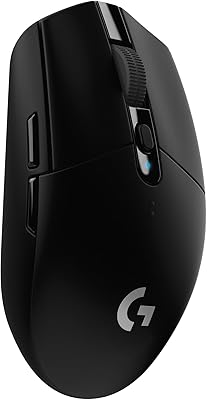
The G305 remains the benchmark for affordable wireless gaming. Its HERO 12,000 DPI sensor delivers pixel-accurate tracking with no smoothing or acceleration, and Logitech’s Lightspeed protocol keeps latency indistinguishable from a wired connection. A single AA battery powers up to 250 hours of play, so you rarely think about charging. At around 99 grams it is not the lightest option, but the shape suits palm and claw grips equally. For anyone stepping up from a stock office mouse, this is the easiest recommendation, and it pairs beautifully with a compact 60 percent keyboard layout for a clutter-free desk.
Razer DeathAdder Essential: Ergonomic Budget Gaming Mouse
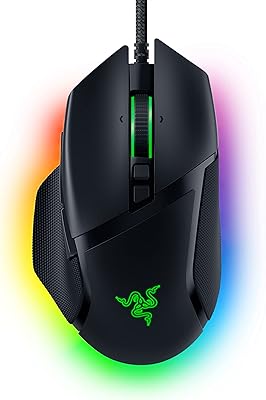
The DeathAdder shape has sold tens of millions of units for a reason. The Essential model strips the price to the bone while keeping the sculpted right-handed body that cradles larger hands during marathon sessions. A 6,400 DPI optical sensor is more than enough for the vast majority of gamers, and the mechanical switches are rated for ten million clicks. Wired-only means zero latency and no batteries to manage. If comfort is your top priority and you have a medium-to-large hand, this budget gaming mouse is hard to beat and slots neatly onto any large L-shaped desk.
Glorious Model O: Ultralight Budget Gaming Mouse for FPS
Weighing just 67 grams thanks to its honeycomb shell, the Glorious Model O made ultralight mice mainstream and remains a top budget choice. The perforated design keeps the mouse featherlight for rapid flick shots in shooters, while G-Skates PTFE feet glide effortlessly across cloth and hard pads. The Pixart 3360 sensor tracks flawlessly up to 12,000 DPI. Some players dislike the holes for hygiene reasons, but the tradeoff is a mouse that disappears in your hand during intense play. It is a favorite among competitive gamers who also invest in a high-refresh 32-inch gaming monitor.
SteelSeries Rival 3: The Most Durable Budget Gaming Mouse
SteelSeries built the Rival 3 to survive years of abuse. Its switches are rated for 60 million clicks, roughly double the industry norm, and the TrueMove Core sensor delivers one-to-one tracking without jitter. Three-zone RGB lighting adds a splash of personality, and the lightweight 77-gram body works well for claw and fingertip grips. The braided cable resists tangling and fraying over time. For students or anyone who wants a set-and-forget mouse that will not wear out, the Rival 3 offers exceptional long-term value in the budget category.
Redragon M711 Cobra: Cheapest Reliable Budget Gaming Mouse
If your budget is truly tight, the Redragon M711 Cobra delivers a stunning amount of mouse for often under twenty dollars. You get a genuine optical sensor up to 10,000 DPI, seven programmable buttons, full RGB backlighting, and onboard memory for macros. The build is heavier and the software less polished than pricier rivals, but as a gateway into PC gaming it overdelivers dramatically. Many owners keep it as a reliable backup even after upgrading. Combined with an affordable rig from our budget gaming PC guide, it completes a shockingly cheap setup.
Wired vs Wireless Budget Gaming Mouse: Which Should You Buy?
A few years ago, budget shoppers were pushed toward wired mice to avoid latency and cost penalties. That has changed. Models like the G305 prove that affordable wireless can match wired responsiveness while eliminating cable drag. That said, wired mice remain the cheapest way to get top-tier sensors, and you never worry about batteries. Choose wireless if desk cleanliness and freedom of movement matter most; choose wired if you want maximum performance per dollar. Either way, prioritize sensor quality and grip comfort over flashy RGB when spending a limited budget, and consider how the mouse fits your broader complete gaming setup.
Frequently Asked Questions
Is a budget gaming mouse good enough for competitive gaming?
Absolutely. Modern budget gaming mice like the Logitech G305 and Glorious Model O use the same flagship-grade sensors found in premium models. For the overwhelming majority of players, sensor performance is no longer the limiting factor. Your aim, reflexes, and practice matter far more than spending extra money on marginal hardware upgrades that most people cannot perceive in real gameplay.
How much should I spend on a good budget gaming mouse?
You can get an excellent gaming mouse for between twenty and fifty dollars in 2026. Spending under twenty gets you functional options like the Redragon M711, while the thirty-to-fifty range unlocks premium wireless, ultralight shells, and longer-lasting switches. Beyond fifty dollars you are largely paying for brand prestige, marginal weight savings, and software ecosystems rather than meaningful performance gains.
Does DPI matter when choosing a budget gaming mouse?
DPI matters far less than marketing suggests. Most competitive players use between 400 and 1,600 DPI regardless of a mouse’s maximum rating. A sensor advertised at 20,000 DPI offers no advantage over one at 8,000 for actual gaming. Instead, focus on tracking accuracy, the absence of smoothing or acceleration, and consistent performance across the DPI range you actually use daily.
Are wireless budget gaming mice reliable in 2026?
Yes, budget wireless gaming mice have become genuinely reliable. Technologies like Logitech Lightspeed and Razer HyperSpeed deliver latency low enough that human players cannot distinguish them from wired connections. Battery life often exceeds one to two hundred hours. As long as you buy from a reputable brand rather than an unknown one, a budget wireless mouse will serve competitive and casual gaming needs without compromise.

















