A headset microphone works until teammates ask you to repeat callouts or keyboard noise rides along with every sentence. A dedicated desktop microphone is the simplest fix, and the budget market is now dominated by USB condenser models that need no interface or extra software.

As an Amazon Associate we earn from qualifying purchases.
This guide compares four gaming microphones sold on Amazon US within the budget named in the title. Every pick is USB, because USB keeps the setup honest: power comes from the computer, and your money goes to what shapes the result, such as a stand, pop filter, or shock mount. The differences that matter are pickup pattern, connection, power needs, and included accessories. Our guide to the best cheap gaming microphones in this tier covers a neighbouring shortlist worth comparing.
Quick Comparison
| Model | Pickup pattern | Connection | Power | Included stand or mount | Standout feature |
|---|---|---|---|---|---|
| HyperX SoloCast | Cardioid | USB | USB bus power | Adjustable stand | Tap-to-mute sensor |
| Razer Seiren V3 Mini | Supercardioid | USB | USB bus power | Tilting stand | Ultra-compact body, tap-to-mute |
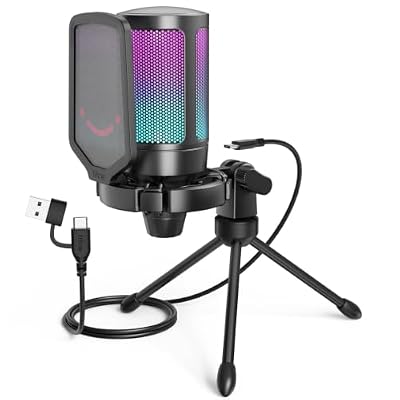
| FIFINE AmpliGame A6V | Cardioid | USB | USB bus power | Tripod, shock mount, pop filter | Gain control, RGB indicator |
| TONOR TC30 | Cardioid | USB | USB bus power | Tripod, shock mount, pop filter | Complete accessory kit |
How to Choose
Pickup pattern comes first
Cardioid focuses on sound in front of the capsule and rejects more from the sides and rear, suiting a single player at a desk. Supercardioid narrows that focus further, helping in a shared room, but placement becomes less forgiving: drift off axis and your level drops. Omnidirectional models collect the whole room, so every pick here uses cardioid or supercardioid pickup.
Connection should stay simple
All four connect over USB and are listed as plug and play, so the computer sees them as an audio device without a separate interface. Check the connector at both ends: some models use USB-C at the microphone and USB-A at the computer, so a USB-C-only laptop may need an adapter that is not always included.
Power needs are part of the connection
USB microphones are bus powered: the same cable carries audio and supplies power, with no phantom power supply to buy and no battery to charge. A worn cable or unpowered hub can cause dropouts, so connect directly to the computer where possible.
Accessories decide the real cost
A low tripod sits far from your mouth and close to your keyboard, which works against clarity. A shock mount reduces desk thumps, a pop filter softens plosives, and a boom arm, usually bought separately, lifts the microphone closer so you can lower gain and reject more room noise. Weigh what is in the box against what you would still add.
The Picks in Detail
1. HyperX SoloCast — Simple Cardioid Pick for PC and Console
The HyperX SoloCast is a USB condenser microphone listed for PC, PS4, PS5, and Mac, with a cardioid polar pattern and a tap-to-mute sensor on top — the fastest way to silence a cough without reaching for a software control.
- Product link: https://www.amazon.com/dp/B08KFL3SFV
Pickup pattern: Cardioid. Position it ahead of you, slightly below mouth level and angled up, so your voice stays on axis while keyboard sound stays off axis.
Connection and power: USB with bus power from the host device and plug-and-play operation on the platforms named in the listing. There is no XLR output, so this is a microphone for direct-to-computer use rather than a mixer-based setup.
Accessories: The listing describes a flexible, adjustable stand; a boom arm and pop filter are separate extras. Choose the SoloCast for the fewest decisions: one pattern, one cable, one mute control, and PC plus PlayStation compatibility.
2. Razer Seiren V3 Mini — Compact Supercardioid Pick
The Razer Seiren V3 Mini is an ultra-compact USB condenser microphone with a supercardioid pickup pattern, a tap-to-mute sensor with LED indicator, and a built-in shock absorber. Razer lists it for PC use, naming Discord, OBS Studio, and XSplit.
- Product link: https://www.amazon.com/dp/B0CT787NLW
Pickup pattern: Supercardioid, the narrowest focus here. It suits a room with noise off to the sides, provided the microphone stays pointed at your mouth. If you move around a lot, that narrowness can work against you.
Connection and power: USB, bus powered, and plug and play. There is no second connection type, so confirm your computer has a suitable USB port or plan on an adapter.
Accessories: The small body and tilting stand take up little desk space, and the built-in shock absorber handles desk vibration. A pop filter and boom arm are optional extras. Choose it if desk space is the constraint, or a narrower pattern fits a busier room.
3. FIFINE AmpliGame A6V — Gain Control and a Fuller Kit
The FIFINE AmpliGame A6V is a USB condenser microphone listed with quick mute, an RGB indicator, a tripod stand, a pop filter, a shock mount, and gain control, for PC and console use including PS4 and PS5. The gain knob is the differentiator: adjusting level on the microphone is quicker than opening software mid-session, and correct gain at the source keeps loud moments from clipping.
- Product link: https://www.amazon.com/dp/B09JG62KDJ
Pickup pattern: Cardioid, per the listing. Keep the front of the capsule facing you; speaking into the side of a cardioid condenser is a common reason a new microphone sounds worse than expected.
Connection and power: USB with bus power. No interface or external supply is required, and the mute and gain controls work as part of that direct USB setup.
Accessories: Tripod stand, pop filter, and shock mount are all listed as included, so the full desktop setup works on day one. A boom arm remains separate. Choose the A6V for hardware gain control and the fewest immediate accessory purchases.
4. TONOR TC30 — Accessory Kit Pick with Tripod and Pop Filter
The TONOR TC30 is a USB condenser microphone listed with a tripod stand, pop filter, and shock mount for gaming, streaming, and podcasting. TONOR lists plug-and-play USB operation with no driver required, and compatibility with Windows, macOS, and Linux.
- Product link: https://www.amazon.com/dp/B0C4DTCKS5
Pickup pattern: Cardioid. Manufacturer material describes cardioid pickup, a sample rate of 48kHz, and USB power, with the microphone intended to be spoken into from the front at a modest distance.
Connection and power: USB 2.0 connection, bus powered through the included USB Type-C to USB-A cable. TONOR notes limits worth checking: the TC30 is listed as compatible with Macs, PCs, and PS4, with an adapter required for iPad use, and it is not listed as compatible with phones or Xbox. Players on those platforms should pick a different model from this list.
Accessories: Listed contents are the microphone, shock mount, foldable tripod, pop filter, USB Type-C to USB-A cable, and manual — the standard desktop setup in one purchase, with a boom arm as a separate addition. Choose the TC30 if you play on PC or PlayStation and want the kit settled at once.
Which One Should You Buy?
Start with room and platform, not brand. If you play on Xbox or record on a phone, these USB desktop models are the wrong tool, as the TC30 listing states plainly. For PC and PlayStation players: the SoloCast for the simplest setup, the Seiren V3 Mini for tight desks, the A6V for an on-mic gain knob, and the TC30 for the full included kit.
Whichever model you choose, placement does more than any setting: aim its front at your mouth, keep it close, and set gain so loud moments stay below clipping.
FAQ
Do these microphones need an audio interface or phantom power?
No. All four are powered by the USB connection itself. Plug in, select the microphone as the input in your game, Discord, or recording software, and it works without an interface or separate supply.
What is the difference between cardioid and supercardioid for gaming?
Cardioid focuses on sound in front of the microphone and rejects sound from the rear, suiting most desk setups. Supercardioid narrows the focus and rejects more side noise, but is less forgiving off axis. For most gaming desks, cardioid is the safer default.
Can I use these microphones on PlayStation and Xbox?
The listings name PC, Mac, PS4, and PS5 support for the SoloCast and A6V, and PC and PS4 for the TC30. Xbox is the recurring gap — TONOR states the TC30 is not compatible with Xbox — so check the listing for your exact console before ordering.
Do I still need a boom arm if a tripod stand is included?
Not at first. A tripod is enough to start, and the shock mount and pop filter included with the A6V and TC30 handle vibration and plosives. A boom arm becomes worthwhile when the tripod puts the microphone too far from your mouth or too close to your keyboard.
Why does a new microphone sometimes sound worse than a headset mic?
Usually placement. Speaking into the side of a cardioid condenser, sitting too far away with gain raised, or leaving a chat app on a different input will undo the upgrade. Aim the front at your mouth, move closer, lower the gain, and confirm the microphone is selected in each app.
Conclusion
The budget tier is a USB tier, and that is a strength: bus power and plug-and-play connection keep the purchase inside one box. The SoloCast covers the simple cardioid brief, the Seiren V3 Mini covers small desks with a tighter pattern, the A6V adds hardware gain control, and the TC30 bundles the full accessory kit. Match the pattern to your room, confirm console compatibility, and spend your remaining effort on placement.