

As an Amazon Associate we earn from qualifying purchases.

A Necessary Clarification Before the Picks
Laptop GPUs are not sold on their own. An NVIDIA GeForce RTX laptop GPU is fitted into a specific chassis by the manufacturer, paired with a chosen cooling system, power limit, screen, and processor. You cannot buy one in a box and install it in a machine you already own.
So this guide ranks GPU tiers instead — and for each tier names a complete gaming laptop currently listed on Amazon US built around that GPU. When you choose the best NVIDIA GPU for laptop gaming, you are really choosing a laptop, and the rest of it matters almost as much as the chip name.
Two laptops with the same GPU name can also perform differently. Total graphics power (TGP), cooling, a MUX switch or Advanced Optimus, and display resolution all change the result. Keep that in mind below, and for the desktop side see our guide to the best NVIDIA GPU options for tower PCs.
Quick Comparison
| Laptop | GPU tier | GPU memory | CPU | Display | RAM / Storage |
|---|---|---|---|---|---|
| Lenovo Legion Pro 7i | RTX 5080 | Not stated in the listing summary | Intel Core Ultra 9 275HX | 16-inch OLED WQXGA, 240Hz | 32GB DDR5 / 2TB SSD |
| ASUS ROG Strix G16 (2025) | RTX 5070 Ti | 12GB GDDR7 | AMD Ryzen 9 9955HX | 16-inch 2.5K (2560 x 1600), 240Hz | 32GB DDR5 / 1TB SSD |
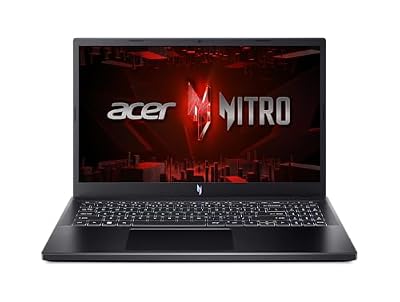
| Acer Nitro V 15 | RTX 4060 | 8GB GDDR6 class | Intel Core i9-13900H | 15.6-inch FHD IPS, 180Hz | 16GB DDR5 / 1TB SSD |
| MSI Katana 15 B13VEK-277US | RTX 4050 | 6GB GDDR6 | Intel Core i7-13620H | 15.6-inch Full HD IPS, 144Hz | 16GB DDR5 / 1TB NVMe SSD |
How the GPU Tiers Stack Up
RTX 5080: The High-End Tier
The RTX 5080 sits near the top of the current laptop range. Target it for demanding games at 2560 x 1600 with high settings, ray tracing with DLSS, and a machine that stays relevant through several release cycles.
RTX 5070 Ti: The Sweet Spot for 1600p and High-Refresh 1080p
The RTX 5070 Ti, with 12GB of GDDR7 memory in the laptop below, is arguably the most balanced tier here: enough headroom for modern games at higher resolutions, without the largest, heaviest flagship chassis.
RTX 4060: The Mainstream Workhorse
The RTX 4060 is a sensible mainstream choice for 1080p gaming, including high-refresh esports play, in thinner and more affordable machines. Its 8GB of video memory works for Full HD, though the newest open-world titles may need texture settings trimmed.
RTX 4050: The Entry Tier
The RTX 4050 is the starting point for dedicated NVIDIA laptop graphics. With 6GB of GDDR6 memory, it suits 1080p play at medium to high settings and esports titles, rather than maxed-out ray tracing — a rational pick for a first gaming laptop.
The Picks: One Laptop per GPU Tier
1. Lenovo Legion Pro 7i — RTX 5080 Tier
View the Lenovo Legion Pro 7i on Amazon
The Legion Pro 7i listing describes a 16-inch machine built around the RTX 5080 and an Intel Core Ultra 9 275HX processor, in Eclipse Black — a high-end CPU pairing that matters for high-refresh play, where the processor must keep up with the GPU.
The display is a 16-inch OLED panel at WQXGA resolution with a 240Hz refresh rate, a specification that actually gives the RTX 5080 something to aim at. Memory and storage are listed as 32GB of DDR5 RAM and 2TB of SSD capacity, described as two 1TB M.2 drives. The operating system is Windows 11 Home.
One caution: Legion Pro 7i configurations vary, and seller listings for this family do not always present TGP consistently. Before ordering, confirm the exact configuration, GPU memory, documented TGP, and warranty terms on the variant you select. Choose this tier if display quality and longevity matter more than portability.
2. ASUS ROG Strix G16 (2025) — RTX 5070 Ti Tier
View the ASUS ROG Strix G16 on Amazon
This Strix G16 is the most completely documented pick here. Its listing specifies an AMD Ryzen 9 9955HX and an RTX 5070 Ti laptop GPU with 12GB of GDDR7 memory, and it documents the power limit: ROG Boost at 140W, described as 115W plus 25W Dynamic Boost. That tells you this is not a heavily power-limited implementation.
The display is a 16-inch 2.5K (2560 x 1600) panel at 240Hz with 3ms response, 100% DCI-P3 coverage, and Pantone validation noted in the listing. Memory is 32GB of DDR5 and storage is a 1TB PCIe SSD. Ports include HDMI 2.1, two USB 3.2 Gen 2 Type-A ports, RJ45 LAN, and two USB4 Type-C ports with DisplayPort support, one also supporting power delivery and G-SYNC. Wireless is Wi-Fi 6E with Bluetooth 5.3, and the operating system is Windows 11 Pro.
For most buyers, this tier — in a full-power implementation like this one — is the answer we would point to first.
3. Acer Nitro V 15 — RTX 4060 Tier
View the Acer Nitro V on Amazon
The Nitro V pairs the RTX 4060 laptop GPU with an Intel Core i9-13900H — an unusually strong CPU for this class, helpful in strategy and simulation titles as well as shooters.
The display is a 15.6-inch Full HD IPS panel at 180Hz, which suits the RTX 4060 well at 1920 x 1080, with DLSS available in supported titles. The listing specifies 16GB of DDR5 memory and a 1TB Gen 4 SSD, and the model details note two DDR5 slots and two M.2 slots, giving an upgrade path later. Connectivity includes Wi-Fi 6, and the operating system is Windows 11 Home.
The seller listing does not state a TGP figure for this configuration, so resolve that on the product page before buying rather than assuming a number. Check the warranty statement too, and whether the configuration is sold by Acer or a third-party seller, since support routes can differ.
4. MSI Katana 15 B13VEK-277US — RTX 4050 Tier
View the MSI Katana 15 on Amazon
The Katana 15 is the entry point here. Its listing specifies an Intel Core i7-13620H, an RTX 4050 with 6GB of GDDR6 memory, 16GB of DDR5-4800 RAM, and a 1TB NVMe SSD. The display is a 15.6-inch Full HD IPS panel at 144Hz, and the operating system is Windows 11 Home.
That specification is coherent for its tier: the 1080p screen matches what the RTX 4050 can drive well, and 16GB is the sensible minimum for a modern gaming laptop. At about 14.13 by 10.20 by 0.98 inches and just under five pounds in the listing, it can realistically travel in a backpack.
As with the Nitro, confirm the documented graphics power and warranty coverage before ordering, because Katana configurations vary by model code. If your games are mainly esports, indie, and older releases, this tier covers them without paying for GPU capacity you will not use.
What to Check Before You Buy
GPU tier and TGP
Start with the tier, then look for the TGP in watts: the same GPU name at low and high power limits describes two different products. If a listing does not document TGP, check the manufacturer’s specification sheet for that exact model code.
VRAM capacity
Video memory limits texture quality and resolution headroom. Here the tiers run from 6GB on the RTX 4050 to 12GB on the RTX 5070 Ti. More memory generally means a longer useful life at higher settings, especially above 1080p.
CPU pairing
A strong GPU paired with a modest processor can leave performance on the table in CPU-heavy games. All four picks pair their GPU with a high-performance H or HX processor — the pattern to look for.
Display match
Match the screen to the GPU. A 240Hz 1600p panel makes sense with an RTX 5080 or 5070 Ti; a 144Hz or 180Hz 1080p panel partners naturally with an RTX 4050 or 4060.
RAM, storage, and upgrade slots
Sixteen gigabytes of RAM and a 1TB SSD are a reasonable floor. Slotted memory and a second M.2 bay, where documented, extend a machine’s life. With soldered memory, buy the capacity you will need later, now.
Ports and warranty
Check for HDMI, USB-C with DisplayPort, and wired Ethernet if your network is unstable. Finally, read the warranty line on the exact listing: manufacturer coverage and third-party seller coverage are not the same thing.
FAQ
Can I buy a laptop GPU on its own and install it?
No. NVIDIA laptop GPUs are integrated into specific laptop models by the manufacturer and are not sold as standalone upgrade parts for consumers. Choosing a laptop GPU means choosing the laptop built around it.
Does TGP really change performance that much?
Yes. TGP sets how much power the GPU can draw, and higher power generally allows higher sustained clock speeds. That is why this guide highlights documented TGP where a listing provides it.
How much VRAM do I need for 1080p gaming?
For 1080p, 6GB can work in esports and older titles, while 8GB gives more headroom for current releases. For 1600p displays, 12GB or more is the more comfortable target here.
Is an RTX 4050 laptop still worth considering?
Yes, for the right expectations. It handles 1080p play in competitive and well-optimised games, supports DLSS in compatible titles, and comes in lighter machines. It is not the tier for maxed settings with heavy ray tracing.
Conclusion
The best NVIDIA GPU for laptop gaming depends on the screen you want to drive and how long the machine should stay capable. The RTX 5080 tier in the Legion Pro 7i is the high-end choice for a 1600p OLED display. The RTX 5070 Ti tier in the ROG Strix G16, with its documented 140W limit and 12GB of GDDR7, is the balanced pick for most buyers. The RTX 4060 in the Acer Nitro V is the mainstream option for high-refresh 1080p, and the RTX 4050 in the MSI Katana 15 is the sensible entry point. Whichever tier you choose, verify TGP, VRAM, and warranty on the exact listing before ordering.

















